
1. Sarrera
This manual provides detailed instructions for the installation, operation, maintenance, and troubleshooting of your Palit GeForce RTX 3060 Ti Dual OC graphics card. Please read this manual thoroughly before installing and using the product to ensure proper functionality and to prevent damage.
The Palit GeForce RTX 3060 Ti Dual OC is a high-performance graphics card designed for gaming and demanding graphical applications. It features 8GB of GDDR6 memory, a dual-fan cooling system, and supports PCI Express 4.0.
2. Segurtasun informazioa
Jarraitu segurtasun-jarraibide hauek zure ekipamenduari lesioak eta kalteak saihesteko:
- Deskonektatu beti ordenagailuko energia-iturria edozein osagai instalatu edo kendu aurretik.
- Wear an anti-static wrist strap or frequently touch a grounded metal object to discharge static electricity before handling the graphics card. Static discharge can damage electronic components.
- Handle the graphics card by its edges. Avoid touching the gold-plated PCI Express connector or other components on the board.
- Ziurtatu ordenagailuaren karkasak aireztapen egokia duela gehiegi berotzea saihesteko.
- Ez jarri txartel grafikoa hezetasunean edo tenperatura altuetan.
- Keep the graphics card away from children.
3. Paketearen edukia
Egiaztatu elementu guztiak zure produktuaren paketean daudela:
- Palit GeForce RTX 3060 Ti Dual OC Graphics Card
- Instalazio Gida Azkarra (dokumentu hau)
- Driver CD (or instructions for online download)
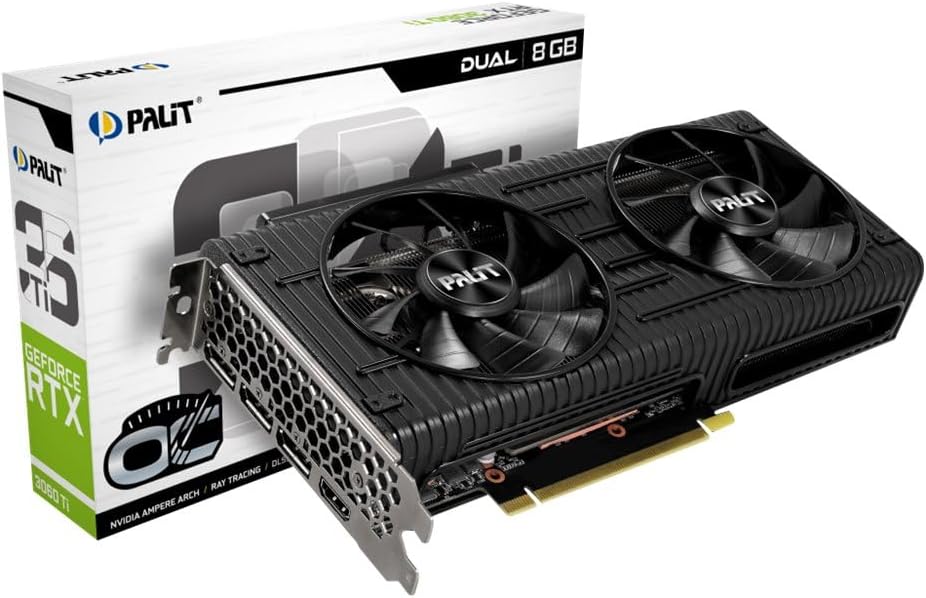
Image: The Palit GeForce RTX 3060 Ti Dual OC graphics card shown alongside its retail packaging.
4. Konfigurazioa
4.1. Sistemaren eskakizunak
Instalatu aurretik, ziurtatu zure sistemak gutxieneko baldintza hauek betetzen dituela:
- PCI Express bateragarria den plaka basea, x16 grafiko zirrikitu batekin.
- Gutxienez 600W-ko elikatze-iturria 8 pineko PCIe elikatze-konektore batekin.
- Microsoft Windows 10 64-bit or Linux 64-bit operating system.
- 8 GB sistemaren memoria (16 GB gomendatzen dira).
- Interneteko konexioa gidariak deskargatzeko eta eguneratzeko.
4.2. Instalazio fisikoa
Follow these steps to install the graphics card into your computer:
- Itzali ordenagailua eta deskonektatu korronte-kablea hormako entxufetik.
- Ireki ordenagailuaren karkasa. Ikusi ordenagailuaren karkasaren eskuliburua argibide zehatzak lortzeko.
- Locate an available PCI Express x16 slot on your motherboard. Remove any expansion slot covers that block the slot.
- Carefully align the graphics card with the PCI Express x16 slot. Press down firmly until the card is securely seated in the slot.
- Secure the graphics card to the computer case with the screw from the expansion slot cover.
- Connect the 8-pin PCIe power connector from your power supply to the corresponding port on the graphics card. Ensure a secure connection.
- Itxi ordenagailuaren karkasa eta konektatu berriro elikatze-kablea.

Irudia: Goitik behera view of the Palit GeForce RTX 3060 Ti graphics card, highlighting its dual cooling fans and the heatsink assembly.
4.3. Gidariaren instalazioa
Instalazio fisikoa egin ondoren, grafikoen kontrolatzaileak instalatu behar dituzu:
- Piztu ordenagailua.
- If an internet connection is available, Windows may automatically install a basic display driver. For optimal performance, download the latest drivers from the official NVIDIA webgunea (www.nvidia.com/drivers) or the Palit webgunea (www.palit.com/download).
- Run the downloaded driver installer and follow the on-screen instructions.
- Berrabiarazi ordenagailua kontrolatzailearen instalazioa amaitutakoan.
5. Funtzionamendua
5.1. Pantailak konektatzea
The Palit GeForce RTX 3060 Ti Dual OC graphics card features multiple display outputs:
- 3x DisplayPort
- 1x HDMI
Connect your monitor(s) to the available ports on the graphics card. Ensure your display cables are securely connected to both the graphics card and your monitor.

Irudia: Angelu formakoa view of the graphics card, highlighting the DisplayPort and HDMI output connectors on the rear I/O bracket.
5.2. Softwarearen konfigurazioa
After driver installation, you can access the NVIDIA Control Panel or Palit ThunderMaster utility for advanced settings. These tools allow you to:
- Adjust display resolutions and refresh rates.
- Configure multi-monitor setups.
- Optimize 3D settings for games and applications.
- Monitor GPU temperature and fan speed (ThunderMaster).
- Perform overclocking (ThunderMaster, use with caution).
6. Mantentzea
Mantentze egokiak zure txartel grafikoaren iraupena eta errendimendua bermatzen ditu:
- Garbiketa: Periodically clean dust from the fans and heatsink using compressed air. Ensure the computer is powered off and unplugged before cleaning. Hold the fan blades gently to prevent them from spinning rapidly during cleaning, which can damage the bearings.
- Gidarien eguneraketak: Regularly check for and install the latest graphics drivers from NVIDIA to ensure optimal performance, stability, and access to new features.
- Tenperaturaren jarraipena: Use monitoring software (e.g., Palit ThunderMaster, MSI Afterburner) to keep an eye on GPU temperatures, especially during heavy loads. Ensure temperatures remain within safe operating limits.
7. Arazoak
Arazoak badituzu, jo ezazu honako arazo eta irtenbide ohikoenei:
| Arazoa | Irtenbide posiblea |
|---|---|
| Ez da pantaila-irteerarik erakusten instalazioaren ondoren. |
|
| Sistemak huts egiten du edo blokeatzen da erabiltzean. |
|
| Poor performance in games or applications. |
|
| Haizagailuak ez dira biratzen. | Many modern graphics cards feature a 0dB fan mode, where fans only spin up when the GPU reaches a certain temperature (e.g., 50°C). This is normal behavior for silent operation under light loads. If fans do not spin under heavy load and temperatures are high, check power connections and driver installation. |
8. Zehaztapen Teknikoak
Key specifications for the Palit GeForce RTX 3060 Ti Dual OC graphics card:
| Ezaugarri | Zehaztapena |
|---|---|
| Koprozesadore grafikoa | NVIDIA GeForce RTX 3060 Ti |
| Graphics Ram Size | 8 GB GDDR6 |
| Boost Erlojua | 1695 MHz |
| Bideo Irteerako Interfazea | DisplayPort 3, HDMI 1 |
| Interfazea | PCI Express 4.0 |
| Produktuaren neurriak | 9.72 x 4.72 x 1.57 hazbete (24.7 x 12.0 x 4.0 cm) |
| Elementuaren pisua | 7 ontza (198 gramo) |
| Modelo zenbakia | NE6306TS19P2-190AD |
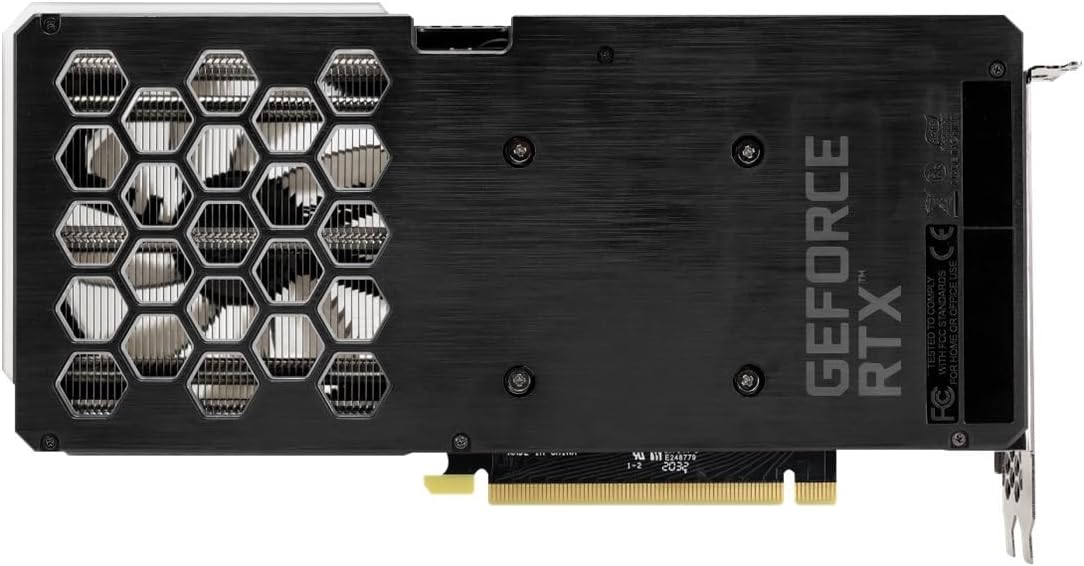
Image: The backplate of the Palit GeForce RTX 3060 Ti graphics card, showing its design and ventilation.
9. Bermea eta Laguntza
9.1. Bermearen informazioa
This Palit GeForce RTX 3060 Ti Dual OC graphics card is backed by Palit's 2-year manufacturer's warranty. This warranty covers defects in materials and workmanship under normal use. For full warranty terms and conditions, please refer to the official Palit website or contact Palit customer support.
9.2. Bezeroarentzako arreta
If you require technical assistance or have questions regarding your product, please visit the official Palit weblaguntza baliabideen, maiz egiten diren galderen eta harremanetarako informazioaren gunea:
- Palit Official Webgunea: www.palit.com
- Laguntza orria: Look for a 'Support' or 'Contact Us' section on the webgunea.
When contacting support, please have your product model number (NE6306TS19P2-190AD) and purchase information readily available.