
Sarrera
This manual provides essential instructions for the proper use and maintenance of your Vikefon Type C Charging and Data Cable. This 1-meter cable is designed for efficient charging and high-speed data transfer between your Type C enabled devices and compatible power sources or computers.

Image: The Vikefon Type C Charging and Data Cable, featuring a standard USB-A connector on one end and a reversible USB-C connector on the other.
Produktuaren Ezaugarriak
- USB Connector Quality: Ensures reliable charging and high-speed data transmission.
- Potentzia irteera: Supports up to 5V, 3 Amp azkar kargatzeko.
- Bateragarritasun Unibertsala: Fully compatible with all Type C mobile devices for fast charging and syncing.
- Reversible USB Type-C Connector: Allows for quick and easy connections in any orientation.
- Diseinu iraunkorra: Features intricate nylon braiding for enhanced durability and longevity, outlasting standard cables.
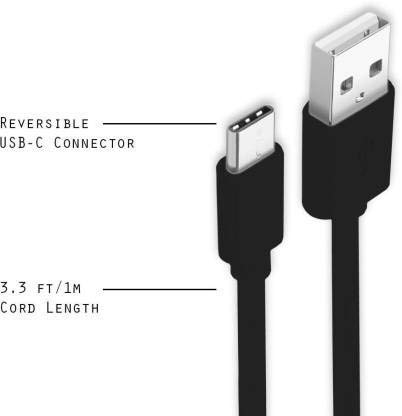
Image: A diagram illustrating the reversible nature of the USB-C connector and the cable's 1-meter (3.3 ft) cord length.
Konfigurazioa
- Identifikatu konektoreak: The cable has a standard USB-A connector on one end and a smaller, oval-shaped USB Type-C connector on the other.
- Konektatu energia iturrira/ordenagailura: Insert the USB-A end of the cable into a compatible USB port on a wall adapter, power bank, car charger, or computer.
- Konektatu gailura: Insert the USB Type-C end into the charging/data port of your smartphone, tablet, or other Type C enabled device. The USB Type-C connector is reversible, so it can be inserted in either orientation.
- Egiaztatu konexioa: Ensure both ends are securely connected. Your device should indicate that it is charging or connected for data transfer.
Funtzionamendu-argibideak
Zure gailua kargatzen
- Connect the USB-A end of the cable to a compatible USB power adapter (e.g., wall charger, car charger, power bank).
- Connect the USB Type-C end to your device's charging port.
- Ensure the power adapter is plugged into a live power outlet. Your device should begin charging.
Datuak transferitzea
- Connect the USB-A end of the cable to a USB port on your computer.
- Connect the USB Type-C end to your device.
- On your device, you may receive a prompt asking to allow data access or to select a USB connection mode (e.g., "File Transfer," "MTP"). Select the appropriate option to enable data transfer.
- Zure gailua unitate aldagarri edo multimedia gailu gisa agertu beharko litzateke zure ordenagailuan, transferitzeko aukera emanez files.
Mantentzea
- Tratamendu egokia: Always grasp the connector head when plugging or unplugging the cable. Avoid pulling directly on the cable itself to prevent damage to the internal wires.
- Saihestu okertzea: Do not excessively bend or crimp the cable, especially near the connectors, as this can cause internal wire breakage.
- Biltegiratzea: Store the cable in a clean, dry place away from extreme temperatures and direct sunlight. Avoid tangling the cable.
- Garbiketa: If necessary, gently wipe the cable and connectors with a dry, soft cloth. Do not use liquids or abrasive cleaners.

Irudia: Gertutik view highlighting the durable metal heads of the Vikefon Type C cable connectors, designed for anti-oxidation and corrosion resistance.
Arazoak konpontzea
- Gailua ez da kargatzen:
- Ziurtatu kablearen bi muturrak ongi konektatuta daudela.
- Egiaztatu korronte-egokitzailea behar bezala funtzionatzen duela eta entxufe bizi batera konektatuta dagoela.
- Saiatu beste korronte egokitzaile bat edo USB ataka bat erabiltzen.
- Egiaztatu gailuaren kargatzeko ataka hondakinik edo kalterik dagoen.
- Karga motela:
- Ensure you are using a power adapter that supports fast charging (e.g., 3A output).
- Close any unnecessary background applications on your device.
- Datu-transferentziarik ez:
- Confirm the cable is properly connected to both your device and computer.
- On your device, check the notification panel for USB options and select "File "Transferentzia" edo "MTP".
- Saiatu ordenagailuko beste USB ataka batera konektatzen.
- Berrabiarazi zure gailua eta ordenagailua.
Zehaztapenak
| Ezaugarri | Xehetasuna |
|---|---|
| Marka | Vikefon |
| Ereduaren izena | C mota |
| Modelo zenbakia | C mota 0129 |
| Konektore mota | USB C mota (ar-ar) |
| Kable mota | USBa |
| Gailu bateragarriak | Laptop, PC, Smartphone (e.g., Xiaomi Redmi 8A, Poco M2, Poco M2 Pro, Samsung, Motorola, Lenovo, Lava, Sony, HTC, LG, Karbonn, Maxx) |
| Ezaugarri bereziak | Charging Wire, Durable, High Data Transfer Rate, High Quality, Long Length |
| Datuen transferentzia-tasa | Gehienez 0.48 gigabit segundoko (480 Mbps) |
| Konektibitate Teknologia | USBa |
| Zehaztapena Met | ISO |
| Kolorea | Beltza |
| Elementuaren forma | Biribila |
| Outer Material Type | Rubber (with Nylon Braiding) |
| Kablearen luzera | 1 metro |
Bermea eta Laguntza
Specific warranty details for the Vikefon Type C Charging and Data Cable are not provided in this manual. For information regarding warranty coverage, returns, or technical support, please refer to the product packaging or contact the manufacturer directly through their official channels.