
1. Sarrera
Thank you for choosing the Selvim WiFi Mini Projector. This portable movie projector offers 1080P compatibility, a large 200-inch display, Bluetooth audio, and a 60,000-hour LED lamp life. It is designed for versatile connectivity with devices such as TV sticks, HDMI, USB, laptops, PS4, and iOS/Android smartphones. This manual provides detailed instructions for setup, operation, and maintenance to ensure you get the best experience from your projector.
2. Paketearen edukia
Mesedez, markatu laukitxoa elementu hauetarako:
- Selvim WiFi Mini Projector
- Urruneko kontrola (pilak ez barne)
- Elikatze-kablea
- HDMI kablea
- AV Cable (3-in-1 RCA to 3.5mm jack)
- Lenteak garbitzeko zapia
- Oin-torloju erregulagarria
- Erabiltzailearen eskuliburua
3. Produktua amaitu daview
The Selvim Mini Projector features a compact design with multiple connectivity options and user-friendly controls.
3.1 Aurrealdea eta atzekoa View
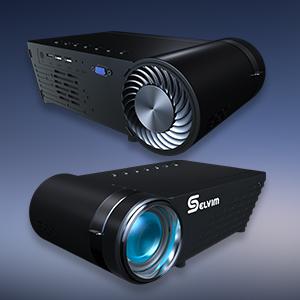
Irudia: Aurrealdea eta atzealdea view of the Selvim Mini Projector, highlighting its compact design and various ports.
3.2 Portuak eta kontrolak
- IR hargailua: Urrutiko agintearen seinaleetarako.
- HDMI ataka: Connect to HDMI-enabled devices (laptops, game consoles, TV sticks).
- USB1/USB2 Ports: Connect USB storage devices or power compatible streaming sticks.
- AV/AUX sarrera: Connect devices using the included AV cable.
- VGA ataka: VGA irteera duten ordenagailuetara konektatu.
- Audio irteera (3.5 mm): Konektatu kanpoko bozgorailuak edo entzungailuak.
- Potentzia sarrera: Konektatu korronte kablea.
- Fokatzeko eraztuna: Adjust for image clarity.
- Keystone zuzenketa: Adjust image shape (±15 degrees).
- On-device Control Buttons: Navigate menus and adjust settings directly on the projector.

Image: The rear panel of the Selvim Mini Projector, clearly showing the HDMI, USB, AV, AUX, and VGA ports for multi-device connectivity.
4. Konfigurazioa
4.1 Kokapena eta pantailaren tamaina
Position the projector on a stable surface or mount it using a tripod or ceiling mount. The recommended projection distance is 2-5 meters (approximately 6.5-16.4 feet) for a screen size of 50-200 inches.
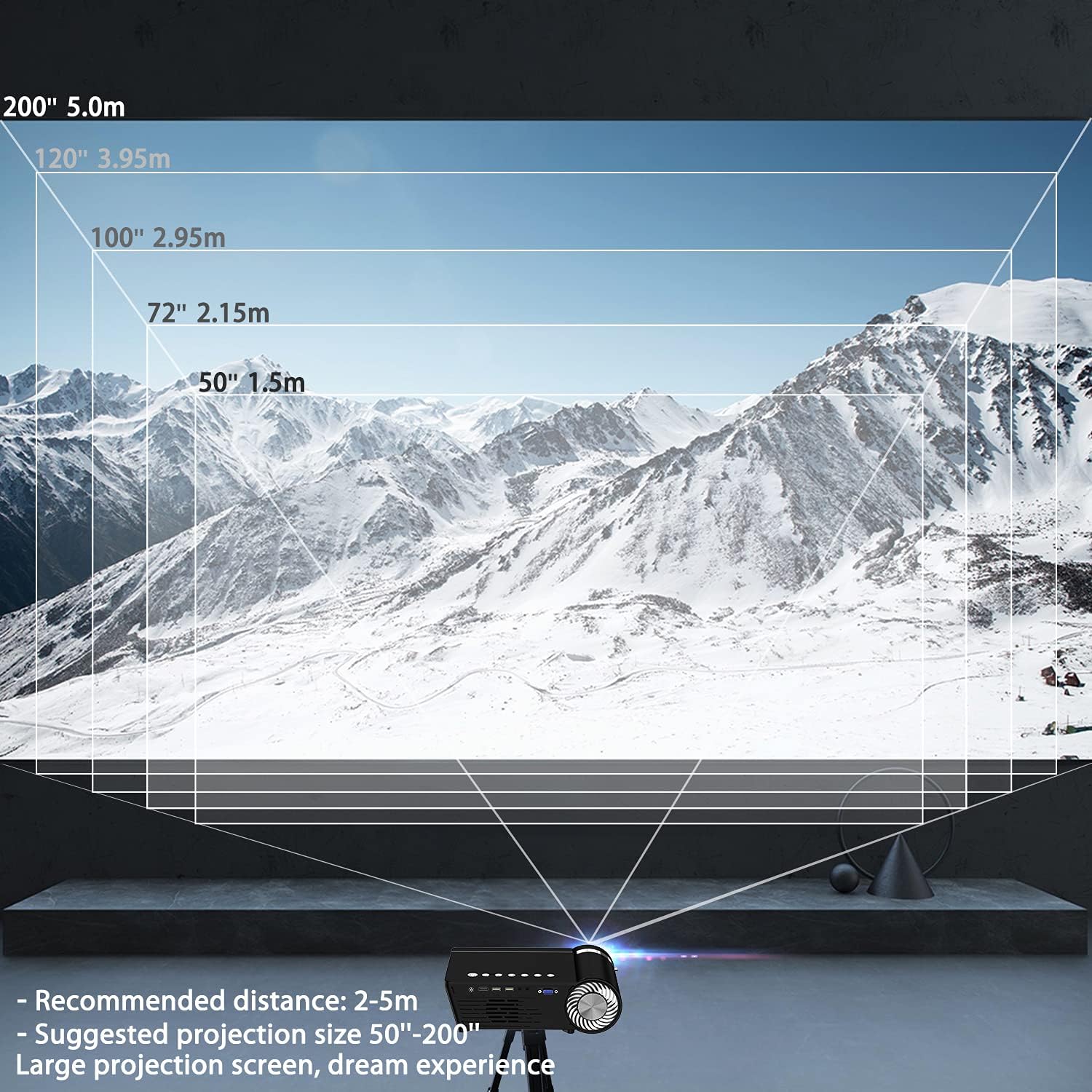
Image: A diagram illustrating recommended projection distances (1.5m for 50", 2.15m for 72", 2.95m for 100", 3.95m for 120", 5.0m for 200") for various screen sizes.
4.2 Energia-konexioa
Konektatu elikatze-kablea proiektorearen elikatze-sarrerara eta gero entxufe batera.
4.3 Fokua eta Keystone doikuntza
After powering on, adjust the focus ring on the lens until the image is clear. Use the keystone correction dial to correct any trapezoidal distortion, ensuring the projected image is rectangular.

Image: A visual representation of how focus and keystone adjustments affect the projected image, showing a blurry image being sharpened by focus and a trapezoidal image being corrected to a rectangle by keystone.
4.4 Konexio aukerak
The projector supports various wired and wireless connections:
- HDMI: Connect your laptop, game console, or streaming device via an HDMI cable.
- USBa: Sartu USB flash unitate bat multimedia erreproduzitzeko files zuzenean.
- AV/VGA: Use the provided AV cable or a VGA cable for older devices.
- Bluetooth 5.0: Konektatu kanpoko Bluetooth bozgorailuak edo entzungailuak audioa hobetzeko.
- WiFi konexioa: For screen mirroring from iOS and Android devices.

Image: The Selvim Mini Projector connected wirelessly to Bluetooth 5.0 headphones and earbuds, illustrating stable signal transmission and a superior stereo experience.
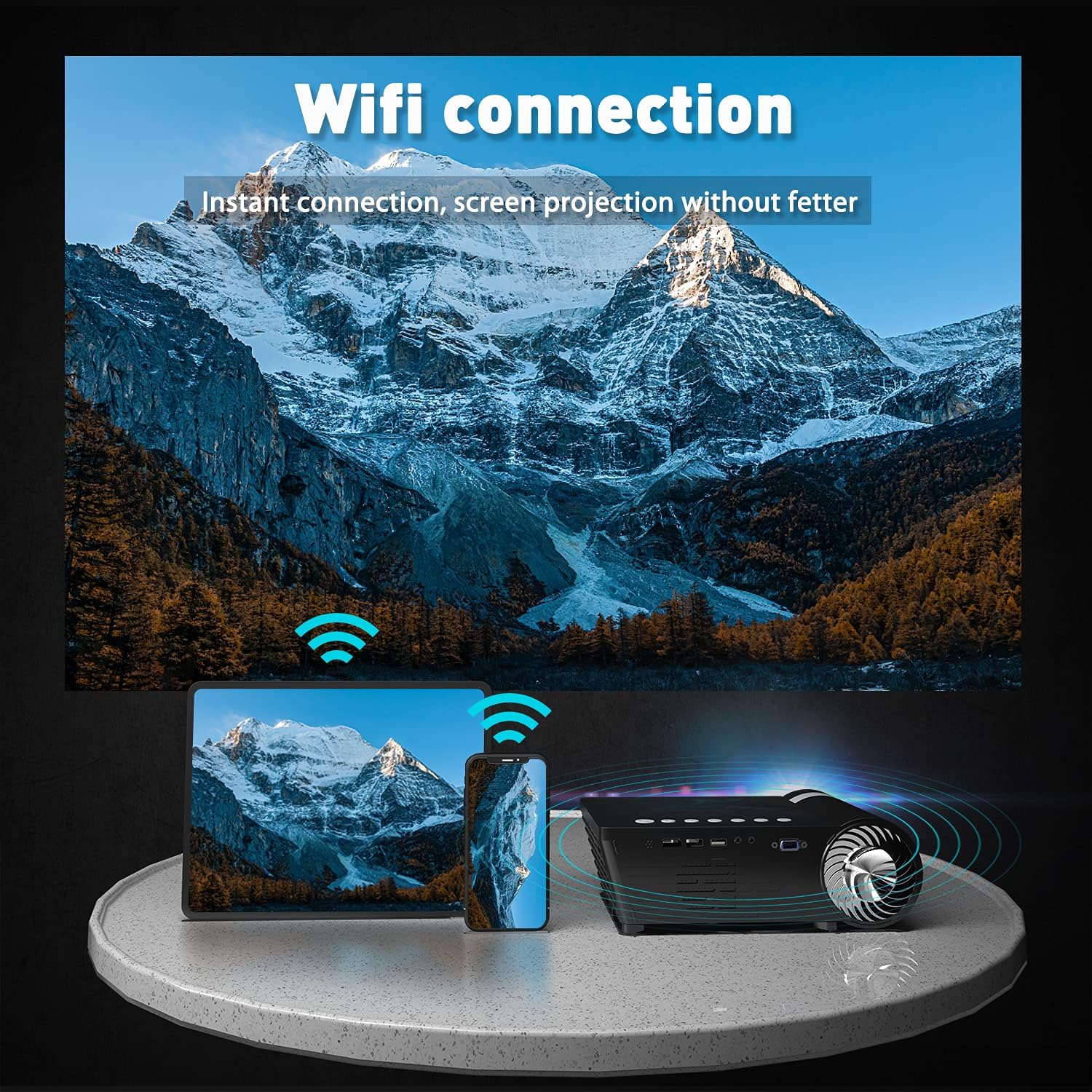
Image: The Selvim Mini Projector demonstrating WiFi connection for instant screen projection from a smartphone and tablet.
5. Funtzionamendu-argibideak
5.1 Oinarrizko kontrolak
Use the included remote control or the buttons on top of the projector to navigate the menu, select input sources, and adjust settings.

Image: A four-panel image showing the projector's main menu, remote control interaction, and options for iOS and Android screen mirroring.
5.2 Sarrera iturriaren hautaketa
From the main menu, select the desired input source (HDMI, USB, AV, VGA, or Miracast for screen mirroring) using the remote or projector buttons.
5.3 Haririk gabeko pantailaren islatzea (iOS/Android)
Zure telefonoaren edo tabletaren pantaila islatzeko:
- Select 'Miracast' or 'iOS Display' / 'Android Display' from the projector's main menu.
- On your mobile device, go to WiFi settings and connect to the projector's WiFi network (e.g., 'PROJECTOR-XXXX').
- Ireki a web browser on your mobile device and enter the IP address displayed on the projector screen (e.g., 192.168.49.1).
- On webpage, select 'WiFi AP' and then 'Scan' to find your home WiFi network.
- Connect your mobile device to your home WiFi network.
- Ensure your mobile device is connected to the same WiFi network as the projector.
- For iOS, activate 'Screen Mirroring' from your Control Center and select the projector. For Android, use the 'Screen Cast' or 'Wireless Display' function.
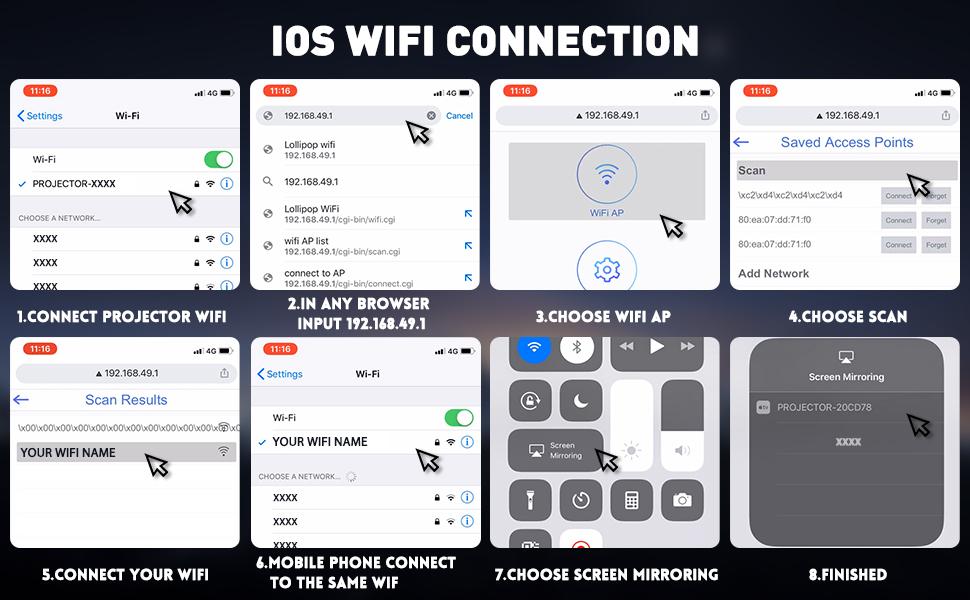
Image: A detailed eight-step visual guide demonstrating how to connect an iOS device to the Selvim Mini Projector for screen mirroring via WiFi.
5.4 Bluetooth audio parekatzea
To pair with a Bluetooth audio device:
- Ziurtatu zure Bluetooth bozgorailua edo entzungailuak parekatze moduan daudela.
- On the projector, navigate to the 'Sound' settings menu.
- Select 'Bluetooth On' and then 'Scan Device'.
- Aukeratu zure Bluetooth gailua zerrendatik parekatzeko.
6. Mantentzea
6.1 Lenteen garbiketa
Regularly clean the projector lens using the provided cleaning cloth or a soft, lint-free cloth. Avoid abrasive materials that could scratch the lens.

Image: A cutaway diagram showing the multi-layer glass lens of the Selvim Mini Projector, emphasizing its optical quality.
6.2 Hozte-sistema
The projector features an efficient cooling system with multiple fans to dissipate heat and ensure a long lamp life. Ensure the ventilation vents are not blocked during operation.
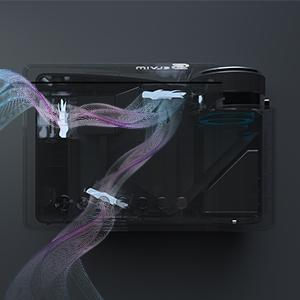
Image: An internal diagram of the Selvim Mini Projector showing the airflow and cooling system, designed to maintain optimal operating temperature.
6.3 LED Lamp Bizitza
Proiektoreak LED bat erabiltzen duamp with an impressive lifespan of up to 60,000 hours, providing years of reliable use.
7. Arazoak
- Irudirik ez: Check power connection, input source selection, and cable connections. Ensure the lens cap is removed.
- Irudi lausoa: Adjust the focus ring. If edges are blurry, adjust keystone correction. Ensure the projection distance is within the recommended range.
- Soinurik ez: Check volume settings on both the projector and the source device. Ensure external speakers are properly connected or Bluetooth is paired correctly.
- Pantaila islatzearen arazoak: Ensure both the projector and your mobile device are connected to the same WiFi network. For iOS, verify Screen Mirroring is active. For Android, check 'Screen Cast' or 'Wireless Display' settings. Some apps or content may be protected and not allow mirroring.
- Gehiegizko berotzea: Ensure ventilation vents are clear and not obstructed. Operate the projector in a well-ventilated area.
8. Zehaztapenak
| Marka | Selvim |
| Eredua | B08RYTXVY8 |
| Bistaratzeko Gehienezko bereizmena | 1920 x 1080 (1080P Compatible) |
| Konektibitate Teknologia | Bluetooth, HDMI, USB, VGA |
| Ezaugarri bereziak | Wi-Fi integratua, eramangarria, haririk gabekoa |
| Elementuaren pisua | 3.91 kilo |
| Paketearen neurriak | 12.76 x 8.86 x 5 hazbete |
| LED Lamp Bizitza | 60,000 ordu |
| Keystone zuzenketa | ±15 gradu |
9. Bermea eta Laguntza
For warranty information or technical support, please refer to the contact details provided with your purchase or visit the official Selvim webgunea. Gorde erosketa-agiria erosketaren frogagiri gisa berme-erreklamazioetarako.