
Goshyda KX-T6001CID
Goshyda KX-T6001CID Big Button Corded Telephone User Manual
Model: KX-T6001CID | Brand: Goshyda
Sarrera
Thank you for choosing the Goshyda KX-T6001CID Big Button Corded Telephone. This manual provides detailed instructions to help you set up, operate, and maintain your new telephone. Please read this manual thoroughly before use to ensure proper functionality and to take full advantage bere ezaugarriak.
Segurtasun Informazioa
- Do not expose the telephone to water or moisture.
- Avoid placing the telephone in direct sunlight or near heat sources.
- Use only the provided telephone line cord.
- Do not attempt to open or repair the telephone yourself. Refer all servicing to qualified personnel.
- Mantendu haurren eskura.
Paketearen edukia
Egiaztatu elementu guztiak paketean daudela:
- 1 x Telefonoa
- 1 x Telephone Base Unit
- 1 x Handset Cord
- 1 x Telefono-kablea
- 1 x Erabiltzailearen eskuliburua

Image: The Goshyda KX-T6001CID telephone, showing the base unit, handset, and coiled cord.
Produktua amaituview
Familiarize yourself with the main components and controls of your telephone.

Irudia: Aurrealdea view of the telephone, highlighting the LCD display, large numeric keypad, and function buttons.
Keypad and Display:
- Zenbakizko teklatua (0-9, *, #): For dialing phone numbers.
- LCD pantaila: Deitzailearen IDa, ordua, data eta menu aukerak erakusten ditu.
- M1/M2 botoiak: One-touch memory dialing keys.
- SET/STORE Button: Used for entering settings menu and saving entries.
- GORA/BEHERA botoiak: Navigate through menu options or adjust volume.
- RING Button: Adjust ringer volume.
- VOL botoia: Adjust earpiece/speaker volume.
- FL/BRT (Flash/Brightness) Button: Flash function for call waiting, also adjusts LCD brightness.
- REDIAL Button: Redials the last dialed number.
- H.F (Hands-Free) Button: Activates speakerphone mode.

Irudia: Gertutik view of the large, easy-to-read buttons on the telephone's keypad.
Konfigurazioa
1. Connecting the Telephone:
- Konektatu telefonoaren kable kiribilduaren mutur bat telefonora eta beste muturra telefonoaren oinarriaren ezkerreko aldean dagoen telefonoaren hartunera.
- Connect one end of the telephone line cord to the LINE jack on the back of the telephone base unit.
- Konektatu telefono-kablearen beste muturra hormako telefono-hartuneari.
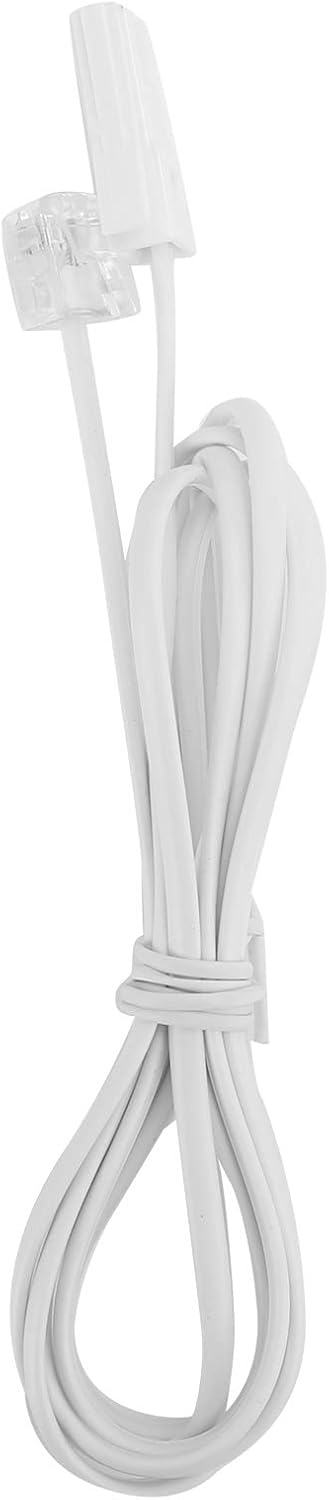
Image: The telephone line cord, used to connect the phone to the wall jack.
2. Hasierako ezarpenak:
Upon initial connection, the LCD display may prompt you to set the date and time. Follow the on-screen instructions using the UP eta BEHERA balioak doitzeko botoiak eta EZARRI/GORDE botoia berresteko.
Funtzionamendu-argibideak
Dei bat egitea:
- Altxa telefonoa edo sakatu HF button for speakerphone.
- Markatu nahi duzun telefono zenbakia zenbakizko teklatua erabiliz.
- Itxaron deia konektatu arte.
- Deia amaitzeko, jarri telefonoa berriro edo sakatu tekla HF botoia berriro.
Dei bati erantzutea:
Telefonoak jotzen duenean, altxatu telefonoa edo sakatu tekla HF erantzuteko botoia.
Birmarkatzea:
Altxatu telefonoa edo sakatu HF, eta, ondoren, sakatu ERREPOSTUA botoia azken markatutako zenbakira deitzeko.
Using Memory Keys (M1/M2):
Zenbaki bat gordetzea:
- Altxatu telefonoa edo sakatu HF.
- Sakatu EZARRI/GORDE.
- Markatu gorde nahi duzun telefono zenbakia.
- Sakatu EZARRI/GORDE berriz.
- Sakatu bai M1 or M2 to save the number to that memory key.
Memoriatik markatzea:
Altxatu telefonoa edo sakatu HF, then press either M1 or M2 to dial the stored number.
Ezaugarriak
- DTMF/FSK Dual System Caller ID: Supports both DTMF and FSK caller ID systems for displaying incoming call information.

Image: The telephone's display, showing its capability for DTMF/FSK dual system caller ID function.
- FLASH Time Adjustment: Adjustable FLASH time (90/95/100/120/180/300/600/1000ms) for compatibility with various PBX systems or call waiting services.
- 16 Ringtone Options: Choose from 16 different ringtones.

Image: The telephone with graphic elements suggesting a choice of 16 ringtones.
- Adjustable LCD Brightness: Five levels of LCD screen brightness adjustment for optimal viewing.
- 3 Alarm Clock Functions: Set up to 3 different alarm clocks, each with unique alarm sounds.
- 10 Groups of Dual Key Memory: Store up to 10 frequently called numbers using dual-key memory functions.
- 1-99 Hours Do Not Disturb Function: Set a "Do Not Disturb" period from 1 to 99 hours.
Mantentzea
- Clean the telephone with a soft, damp oihal. Ez erabili garbitzaile edo disolbatzaile urratzailerik.
- Keep the telephone away from dust and extreme temperatures.
- Ziurtatu kableak ez daudela korapilatuta edo estututa kalteak ekiditeko.
Arazoak konpontzea
| Arazoa | Kausa posiblea | Irtenbidea |
|---|---|---|
| Markatze-tonurik ez | Telefono-kablea deskonektatuta edo akastuna dago. | Check all cable connections. Try a different telephone line cord. Test the wall jack with another phone. |
| Ezin ditut deiak egin edo jaso | Line issue, or phone is in "Do Not Disturb" mode. | Verify phone line service. Check if "Do Not Disturb" is active and disable it. |
| Deitzailearen IDa ez da bistaratzen | Caller ID service not subscribed or incompatible system. | Contact your telephone service provider to ensure Caller ID service is active. |
| Pantaila iluna edo hutsik dago | LCD brightness setting is too low. | Adjust the LCD brightness using the FL/BRT button or menu settings. |
Zehaztapenak
| Ezaugarri | Xehetasuna |
|---|---|
| Eredua | KX-T6001CID |
| Marka | Goshyda |
| Materiala | Akrilonitrilo Butadieno Estirenoa (ABS) |
| Kolorea | Zuria |
| Mota | Telefono kablea |
| Markagailu mota | Teklatu bakarra |
| Deitzailearen IDa | Yes (DTMF/FSK Dual System) |
| Flash Denbora | 90/95/100/120/180/300/600/1000ms |
| Dei-tonuak | 16 aukera |
| LCD distira | 5 maila erregulagarriak |
| Alarma Funtzioak | 3 talde |
| Memoria Funtzioa | 10 groups of dual key memory |
| Ez molestatu | 1-99 ordu |
| Elementuaren pisua | 481 gramo |
| Neurriak (L x W x H) | 10 x 10 x 10 millimeters (approximate) |
| Energia iturria | Battery Powered (likely referring to LCD/memory backup, as corded phones are line-powered for basic functions) |
Bermea eta Laguntza
This Goshyda product is covered by a standard manufacturer's warranty. For specific warranty details, please refer to the documentation included with your purchase or contact Goshyda customer support.
For technical assistance or further inquiries, please contact Goshyda customer service through their official webgunea edo zure produktuarekin emandako harremanetarako informazioa.
Ask a question about this manual
Ask about setup, troubleshooting, compatibility, parts, safety, or missing instructions. Manuals+ will review the question and use this page’s manual context to help answer it.