Sarrera
The Sony FX6 Full-Frame Cinema Camera (Model ILME-FX6V) is designed for versatile, cine-style imaging in a compact form. It features a 4K full-frame Exmor R sensor and BIONX XR engine, offering exceptional low-light performance and up to 15+ stops of dynamic range. With S-Cinetone gamma and advanced autofocus capabilities, the FX6 is suitable for a wide range of professional video productions, from documentaries to gimbal and drone shoots.
Zer sartzen da
The standard package for the Sony FX6 Full-Frame Cinema Camera (Body Only) includes the following components:
- Sony FX6 Full-Frame Cinema Camera (Body Only)
- Lilliput A7S 7" Full HD Monitor
- Sony 80GB CFexpress Type A TOUGH Memory Card
- Sony MDR-7506 Headphones
- Sony ECM-VG1 Electret Condenser Shotgun Microphone
- 2 x Sony BP-U35 Battery
- LED Argia
- Pro Camcorder Case
- Deluxe Cleaning Set
- HDMI kablea
- Memoria Txartelaren Zorroa
Konfigurazio Gida
1. Despaketatzea eta Hasierako Ikuskapena
Carefully remove all components from the packaging. Inspect each item for any signs of damage. Ensure all listed accessories are present.
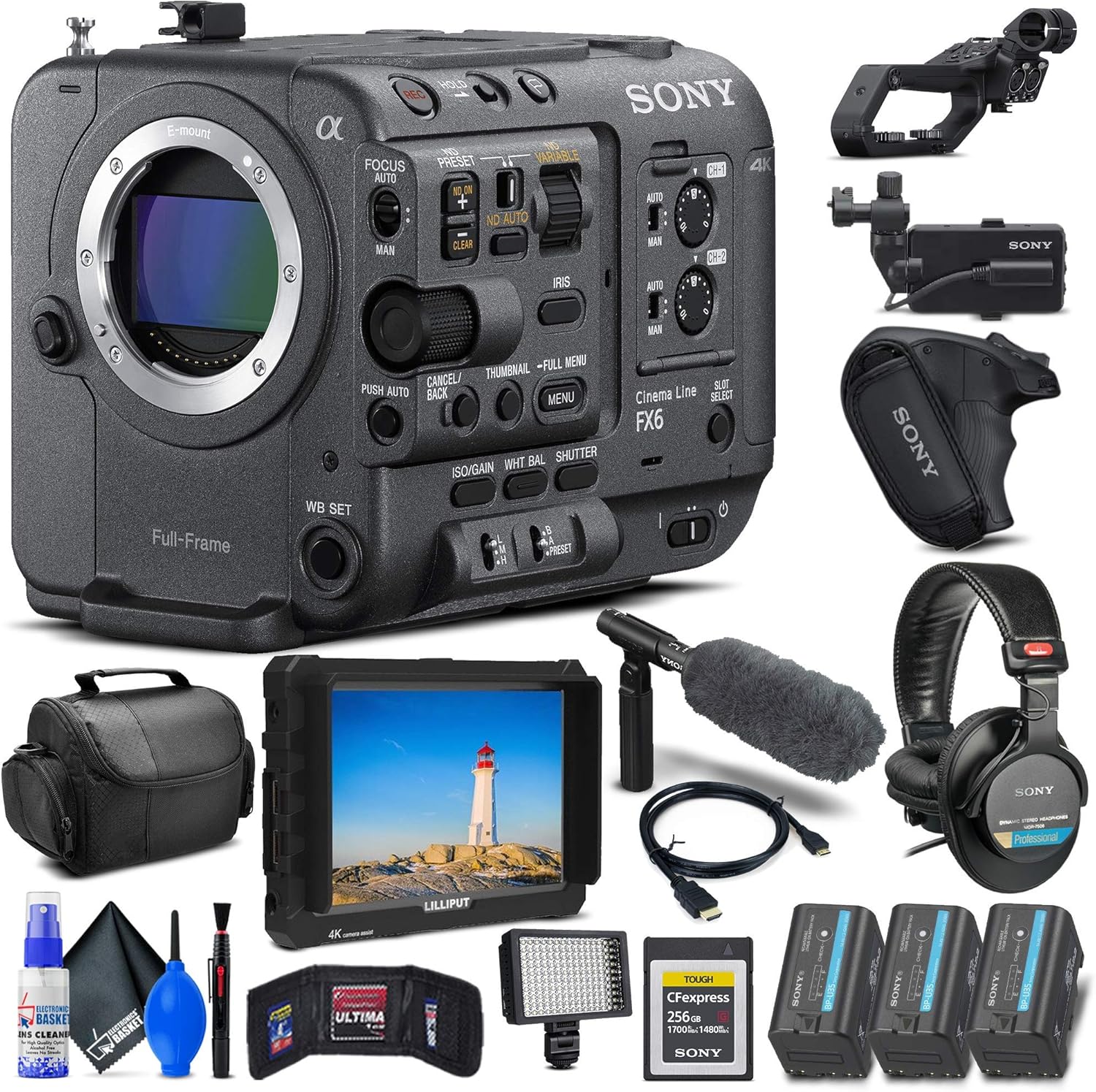
Figure 1: Sony FX6 camera body and various accessories included in the bundle, such as monitor, batteries, microphone, and headphones.
2. Attaching the Handle and Monitor
Attach the top handle to the camera body using the provided screws. The handle provides additional mounting points and houses the monitor attachment. Secure the 3.5" LCD monitor to the handle's mounting point. The monitor can be positioned for optimal viewfuntzionamenduan zehar.

Figure 2: The Sony FX6 camera with its top handle and LCD monitor securely attached, ready for use.
3. Bateria instalatzea eta kargatzea
Insert the BP-U35 battery into the battery slot at the rear of the camera. Ensure it clicks into place. Charge the battery using the supplied charger before first use. A fully charged battery ensures maximum operational time.

3. Irudia: Atzealdea view of the Sony FX6 camera, highlighting the battery compartment and various input/output ports for connectivity.
4. Memoria txartelaren txertatzea
The FX6 supports dual CFexpress Type A/SDXC card slots. Open the memory card slot cover and insert the memory card(s) until they click into place. Ensure the card is oriented correctly to avoid damage.
Funtzionamendu-argibideak
1. Piztea eta oinarrizko kontrolak
Press and hold the power button to turn on the camera. The 3.5" LCD monitor will display the live view. Familiarize yourself with the main controls on the camera body and handle, including the record button, zoom rocker, and menu navigation buttons.
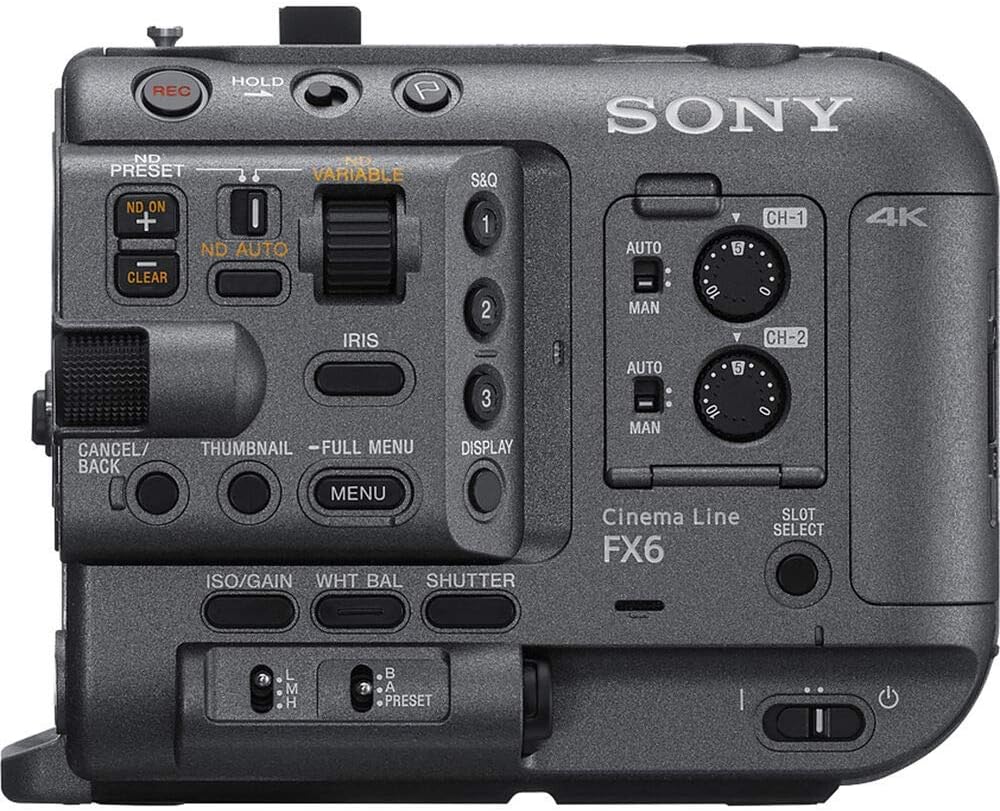
4. irudia: Goitik behera view of the Sony FX6 camera, detailing the layout of its primary control buttons and dials for quick access during shooting.
2. Focus and Exposure Settings
The FX6 features fast and accurate phase-detection autofocus with Face Detection and real-time Eye autofocus. You can switch between auto and manual focus modes. Adjust exposure using the auto and manual ND filter settings for quick compensation in varying light conditions. The camera also offers a base ISO of 800 and a high-sensitivity mode up to ISO 12800 for low-light scenes.

Figure 5: Front-side perspective of the Sony FX6 camera body, showcasing the full-frame lens mount and surrounding controls.
3. Bideoa grabatzea
The camera supports DCI 4K60p, UHD 4K120, and 1080p240 recording. It records in 10-bit 4:2:2 XAVC-I and offers 16-Bit Raw Output. Press the REC button to start and stop recording. Monitor your footage LCD pantailan.
4. Audio Input and Monitoring
Connect the Sony ECM-VG1 Electret Condenser Shotgun Microphone to the camera's audio input. Monitor audio levels using the on-screen meters and through the Sony MDR-7506 Headphones connected to the headphone jack. The camera supports AAC and PCM audio formats.
Mantentzea
1. Kamera garbitzea
Use the Deluxe Cleaning Set to keep your camera and accessories clean. Gently wipe the camera body with a soft, dry cloth. For the lens and sensor, use specialized cleaning solutions and cloths to avoid scratches or damage. Regularly clean the LCD screen with a microfiber cloth.
2. Bateria zaintzea
To prolong battery life, avoid fully discharging the batteries frequently. Store batteries in a cool, dry place when not in use. If storing for extended periods, charge them to about 50% capacity.
3. Firmware eguneraketak
Aldian-aldian egiaztatu Sonyren laguntza ofiziala webfirmware eguneratzeetarako gunea. Kameraren firmwarea eguneratuta mantentzeak errendimendu optimoa, funtzio berriak eta akatsen konponketak bermatzen ditu.
Arazoak konpontzea
| Arazoa | Kausa posiblea | Irtenbidea |
|---|---|---|
| Kamera ez da pizten. | Bateria ez dago kargatuta edo ez dago behar bezala sartuta. | Ensure battery is fully charged and properly seated in the compartment. |
| No image on LCD monitor. | Monitor cable loose or monitor not powered. | Check monitor cable connection. Ensure monitor has power if external. |
| Grabaketa ustekabean gelditu da. | Memory card full or too slow; battery low. | Check memory card capacity and speed rating. Replace or charge battery. |
| Audio kalitate eskasa. | Microphone not connected, incorrect audio settings, or external interference. | Verify microphone connection. Check audio input levels and settings. Move away from interference sources. |
Zehaztapenak
| Ezaugarri | Xehetasuna |
|---|---|
| Modelo zenbakia | ILME-FX6V |
| Sentsore mota | 4K Full-Frame 10.2MP CMOS Exmor R Sensor |
| Bideo Ebazpena | DCI 4K60p, UHD 4K120, 1080p240 |
| Barruti dinamikoa | 15+ Stops (in S-Log 3 EI) |
| ISO sentikortasuna | Base 800-12,800 ISO / 320-409,600 Max |
| Kolore moduak | S-Cinetone, S-Log3, HLG Modes |
| Grabaketa formatua | 10-Bit 4:2:2 XAVC-I, 16-Bit Raw Output |
| Foku automatikoa | Phase Detection AF/Face Tracking/Eye AF |
| Memoria txartelaren zirrikituak | Dual CFexpress Type A/SDXC Card Slots |
| Pantailaren tamaina | 3.5 Inches (LCD Monitor) |
| Konektibitatea | HDMI, SDI Out, Remote, Multi |
| Dimensions (Camera Body) | 6 x 4.6 x 4.5 hazbete inguru |
| Weight (Camera Body) | Just under 2 lb (approx. 0.9 kg) |
Bermea eta Laguntza
This product is offered as a renewed item. For specific warranty and support details, please refer to the Amazon Renewed Guarantee information provided at the time of purchase. Renewed products are typically eligible for replacement or refund under the Amazon Renewed Guarantee if not satisfied with the purchase.
For technical support, firmware updates, and additional resources, please visit the official Sony support website for the ILME-FX6V model.
Note: As this is a renewed product, specific warranty terms may differ from new products. Always consult your purchase documentation for precise details.


