1. Sarrera
This manual provides detailed instructions for the setup, operation, maintenance, and troubleshooting of your Hannspree HO275PTB LED-Monitor. Please read this manual thoroughly before using the product to ensure proper and safe operation.
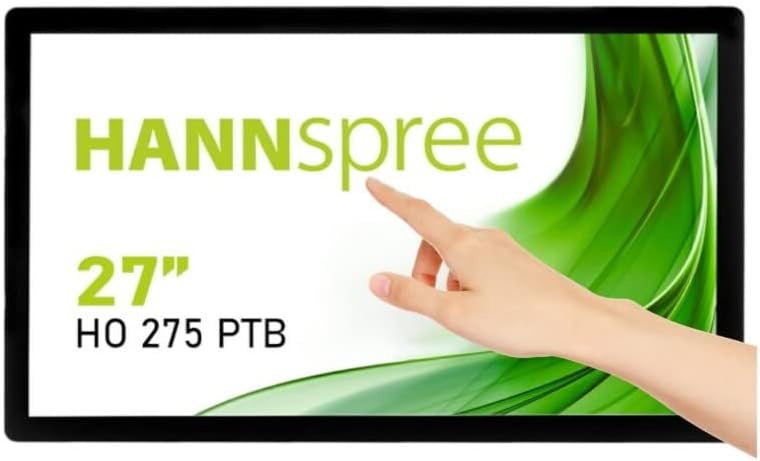
1.1. irudia: Aurrealdea view of the Hannspree HO275PTB LED-Monitor, showcasing its 27-inch display and touch functionality.
2. Konfigurazioa
2.1 Paketatzea
Kontu handiz atera osagai guztiak paketetik. Ziurtatu behean zerrendatutako elementu guztiak daudela:
- Hannspree HO275PTB LED-Monitor
- Elikatze-kablea
- HDMI kablea (eskualdearen arabera alda daiteke)
- USB kablea (ukipen-funtzionalitaterako)
- Erabiltzailearen eskuliburua (dokumentu hau)
2.2 Instalazio fisikoa
The monitor can be placed on a flat surface or mounted using a VESA-compatible mount (not included).

2.1 irudia: Alboko aldeafile of the monitor, illustrating its slim design.

2.2. Irudia: Atzealdea view of the monitor, highlighting the VESA mounting holes for wall or arm installation.
2.3 Konektatzeko kableak
Connect the necessary cables to the corresponding ports on the back of the monitor. Ensure all connections are secure.
- Potentzia-konexioa: Konektatu elikatze-kablea monitorearen elikatze-sarrerara eta gero entxufe batera.
- Bideo-konexioa: Connect an HDMI or DisplayPort cable from your computer's video output to the corresponding input on the monitor.
- USB konexioa (ukipenerako): Connect the USB cable from your computer to the USB upstream port on the monitor to enable touch functionality.
- Audio konexioa: If using external speakers or headphones, connect them to the audio output port.

2.3. irudia: Xehetasuna view of the monitor's connectivity ports, including power, USB, HDMI, and DisplayPort.
3. Monitorea funtzionatzea
3.1 Piztu/Itzali
Sakatu monitorearen gainean dagoen pizteko botoia pizteko edo itzaltzeko. Pizteko adierazlearen argia piztuko da monitorearen piztuta dagoenean.
3.2 Sarrera hautatzea
The monitor automatically detects the active video input. If multiple sources are connected, you may need to manually select the input using the monitor's on-screen display (OSD) menu.
3.3 Pantailan bistaratzeko (OSD) menua
Access the OSD menu to adjust various display settings such as brightness, contrast, color temperature, and aspect ratio. Refer to the quick start guide for specific button functions.
3.4 Touch Functionality
The Hannspree HO275PTB features multi-touch capability. Ensure the USB cable is connected to your computer for this feature to work. Drivers may be required for certain operating systems.
4. Mantentzea
4.1 Monitorea garbitzea
Monitorearen pantaila garbitzeko, astiro-astiro zapi leun eta pelusik gabeko batekin garbitu. Orba egoskorrak kentzeko, garbituampGarbitu zapi apur bat urarekin edo pantaila-garbitzaile ez-urratzaile batekin. Ez ihinztatu likidoa zuzenean pantailan.
C monitorearentzat.asing, use a soft, dry cloth. Avoid using strong detergents or abrasive cleaners.
4.2 Biltegiratzea
When storing the monitor for an extended period, disconnect all cables and place it in its original packaging or a protective cover to prevent dust accumulation and damage.
5. Arazoak
Monitorearekin arazoak badituzu, jo ezazu honako arazo eta irtenbide ohikoenei:
| Arazoa | Kausa posiblea | Irtenbidea |
|---|---|---|
| Botererik ez | Kable elektrikoa ez dago konektatuta edo arazoa entxufearekin. | Ensure power cable is securely connected to both the monitor and a working power outlet. |
| Seinalerik ez | Bideo kablea ez dago konektatuta edo sarrera okerra hautatu da. | Check video cable connections (HDMI/DisplayPort). Select the correct input source via the OSD menu. |
| Display is Blurry/Distorted | Incorrect resolution or refresh rate. | Ezarri ordenagailuaren pantailaren bereizmena 1920x1080-ra eta freskatze-tasa 60Hz-ra. |
| Ukipen-funtzioa ez dabil | USB kablea ez dago konektatuta edo gidariaren arazoa. | Ensure the USB upstream cable is connected. Install or update touch screen drivers for your operating system. |
6. Zehaztapenak
Below are the technical specifications for the Hannspree HO275PTB LED-Monitor:
- Eredua: HO275PTB
- Pantailaren tamaina: 27 hazbete
- Ebazpena: FHD 1080p (1920 x 1080 pixels)
- Aspektu-erlazioa: 16:9
- Pantailaren gainazala: Laua
- Fabrikatzailea: HANNSPREE
- Produktuaren neurriak: 1.85 x 21.61 x 15.24 hazbete (4.7 x 54.9 x 38.7 cm)
- Elementuaren pisua: 19.36 libra (8.78 kg)
- liburukiatage: 220V
- Freskatze-tasa: 60 Hz
- Energia Eraginkortasun Klasea (SDR): D
- Power Consumption (SDR): 16.8 W

Figure 6.1: Energy label for the Hannspree HO275PTB, indicating its energy efficiency class and consumption.
Produktuari eta energia-eraginkortasunari buruzko informazio zehatza lortzeko, jo ezazu EPREL datu-base ofizialera:
7. Bermea eta Laguntza
7.1 Bermearen informazioa
The Hannspree HO275PTB LED-Monitor comes with a minimum guaranteed product support period of 8 urte and a general warranty period of 3 urte hornitzaileak emandakoa.
7.2 Bezeroarentzako laguntza
For technical assistance, warranty claims, or general inquiries, please contact Hannspree customer support:
- Webgunea: www.hannspree.com
- Posta elektronikoa: service@eu.hannspree.com
- Telefonoa: +49 (0) 21 59 / 81 45 7 - 0