
Ctronics CTIPC-285C-Z4B
Ctronics 5X Optical Zoom WiFi Outdoor Security Camera User Manual
Model: CTIPC-285C-Z4B
1. Sarrera
Thank you for choosing the Ctronics 5X Optical Zoom WiFi Outdoor Security Camera. This manual provides detailed instructions for the installation, operation, and maintenance of your camera. Please read this manual thoroughly before use to ensure proper functionality and safety. This camera is designed for outdoor surveillance, offering advanced features such as 5X optical zoom, human detection, auto-tracking, color night vision, and two-way audio.

1.1. irudia: Ctronics 5X Optical Zoom WiFi Outdoor Security Camera. This image shows the main unit of the camera with its dual antennas and lens array.
2. Segurtasun informazioa
Produktuari kalterik ez egiteko edo zeure buruari edo besteei lesiorik ez egiteko, jarraitu segurtasun neurri hauek:
- Ensure the power supply is stable and matches the camera's voltage eskakizunak (12 Volt).
- Ez jarri kamera bere funtzionamendu-eremutik kanpo dauden tenperatura edo hezetasun handien eraginpean.
- Avoid direct exposure of the lens to strong light sources, which may damage the sensor.
- Ez saiatu kamera desmuntatzen edo aldatzen. Mantendu konponketa guztiak langile kualifikatuen esku.
- Gorde kamera eta haren osagarriak haurren eskura ez dauden lekuetan.
- Ensure proper mounting to prevent the camera from falling.
3. Paketearen edukia
Please check the package contents upon opening. If any items are missing or damaged, contact your retailer or Ctronics support.
- Ctronics 5X Optical Zoom WiFi Outdoor Security Camera
- Elikatze-moldagailua
- Muntatzeko torlojuak eta hormako takoak
- Waterproof Kit for Network Cable (if applicable)
- Hasierako gida azkarra
4. Konfigurazioa
4.1 Instalazio fisikoa
- Aukeratu kokapena: Select a suitable outdoor location with a clear view of the area you wish to monitor. Ensure the location has access to a power outlet.
- Muntaketa: Use the provided mounting template (if included) to mark drill holes on the wall or ceiling. Drill the holes, insert wall plugs, and secure the camera bracket using the screws.
- Potentzia-konexioa: Connect the power adapter to the camera's power input and plug it into a power outlet.
4.2 Sareko konexioa
The camera supports 2.4GHz Wi-Fi networks.
- Deskargatu aplikazioa: Download the "Ctronics" app from your smartphone's app store (iOS/Android). For PC users, download the HiP2P software for MAC/Windows.
- Hasierako konfigurazioa: Jarraitu aplikazio barruko argibideei kamera gehitzeko. Horrek normalean kamerako QR kode bat eskaneatzea edo IDa eskuz sartzea dakar.
- Wi-Fi konfigurazioa: Konektatu kamera zure 2.4 GHz-ko Wi-Fi sarera aplikazioaren bidez.

4.1. irudia: Broad Compatibility. This image illustrates the camera's compatibility with various devices and operating systems, including iOS, Android, Windows, and Mac OS, through the Ctronics Pro app and HiP2P Client software.
4.3 Mikro SD txartelaren instalazioa (aukerakoa)
The camera supports a micro SD card up to 64GB for local storage of recordings.
- Locate the SD card slot on the camera (refer to the camera diagram in the quick start guide).
- Carefully insert the micro SD card into the slot until it clicks into place.
- Format the SD card via the camera's settings in the Ctronics app for optimal performance.
5. Kameraren funtzionamendua
5.1 Panoramikoa, inklinatua eta zooma (PTZ)
The camera features motorized pan (355° horizontally) and tilt (90° vertically) functions, along with 5X optical zoom.
- Kontrola: Use the Ctronics app to remotely control the camera's pan and tilt movements by swiping on the live view pantaila.
- Zoom optikoa: Pinch-to-zoom on the live view to activate the 5X optical zoom. The camera will auto-focus for clear detailed images.
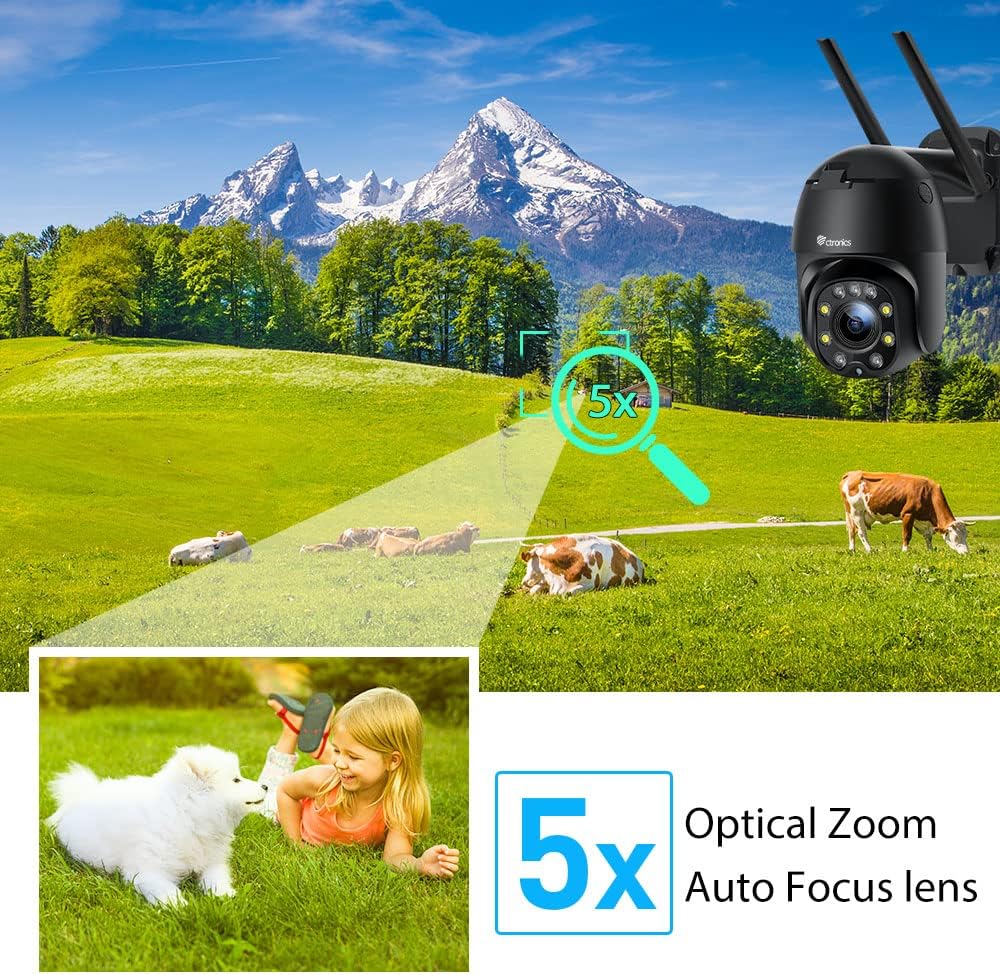
5.1. irudia: 5X Optical Zoom. This image demonstrates the camera's 5X optical zoom capability, allowing for detailed viewing of distant objects with auto-focus functionality.
5.2 Human Detection and Auto-Tracking
The camera utilizes AI algorithms to distinguish human movement from other triggers, reducing false alarms by up to 95%.
- Detekzioa: When a human is detected, the camera will automatically track their movement within its field of view.
- Alertak: You will receive instant notifications via the app, FTP, or email.
- Grabaketa: Detected events are recorded to the installed SD card.

5.2. irudia: Human Detection. This image illustrates how the camera's human detection feature accurately identifies people while ignoring non-human movements like pets, significantly reducing false alarms.

5.3. irudia: Auto Tracking. This image demonstrates the camera's auto-tracking capability, showing how it follows a detected subject's movement within its 355° horizontal and 90° vertical range.
5.3 HD 1080P & Night Vision
The camera provides 1920x1080P resolution for clear images and offers two night vision modes.
- Kolore Gaueko Ikusmena: With 4 spotlights and 5 infrared lights, the camera can display vivid color images in total darkness up to 25 meters.
- Gaueko infragorria: Standard black and white infrared vision is also available.

5.4. irudia: Color Night Vision. This image illustrates the camera's ability to provide full-color video surveillance even in low-light or nighttime conditions.
5.4 Bi norabideko audioa
Komunikatu bisitariekin edo uxatu intrusoak barneko mikrofonoa eta bozgorailua erabiliz.
- Real-time Conversation: Use the Ctronics app to engage in real-time conversations.
- Zarata murriztea: The camera features ambient noise reduction technology for clearer sound quality.

5.5. irudia: Two-Way Audio. This image depicts the camera's two-way audio functionality, allowing users to communicate with individuals near the camera via their smartphone.
5.5 Urruneko sarbidea
View bizi footage and recordings from anywhere at any time using the Ctronics app or HiP2P software.
- Ensure your camera is connected to the internet.
- Log in to your Ctronics app or HiP2P software account to access your camera feed.
6. Mantentzea
Mantentze-lan erregularrak zure kameraren iraupena eta errendimendu optimoa bermatzen ditu.
- Garbiketa: Garbitu astiro kameraren lentea eta gorputza zapi leun batekin,amp oihal. Ez erabili produktu kimiko gogorrak edo garbitzaile urratzaileak.
- Firmware eguneraketak: Check the Ctronics app periodically for available firmware updates. Keeping the firmware updated ensures you have the latest features and security enhancements.
- Potentzia-zikloa: If the camera experiences minor issues, try power cycling it by unplugging and replugging the power adapter.
7. Arazoak
Atal honek aurki ditzakezun arazo ohikoenei heltzen die.
| Arazoa | Kausa posiblea | Irtenbidea |
|---|---|---|
| Kamera konexiorik gabe | Argindarrik ez; Wi-Fia deskonektatuta; Routerraren arazoa | Check power connection; Reconnect Wi-Fi in app; Restart router |
| Irudi kalitate eskasa | Dirty lens; Network bandwidth; Low light | Clean lens; Check internet speed; Ensure sufficient lighting or use night vision |
| Alarma faltsuak | Sensitivity too high; Non-human movement | Adjust detection sensitivity in app; Ensure human detection is enabled |
| SD txartelak ez du grabatzen | SD card full/corrupted; Not formatted; Incorrect settings | Format SD card in app; Check recording settings; Replace SD card if faulty |
8. Zehaztapenak
Detailed technical specifications for the Ctronics CTIPC-285C-Z4B camera:
| Ezaugarri | Zehaztapena |
|---|---|
| Modelo zenbakia | CTIPC-285C-Z4B |
| Neurriak (L x W x H) | 11 x 17 x 30 cm |
| Pisua | 940 gramo |
| Materiala | Akrilonitrilo Butadieno Estirenoa (ABS) |
| Potentzia Mota | Kable elektrikoa |
| liburukiatage | 12 Volt |
| Energia-kontsumoa | 6 Watt |
| Ebazpena | 1920x1080p |
| Zoom optikoa | 5X |
| Pan Range | 355° |
| Inklinazio barrutia | 90° |
| Gaueko Ikusmenaren Distantzia | Gutxi gorabehera. 25 metro |
| Iragazgaitzaren balorazioa | IP66 |
| Memoria Txartel Mota | Mikro SD |
| Gehienezko memoria-ahalmena | 64 GB |
| Gailu bateragarriak | Smartphone (iOS/Android), PC (MAC/Windows) |
9. Bermea eta Laguntza
Ctronics products come with a standard warranty. For specific warranty terms and conditions, please refer to the warranty card included with your product or visit the official Ctronics website. If you encounter any issues not covered in this manual or require further assistance, please contact Ctronics customer support:
- Webgunea: www.ctronics.com
- Posta elektronikoa: Ikusi zure produktuaren ontzia edo weblaguntza-mezu elektronikorako gunea.
- Telefonoa: Ikusi zure produktuaren ontzia edo weblaguntza telefono zenbakirako gunea.
Please have your model number (CTIPC-285C-Z4B) and purchase information ready when contacting support.
Ask a question about this manual
Ask about setup, troubleshooting, compatibility, parts, safety, or missing instructions. Manuals+ will review the question and use this page’s manual context to help answer it.