
MUNTUA MU0034
MOUNTUP MU0034 Monitore bakarreko mahaigaineko argibideen eskuliburua
Marka: MOUNTUP | Eredua: MU0034
1. Sarrera
This manual provides detailed instructions for the installation, operation, and maintenance of your MOUNTUP MU0034 Single Monitor Desk Mount. Please read this manual thoroughly before installation to ensure correct setup and safe operation. This monitor mount is designed to enhance your workspace ergonomics by providing adjustable positioning for a single monitor.
2. Segurtasun informazioa
- Ensure all components are present and undamaged before installation. Do not use if any parts are missing or faulty.
- This product is intended for monitors weighing up to 17.6 lbs (8 kg) and screen sizes from 17 to 32 inches. Do not exceed the maximum weight capacity.
- Compatible VESA patterns are 75x75mm and 100x100mm. Verify your monitor's VESA pattern before proceeding.
- Ensure the desk surface is stable and strong enough to support the combined weight of the mount and monitor.
- Tighten all screws firmly, but do not overtighten to avoid stripping threads or damaging components.
- Mantendu haurrak eta maskotak urrun instalatzean.
- Instalazio prozesuari buruzko zalantzarik baduzu, kontsultatu profesional kualifikatu bati.
3. Paketearen edukia
Please verify that all parts are included in your package:
- Monitorearen besoaren muntaketa
- Mahaia Clamp Oinarria
- Grommet oinarriaren osagaiak
- VESA Plaka
- Hardware kita (torlojuak, arandelak, Allen giltzak)
- Argibide eskuliburua
4. Zehaztapenak
| Ezaugarri | Zehaztapena |
|---|---|
| Modelo zenbakia | MU0034 |
| Materiala | Aluminio leundua |
| Pantailaren tamainaren bateragarritasuna | 17" to 32" (flat or curved) |
| Pisu Edukiera | Gehienez 17.6 lb (8 kg) |
| VESA bateragarritasuna | 75x75mm, 100x100mm |
| Altuera doitzea | Up to 11" (16.3" total height adjustment range) |
| Inklinazio barrutia | +45°-tik -45°-ra |
| Bira biraka | 360° (arm), 180° (monitor plate) |
| Errotazioa | 360° (landscape to portrait) |
| Max Desk Thickness (C-clamp) | 3.35" |
| Grommet zuloaren diametroa | 0.39" - 3.1" |
5. Konfigurazioa eta instalazioa
The MOUNTUP MU0034 offers two installation options: C-clamp mounting and Grommet mounting. Choose the method suitable for your desk.
5.1. C-Clamp Muntaketa
This method is for desks without existing grommet holes, or if you prefer clamping to the edge of your desk. Ensure your desk thickness is no more than 3.35 inches.
- Erantsi C-clamp: Assemble the C-clamp components to the base of the monitor arm. Position the base on the edge of your desk and tighten the clamp screw until it is secure.
- Erantsi VESA plaka monitoreari: Secure the VESA plate to the back of your monitor using the appropriate screws from the hardware kit. Ensure the screws are tightened securely.
- Slide Monitor onto Arm: Carefully slide the monitor (with the attached VESA plate) onto the monitor arm's VESA head. Ensure it clicks into place or is secured with the provided locking mechanism.
- Tentsioa doitzea: Refer to Section 6.1 for adjusting the gas spring tension to match your monitor's weight.

Figure 1: Illustration of C-clamp and Grommet mounting options. The C-clamp is shown securing the mount to the desk edge, while the grommet mount uses a desk hole.
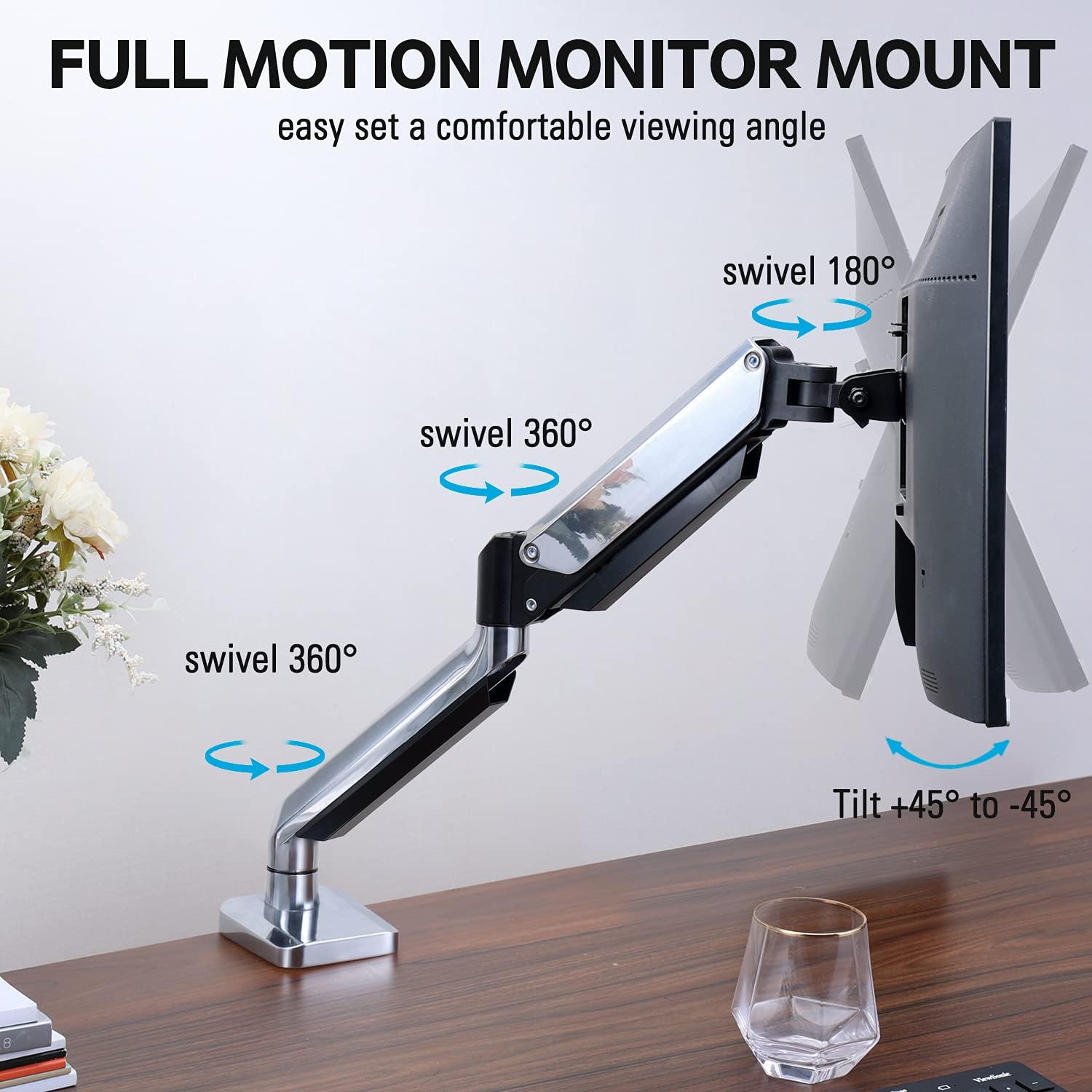
Figure 2: The removable VESA plate being attached to the back of a monitor, then sliding onto the monitor arm for easier installation.
5.2. Grommet Muntaketa
This method utilizes an existing hole in your desk. Ensure your desk thickness is no more than 3.35 inches and the grommet hole diameter is between 0.39 and 3.1 inches.
- Assemble Grommet Base: Insert the grommet base components through the desk hole and secure them from underneath the desk using the provided plate and nut.
- Erantsi VESA plaka monitoreari: Secure the VESA plate to the back of your monitor using the appropriate screws from the hardware kit. Ensure the screws are tightened securely.
- Slide Monitor onto Arm: Carefully slide the monitor (with the attached VESA plate) onto the monitor arm's VESA head. Ensure it clicks into place or is secured with the provided locking mechanism.
- Tentsioa doitzea: Refer to Section 6.1 for adjusting the gas spring tension to match your monitor's weight.
6. Funtzionamendua eta doikuntzak
The MOUNTUP MU0034 monitor arm offers various adjustments for optimal viewerosotasuna.
6.1. Gas malgukiaren tentsioaren doikuntza
The gas spring tension needs to be adjusted to match the weight of your monitor. This ensures the monitor stays in position once adjusted.
- If the monitor drifts down, turn the adjustment screw (usually located on the arm joint) clockwise ("+") to increase tension.
- If the monitor floats up, turn the adjustment screw counter-clockwise ("-") to decrease tension.
- Doitu pixkanaka monitoreak altuera edozeinetan egonkor mantendu arte.
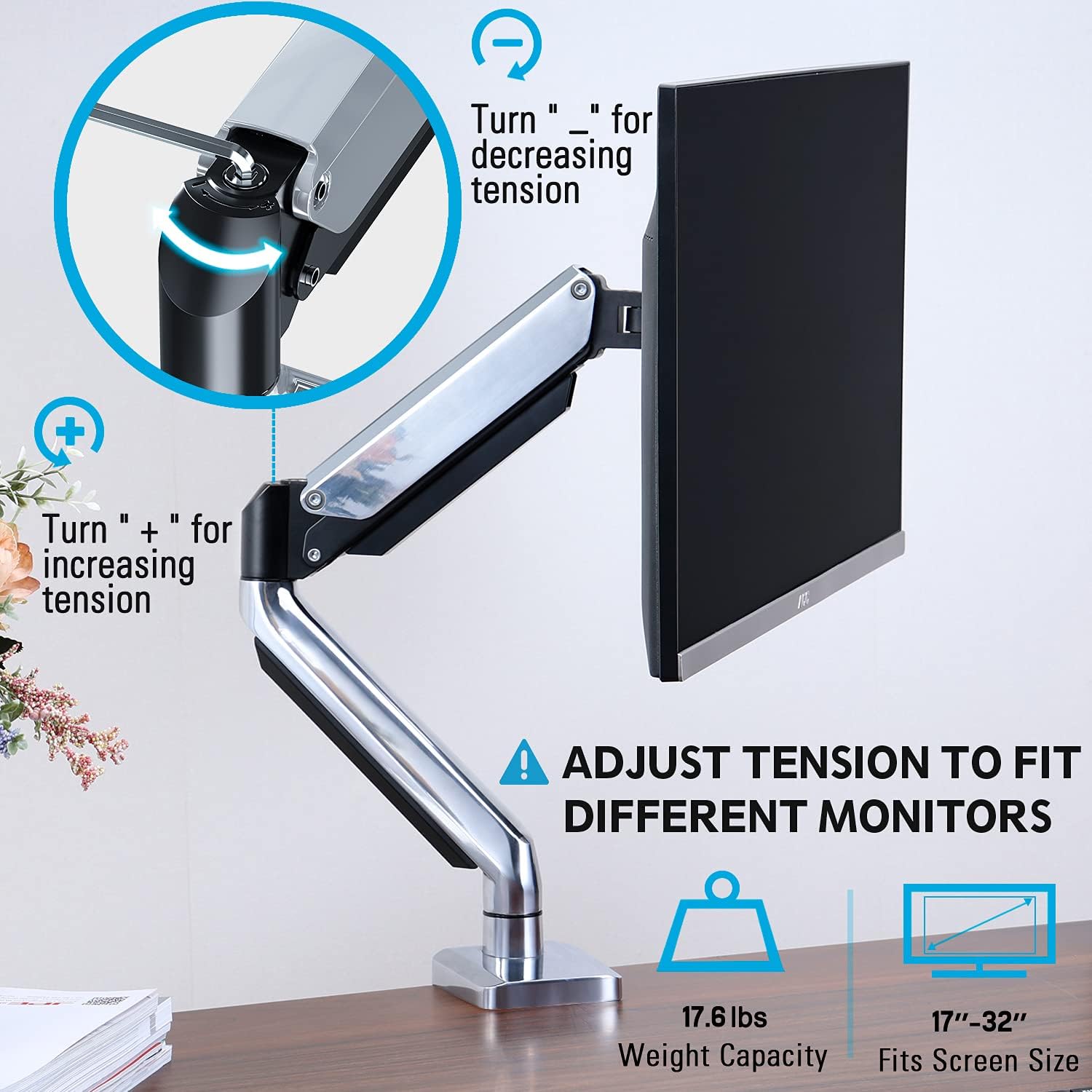
Figure 3: Instructions for adjusting the gas spring tension using an Allen key. Turning clockwise increases tension, counter-clockwise decreases it.
6.2. Altuera doitzea
Once the gas spring tension is correctly set, you can easily raise or lower your monitor to your desired ergonomic height. The arm allows for up to 11 inches of vertical adjustment.

Figure 4: Diagram illustrating the maximum height adjustment of 11 inches and maximum extension of 17.5 inches.
6.3. Tilt, Swivel, and Rotation
The monitor arm provides full motion capabilities:
- okertu: Adjust the monitor screen +45° to -45° to reduce glare or find a comfortable viewangelua.
- Birakaria: The arm can swivel 360° at the base and 360° at the middle joint. The monitor plate itself can swivel 180°. This allows for easy screen sharing or repositioning.
- Errotazioa: Biratu monitorearen pantaila 360° horizontalaren eta bertikalaren orientazioaren artean aldatzeko.

Figure 5: Visual representation of the monitor arm's full motion capabilities, including 360° swivel, 180° swivel at the monitor plate, and +45° to -45° tilt.

Figure 6: An image demonstrating the monitor's ability to rotate 360 degrees, allowing for both landscape and portrait viewing moduak.
7. Kableen kudeaketa
The MOUNTUP MU0034 features integrated cable management to keep your workspace tidy.
- Route your monitor cables (power, video, etc.) along the underside of the arm.
- Use the provided cable clips or covers to secure the cables within the arm channels.
- Ensure cables have enough slack to allow for full range of motion without tension.

Figure 7: Illustration of how cables are routed and organized through the integrated channels on the monitor arm, keeping the desk clear.
8. Mantentzea
- Aldian-aldian egiaztatu torloju eta konexio guztiak ondo estututa daudela ziurtatzeko.
- Garbitu euskarria zapi leun batekin,amp oihal. Saihestu garbitzaile edo disolbatzaile urratzaileak.
- Ez lubrifikatu gas malguki mekanismoa.
9. Arazoak
| Arazoa | Kausa posiblea | Irtenbidea |
|---|---|---|
| Monitor sags or won't stay up | Gas malgukiaren tentsioa baxuegia da monitorearen pisurako. | Increase gas spring tension by turning the adjustment screw clockwise ("+"). |
| Monitor floats up or is hard to push down | Gas malgukiaren tentsioa altuegia da monitorearen pisurako. | Decrease gas spring tension by turning the adjustment screw counter-clockwise ("-"). |
| Monitor is wobbly | Mount not securely fastened to desk or VESA plate not tight. | Egiaztatu eta estutu giltza guztiakamp/grommet screws and VESA plate screws. |
| Difficulty rotating/tilting monitor | Loturak gehiegi estututa daude. | Loosen the corresponding joint screws slightly (do not remove). |
10. Bermea eta Laguntza
The MOUNTUP MU0034 Single Monitor Desk Mount is backed by a 3-year support period. For technical assistance, missing parts, or warranty claims, please contact MOUNTUP customer support through their official channels or the retailer where the product was purchased.
Gorde erosketaren egiaztagiria bermearen ondorioetarako.
Ask a question about this manual
Ask about setup, troubleshooting, compatibility, parts, safety, or missing instructions. Manuals+ will review the question and use this page’s manual context to help answer it.