Sarrera
This manual provides comprehensive instructions for the installation, operation, and maintenance of your Generic X550-T2 Dual Port 10GB Ethernet Adapter. Please read this manual thoroughly before installation and retain it for future reference.
Segurtasun Informazioa
- Ensure your computer is powered off and unplugged from the wall outlet before installing or removing the adapter.
- Discharge any static electricity from your body by touching a grounded metal object before handling the adapter.
- Handle the adapter by its edges to avoid touching components on the circuit board.
- Ez jarri egokitzailea hezetasunean edo muturreko tenperaturetan.
Paketearen edukia
Egiaztatu elementu guztiak paketean daudela:
- Generic X550-T2 Dual Port 10GB Ethernet Adapter
- Pro baxuafile bracket (if applicable, for small form factor PCs)
- Driver CD (or instructions for driver download)
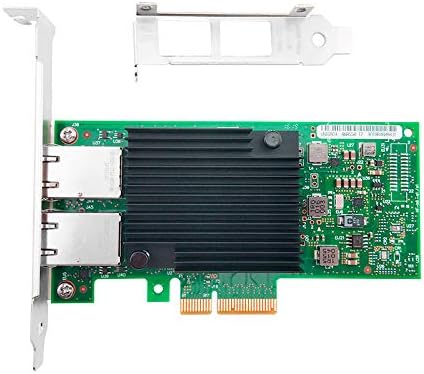
Image 1: The X550-T2 Dual Port 10GB Ethernet Adapter, showing the main board and included brackets.
Konfigurazioa eta Instalazioa
- Itzaltze sistema: Itzali ordenagailua erabat eta deskonektatu korronte-kablea hormako entxufetik.
- Ordenagailuaren kaxa irekia: Kendu ordenagailuaren karkasaren alboko panela plaka basera sartzeko.
- Aurkitu PCI-E zirrikitua: Identify an available PCI Express (PCI-E) x4 or larger slot on your motherboard.
- Kendu zirrikituaren estalkia: Carefully remove the metal slot cover corresponding to the chosen PCI-E slot on the back of your computer case.
- Install Adapter: Align the adapter with the PCI-E slot and firmly press it down until it is securely seated. Ensure the bracket is flush with the case opening.
- Egokitzaile segurua: Use a screw to secure the adapter's bracket to the computer case.
- Itxi kasua: Ordeztu ordenagailuaren kaxaren alboko panela.
- Berriro konektatu energia: Konektatu berriro korronte-kablea hormako entxufean eta piztu ordenagailua.
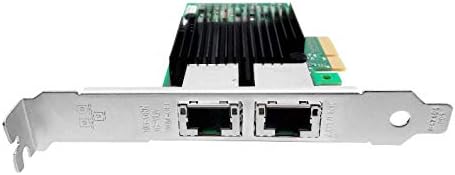
2 irudia: Gertuko planoa view of the dual RJ45 ports on the adapter, ready for network cable connection.
Funtzionamendu-argibideak
Gidariaren instalazioa
Upon first boot after installation, your operating system (e.g., Windows) may automatically detect and install the necessary drivers. If not, follow these steps:
- Insert Driver CD: If provided, insert the driver CD into your computer's optical drive and follow the on-screen instructions.
- Deskargatu gidariak: If no CD is provided or for updated drivers, visit the manufacturer's website (or a reputable driver download site for Generic products) and download the appropriate drivers for the X550-T2 adapter and your operating system.
- Instalatu kontrolatzaileak: Run the downloaded driver installer and follow the prompts. Restart your computer if prompted.
Sare-konexioa
Once drivers are installed, connect your network cables:
- Connect one end of a standard RJ45 Ethernet cable to one of the ports on the X550-T2 adapter.
- Connect the other end of the Ethernet cable to your network switch, router, or directly to another 10GB Ethernet device.
- Repeat for the second port if dual connectivity is desired.
- Verify network connectivity through your operating system's network settings.
Mantentzea
- Keep the computer case clean and free of dust to ensure proper airflow and prevent overheating of the adapter.
- Periodically check for updated drivers on the manufacturer's webgunea errendimendu eta bateragarritasun optimoa bermatzeko.
- Avoid physical impact or bending of the adapter.
Arazoak konpontzea
- No network connectivity after installation:
- Ensure the adapter is fully seated in the PCI-E slot.
- Verify that the network cables are securely connected to both the adapter and the network device.
- Check if the drivers are correctly installed in your operating system's Device Manager. Reinstall drivers if necessary.
- Confirm that the network switch/router is powered on and functioning correctly.
- Slow network speeds:
- Ensure you are using CAT6a or CAT7 Ethernet cables for 10GB speeds.
- Verify that your network switch/router supports 10GB Ethernet.
- Update the network adapter drivers to the latest version.
- Check for other network congestion or issues on your network.
- Adapter not detected by the system:
- Reseat the adapter in the PCI-E slot.
- Try installing the adapter in a different PCI-E slot if available.
- Ensure your motherboard's BIOS/UEFI settings are configured to enable PCI-E slots.
Zehaztapenak
| Ezaugarri | Xehetasuna |
|---|---|
| Modelo zenbakia | 902867-001 |
| Hardware interfazea | Ethernet, PCI Express x4 |
| Datu-loturako protokoloa | Ethernet |
| Datuen transferentzia-tasa | 10 Gigabit segundoko |
| Portuak | RJ45 bikoitza |
| Gailu bateragarriak | Mahaigaineko ordenagailuak |
| Sistema eragile bateragarrien familia | Windows (and likely Linux/macOS with appropriate drivers) |
| Elementuaren pisua | 7 ontza |
| Paketearen neurriak | 8.93 x 5.78 x 1.33 hazbete |
Bermea eta Laguntza
For warranty information and technical support, please refer to the documentation provided with your purchase or contact the retailer. As this is a Generic product, specific warranty terms may vary by seller.


