
Sonos ROAM1US1BLK
Sonos Roam Wireless Portable Bluetooth Speaker Instruction Manual
Model: ROAM1US1BLK | Brand: Sonos
1. Produktua amaitu daview
The Sonos Roam is a portable smart speaker designed for versatile listening experiences. It offers both Wi-Fi connectivity for home use and Bluetooth for on-the-go audio streaming. Its compact and durable design makes it suitable for various environments.

1. irudia: Aurrealdea view of the Sonos Roam speaker.
Ezaugarri nagusiak:
- Konektibitate bikoitza: Stream music over Wi-Fi at home or via Bluetooth on the go.
- Eramangarritasuna: Lightweight and compact design for easy transport.
- Iraunkortasuna: Waterproof (IP67 rated) and drop-resistant construction.
- Bateriaren iraupen luzea: Gehienez 10 orduko erreprodukzio jarraitua.
- Ahots kontrola: Integrated microphone for voice assistant compatibility (e.g., Amazon Alexa, Google Assistant).
- Automatic Trueplay™: Adapts sound to the environment for optimal listening.
- Gela anitzeko audioa: Seamless integration with existing Sonos systems.
- Kontrol intuitiboak: Physical buttons for playback, volume, and microphone control.

Figure 2: At a glance features of the Sonos Roam.
2. Konfigurazioa
2.1 Kutxatik ateratzea eta hasierako kargatzea
Kutxa irekitzean, ziurtatu osagai guztiak daudela:
- Sonos Roam Speaker
- USB-C kablea
Before first use, fully charge your Sonos Roam using the included USB-C cable and a compatible USB power adapter (not included). The speaker has a battery life of up to 10 hours on a full charge, with a charging time of approximately 10 hours for a complete recharge.

Figure 3: Sonos Roam with its USB-C charging cable.
2.2 Connecting to Wi-Fi (Sonos App)
- Deskargatu Sonos aplikazioa zure gailuaren aplikazio-dendatik.
- Open the Sonos app and follow the on-screen instructions to set up your new Roam.
- The app will guide you through connecting the speaker to your home Wi-Fi network.
2.3 Bluetooth parekatzea
To use the Sonos Roam with Bluetooth:
- Ziurtatu bozgorailua piztuta dagoela.
- Press and hold the power button on the back of the speaker for approximately 2 seconds until you hear a second tone, and the status light begins flashing blue. This indicates Bluetooth pairing mode.
- On your mobile device, go to Bluetooth settings and select "Sonos Roam" from the list of available devices.
- Once paired, the status light will turn solid blue.
3. Operating the Sonos Roam
3.1 Kontrolak eta adierazleak
The Sonos Roam features intuitive physical buttons on its top panel:
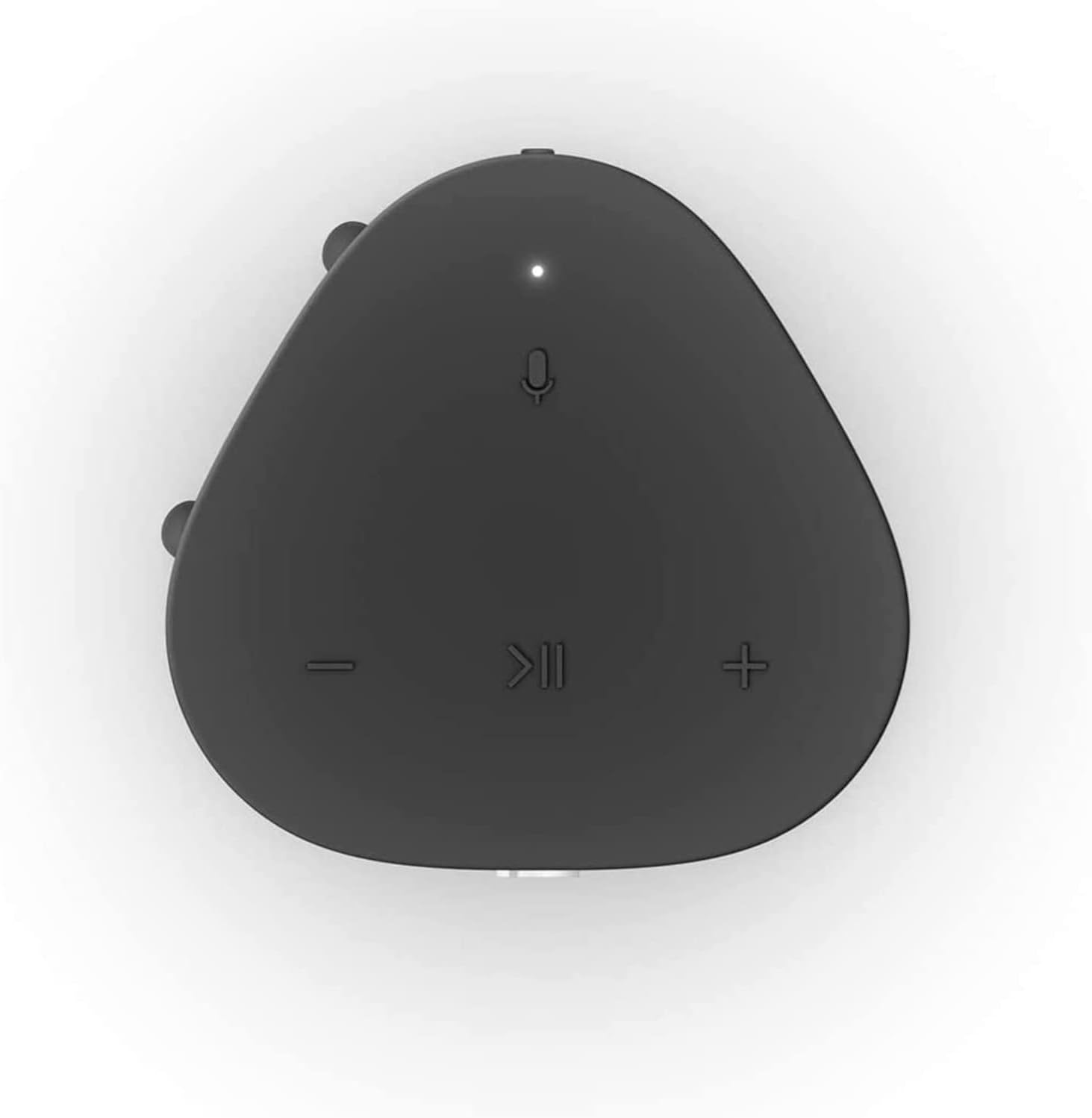
Figure 4: Top panel controls of the Sonos Roam.
- Erreproduzitu/Pausatu: Sakatu behin audioa erreproduzitzeko edo eteteko.
- Bolumena igo (+): Sakatu bolumena handitzeko.
- Bolumena jaitsi (-): Sakatu bolumena jaisteko.
- Mikrofonoa: Press to toggle the microphone on/off for voice control.
- Power Button (Rear): Press and hold for 5 seconds to power on/off. A short press puts it into sleep mode.
3.2 Switching Between Wi-Fi and Bluetooth
The Sonos Roam automatically connects to your Wi-Fi network when in range. To switch to Bluetooth mode, ensure the speaker is powered on and press and hold the power button until the status light flashes blue. To switch back to Wi-Fi, simply bring the speaker back into range of your configured Wi-Fi network.

Figure 5: The Sonos Roam offers seamless connectivity.
3.3 Automatic Trueplay™
The Sonos Roam features Automatic Trueplay, which uses the speaker's microphone to detect the environment and automatically adjust the sound for optimal audio performance. This feature works in both Wi-Fi and Bluetooth modes.
3.4 Hizlarien kokapena
The Sonos Roam can be placed either vertically or horizontally. Placing it vertically saves surface space, while laying it horizontally provides added stability. The speaker's sound adapts to its orientation for the best listening experience.
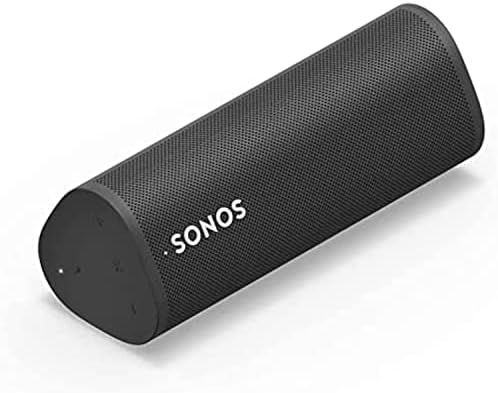
Figure 6: Sonos Roam in horizontal orientation.
4. Mantentzea
4.1 Garbiketa
To clean your Sonos Roam, use a soft, dry cloth. Avoid using harsh chemicals or abrasive materials, as these may damage the speaker's finish or internal components. Ensure the charging port is free of debris.
4.2 Urarekiko eta hautsarekiko erresistentzia
The Sonos Roam is rated IP67, meaning it is dustproof and can withstand immersion in up to one meter of water for up to 30 minutes. While designed for rugged use, it is recommended to dry the speaker thoroughly after exposure to water to prevent long-term damage to the charging port or internal electronics.

Figure 7: The Sonos Roam is built for rugged durability.
4.3 Bateria zaintzea
To maximize battery lifespan, avoid fully discharging the speaker frequently. For long-term storage, charge the battery to about 50% before storing it in a cool, dry place.
5. Arazoak
5.1 Ohiko arazoak eta irtenbideak
- Potentziarik gabe: Ziurtatu bozgorailua kargatuta dagoela. Konektatu energia-iturri batera USB-C kablea erabiliz.
- Ezin da Wi-Fira konektatu:
- Verify your Wi-Fi network is active and the password is correct.
- Restart your router and the Sonos Roam.
- Ziurtatu bozgorailua zure Wi-Fi bideratzailearen irismenean dagoela.
- Check the Sonos app for network diagnostics.
- Bluetooth parekatzearen arazoak:
- Ensure the Sonos Roam is in Bluetooth pairing mode (flashing blue light).
- Forget "Sonos Roam" from your device's Bluetooth settings and try pairing again.
- Move closer to the speaker and ensure no other devices are interfering.
- Ez dago soinurik edo bolumen baxurik:
- Egiaztatu bozgorailuaren eta konektatutako gailuaren bolumen-mailak.
- Ensure the correct input source is selected in the Sonos app.
- If using Wi-Fi, check the Sonos app for any playback errors.
5.2 Fabrika berrezarri
Arazoak irauten badute, fabrika berrezartzeak konpondu ditzake. Abisua: A factory reset will erase all settings and data from your speaker. You will need to set it up again as a new device.
- Unplug the Sonos Roam from its power source.
- Press and hold the Play/Pause button while simultaneously plugging the power cable back in.
- Continue holding the Play/Pause button until the status light flashes orange and white.
- Release the button. The light will flash green when the reset is complete and the speaker is ready for setup.
6. Zehaztapenak

Figure 8: Sonos Roam dimensions.
| Ezaugarri | Xehetasuna |
|---|---|
| Marka | Sonos |
| Ereduaren izena | Sonos Roam - Black (ROAM1US1BLK) |
| Kolorea | Beltza |
| Produktuaren neurriak | 2.44" L x 2.32" W x 6.61" H |
| Elementuaren pisua | 7.1 ontza (200 gramo) |
| Materiala | Polikarbonatoa (PC) |
| Konektibitate Teknologia | Bluetooth, USB, Wi-Fi, Airplay, NFC |
| Bateriaren iraupena | Gehienez 10 ordu |
| Kargatzeko Denbora | Gutxi gorabehera. 10 ordu |
| Iragazgaitzaren balorazioa | IP67 |
| Kontrol-metodoa | App, Voice, Buttons |
| Dakarten osagaiak | Sonos Roam - Black, USB C Cable |
| UPC | 840136801467 |
7. Bermea eta Laguntza
7.1 Berme mugatua
The Sonos Roam comes with a Limited Warranty. For specific terms and conditions, please refer to the warranty information provided in the product packaging or visit the official Sonos webgunea.
7.2 Bezeroarentzako laguntza
For further assistance, technical support, or to register your product, please visit the Sonos support webwebgunera edo jarri harremanetan bezeroarentzako arreta-zerbitzura. Gorde erosketa-agiria eta produktuaren serie-zenbakia eskura berme-erreklamazioetarako.
Official Sonos Webgunea: www.sonos.com
Erlazionatutako dokumentuak - ROAM1US1BLK
 |
Sonos User Guide: Your Complete Guide to the Sonos Home Sound System Explore the Sonos ecosystem with this comprehensive user guide. Learn how to set up, control, and get the most out of your Sonos wireless home sound system, including speakers, soundbars, and ampigogailuak. |
 |
Sonos Produktuen Gidak: Konfigurazioa, Ezaugarriak eta Zehaztapenak Arakatu Sonos bozgorailu eta soinu-barraren gida osoak, besteak beste, konfigurazio-argibideak, funtzioen xehetasunak, kontrolak, zehaztapenak eta segurtasun-informazioa Sonos One, Beam, Arc, Roam eta beste produktu batzuentzat. |
 |
Sonos Erabiltzailearen Gida: Etxeko Audio Sistemaren Eskuliburu Osoa Explore the full capabilities of your Sonos wireless home sound system with this comprehensive user guide. Learn about setup, product features, app control, and troubleshooting for all Sonos speakers, soundbars, and accessories. |
 |
Sonos erabiltzailearen gida: konfigurazioa, funtzioak eta produktuaren informazioa Erabiltzailearen gida oso honek Sonos haririk gabeko etxeko soinu-sistemaren produktuen gama osoa konfiguratzeko, erabiltzeko eta aztertzeko informazio zehatza eskaintzen du, bozgorailuak, soinu-barrak barne. ampbizigarriak eta osagarriak. Produktuaren ezaugarriak, kontrolak, zehaztapenak eta segurtasunari buruzko informazioa biltzen ditu. |
 |
Hunter ROAM haririk gabeko urrutiko agintea ureztatze sistemetarako Ikasi Hunter ROAM haririk gabeko urrutiko aginteari buruz, bere abantaila nagusiei, funtzionamendu-zehaztapenei eta ureztatze-sistema eroso kudeatzeko eskuragarri dauden modeloei buruz. |
 |
Sonos Home Sound System erabiltzailearen gida: konfigurazioa, ezaugarriak eta zehaztapenak Arakatu Sonos Home Sound System erabiltzaile-gida oso honekin. Ikasi Sonos bozgorailuen eta osagaien konfigurazioari, produktuaren ezaugarriei, kontrolari eta zehaztapenei buruz. |
Ask a question about this manual
Ask about setup, troubleshooting, compatibility, parts, safety, or missing instructions. Manuals+ will review the question and use this page’s manual context to help answer it.