
SilverStone ST1000-PTS
SilverStone ST1000-PTS 1000W 80 PLUS Platinum Fully Modular Power Supply User Manual
Model: ST1000-PTS
1. Segurtasun informazioa
Please read these safety instructions carefully before installing or operating your SilverStone ST1000-PTS power supply unit (PSU). Failure to follow these instructions may result in electric shock, fire, or damage to the product and connected components.
- Hazardous Area: This device is not designed to be user serviceable and contains high voltage inside that can be dangerous when opened. In the event of malfunction, please notify your dealer or local distributor for service.
- Potentzia deskonexioa: Always disconnect the AC power cord from the wall outlet before installing, removing, or cleaning the PSU or any other computer components.
- Lurreratze egokia: Ensure the PSU is properly grounded to prevent electrical hazards.
- Aireztapena: Do not block any ventilation openings of the PSU. Ensure adequate airflow around the unit to prevent overheating.
- Hezetasuna: Do not expose the PSU to water or moisture. Operate in a dry environment.
- liburukiatage: Ziurtatu sarrera voltage matches the specifications of your region (100-240V).
2. Produktua amaitu daview
The SilverStone ST1000-PTS is a 1000W 80 PLUS Platinum certified fully modular power supply designed for high-performance personal computers. Its compact 140mm depth allows for easy integration into various chassis sizes.
Ezaugarri nagusiak:
- 80 PLUS Platinozko Eraginkortasuna: Reduces heat waste and saves electricity.
- Fully Modular Cabling: Allows for easy cable management and removal, improving airflow within the PC case.
- Diseinu trinkoa: 140mm depth for versatile installation.
- Funtzionamendu isila: Integrated 120mm fan provides excellent airflow with low noise.
- Energia-horniketa egonkorra: Features ±3% regulation and low ripple noise.
- Single +12V Rail: Powerful single +12V rail for high-end components and overclocking.
- Flat 24-pin Cable: Offers increased flexibility for cable routing.
- Included Fan Filter: FF122 fan filter with integrated magnets for dust reduction and easy installation/removal.

2.1. irudia: Aurrealdea eta albokoa view of the SilverStone ST1000-PTS power supply, showing the 120mm fan and modular cable connectors.

2.2. irudia: Goiena view of the SilverStone ST1000-PTS power supply, highlighting the fan grille and product branding.
3. Paketearen edukia
Egiaztatu elementu guztiak zure paketean daudela:
- SilverStone ST1000-PTS Power Supply Unit
- Modular Cable Set (including 24-pin ATX, EPS, PCIe, SATA, Peripheral cables)
- AC korronte kablea
- Muntatzeko Torlojuak
- FF122 Fan Filter
- Cable Ties / Velcro Straps
- Erabiltzailearen eskuliburua / Bermearen informazioa

3.1. irudia: All components included with the SilverStone ST1000-PTS power supply, showing the PSU, modular cables, and accessories.
4. Konfigurazioa eta instalazioa
Follow these steps to properly install your SilverStone ST1000-PTS power supply:
- Prestaketa:
- Ziurtatu ordenagailua guztiz itzalita eta hormako entxufetik deskonektatuta dagoela.
- Open your computer case to access the PSU mounting area.
- Mounting the PSU:
- Carefully place the ST1000-PTS into the designated PSU bay in your computer case.
- Align the screw holes on the PSU with those on the case.
- Secure the PSU using the provided mounting screws.

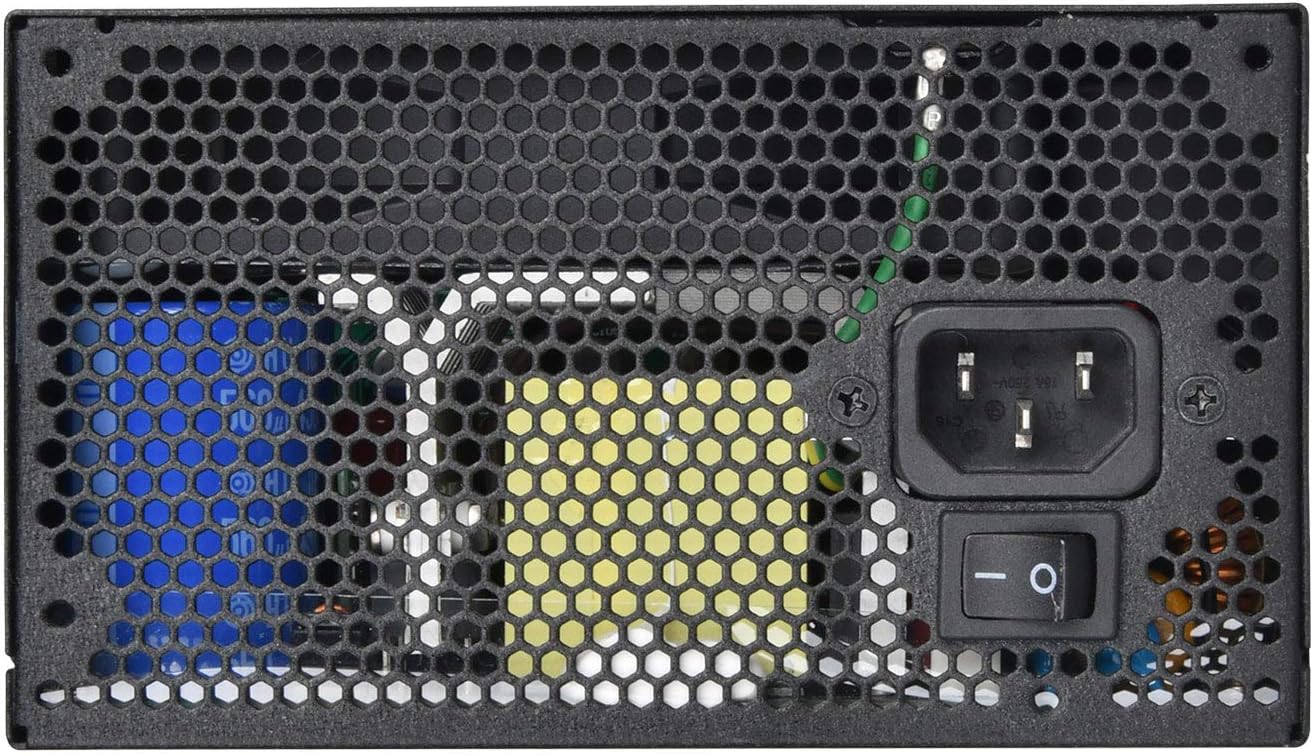
4.1. irudia: Atzekoa view of the SilverStone ST1000-PTS, showing the AC power inlet, power switch, and exhaust grille for proper mounting orientation.
- Connecting Modular Cables:
- Identify the necessary cables for your components (motherboard 24-pin, CPU EPS, PCIe for graphics cards, SATA for drives, Peripheral for fans/accessories).
- Connect the required modular cables to the corresponding ports on the PSU. Ensure a firm connection.
- Route the cables neatly through your case for optimal airflow and aesthetics.

4.2. irudia: Gertutik view of the modular cable connection ports on the SilverStone ST1000-PTS power supply, indicating different types of connectors.
- Connecting to Components:
- Connect the other end of the modular cables to your motherboard, graphics card(s), storage drives, and other peripherals.
- Double-check all connections to ensure they are secure and correctly seated.
- Kableen kudeaketa:
- Use the included cable ties or Velcro straps to organize cables, improving airflow and reducing clutter.
- Azken urratsak:
- Itxi ordenagailuaren zorroa.
- Connect the AC power cord to the PSU's inlet and then to a wall outlet.
- Ensure the power switch on the back of the PSU is in the 'OFF' (O) position before plugging into the wall, then switch to 'ON' (I) before powering on your computer.
5. Funtzionamendu-argibideak
Once the SilverStone ST1000-PTS is correctly installed and all connections are secure:
- Piztu: Flip the power switch on the back of the PSU to the 'ON' (I) position.
- Sistema martxan jartzea: Press the power button on your computer case to start your system.
- Funtzionamendu normala: The PSU will provide stable power to your components. The integrated 120mm fan will operate to maintain optimal temperatures.
- Itzali: To shut down your system, perform a normal shutdown through your operating system. For complete power disconnection, flip the PSU switch to 'OFF' (O) and unplug the AC cord.
6. Mantentzea
Regular maintenance helps ensure the longevity and optimal performance of your ST1000-PTS PSU.
- Hautsa garbitzea: Periodically clean dust from the PSU's fan and vents. Always disconnect the AC power cord before cleaning. Use compressed air to gently blow dust out of the unit.
- Fan Filter: The included FF122 fan filter can be easily removed due to its integrated magnets for cleaning. Clean the filter regularly to prevent dust buildup and maintain airflow.
- Kableen ikuskapena: Occasionally inspect all modular cable connections to ensure they remain secure and free from damage.
- Ingurumena: Operate the PSU in a clean, dry, and well-ventilated environment to prevent dust accumulation and overheating.
7. Arazoak
If you encounter issues with your SilverStone ST1000-PTS PSU, refer to the following common problems and solutions:
| Arazoa | Kausa posiblea | Irtenbidea |
|---|---|---|
| Sistema ez da pizten. | AC power cord not connected or loose. PSU power switch is OFF. Korronte hartune akastuna. Loose internal cable connections. | Ensure AC power cord is securely plugged into PSU and wall outlet. Flip PSU power switch to 'ON' (I). Probatu entxufea beste gailu batekin. Egiaztatu kable modular guztien konexioak (24 pinekoa, EPS, PCIe). |
| Sistema piztu egiten da baina berehala itzaltzen da. | Gainkarga edo zirkuitulaburra. Gehiegi berotzea. Osagai akastuna. | Deskonektatu funtsezkoak ez diren osagaiak gainkarga egiaztatzeko. Ensure proper ventilation and clean dust from PSU and case. Arazoak jarraitzen badu, kontsultatu teknikari kualifikatu bati. |
| Fan is noisy or not spinning. | Hauts metaketa. Fan oztopoa. Haizagailuaren funtzionamendu okerra. | Clean dust from the fan and fan filter. Ensure no cables or objects are obstructing the fan. If fan still does not spin or is excessively noisy, contact support. |
| Unstable system operation. | Loose power connections. Insufficient power for components. PSU malfunction. | Egiaztatu konexio elektriko guztiak ondo daudela. Ensure your system's power requirements do not exceed 1000W. If issues persist, contact SilverStone support. |
If the problem cannot be resolved using the above steps, please contact SilverStone customer support or your dealer for assistance. Do not attempt to open or repair the PSU yourself.
8. Zehaztapenak
Detailed technical specifications for the SilverStone ST1000-PTS power supply:
8.1. irudia: Product label of the SilverStone ST1000-PTS, displaying detailed electrical specifications and certifications.
| Ezaugarri | Zehaztapena |
|---|---|
| Modelo zenbakia | PS-ST1000-PTS-X |
| Max. DC Output | 1000W |
| Eraginkortasuna | 80 PLUS Platinoa |
| Forma-faktorea | ATX |
| Modularra | Erabat modularra |
| Hozte Sistema | 120mm haizagailua |
| Funtzionamendu-tenperatura | 0 ℃ eta 40 ℃ artean |
| Neurriak (L x W x H) | 140 mm x 150 mm x 86 mm (5.51" x 5.91" x 3.39") |
| Pisua | 3.84 kg (8.47 lb) |
| Sarrera boltage | 100-240V |
| Sarrerako maiztasuna | 50 Hz - 60 Hz |
| PFC | PFC aktiboa |
| MTBF | 100,000 ordu |
DC Output Table:
| Trenbidea | +3.3V | Max. Oraingoa | Gehienez Potentzia konbinatua |
|---|---|---|---|
| +3.3V | 25A | 22A | 120W |
| +5V | 22A | 22A | 120W |
| +12V | 83A | 996W | 996W |
| -12V | 0.3A | 3.6W | 3.6W |
| +5Vsb | 3A | 15W | 15W |
9. Bermea eta Laguntza
SilverStone Technology provides a limited warranty for the ST1000-PTS power supply. Please refer to the warranty information included in your package for specific terms and conditions, including warranty period and coverage details.
Bezeroarentzako laguntza:
For technical support, troubleshooting assistance, or warranty claims, please contact SilverStone Technology customer service through their official webgunea edo bermearen dokumentazioan emandako harremanetarako informazioa.
Fabrikatzailea: SilverStone Teknologia
Modelo zenbakia: PS-ST1000-PTS-X
UPC/GTIN: 844761022747
Ask a question about this manual
Ask about setup, troubleshooting, compatibility, parts, safety, or missing instructions. Manuals+ will review the question and use this page’s manual context to help answer it.