
Sarrera
This instruction manual provides essential information for the proper setup, operation, and maintenance of your Terratec Aureon 5.1 USB Sound Card. Please read this manual thoroughly before using the device to ensure optimal performance and longevity.
Paketearen edukia
Egiaztatu elementu guztiak paketean daudela:
- TERRATEC Aureon 5.1 USB sound card
- Azkar hasteko argibideak
- Berme txartela
Produktua amaituview
The Terratec Aureon 5.1 USB Sound Card is an external audio device designed to enhance your computer's sound capabilities. It features a Signal-to-Noise Ratio (SNR) of 80 dB and a frequency range of 15 Hz to 25 kHz, ensuring clear audio output. The device includes two stereo outputs, allowing for simultaneous connection of two audio devices, and an integrated volume control for convenient adjustment. Its 10 cm USB 2.0 cable provides broad compatibility with various systems.

1. irudia: Aurrealdea view of the Terratec Aureon 5.1 USB Sound Card, showing the central volume knob, microphone and headphone input/output ports, and the USB cable.
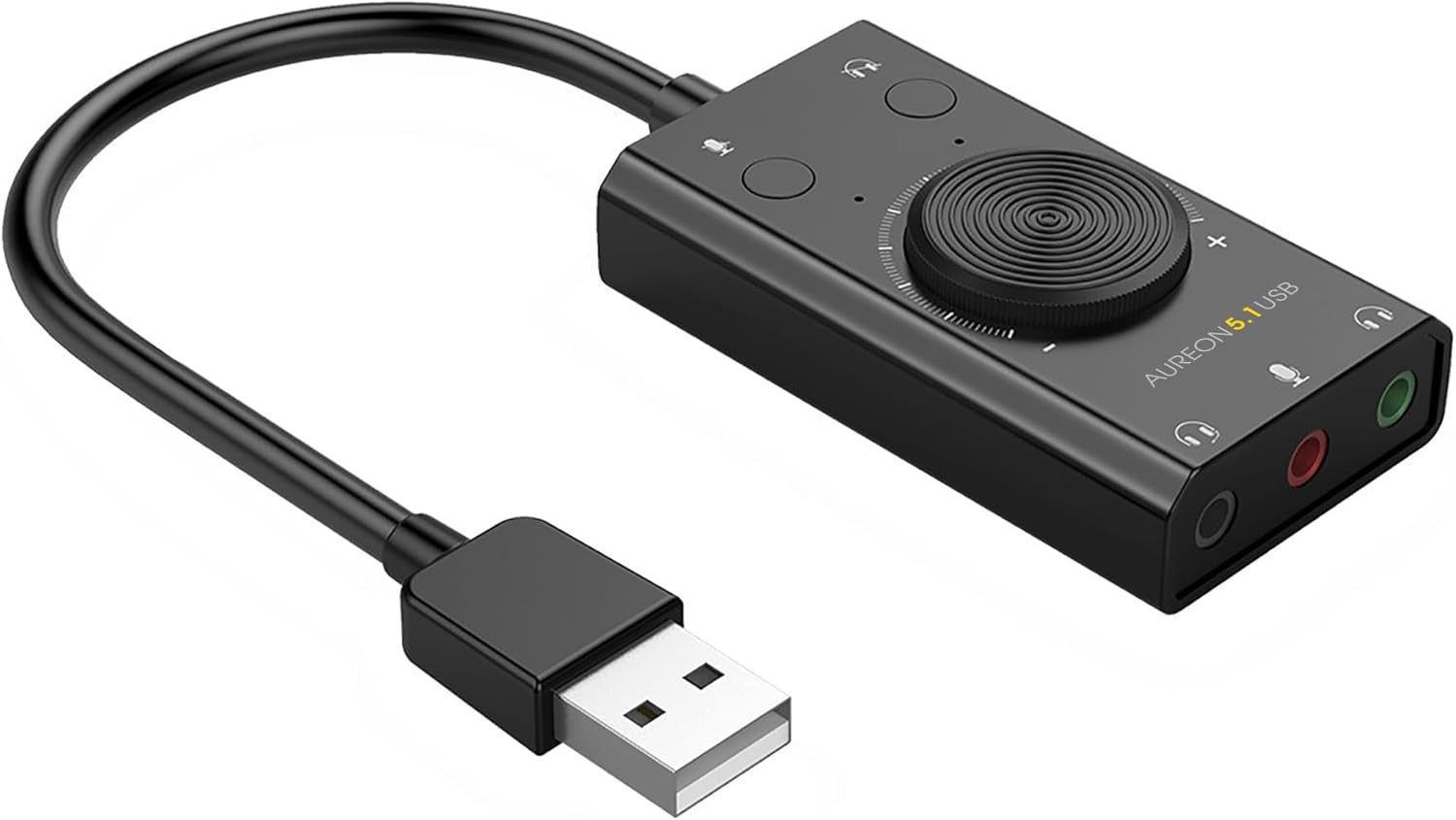
2. irudia: Angelukoa view of the Terratec Aureon 5.1 USB Sound Card, highlighting the various audio ports and the USB connector.
Konfigurazioa
- Konektatu ordenagailura: Plug the USB connector of the Aureon 5.1 USB Sound Card into an available USB port on your computer. The device is designed for plug-and-play operation and typically does not require additional driver installation on most modern operating systems (e.g., Windows 10/11).
- Konektatu audio gailuak:
- Connect your headphones or speakers to one of the two stereo output jacks (usually green).
- If using a microphone, connect it to the microphone input jack (usually pink).
- Configure Audio Settings (if necessary):
- On your computer, navigate to your operating system's sound settings.
- Select the Terratec Aureon 5.1 USB Sound Card as your default playback and recording device.
Funtzionamendu-argibideak
- Bolumen kontrola: Use the large rotary knob on the sound card to adjust the output volume. Turn clockwise to increase volume and counter-clockwise to decrease it.
- Mute Functions: The sound card features dedicated buttons for muting the microphone input and the audio output. Press the respective button to toggle the mute function.
- Dual Stereo Outputs: The two stereo output jacks allow you to connect two sets of headphones or speakers simultaneously. Audio will be routed to both outputs.
- 5.1 Channel Processing: While the device provides 5.1 channel audio processing, its physical outputs are two stereo jacks. For true 5.1 surround sound experience, ensure your software and connected audio system (e.g., a 5.1 speaker system with an appropriate amplifier) are configured to utilize the 5.1 channel output from your computer's audio settings, if supported by your operating system's interpretation of the device.
Mantentzea
- Garbiketa: Use a soft, dry cloth to clean the exterior of the sound card. Avoid using liquid cleaners or solvents, as they may damage the device.
- Biltegiratzea: When not in use, store the sound card in a cool, dry place away from direct sunlight and extreme temperatures.
- Kableen zainketa: Barne-kalteak saihesteko, saihestu USB kablea gehiegi tolestea edo bihurritzea.
Arazoak konpontzea
- Soinu-irteerarik ez:
- Ensure the sound card is securely connected to a USB port.
- Check the volume knob on the sound card and your computer's system volume.
- Verify that the output mute button on the sound card is not active.
- Confirm that the Terratec Aureon 5.1 USB Sound Card is selected as the default playback device in your operating system's sound settings.
- Test with different headphones or speakers.
- Mikrofonoa ez dabil:
- Ensure the microphone is correctly plugged into the microphone input jack.
- Check the microphone mute button on the sound card.
- Verify that the Terratec Aureon 5.1 USB Sound Card is selected as the default recording device in your operating system's sound settings.
- Adjust microphone input levels in your computer's sound settings.
- Soinu distortsionatua edo kalitate baxukoa:
- Ziurtatu kable guztiak ondo konektatuta daudela.
- Try connecting the sound card to a different USB port.
- Reduce the volume level on both the sound card and your computer to avoid clipping.
- Egiaztatu beste gailu elektroniko batzuek interferentziarik izan dezaketen.
Zehaztapenak
| Produktuaren neurriak | 0.39 x 0.39 x 0.39 hazbete |
| Elementuaren pisua | 0.847 ontza |
| Fabrikatzailea | Terratec |
| Elementuaren eredu-zenbakia | TERRA-324195 |
| Gailu bateragarriak | Tablet (and other devices with USB audio support) |
| Hardware interfazea | USBa |
| Audio irteera modua | Stereo (with 5.1 channel processing) |
| Eskuragarri dagoen lehen data | 29ko maiatzaren 2024a |
Bermea eta Laguntza
This product comes with a limited manufacturer's warranty. Please refer to the included warranty card for specific terms and conditions, including the warranty period and coverage details. For technical support, troubleshooting assistance beyond this manual, or warranty claims, please contact Terratec customer service through their official webgunea edo berme-txartelean emandako harremanetarako informazioa.