
Sarrera
This manual provides detailed instructions for the assembly, operation, and maintenance of your KEDIERS ATX Mid Tower PC Case. This case features a tempered glass side panel, an open frame design, and seven pre-installed Addressable RGB (ARGB) fans to enhance your computing experience. Please read this manual thoroughly before beginning installation to ensure proper setup and safe operation.

Aurrealde bat. view of the KEDIERS ATX Mid Tower PC Case, showcasing the tempered glass side panel and the three front-mounted ARGB fans.
Setup and Component Installation
Follow these steps to install your computer components into the KEDIERS ATX Mid Tower PC Case.
1. Desontziratzea eta prestatzea
- Kontu handiz atera ordenagailuaren kaxa bere paketetik.
- Jarri zorroa gainazal egonkor eta lau batean.
- Remove the tempered glass side panel by unscrewing the thumb screws. Set it aside on a soft, non-abrasive surface to prevent scratches.
2. Plaka amaren instalazioa
- The KEDIERS ATX Mid Tower PC Case supports ATX, Micro ATX, and Mini ITX motherboards.
- Instalatu E/S babeskia (hala badagokio) kaxaren atzeko irekiduran.
- Align your motherboard with the standoffs inside the case. Ensure all standoffs match the motherboard's mounting holes.
- Lotu plaka nagusia emandako torlojuekin.

An illustration of the internal layout of the KEDIERS PC case, indicating maximum clearances for a CPU cooler (160mm), PSU (200mm), GPU (300mm), and compatibility with ATX, Micro ATX, and Mini ITX motherboards.
3. Elikatze-iturriaren (PSU) instalazioa
- Mount the PSU in the designated compartment at the bottom rear of the case.
- Lotu PSUa kaxaren atzealdeko torlojuekin.
4. Biltegiratze unitatearen instalazioa
- Install 3.5-inch hard drives (HDDs) or 2.5-inch solid-state drives (SSDs) into the available drive bays.
- Secure drives with the appropriate screws.
5. Grafiko Txartelaren (GPU) eta Hedapen Txartelaren Instalazioa
- Remove the necessary PCI slot covers from the rear of the case.
- Insert your graphics card or other expansion cards into the motherboard's PCI-E slots.
- Secure the cards with screws. The case provides 7 expansion slots.
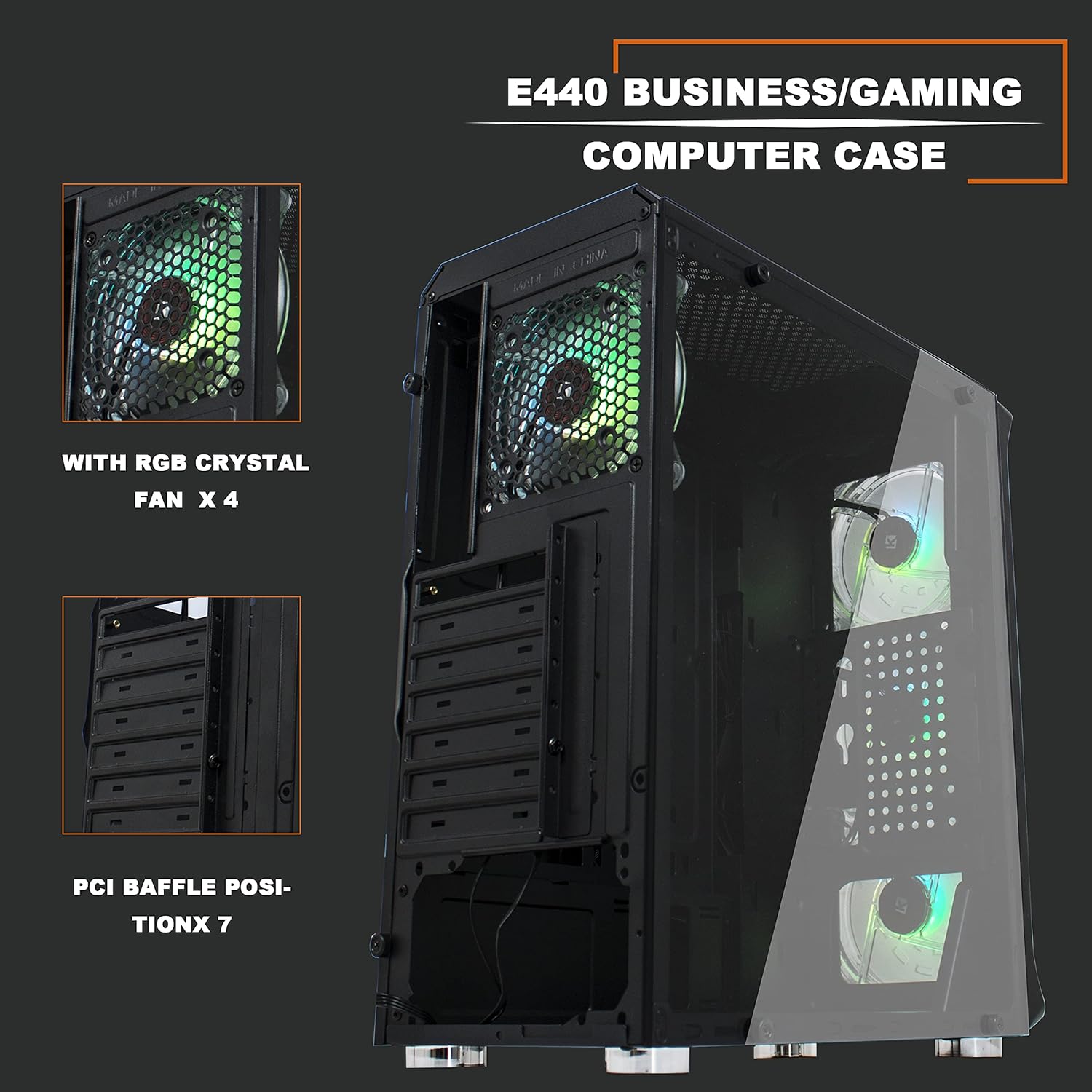
Barne bat view of the KEDIERS PC case, highlighting the seven PCI expansion slots and the pre-installed rear ARGB fan.
6. Aurreko paneleko sarrera/irteera konektatzea
- Connect the front panel cables (USB 3.0, USB 2.0, HD Audio, Power Switch, Reset Switch, Power LED, HDD LED) to the corresponding headers on your motherboard. Refer to your motherboard manual for exact header locations.
- Connect the ARGB fan controller to the power supply via SATA power and to the motherboard's 5V 3-pin D-RGB header for software control, if desired.

A close-up of the top-front control panel, featuring the power switch, RGB switch, USB 2.0 port, USB 3.0 port, and audio jack.
Funtzionamendu-argibideak
1. Powering On Your System
- Ensure all internal components are securely installed and all cables are connected.
- Connect your monitor, keyboard, mouse, and power cable to the rear of your PC.
- Flip the power switch on your PSU to the 'ON' position.
- Press the power button on the top-front panel of the case to start your computer.
2. ARGB haizagailuaren kontrola
The KEDIERS PC Case includes seven pre-installed ARGB fans. These can be controlled via the included remote or synchronized with your motherboard's ARGB software.
- Urruneko kontrola: Use the provided remote to cycle through various lighting modes, adjust brightness, change colors, and control fan speed. Refer to the remote control diagram for specific button functions.
- Plaka basearen sinkronizazioa: If your motherboard has a 5V 3-pin D-RGB header, connect the ARGB controller cable to it. This allows you to control the fan lighting effects through your motherboard's RGB software (e.g., ASUS Aura Sync, MSI Mystic Light Sync, Gigabyte RGB Fusion). Note that 12V 4-pin RGB headers are not compatible with this system.
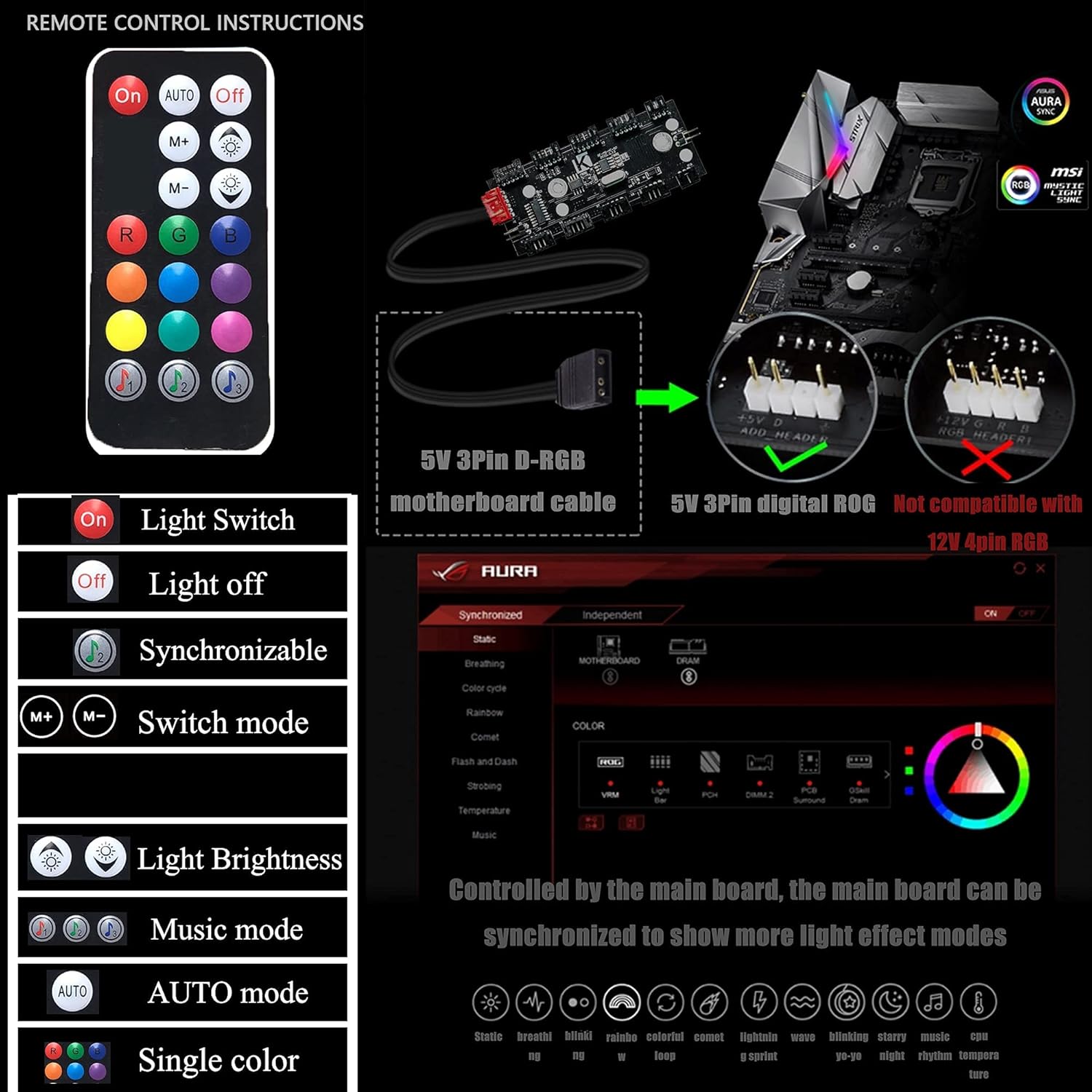
An image detailing the functions of the ARGB fan remote control and illustrating the 5V 3-pin D-RGB motherboard cable connection for synchronization, noting incompatibility with 12V 4-pin RGB headers.
Mantentzea
Mantentze-lan erregularrak zure ordenagailuaren osagaien errendimendu optimoa eta iraupena bermatzen laguntzen du.
1. Hauts-iragazkiak garbitzea
- The case features a detachable dust filter on the top panel. Regularly remove and clean this filter to prevent dust buildup and maintain optimal airflow.
- Gently brush or rinse the filter with water. Ensure it is completely dry before reattaching.

The top panel of the KEDIERS PC case, showing the ventilation grille and the removable magnetic dust filter designed for easy cleaning and improved airflow.
2. Kanpoko eta Barneko Garbiketa
- Erabili biguna, damp cloth to wipe down the exterior surfaces of the case, including the tempered glass panel. Avoid abrasive cleaners.
- For interior cleaning, use compressed air to remove dust from fans, heatsinks, and other components. Ensure the system is powered off and unplugged before cleaning the interior.
Arazoak konpontzea
If you encounter issues with your KEDIERS PC Case, refer to the following common troubleshooting steps:
- Sistemak ez du pizten:
- Check if the PSU is switched on and properly connected to the wall outlet.
- Verify that the power switch cable from the front panel is correctly connected to the motherboard header.
- Ensure all power cables to the motherboard and components are securely seated.
- ARGB Fans Not Lighting Up/Spinning:
- Confirm the ARGB controller is receiving power from the PSU (SATA power connector).
- If using motherboard synchronization, ensure the 5V 3-pin D-RGB cable is correctly connected to the motherboard.
- Check if the fans are properly connected to the ARGB controller.
- Test the remote control by ensuring its battery is functional.
- Aurreko paneleko USB/Audioa ez dabil:
- Verify that the USB 3.0, USB 2.0, and HD Audio cables from the front panel are correctly connected to their respective motherboard headers.
- Ensure your motherboard drivers are up to date.
Zehaztapenak
| Ezaugarri | Zehaztapena |
|---|---|
| Kasu mota | Mid dorrea |
| Neurriak (L x W x H) | 15.35 x 7.48 x 16.93 hazbete (390 x 190 x 430 mm) |
| Elementuaren pisua | 10.98 libra (4.98 kg) |
| Materiala | Beira tenplatua, altzairua, plastikoa |
| Plaka amaren bateragarritasuna | ATX, Mikro ATX, Mini ITX |
| Zabaltzeko Slots | 7 |
| Aurrez instalatutako zaleak | 7 x 120 mm ARGB zale |
| Aurreko I / O Portuak | 2 x USB 3.0, 1 x USB 2.0, HD Audio (Mic/Headphone), Power Button, RGB Control Button |
| CPU hozgailuaren gehienezko altuera | 160 mm |
| GPUaren gehienezko luzera | 300 mm |
| PSUaren gehienezko luzera | 200 mm |
| Hozteko metodoa | Airea |
| Disko gogorraren forma-faktorea | 3.5 Inches (HDD) / 2.5 Inches (SSD) |
Bermea eta Laguntza
For warranty information or technical support, please contact KEDIERS customer service through their official webproduktua erosi zenuen gunera edo dendara. Gorde erosketaren frogagiria bermearen erreklamazioetarako.