
Brilnurse KRES100B
Brilnurse Dual Channel TENS EMS Massage Unit User Manual
Model: KRES100B
Brand: Brilnurse
Produktua amaituview
The Brilnurse Dual Channel TENS EMS Massage Unit is a versatile device designed for symptomatic relief of chronic intractable pain, temporary relief of pain associated with sore and aching muscles, relaxation of muscle spasms, increased blood flow circulation, and muscle performance improvement. It combines TENS (Transcutaneous Electrical Nerve Stimulation), EMS (Electrical Muscle Stimulation), and Massage functions into one compact unit.

Image: The Brilnurse TENS EMS Massage Unit, showing the main device, various electrode pads, and a storage pouch.
Ezaugarri nagusiak
- 28 Modes (TENS+EMS+MASSAGE): Offers a wide range of pre-programmed massage modes for comprehensive pain and muscle relief.
- 40 Level Intensity: Provides 40 adjustable intensity levels to suit individual needs and comfort.
- 10-90 Minutes Time Control: Allows setting treatment duration from 10 to 90 minutes, with a default of 5 minutes.
- A/B Dual Channels: Enables setting separate intensities for channels A and B simultaneously, allowing for shared use or treatment of multiple areas.
- Powerful Dual Battery Sources: Features a built-in rechargeable lithium battery and supports 3 AAA batteries (not included) for extended use up to 30+ hours.
- Upgraded TENS Unit Pads: Includes 12 reusable electrode pads (8 palm, 2 rectangular, 2 oval) with excellent self-stick and conductivity, designed for up to 45 uses.
- Memoria Funtzioa: The device remembers your last settings for convenience.
- Portable and Convenient Design: Lightweight, small, and durable, ideal for use during sports, housework, or travel. Comes with a dust-proof drawstring storage bag.

Image: Visual representation of the unit's key features, including mode variety, intensity levels, and power options.
Konfigurazio Gida
Kutxan dagoena
Kutxa irekitzean, ziurtatu osagai guztiak daudela:
- 1 x Brilnurse TENS Machine
- 12 x Electrode Pads (8 Palm, 2 Rectangular, 2 Oval)
- 2 x Hari-kableak
- 1 x USB kablea
- 1 x Pad Holder
- 1 x Poltsa
- 1 x Erabiltzailearen eskuliburua
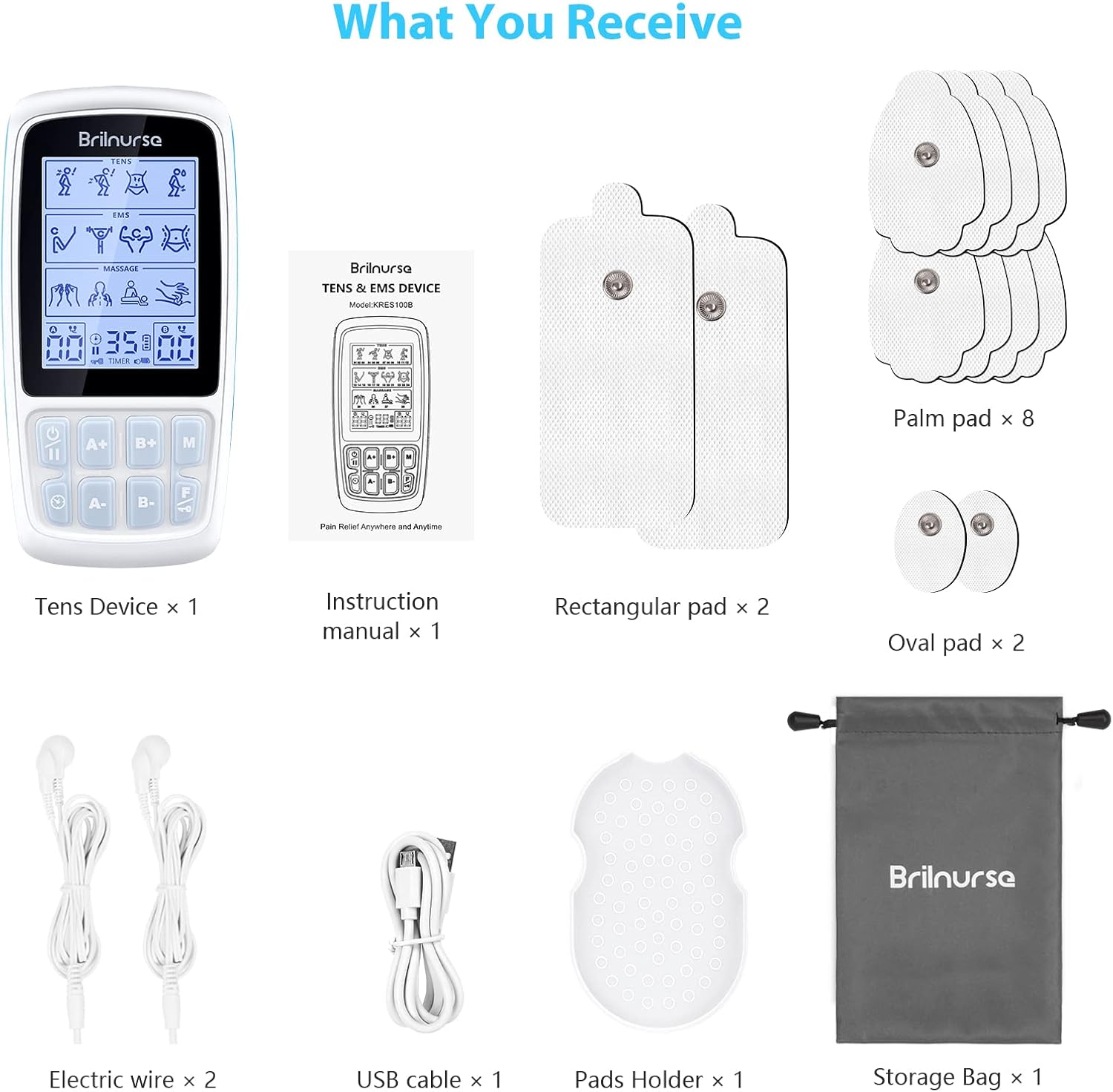
Image: All items included in the Brilnurse TENS EMS Massage Unit package.
Gailua piztea
The Brilnurse TENS EMS Massage Unit offers dual power options:
- Litiozko bateria kargagarria: The device has a built-in rechargeable battery. Use the provided USB cable to charge it via a wall charger, power bank, or laptop USB port.
- AAA bateriak: For continuous use or when a power source is unavailable, insert 3 AAA batteries (not included) into the battery compartment located at the back of the device.

Image: Illustration of the device's power options, including USB charging and AAA battery insertion.
Funtzionamendu-argibideak
Device Controls Overview
Familiarize yourself with the device's buttons and display indicators:
- LCDa: Displays mode, intensity, time, and battery status.
- On/Off Switch (Long press): Gailua piztu edo itzaltzen du.
- Pause/Start (Short press): Pauses or resumes the current session.
- 'F' Button (Function): Selects between TENS, EMS, and Massage functions.
- 'M' botoia (Modua): Cycles through the available modes within the selected function.
- A+/- Buttons: Adjusts intensity for Channel A.
- B+/- Buttons: Adjusts intensity for Channel B.
- Time Adjustment Button: Sets the session duration.
- Screen Lock Indicator: Shows if the screen is locked.

Irudia: Xehetasun handikoa view of the device's user interface and controls.
Applying Electrode Pads
- Connect the electrode pads to the lead wires.
- Aplikatu aurretik, ziurtatu azala garbi eta lehorra dagoela.
- Carefully peel the protective film off the pads.
- Place the pads on the desired massage area. Ensure a pair of pads are stuck well on the body in one channel for proper function.
- Plug the lead wires into the output ports (A or B) on the top of the device.

Irudia: Adibample of electrode pad placement on the back for muscle stimulation.
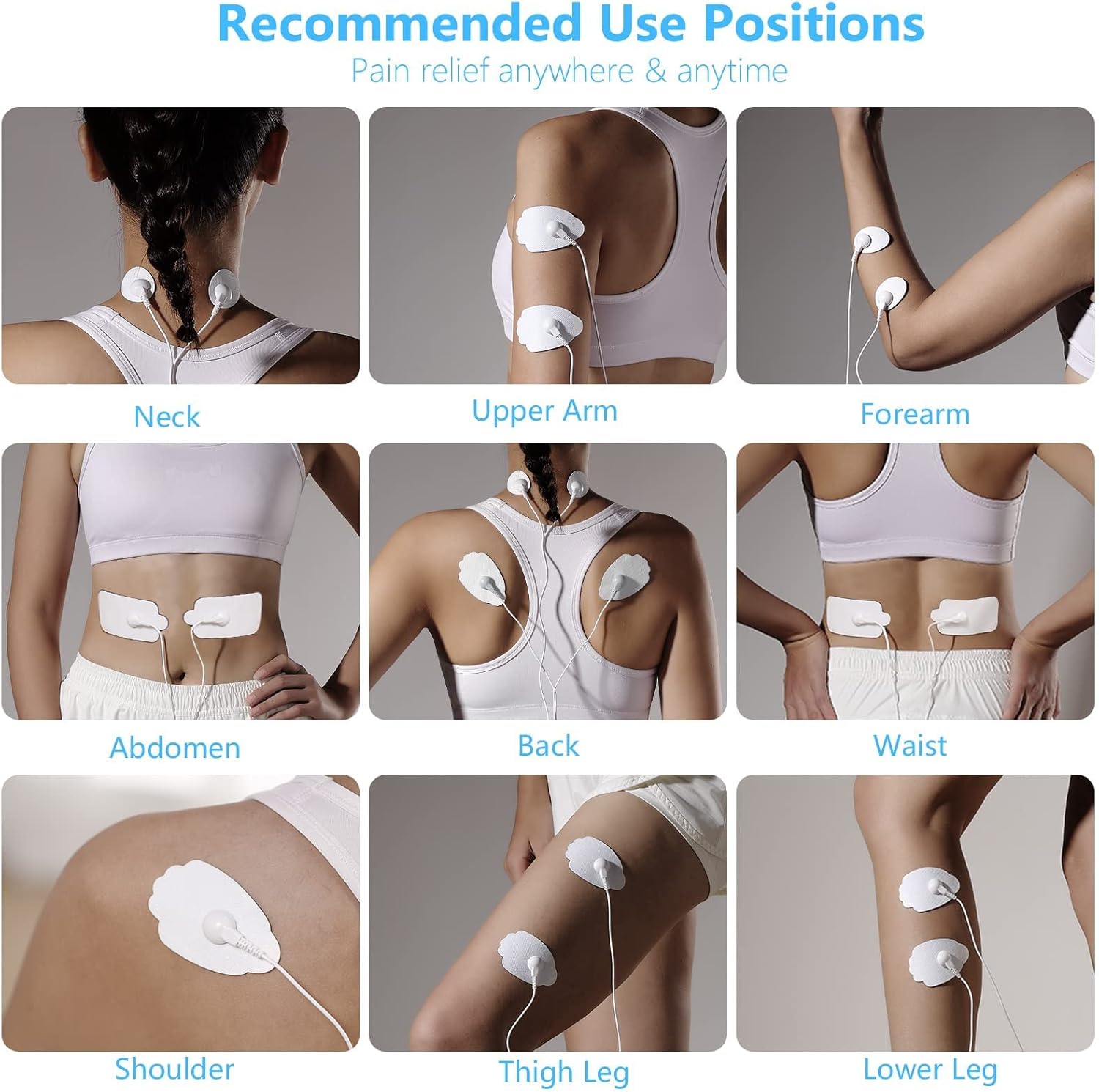
Image: Guide to recommended electrode pad placement for different body areas.
Selecting Modes and Intensity
- Long press the On/Off switch to power on the device.
- Press the 'F' button to select your desired function: TENS (Pain Relief), EMS (Muscle Conditioning), or MASSAGE (Relaxing Body).
- Press the 'M' button to cycle through the specific modes available within the selected function.
- Use the 'A+/-' and 'B+/-' buttons to adjust the intensity for Channel A and Channel B respectively. Start with a low intensity and gradually increase until a comfortable sensation is achieved.
- Press the Time Adjustment button to set the desired session duration (10-90 minutes).
- Long press the screen lock button to lock/unlock the screen, preventing accidental changes during use.
- Short press the Pause/Start button to suspend or resume the session.

Image: Display showing the three main functions: TENS, EMS, and Massage, with their respective mode ranges.
Instructional Video: How to Use
Video: Demonstrates the basic operation of the Brilnurse TENS EMS Massage Unit, including connecting pads and selecting modes.
Instructional Video: Mode and Intensity Guiding
Video: Provides a detailed guide on navigating the 28 modes and adjusting the 40 intensity levels of the Brilnurse TENS EMS Massage Unit.
Mantentzea eta biltegiratzea
Proper maintenance ensures the longevity and effectiveness of your device and electrode pads.
Cleaning and Storing Pads
- After each use, gently lift a corner of the electrode pad and slowly peel it away from your skin. Avoid pulling by the wire.
- To clean the pads, gently wipe the adhesive side with a damp oihal. Ez erabili produktu kimiko gogorrak edo garbitzaile urratzaileak.
- Once clean and dry, reapply the pads to their protective plastic sheets. The included pad holder can assist in keeping them organized.
- Wrap the lead wires around the pad holder or pads to keep them tidy.
- Store the device and all accessories in the provided dust-proof drawstring pouch in a cool, dry place away from direct sunlight.
Instructional Video: How to Store
Video: Demonstrates the proper method for removing, cleaning, and storing electrode pads, as well as organizing the device and accessories in the pouch.
Arazoak konpontzea
If you encounter issues with your Brilnurse TENS EMS Massage Unit, refer to the following common solutions:
- No Sensation or Weak Sensation:
- Ensure the device is powered on and the intensity level is increased sufficiently.
- Check that the electrode pads are firmly attached to the skin and that both pads in a channel are making good contact.
- Verify that the lead wires are securely plugged into both the pads and the device's output ports.
- The pads may have lost their adhesiveness. Clean them or replace with new ones if necessary.
- Check battery level. Recharge the device or replace AAA batteries.
- Pads Not Sticking:
- Clean the skin area thoroughly before applying pads.
- Clean the adhesive side of the pads with a damp oihala eta utzi lehortzen airera.
- If pads are old or heavily used, their adhesive properties may diminish. Replace with new pads.
- Gailua ez da pizten:
- Ensure the device is fully charged or that fresh AAA batteries are inserted correctly.
- Long press the On/Off switch for a few seconds to ensure it registers.
- Inconsistent Pulses:
- Ensure all connections (pads to wires, wires to device) are secure.
- Check pad placement; uneven contact can lead to inconsistent sensation.
Produktuaren zehaztapenak
| Zehaztapena | Balioa |
|---|---|
| Eredua | KRES100B |
| Moduak | 28 (TENS, EMS, Massage) |
| Intentsitate Mailak | 40 |
| Tenporizadorearen ezarpenak | 10-90 minutu |
| Kanalak | Dual (A/B) |
| Energia iturria | Rechargeable Lithium Battery / 3*AAA Battery (not included) |
| Continuous Usage | Gehienez 30 ordu baino gehiago |
| Elektrodoak | 12 pcs (8 Palm, 2 Rectangular, 2 Oval) |
| Paketearen neurriak | 5.91 x 3.86 x 2.36 hazbete |
| Pisua | 10.58 ontza |
| Fabrikatzailea | Brilerizaina |
| ASIN | B093R355YF |
Bermea eta Bezeroarentzako Arreta
Brilnurse stands behind the quality of its products. Your Brilnurse Dual Channel TENS EMS Massage Unit comes with a 12 hilabeteko bermea.
To activate your warranty or for any customer service inquiries, please refer to the contact information provided in your product packaging or visit the official Brilnurse website. You may also find a QR code in the packaging to register your product for warranty activation.
For direct support, you can typically reach Brilnurse customer service via:
- Posta elektronikoa: support@brilnurse.com
- Webgunea: www.brilnurse.com
Dieta-osagarriei buruzko adierazpenak ez ditu FDAk ebaluatu eta ez dira inolako gaixotasun edo osasun-egoera diagnostikatzeko, tratatzeko, sendatzeko edo prebenitzeko.
Ask a question about this manual
Ask about setup, troubleshooting, compatibility, parts, safety, or missing instructions. Manuals+ will review the question and use this page’s manual context to help answer it.