
1. Sarrera
Thank you for choosing the IROAD X5 Dash Cam. This device is designed to record your driving journey in Full HD, providing crucial evidence in case of an incident. It features front and rear cameras, Wi-Fi connectivity for smartphone access, a G-Sensor for impact detection, and advanced driver assistance systems (ADAS). Please read this manual carefully before installation and operation to ensure proper use and optimal performance.

Figure 1: IROAD X5 Dash Cam (Front and Rear Units)
2. Produktua amaitu daview
2.1 Paketearen edukia
- Main Unit (Front Camera)
- Atzeko kamera
- Wi-Fi Dongle-a
- IROAD Genuine 16GB MicroSD Card
- Euskarria muntatzea
- Constant Power Cable (3m)
- Rear Camera Connection Cable (6m)
- Argibide eskuliburua (dokumentu hau)
- Spare Double-sided Tape
2.2 Ezaugarri nagusiak
- Dual Full HD Recording: Front and rear cameras record in 1920x1080P at 30fps.
- Zabala ViewAngelua: 140°-ko eremua view for both front and rear cameras.
- G-sentsorea: 3-axis acceleration sensor for automatic impact detection and event recording.
- Wi-Fi konexioa: Connect to your smartphone via Wi-Fi for live view, erreprodukzioa eta ezarpenen doikuntza.
- ADAS (Advanced Driver Assistance System): Includes Lane Departure Warning, Front Vehicle Departure Warning, and Forward Collision Warning.
- Various Recording Modes: Continuous, Impact, Parking, and Motion Detection recording.
- Gaueko ikuspegia: Argi gutxiko baldintzetan grabazio-kalitate hobetua.
- Audio grabaketa: On/Off selectable.
3. Konfigurazioa
3.1 MicroSD Card Insertion
- Ziurtatu kamera itzalita dagoela.
- Locate the MicroSD card slot on the main unit.
- Insert the provided 16GB MicroSD card into the slot until it clicks into place. Ensure the correct orientation.
3.2 Aurreko kameraren instalazioa
- Clean the windshield area where you intend to mount the camera.
- Attach the mounting bracket to the front camera.
- Peel off the protective film from the double-sided tape on the bracket.
- Mount the front camera on the windshield, ideally behind the rearview ispilua, garbitasuna bermatuz view of the road. Press firmly for secure adhesion.

Figure 2: IROAD X5 Front Camera
3.3 Atzeko kameraren instalazioa
- Clean the rear window area.
- Attach the rear camera to the rear window using the double-sided tape, ensuring a clear view.
- Connect the rear camera to the main unit using the provided 6m rear camera connection cable. Route the cable neatly along the vehicle's interior trim.
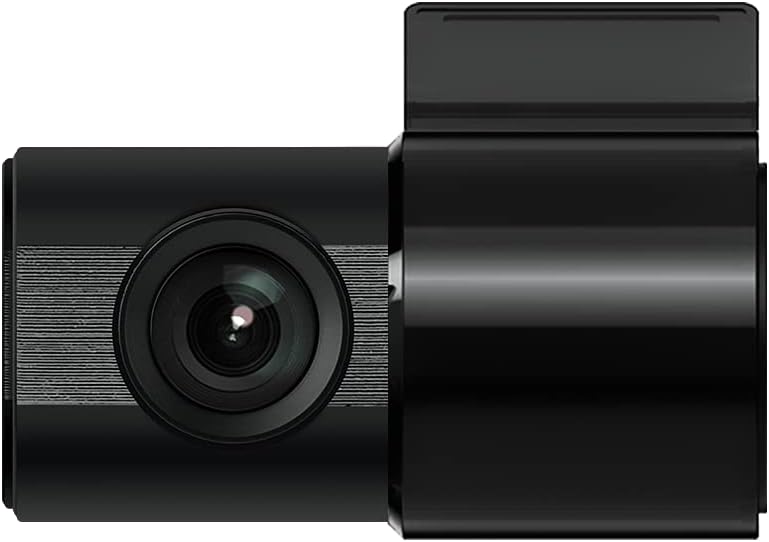
Figure 3: IROAD X5 Rear Camera
3.4 Energia-konexioa
- Connect the constant power cable to the main unit's power input port.
- Connect the other end of the power cable to your vehicle's power source (e.g., OBDII port for general and hybrid vehicles, if using the optional OBDII power cable, or fuse box for constant power). Consult a professional for hardwiring if unsure.
3.5 Wi-Fi Dongle Connection (Optional)
If your model requires an external Wi-Fi dongle, insert it into the designated USB port on the main unit. This enables Wi-Fi connectivity for smartphone app control.
4. Funtzionamendu-argibideak
4.1 Automatic Power On/Off
The IROAD X5 Dash Cam will automatically power on and begin recording when your vehicle's ignition is turned on. It will power off automatically when the ignition is turned off.
4.2 Grabaketa moduak
- Grabaketa jarraitua: The dash cam continuously records while driving. Older files are overwritten by new ones when the MicroSD card is full.
- Impact Recording: When the G-Sensor detects a sudden impact or collision, the dash cam automatically saves the current recording segment as an event file, gainidaztea eragotziz.
- Aparkalekuaren grabaketa: When the vehicle is parked and the ignition is off, the dash cam enters parking mode. It records events triggered by motion detection or impacts.
- Mugimendua detektatzeko grabazioa: In parking mode, the camera records when motion is detected in its field of view.
4.3 ADAS Functions
The IROAD X5 includes Advanced Driver Assistance Systems to enhance driving safety:
- Lane Departure Warning (LDWS): Ibilgailua bere erreitik ateratzen bada abisatzen dizu.
- Front Vehicle Departure Warning (FVDW): Notifies you when the vehicle in front starts moving from a stop.
- Forward Collision Warning (FCWS): Warns you of a potential collision with a vehicle ahead.
These features can be configured via the IROAD smartphone application.
4.4 Audio Grabaketa
Audio recording is enabled by default. You can toggle this feature on or off through the IROAD smartphone application settings.
4.5 Using the IROAD App (Wi-Fi)
- Download the "IROAD" app from your smartphone's app store.
- Piztu dash cam.
- On your smartphone, go to Wi-Fi settings and connect to the IROAD dash cam's Wi-Fi network (SSID and password can be found in the app or on the device label).
- Open the IROAD app to access live view, recorded videos, and adjust settings.
5. Mantentzea
5.1 MicroSD txartelaren kudeaketa
It is recommended to format the MicroSD card regularly (e.g., once a month) to maintain optimal recording performance and prevent data corruption. This can be done through the IROAD smartphone app or by removing the card and formatting it on a computer.
5.2 Lenteak garbitzea
Periodically clean the front and rear camera lenses with a soft, dry cloth to ensure clear video quality. Avoid using abrasive cleaners.
5.3 Firmware eguneraketak
Check the official IROAD website or the IROAD app for available firmware updates. Keeping your dash cam's firmware up-to-date ensures the latest features and bug fixes.
6. Arazoak
| Arazoa | Balizko Kausa / Irtenbidea |
|---|---|
| Auto-kamerak ez du pizten. | Check power cable connection. Ensure vehicle ignition is on. Verify fuse in power cable or vehicle's fuse box. |
| Ez da grabaziorik egiten edo grabazioa gelditu egiten da. | MicroSD card may be full or corrupted. Format the MicroSD card. Ensure the card is inserted correctly. |
| Wi-Fi konexio arazoak. | Ensure Wi-Fi dongle is properly connected (if applicable). Restart the dash cam and your smartphone. Check Wi-Fi settings on your phone. |
| Bideoaren kalitate eskasa. | Clean camera lenses. Ensure protective film is removed from lenses. Check recording resolution settings in the app. |
| ADAS abisuak ez dira zehatzak. | Ensure the camera is properly calibrated and mounted centrally. Environmental factors (heavy rain, fog) can affect performance. |
7. Zehaztapenak
| Ezaugarri | Zehaztapena |
|---|---|
| ren eremua View (Aurrealdea/Atzekoa) | 140° |
| Resolution (Front/Rear) | Full HD 1920x1080P |
| Frame Rate (Front/Rear) | 30 fps |
| Grabaketa moduak | Continuous, Impact, Parking, Motion Detection |
| ADAS Ezaugarriak | Lane Departure Warning, Front Vehicle Departure Warning, Forward Collision Warning |
| G-sentsorea | 3 ardatzeko azelerazio-sentsorea |
| Audio Grabaketa | On/Off selectable |
| Energia-kontsumoa | 2.6W |
| Funtzionamendu-tenperatura | -30°C eta 75°C artean |
| Grabaketa euskarria | MicroSD txartela (16 GB barne) |
| Unitate Nagusiaren Neurriak | 90 x 40 x 30 mm |
| Unitate Nagusiaren Pisua | 60 g |
| Konektibitatea | Wi-Fi |
| Bistaratzeko mota | LCD (4 inch, if applicable, though product description implies no screen on main unit) |
| Muntatzeko metodoa | Itsasgarria |
8. Bermea eta Laguntza
For warranty information, technical support, or service inquiries, please refer to the warranty card included with your product or visit the official IROAD webgunea. Gorde erosketa-agiria erosketaren frogagiri gisa berme-erreklamazioetarako.