
Sarrera
Thank you for choosing the Hbada Ergonomic Gaming Chair. This manual provides essential information for the safe and efficient assembly, operation, and maintenance of your new chair. Please read these instructions carefully before use and retain them for future reference.

Image: The Hbada Ergonomic Gaming Chair in a modern gaming environment, showcasinbere diseinua eta presentzia g.
Segurtasun Informazioa
- Ziurtatu osagai guztiak daudela eta kalterik gabe muntatu aurretik. Ez erabili piezaren bat falta bada edo hautsita badago.
- Jarraitu muntaketa-argibideak zehatz-mehatz. Muntaketa okerrak ezegonkortasuna eta lesioak sor ditzake.
- Ez jarri zutik aulkian. Esertzeko bakarrik erabili.
- Do not exceed the maximum weight capacity (refer to specifications).
- Mantendu haurrak eta maskotak aulkitik urrun muntaketa bitartean.
- Saihestu aulkia eguzki-argiaren edo tenperatura altuen eraginpean jartzea materiala hondatzea saihesteko.
Produktuaren neurriak
Understanding the dimensions of your chair is important for proper placement and comfortable use. Below are the key measurements:
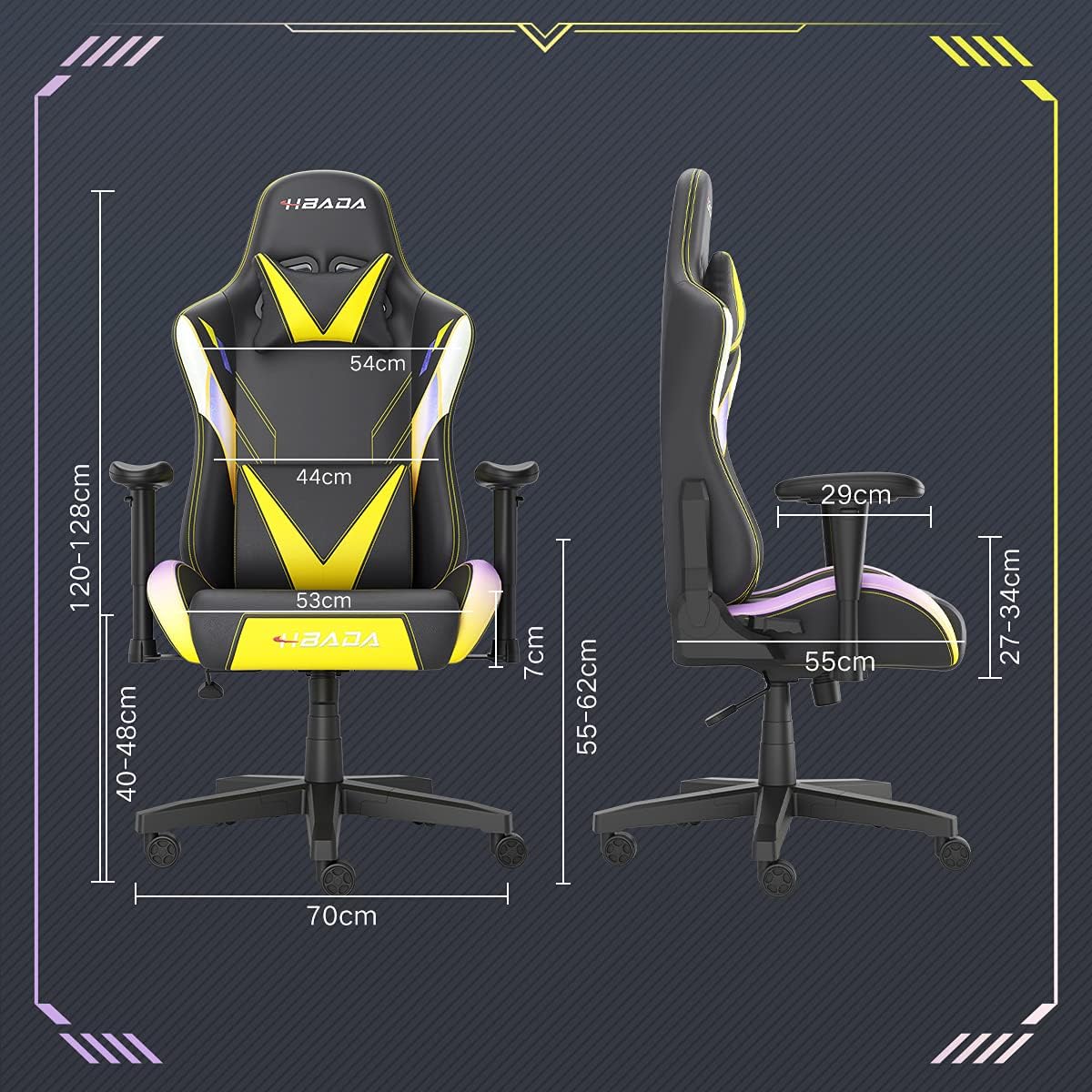
Image: A detailed diagram illustrating the various dimensions of the Hbada Gaming Chair, including height, width, and depth measurements.
- Altuera orokorra: 120-128 cm (adjustable)
- Eserlekuaren altuera: 40-48 cm (adjustable)
- Eserlekuaren zabalera: 53 cm
- Eserlekuaren sakonera: 55 cm
- Bizkarraldearen zabalera: 54 cm (shoulder area), 44 cm (lumbar area)
- Beso-euskarriaren altuera (eserlekutik): 7 cm (adjustable)
- Oinarriaren diametroa: 70 cm
Konfigurazioa eta Muntaketa
Please follow these steps carefully to assemble your Hbada Gaming Chair. It is recommended to have a clear, spacious area for assembly.
Muntatzeko urratsak:
- Step 1: Assemble the Base and Wheels
Insert the five casters into the holes on the star base. Then, place the gas lift cylinder into the center hole of the base.

Image: Illustration of attaching the five casters to the chair's star-shaped base and inserting the gas lift cylinder.
- Step 2: Attach the Seat and Backrest
Connect the backrest to the seat using the provided screws and mounting plates. Ensure all screws are tightened securely.

Image: Diagram showing the process of securing the backrest to the seat cushion using screws and brackets.
- 3. urratsa: Beso-euskarriak instalatu
Attach the armrests to the sides of the seat using the designated screws. Make sure they are firmly attached.

Image: Visual guide for attaching the armrests to the chair's seat base.
- 4. urratsa: Konektatu eserlekua oinarrira
Carefully place the assembled seat onto the gas lift cylinder, ensuring it is properly seated and stable.

Image: Depiction of lowering the assembled seat onto the gas lift cylinder, connecting the upper and lower parts of the chair.
- Step 5: Attach Headrest and Lumbar Pillow
Secure the detachable headrest and lumbar support pillow to the chair as desired for optimal comfort.

Image: Instructions for attaching the headrest and lumbar support pillows to the gaming chair.
Funtzionamendu-argibideak
Your Hbada Gaming Chair is designed with several adjustable features to provide personalized comfort and support.
Key Adjustable Functions:
- Adjustable Sitting Height: Use the lever located under the seat on the right side to raise or lower the chair. Pull the lever up to adjust the height, then release it at your desired position. The seat has an 8 cm elevation range.
- Reclining Backrest (90° to 155°): The backrest can be reclined from 90 degrees (upright) to 155 degrees (nearly flat). Use the recline lever on the side of the chair to adjust the angle. Lean back to your preferred position and lock the lever.
- Beso-euskarri erregulagarriak: The armrests can be adjusted in height by 7 cm. Locate the button or lever on the side of each armrest to unlock, adjust, and then lock them into your desired height.
- 360° Free Swivel: The chair features a full 360-degree swivel function, allowing for easy movement and access to your surroundings without needing to move the entire chair.
- Detachable Headrest and Lumbar Support: The chair includes a removable headrest pillow and lumbar support cushion for enhanced ergonomic comfort. Adjust their positions or remove them based on your preference.

Irudia: Gehiagoview of the chair's ergonomic systems, highlighting adjustable sitting height, armrests, 155° reclining, 360° swivel, cool racing casters, and durable base.

Image: The Hbada Gaming Chair demonstrated in its 155-degree reclined position, illustrating the recline controller.
Mantentzea
Regular maintenance will help prolong the life and appearance of your Hbada Gaming Chair.
- PU larrua garbitzea: Garbitu PU larruzko gainazalak oihal leun eta lehor batekinamp oihal. Orban egoskorretarako, xaboi leun baten soluzioa erabili eta gero zapi garbi batekin garbitu.amp oihal. Saihestu produktu kimiko gogorrak edo garbitzaile urratzaileak, hauek materiala kaltetu baitezakete.
- Gurpilen zaintza: Periodically check the casters for accumulated dust or hair. Clean them with a brush or vacuum cleaner to ensure smooth movement and prevent damage to your flooring.
- Markoa eta osagaiak: Aldian-aldian ikuskatu torloju eta azkoin guztiak ondo estututa daudela ziurtatzeko. Beharrezkoa bada, berriro estutu egonkortasuna mantentzeko.
- Eguzkiaren argia saihestu: Prolonged exposure to direct sunlight can cause the PU leather to fade and crack. Position your chair away from direct sunlight when possible.
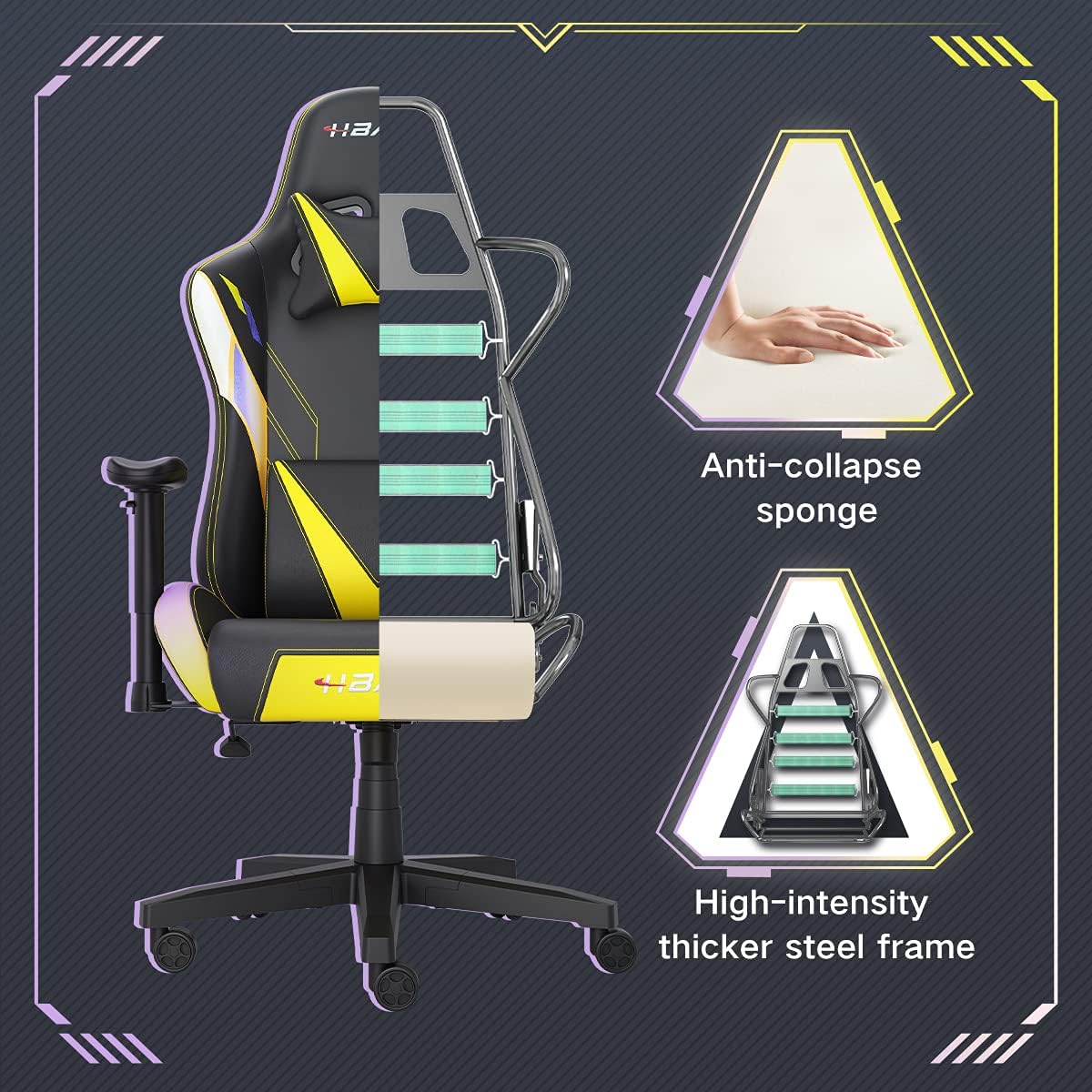
Irudia: Mozketa bat view of the chair's internal structure, highlighting the anti-collapse sponge padding and the high-intensity thicker steel frame, indicating durable construction.
Arazoak konpontzea
If you encounter any issues with your Hbada Gaming Chair, refer to the following common problems and solutions:
| Arazoa | Kausa posiblea | Irtenbidea |
|---|---|---|
| Aulkia ez da altuera doitzen | Gas-igogailuaren matxura edo palanka ez da sartu. | Ziurtatu altuera doitzeko palanka guztiz sartuta dagoela. Arazoak jarraitzen badu, baliteke gas-igogailua aldatu behar izatea. Jarri harremanetan bezeroarentzako arreta-zerbitzuarekin. |
| Aulkia ezegonkorra edo ezegonkorra da | Torloju solteak edo muntaketa desegokia. | Check all assembly screws and bolts, and tighten them securely. Refer to the assembly instructions. |
| Gurpilak ez dira leunki biratzen | Gurpiletan harrapatutako hondakinak (ilea, hautsa). | Irauli aulkia eta kendu gurpiletako hondakin guztiak. |
| Bizkarraldea ez da etzan edo blokeatzen | Etzanda egoteko mekanismoa trabatuta dago edo palanka ez dago sartuta. | Ensure the recline lever is fully engaged. Check for any obstructions around the mechanism. |
Zehaztapenak
| Ezaugarri | Xehetasuna |
|---|---|
| Marka | Hbada |
| Modelo zenbakia | W203YMA/EU |
| ASIN | B095PSFLKX |
| Kolorea | Horia |
| Materiala | PU Leather, Metal Frame |
| Produktuaren neurriak | 70 x 70 x 128 cm (Luzera x Zabalera x Altuera) |
| Produktuaren pisua | 22 kilogramo |
| Ezaugarri bereziak | Ergonomic, Swivel, Casters, Headrest Support, Adjustable Recline (90°-155°), Adjustable Seat Height (8cm range), Adjustable Armrests (7cm range) |
| Unitate kopurua | 1.0 zenbaketa |
Bermea eta Laguntza
Your Hbada Gaming Chair comes with a urtebeteko bermea erosketa-datatik aurrera. Berme honek fabrikazio-akatsak eta materialen akatsak estaltzen ditu erabilera normalaren pean.
If you experience any issues during use, including problems with installation, damage, or missing parts, please do not hesitate to contact Hbada customer service. We are committed to providing reliable service and can offer free exchanges for covered issues.
For support, please visit the official Hbada webwebgunean edo jarri harremanetan zure dendara.