
EuroFone S2 Black
EuroFone S2 Motorcycle Bluetooth Headset User Manual
Model: S2 Black
1. Sarrera
The EuroFone S2 Motorcycle Bluetooth Headset is designed to provide seamless communication and entertainment for motorcycle riders. Featuring Bluetooth 5.1 technology, it offers stable connections, clear audio, and a range of functions including rider-to-rider intercom, hands-free calling, music playback, and FM radio. Its robust IP67 waterproof and dustproof design ensures reliable performance in various weather conditions.
2. Ezaugarri nagusiak
- 2-Rider Full Duplex Intercom: Communicate with a riding partner up to 800 meters away.
- IP67 Iragazgaitza eta hautsaren aurkakoa: Designed to withstand rain, dust, snow, and low temperatures.
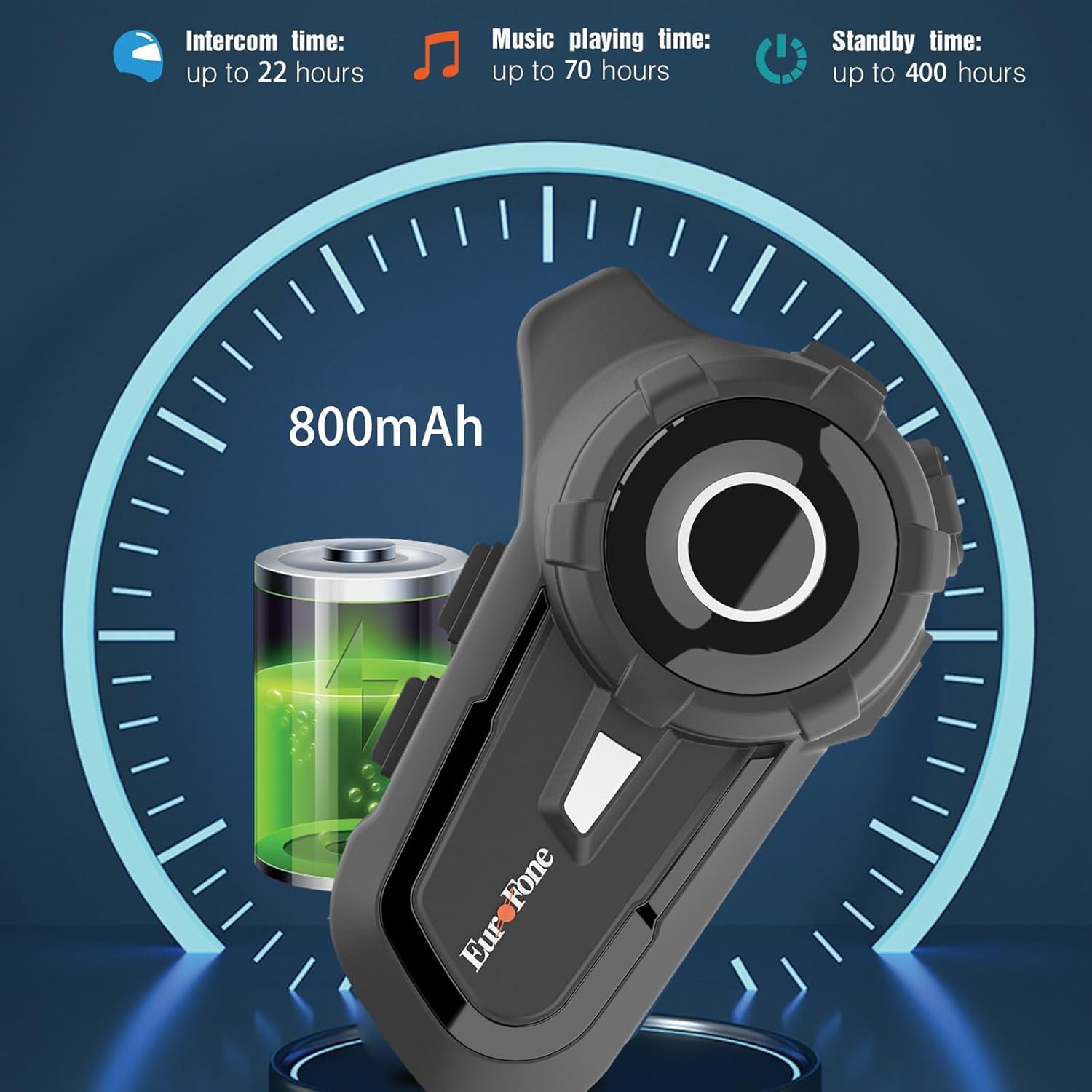
- Bateriaren iraupen luzea: 800 mAh battery provides up to 20 hours of working time and 18 months standby.
- Auto Answer & Voice Control: Automatically answers calls in 10 seconds and supports voice assistant/Siri.
- Noise Reduction & Hi-Fi Stereo Sound: CVC advanced noise cancellation for clear audio and high-fidelity sound quality.
- Bluetooth 5.1: Haririk gabeko konexio egonkorra eta eraginkorra bermatzen du.
- FM irratia: Built-in FM radio for entertainment on the go.
- GPS kokapena: Can connect to GPS devices for navigation.
3. Paketearen edukia
Egiaztatu elementu guztiak zure paketean daudela:
- EuroFone S2 Bluetooth Headset Unit
- Hard Microphone (Boom Mic)
- Soft Microphone (Wired Mic)
- Bozgorailu multzoa
- USB motako C kargatzeko kablea
- Cl muntatzeaamp
- Bozgorailuentzako belkro-kosxinak
- Erabiltzailearen eskuliburua

4. Konfigurazioa eta instalazioa
4.1 Gailua kargatzea
Before first use, fully charge the EuroFone S2 headset. Connect the provided USB Type-C cable to the charging port on the unit and to a USB power source. The indicator light will show charging status. A full charge takes approximately 2.5 hours.

4.2 Installing into Helmet
Follow these steps to install the headset into your motorcycle helmet:
- Prestatu kaskoa: Carefully remove the internal padding of your helmet to access the ear pockets and inner shell.
- Attach Speakers: Use the provided velcro pads to attach the speakers inside the helmet's ear pockets. Ensure they are positioned directly over your ears for optimal sound quality. Route the speaker wires neatly under the lining.
- Mikrofonoa instalatu: Choose either the hard boom microphone (for open-face/modular helmets) or the soft wired microphone (for full-face helmets). Attach the microphone to the helmet lining near your mouth using the adhesive base. Route the microphone cable along with the speaker wires.
- Muntaketa Unitate Nagusia: Secure the main headset unit to the side of the helmet using the mounting clamp. Tighten the screws to ensure a firm attachment.
- Konektatu kableak: Plug the speaker and microphone cables into the corresponding ports on the main headset unit. Ensure connections are secure.
- Kaskoa berriro muntatu: Carefully reinsert the helmet's internal padding, ensuring all wires are tucked away and do not interfere with comfort or safety.

5. Funtzionamendu-argibideak
5.1 Kontrolakview
The EuroFone S2 features intuitive controls for easy operation:
| Kontrola | Funtzioa |
|---|---|
| Piztu/Itzali tekla | Piztu/Itzali |
| Funtzio anitzeko tekla | Play/Pause music, Answer/End calls, Activate voice assistant |
| Knob (Jog Dial) | Rotate clockwise for Volume Up, Counter-clockwise for Volume Down. Short press rotate for Next/Previous track. |
| FM tekla | Activate/Deactivate FM Radio |
| Talkback Key (Intercom Button) | Initiate/End intercom communication |
| Charging Port & K-wire Interface | For charging and connecting external devices. |
| Telefonoa Jack | For wired audio connection (if applicable). |

5.2 Bluetooth parekatzea (Telefonoa)
To pair your EuroFone S2 headset with your mobile phone:
- Ziurtatu entzungailua itzalita dagoela.
- Eduki sakatuta aldi berean Interfono botoia eta du Funtzio anitzeko botoia for approximately 5 seconds until you hear a "di di" voice prompt indicating factory settings restoration. Release the buttons.
- Turn on the power button until you hear a voice prompt. The indicator light will flash blue and red, indicating pairing mode.
- Zure telefono mugikorrean, joan Bluetooth ezarpenetara eta bilatu eskuragarri dauden gailuak.
- Select "S2" from the list of Bluetooth devices.
- Once paired, the headset will confirm with a voice prompt, and the indicator light will show a steady blue light or slow flashes.
5.3 Intercom Pairing (Two Units)
To pair two EuroFone S2 units for intercom communication:
- Ensure both headsets are powered off.
- On the first headset, turn on the power button and press and hold the Interfono botoia for approximately 5 seconds until the indicator flashes with a quick blue light. You will hear a "pairing mode" voice prompt.
- On the second headset, turn on the power button and press and hold the Interfono botoia for approximately 5 seconds until the indicator flashes with a quick blue light. You will also hear a "pairing mode" voice prompt.
- Wait for a few seconds. The two headsets will automatically pair with each other. The indicator lights will change to a steady blue or slow flashes once connected.
5.4 Reconnecting Intercom
If the intercom connection is lost or you wish to re-establish it:
- Short click the Funtzio anitzeko botoia on either headset to hear the prompt "end intercom".
- Egin klik bikoitza Interfono botoia on any one of the headsets.
- Ondoren, egin klik Funtzio anitzeko botoia. You will hear the "start intercom" voice prompt again, indicating the connection is re-established.
5.5 Musika erreproduzitzea
After pairing with your phone, you can control music playback:
- Erreproduzitu/Pausatu: Sakatu Funtzio anitzeko botoia musika erreproduzitzeko edo pausatzeko.
- Bolumen kontrola: Biratu Jog Dial clockwise to increase volume, counter-clockwise to decrease volume.
- Hurrengoa / Aurreko pista: Short press and rotate the Jog Dial counter-clockwise to play the next song. Short press and rotate clockwise to play the previous song.
5.6 Telefono deiak
Kudeatu telefono deiak esku libreekin:
- Erantzun deia: The headset will automatically answer incoming calls after 10 seconds. You can also click the Funtzio anitzeko botoia to answer immediately.
- Amaitu deia: Sakatu Funtzio anitzeko botoia to end an ongoing call.
- Deia baztertu: Eduki sakatuta Funtzio anitzeko botoia 2 segundoz sarrerako dei bat ukatzeko.
- Ahots Laguntzailea/Siri: Sakatu Funtzio anitzeko botoia twice to activate your phone's voice assistant (Siri, Google Assistant, etc.).
5.7 FM Irratia
FM irrati integratua erabiltzeko:
- Piztu/itzali FMa: Sakatu FM tekla to activate or deactivate the FM radio.
- Eskaneatze estazioak: While FM is on, press and hold the FM tekla to automatically scan and save available stations.
- Aldatu geltokia: Biratu Jog Dial to switch between saved FM stations.
6. Mantentzea eta Zainketa
- Garbiketa: Garbitu entzungailuen unitatea zapi leun batekin,amp oihal. Ez erabili produktu kimiko gogorrak edo garbitzaile urratzaileak.
- Uraren esposizioa: While IP67 waterproof, avoid prolonged submersion. Ensure charging port cover is securely closed when not charging.
- Biltegiratzea: Gorde entzungailuak leku fresko eta lehor batean, eguzki-argitik eta muturreko tenperaturetatik babestuta.
- Bateria zaintzea: Bateriaren iraupen optimoa lortzeko, kargatu gailua aldizka, nahiz eta maiz erabiltzen ez den. Saihestu bateria denbora luzez guztiz deskargatzea.
7. Arazoak
| Arazoa | Kausa posiblea | Irtenbidea |
|---|---|---|
| Gailua ez da pizten. | Bateria baxua. | Kargatu gailua guztiz. |
| Ezin da telefonoarekin parekatu. | Headset not in pairing mode; phone Bluetooth off; previously paired device interfering. | Ensure headset is in pairing mode (flashing blue/red). Turn phone Bluetooth off/on. Forget previous pairings on phone. Perform factory reset on headset. |
| Interfonoa ez da konektatzen. | Headsets not in intercom pairing mode; out of range. | Ensure both headsets are in intercom pairing mode. Move closer to each other. Re-initiate intercom connection as per section 5.4. |
| Soinurik ez edo bolumen baxua. | Volume too low; speakers not positioned correctly; loose connections. | Increase volume using the Jog Dial. Adjust speaker position in helmet. Check all cable connections. |
| Poor sound quality/noise. | Microphone not positioned correctly; excessive wind noise; interference. | Adjust microphone position. Ensure microphone foam cover is in place. Reduce speed if wind noise is excessive. |
8. Zehaztapenak
| Ezaugarri | Xehetasuna |
|---|---|
| Ereduaren izena | S2 Beltza |
| Bluetooth bertsioa | 5.1 |
| Interfono barrutia | Up to 800 meters (2-riders) |
| Bateria Edukiera | 800 mAh |
| Kargatzeko Denbora | 2.5 ordu |
| Working Time (Intercom) | Gehienez 22 ordu |
| Working Time (Music) | Gehienez 70 ordu |
| Egonean Denbora | Gehienez 18 hilabete |
| Uraren Erresistentzia Maila | IP67 Waterproof & Dustfree |
| Zarata Kontrola | Zarata Aktiboko Ezeztapena (CVC) |
| Neurriak | 3.35 x 2.17 x 0.98 hazbete |
| Elementuaren pisua | 12.7 ontza |
| Fabrikatzailea | Shenzhen Goldstar Electronics Co., Ltd |
9. Bermea eta Laguntza
For warranty information and technical support, please refer to the official EuroFone webwebgunera edo jarri harremanetan bezeroarentzako arreta-zerbitzura zuzenean. Gorde erosketa-agiria erosketaren frogagiri gisa berme-erreklamazioetarako.
Bisita dezakezu EuroFone Store on Amazon produktuari buruzko informazio gehiago eta laguntza-baliabideak lortzeko.
Ask a question about this manual
Ask about setup, troubleshooting, compatibility, parts, safety, or missing instructions. Manuals+ will review the question and use this page’s manual context to help answer it.