
Infinix X609
Infinix X609 Smart 2 Dual SIM 3G Smartphone User Manual
1. Sarrera
Welcome to the user manual for your Infinix X609 Smart 2 smartphone. This guide provides essential information to help you set up, operate, maintain, and troubleshoot your device. Please read this manual carefully to ensure proper use and to maximize the performance of your smartphone.
2. Segurtasun informazio garrantzitsua
- Do not use the device in prohibited areas, such as aircraft or hospitals.
- Saihestu gailua muturreko tenperatura, eguzki-argi zuzena edo hezetasun handiaren eraginpean jartzea.
- Use only original or certified accessories to prevent damage and ensure safety.
- Ez saiatu gailua desmuntatzen, konpontzen edo aldatzen. Jarri harremanetan zerbitzu-langile kualifikatuekin.
- Keep the device and its accessories out of reach of small children.
- Tokiko araudien arabera bota gailua eta bateria arduraz.
3. Paketearen edukia
Mesedez, egiaztatu zure produktuaren kaxaren edukia. Elementuren bat falta bada edo hondatuta badago, jarri harremanetan zure saltzailearekin.
- Infinix X609 Smart 2 Smartphone
- Elikatze-moldagailua
- USB kablea
- Headphones (may vary by region)
- SIM kanporatzeko tresna
- Hasierako gida azkarra
- Berme Txartela
4. Gailua amaitu daview
Familiarize yourself with the physical features of your Infinix X609 Smart 2 smartphone.
This image displays the rear panel of the Infinix X609 Smart 2 smartphone. Visible features include the main camera module in the upper left corner, a circular fingerprint sensor below it, the 'Infinix' logo centrally placed, and 'smart' branding near the bottom. The phone has a smooth, matte Aqua Blue finish.
Funtsezko osagaiak:
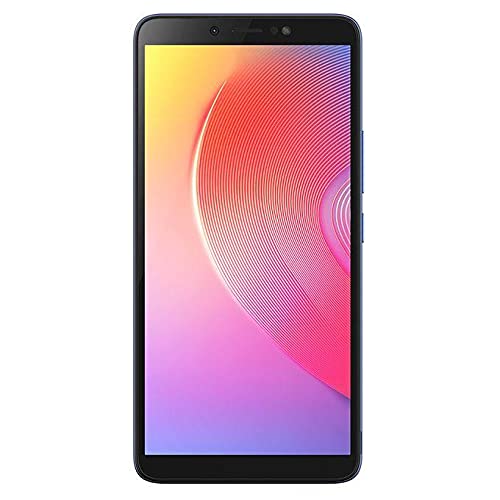
- Aurrealdea: 6.0-inch LCD Touchscreen, Front Camera, Earpiece, Light Sensor.
- Eskuineko aldea: Pizteko botoia, bolumena igo/jaitsteko botoiak.
- Goia: 3.5 mm-ko aurikularretarako konektua.
- Behea: USB Charging Port, Microphone, Speaker.
- Atzekoa: Main Camera, LED Flash, Fingerprint Sensor, Infinix Logo.
5. Konfigurazioa
5.1 Inserting SIM Cards and Memory Card
- Bilatu SIM txartelaren erretilua telefonoaren alboan.
- Sartu SIM txartela ateratzeko tresna erretiluaren ondoko zulo txikian eta bultzatu astiro erretilua atera arte.
- Place your Nano-SIM cards into the designated slots (this device supports dual SIM). Ensure the gold contacts face downwards.
- If using a microSD card for expanded storage, place it into its dedicated slot on the tray.
- Kontu handiz sartu erretilua telefonoan berriro, alboarekin berdindu arte.
5.2 Bateria kargatzea
Lehenengo aldiz erabili aurretik, kargatu gailuaren bateria guztiz.
- Konektatu USB kablea telefonoaren kargatzeko atakara.
- Konektatu USB kablearen beste muturra korronte-egokigailura.
- Entxufatu korronte-egokigailua hormako entxufe batera.
- Kargatzeko adierazlea pantailan agertuko da.
5.3 Piztu/Itzaltzea
- Pizteko: Sakatu eta eutsi pizteko botoia Infinix logotipoa agertu arte.
- Itzaltzeko: Sakatu eta eutsi pizteko botoia energia aukeren menua agertu arte, eta ondoren sakatu 'Itzali'.
- Berrabiarazteko: Press and hold the Power button until the power options menu appears, then tap 'Restart'.
5.4 Hasierako konfigurazioa
Lehen aldiz piztean, jarraitu pantailan agertzen diren argibideei hasierako konfigurazioa osatzeko:
- Hautatu zure hizkuntza.
- Konektatu Wi-Fi sare batera.
- Onartu zehaztapenak eta baldintzak.
- Sign in to your Google account or create a new one.
- Konfiguratu pantailaren blokeoa (PINa, eredua, pasahitza edo hatz-marka).
6. Zure telefonoa erabiltzea
6.1 Oinarrizko nabigazioa
Your Infinix X609 Smart 2 features a touchscreen for interaction:
- Sakatu: Elementu bat hautatzeko edo aplikazio bat irekitzeko.
- Eduki sakatuta: Testuinguru-menuetara sartzeko edo elementuak mugitzeko.
- Pasatu hatza: Zerrendetan zehar mugitzeko edo pantaila artean aldatzeko.
- Pixka bat: Irudiak handitu edo txikitzeko eta web orrialdeak.
6.2 Deiak egitea
- Tap the 'Phone' icon on the home screen.
- Sartu telefono zenbakia markagailuaren teklatua erabiliz.
- Tap the 'Call' button to initiate the call.
6.3 Mezuak bidaltzea
- Tap the 'Messages' icon.
- Sakatu 'Mezu berria' ikonoa.
- Sartu hartzailearen zenbakia edo aukeratu kontaktuetatik.
- Idatzi zure mezua testu eremuan.
- Tap 'Send'.
6.4 Interneteko konexioa
- Wi-Fi: Go to Settings > Wi-Fi, turn Wi-Fi on, and select your network.
- Datu mugikorrak (3G): Go to Settings > Network & internet > Mobile network, and ensure 'Mobile data' is enabled.
6.5 Kamera erabiltzea
Your device is equipped with an 8MP rear camera.
- Tap the 'Camera' icon.
- Markatu zure argazkia.
- Tap the 'Shutter' button to take a photo.
- Switch to video mode by swiping or tapping the mode selector.
6.6 Bluetooth konexioa
Bluetooth gailuetara konektatzeko:
- Joan Ezarpenak > Konektatutako gailuak > Bluetooth atalera.
- Aktibatu Bluetootha.
- Hautatu parekatu nahi duzun gailua eskuragarri dauden gailuen zerrendatik.
6.7 GPS nabigazioa
The device supports GPS for location services and navigation applications. Ensure location services are enabled in Settings > Location.
7. Mantentzea
7.1 Gailua garbitzea
- Erabili zapi leun eta lihorik gabeko bat telefonoaren pantaila eta gorputza garbitzeko.
- Saihestu produktu kimiko gogorrak, garbitzaile urratzaileak edo aerosolak erabiltzea.
- The device is water-resistant; however, avoid submerging it in water. Wipe off any splashes immediately.
7.2 Bateria zaintzea
Your device uses a Lithium-ion battery with a capacity of 3000-4000 mAh.
- Saihestu bateria maiz erabat deskargatzea.
- Ez utzi gailua denbora luzez kargatzen guztiz kargatu ondoren.
- Gorde gailua leku fresko eta lehor batean denbora luzez erabiltzen ez duzunean.
7.3 Software eguneraketak
Regularly check for and install software updates to ensure optimal performance and security. Go to Settings > About phone > System update.
8. Arazoak
Gailuarekin arazoak badituzu, saiatu honako irtenbide hauekin:
| Arazoa | Irtenbidea |
|---|---|
| Gailua ez da pizten | Ziurtatu bateria kargatuta dagoela. Konektatu kargagailu batera eta itxaron minutu batzuk berriro pizten saiatu aurretik. |
| Cannot connect to network (3G) | Check if SIM cards are properly inserted. Ensure mobile data is enabled in settings. Try restarting the device. Contact your network provider if the issue persists. |
| Ukipen-pantailak ez du erantzuten | Restart the device. If the issue continues, perform a factory reset (backup data first). |
| Bateria azkar agortzen da | Itxi atzeko planoan exekutatzen diren erabili gabeko aplikazioak. Murriztu pantailaren distira. Desgaitu Wi-Fi, Bluetooth edo GPSa erabiltzen ez dituzunean. |
| Apps are crashing | Clear the cache of the problematic app (Settings > Apps > [App Name] > Storage > Clear cache). Update the app or reinstall it. |
9. Zehaztapenak
| Ezaugarri | Xehetasuna |
|---|---|
| Marka | Infinix |
| Ereduaren izena | X609 Smart 2 |
| Sistema eragilea | Android 6.0 |
| Prozesadorea | MediaTek Chipset |
| Bistaratzeko tamaina | 6.0 hazbetekoa |
| Bistaratzeko mota | LCD ukipen pantaila |
| Teknologia Zelularra | 3G, GSM, LTE |
| SIM txartelaren zirrikituak | SIM bikoitza |
| Bateria Edukiera | 3000-4000 mAh (Lithium-ion) |
| Atzeko kameraren bereizmena | 8 megapixelekoa |
| Konektibitatea | Bluetooth, GPS, 3.5mm Headphone Jack |
| Uraren Erresistentzia | Urarekiko erresistentea |
| Kolorea | Aqua Blue |
| ASIN | B0979Z4JPM |
10. Bermea eta Laguntza
Your Infinix X609 Smart 2 smartphone comes with a limited warranty. Please refer to the warranty card included in your package for detailed terms and conditions, including the warranty period and coverage.
Laguntza teknikoa, zerbitzua edo kontsulta gehiago lortzeko, bisitatu Infinix-en webgune ofiziala. website or contact their customer service through the information provided on your warranty card or the Infinix brand store page: Infinix Store.
Ask a question about this manual
Ask about setup, troubleshooting, compatibility, parts, safety, or missing instructions. Manuals+ will review the question and use this page’s manual context to help answer it.