
1. Konfigurazioa eta Muntaketa
This section provides instructions for assembling your XLTTY Pedestal Fan. Please follow these steps carefully before initial use.
1.1 Paketatzea
- Kontu handiz kendu osagai guztiak ontzitik.
- Verify that all parts listed in the "Package includes" section are present.
- Gorde ontzia etorkizunean biltegiratzeko edo garraiatzeko.
1.2 Osagaien identifikazioa
Familiarize yourself with the main components of your fan:

Irudia: Key components of the XLTTY Pedestal Fan, including the safety double-ring net cover, the motor housing, the robust circular base (chassis), and the adjustable telescopic pole.
- Robust Chassis: The stable circular base of the fan.
- Polo Teleskopikoa: The adjustable height stand.
- Unitate motorra: Contains the fan motor and control panel.
- Fan Blades: Five blades for air circulation.
- Safety Double-Ring Net Cover: Front and rear protective grilles.
- Loturak: Nuts, bolts, and caps for assembly.
1.3 Muntaketa urratsak
- Attach the Telescopic Pole to the Chassis: Insert the bottom end of the telescopic pole into the robust chassis. Secure it firmly using the provided fasteners, ensuring the base is stable.
- Motor unitatea muntatu: Place the motor unit onto the top of the telescopic pole. Align the holes and secure it with the appropriate screws or locking mechanism.
- Install the Rear Net Cover: Attach the rear safety net cover to the motor unit, ensuring it is correctly oriented and secured.
- Mount the Fan Blades: Carefully slide the five fan blades onto the motor shaft. Ensure they are seated correctly and secured with the blade cap.
- Attach the Front Net Cover: Place the front safety net cover over the fan blades and secure it to the rear net cover using the clips or screws provided. Ensure the net covers are tightly closed to prevent accidental contact with the blades.
- Doitu altuera: Loosen the locking mechanism on the telescopic pole to adjust the fan to your desired height (between 44.5 to 50.4 inches), then tighten to secure.
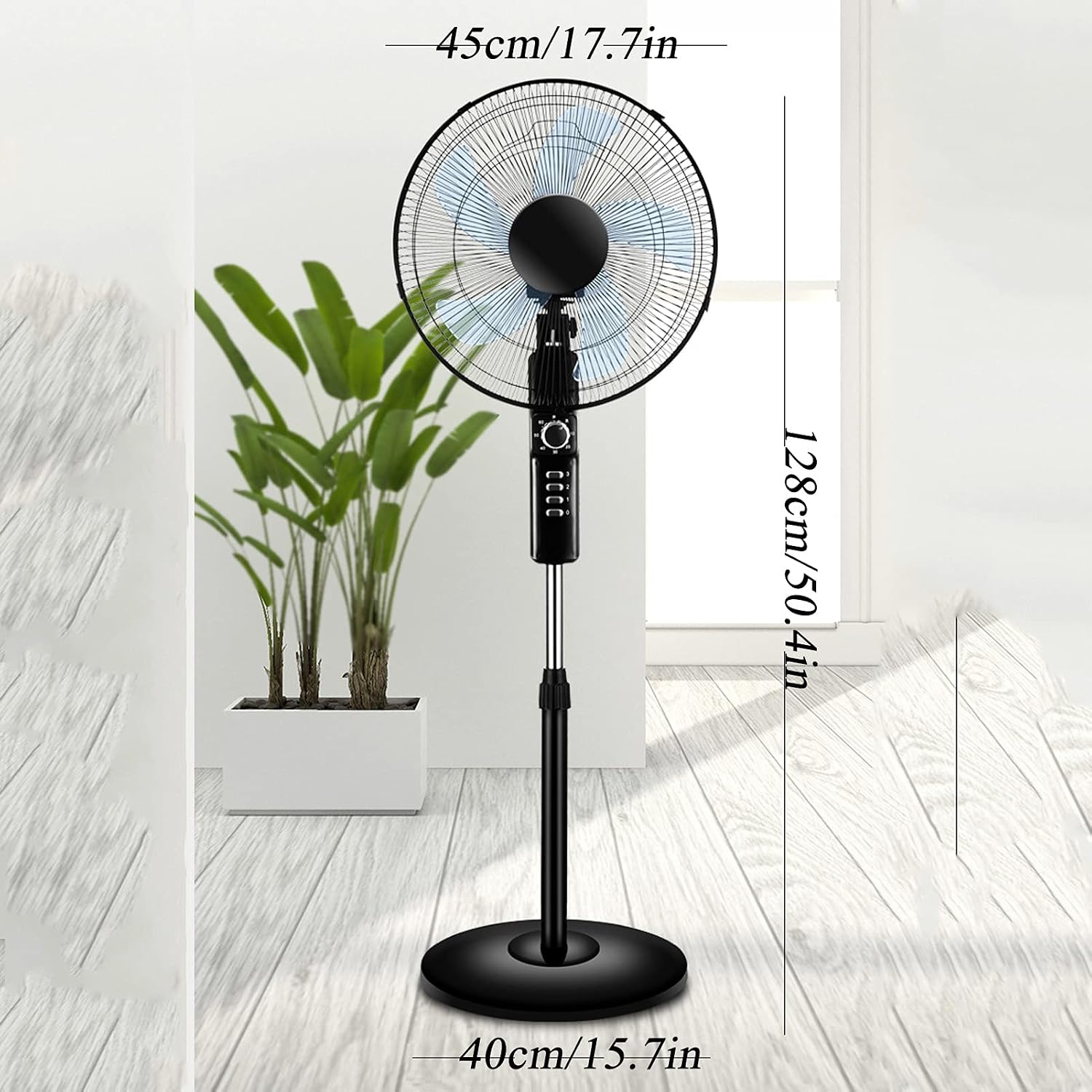
Irudia: Diagram illustrating the dimensions of the XLTTY Pedestal Fan, showing a fan head width of 45cm (17.7 inches), a maximum height of 128cm (50.4 inches), and a base width of 40cm (15.7 inches).
2. Funtzionamendurako jarraibideak
Your XLTTY Pedestal Fan is designed for ease of use with intuitive controls. This section details how to operate your fan effectively.
2.1 Kontrol-panela amaituview
The control panel is located on the motor unit and features mechanical knob controls for power, speed, and timer settings.

Irudia: The XLTTY Pedestal Fan, highlighting the control panel on the main body, which includes a rotary knob and push buttons for various settings.
2.2 Piztea/Itzaltzea eta Abiadura Ezarpenak
- Piztu: Plug the fan into a suitable 110-220V power outlet. Turn the main knob to the desired speed setting (1, 2, or 3).
- Abiadura doitzea: Rotate the knob to select one of the three available speeds:
- 1. abiadura (baxua): Gentle airflow for quiet environments or light cooling.
- 2. abiadura (ertaina): Moderate airflow for general use.
- 3. abiadura (Altua): Powerful airflow for rapid cooling.
- Itzali: Turn the main knob to the "0" or "OFF" position.

Irudia: Visual representation of the fan's three speed settings, suggesting appropriate uses: Speed 1 for quiet activities like reading, Speed 2 for focused tasks like working, and Speed 3 for more active situations like exercise.
2.3 Oszilazio funtzioa
- To activate the oscillation feature, press the oscillation button located on the top of the motor unit. The fan head will begin to rotate from side to side, distributing air across a wider area.
- To stop oscillation, press the button again.

Irudia: The XLTTY Pedestal Fan operating with its wide-angle oscillation feature, illustrating how air is distributed broadly across a room.
2.4 Tenporizadorearen funtzioa
- The fan features a 1-hour smart timing function. To activate, rotate the timer knob to the "1H" position. The fan will operate for approximately one hour and then automatically shut off.
- This feature is ideal for falling asleep or for temporary cooling needs.
2.5 Zarata-maila
The XLTTY Pedestal Fan operates at a low noise level, as low as 40 decibels, ensuring a quiet environment.

Irudia: A comparative chart illustrating the low noise output of the XLTTY Pedestal Fan (26 dB), juxtaposed with common ambient sounds like blooming flowers (10 dB), rustling leaves (20 dB), a quiet office (40 dB), and normal conversation (50 dB).
3. Mantentzea
Regular maintenance ensures optimal performance and extends the lifespan of your XLTTY Pedestal Fan. Always unplug the fan before cleaning or performing any maintenance.
3.1 Haizagailua garbitzea
- Kanpoko garbiketa: Wipe the exterior surfaces of the fan, including the base, pole, and motor housing, with a soft, damp oihal. Ez erabili garbitzaile edo disolbatzaile urratzailerik.
- Parrilla eta palen garbiketa:
- Deskonektatu haizagailua korronte-hartunetik.
- Carefully remove the front safety net cover.
- Wipe the fan blades with a soft, damp oihala hautsa eta hondakinak kentzeko.
- Clean the front and rear grilles with a soft brush or cloth.
- Ensure all parts are completely dry before reassembling the front net cover.
- Do not immerse the fan or its electrical components in water.

Irudia: Xehetasun bat view of the XLTTY Pedestal Fan's five-blade design and the protective double-ring net cover, emphasizing the fine mesh for safety and efficient air cutting.
3.2 Biltegiratzea
- When not in use for extended periods, unplug the fan and clean it thoroughly.
- Store the fan in its original packaging or a dust-free, dry location.
4. Arazoak
If you encounter any issues with your XLTTY Pedestal Fan, please refer to the following common problems and solutions before contacting support.
| Arazoa | Kausa posiblea | Irtenbidea |
|---|---|---|
| Haizagailua ez da pizten. |
|
|
| Aire-fluxu ahula edo batere ez. |
|
|
| Fan is unusually noisy. |
|
|
| Oszilazioa ez dabil. |
|
|
5. Zehaztapenak
Detailed technical specifications for the XLTTY 17.7'' Pedestal Fan.
| Ezaugarri | Xehetasuna |
|---|---|
| Produktuaren izena | Haizagailu elektrikoa |
| Marka | XLTTY |
| Eredua | 17.7'' Pedestal Fan |
| Kolorea | Beltza |
| Dimensions (Fan Head) | 45 cm (17.7 hazbete) |
| Dimensions (Base) | 40 cm (15.7 hazbete) |
| Altuera (erregulagarria) | 113 cm - 128 cm (44.5 - 50.4 hazbete) |
| liburukiatage | 110-220V |
| Boterea | 45W |
| Kontrol-metodoa | Mechanical/Knob |
| Abiadura ezarpenak | 3 Abiadura |
| Fan Blades | 5 Palak |
| Ezaugarri bereziak | Oscillating, Adjustable Height, 1-Hour Timer, Quiet Operation (40dB) |
| Zarata Maila | 40 dezibel bezain baxuak |
| Erabilera gomendatua | Air Circulation for Home, Office, Studio, Bedrooms |
6. Bermea eta bezeroarentzako laguntza
For warranty information and customer support, please refer to the documentation included with your product or contact the manufacturer directly.
- Bermea: Specific warranty terms and conditions are typically provided with the product at the time of purchase. Please retain your proof of purchase for warranty claims.
- Bezeroarentzako laguntza: If you require assistance, have questions, or need to report an issue that cannot be resolved using the troubleshooting guide, please contact XLTTY customer support. Contact details can usually be found on the product packaging or the manufacturer's official webgunea.