
Sarrera
The Poly DA75 is a versatile USB-A/USB-C digital adapter designed to connect Poly Quick Disconnect (QD) headsets to computers. It ensures clear audio quality for call center environments, supporting both USB-A and USB-C connections for compatibility with various systems. This adapter is engineered to work seamlessly with platforms such as Avaya, Genesys, and Cisco, providing a reliable audio solution for professionals.
Ezaugarri nagusiak hauek dira:
- Konektibitate unibertsala: Equipped with both USB-A and USB-C connectors on the cable for broad compatibility with new and legacy equipment.
- Intelligent Headset Recognition: Automatically adjusts audio performance to the specific Poly Quick Disconnect headset for optimized call quality.
- Babes akustikoa: Incorporates features to manage safe volume levels, protecting user hearing.
- Plataformaren integrazioa: Fully compatible with leading call center platforms including Avaya, Genesys, and Cisco.
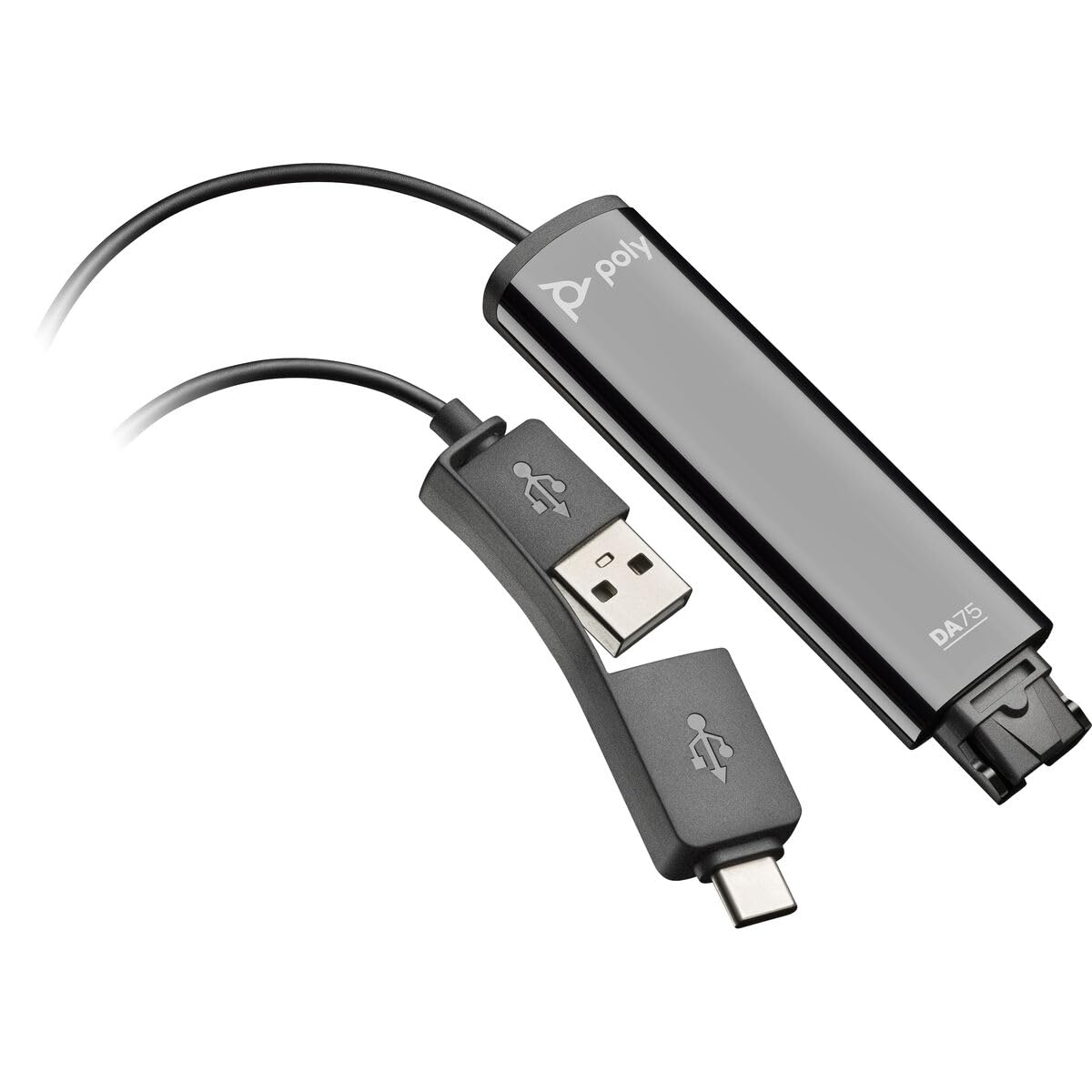
Image: The Poly DA75 USB-A/USB-C Digital Adapter, showing its dual USB-A and USB-C connectors and the Quick Disconnect port for headsets.
Kutxan dagoena
The Poly DA75 package typically includes the following items:
- Poly DA75 USB-A/USB-C Digital Adapter
- Dokumentazioa (Hasierako Gida Azkarra, Segurtasun Informazioa)
Note: Headsets are sold separately and are not included with the DA75 adapter.
Konfigurazioa
Follow these steps to set up your Poly DA75 Digital Adapter:
- Konektatu entzungailuak: Connect your Poly Quick Disconnect (QD) headset to the QD port on the Poly DA75 adapter. Ensure the connection is secure.
- Konektatu ordenagailura:
- If your computer has a USB-A port, use the USB-A connector on the DA75 cable.
- If your computer has a USB-C port, use the USB-C connector on the DA75 cable.
Plug the appropriate USB connector into an available USB port on your computer.
- Gidariaren instalazioa: The DA75 is a plug-and-play device. Your operating system (Windows, macOS) should automatically detect the device and install the necessary drivers. This process may take a few moments.
- Gailuaren ezagutza egiaztatu:
- Windows: Joan zaitez Settings > System > Sound or Kontrol panela > Soinua. The Poly DA75 should appear as an audio input and output device.
- MacOS: Joan zaitez System Settings > Sound. The Poly DA75 should appear as an input and output device.
Select the Poly DA75 as your default communication device for both playback and recording.
- Softwarearen konfigurazioa: If you are using communication software (e.g., Avaya, Genesys, Cisco, Microsoft Teams, Zoom), ensure that the Poly DA75 is selected as the audio device within the application's settings.
Funtzionamendu-argibideak
The Poly DA75 adapter facilitates audio communication through your connected Poly QD headset. Its operation is primarily managed through your computer's operating system and communication software.
- Deiak egitea/jasotzea: Use your communication software to initiate or answer calls. The audio will be routed through your connected Poly QD headset via the DA75 adapter.
- Bolumen kontrola: Adjust the listening volume using your computer's system volume controls or the volume controls within your communication application.
- Mikrofonoa isiltzea: Mute and unmute your microphone using the controls provided by your communication software.
- Audio Optimization: The DA75 automatically optimizes audio for your specific Poly QD headset. No manual adjustments are typically required for audio profiles.
Mantentzea
To ensure the longevity and optimal performance of your Poly DA75 Digital Adapter, follow these maintenance guidelines:
- Garbiketa: Gently wipe the adapter with a soft, dry, anti-static cloth. Do not use liquid cleaners or abrasive materials.
- Biltegiratzea: Gorde egokitzailea leku fresko eta lehor batean, eguzki-argitik eta muturreko tenperaturetatik babestuta.
- Manipulazioa: Saihestu kablea gehiegi tolestea edo bihurritzea, batez ere konektoreen ondoan, barneko kalteak saihesteko.
- Konektibitatea: Ensure the Quick Disconnect (QD) connection and USB connections are clean and free of debris before connecting.
Arazoak konpontzea
If you encounter issues with your Poly DA75 Digital Adapter, refer to the following troubleshooting steps:
| Arazoa | Kausa posiblea | Irtenbidea |
|---|---|---|
| Aurikularretatik ez dago audiorik |
|
|
| Mikrofonoa ez dabil |
|
|
| Adapter not recognized by computer |
|
|
Zehaztapenak
| Ezaugarri | Xehetasuna |
|---|---|
| Modelo zenbakia | 218266-01 |
| Marka | POLY |
| Konektore mota | USB-A, USB-C (dual connector) |
| Gailu bateragarriak | Poly Quick Disconnect (QD) Headsets |
| Erabilera espezifikoak | PC, Call Center Platforms (Avaya, Genesys, Cisco) |
| Kolorea | Beltza |
| Elementuaren neurriak (L x W x H) | 0.98 x 0.39 x 2.95 hazbete |
| Elementuaren pisua | 30 gramo |
| Portu kopurua | 2 (USB-A/USB-C to QD) |
| UPC | 197029650054, 017229175112 |
Bermea eta Laguntza
Bermearen informazioa: The Poly DA75 Digital Adapter comes with a Urtebeteko fabrikatzailearen berme mugatuaBerme honek materialen eta fabrikazioaren akatsak estaltzen ditu erabilera normalaren pean. Gorde erosketaren egiaztagiria bermearen erreklamazioak egiteko.
Laguntza teknikoa: For technical assistance, product inquiries, or warranty service, please contact Poly customer support. Visit the official Poly website for the most up-to-date support contact information, FAQs, and additional resources.
Sareko baliabideak: Poly euskarria Webgunea