
1. Sarrera
This manual provides essential information for the safe and effective operation, setup, and maintenance of your Telwin 816075 Technomig 180 Dual Synergic welding machine. Please read this manual thoroughly before using the equipment to ensure proper function and to prevent injury or damage.
The Technomig 180 Dual Synergic is a microprocessor-controlled inverter multiprocess welding machine capable of MIG-MAG, FLUX, BRAZING, MMA, and TIG DC-Lift welding. Its 'ONE TOUCH' technology allows for fast, synergistic adjustment of welding parameters, making it suitable for various applications and materials including steel, stainless steel, aluminum, and galvanized sheet.
2. Segurtasun informazioa
Welding operations can be hazardous. Always adhere to local safety regulations and the following precautions:
- Norberaren Babeserako Ekipamendua (PPE): Always wear a welding helmet with appropriate shade, flame-resistant clothing, welding gloves, and safety shoes. Protect bystanders with welding screens.
- Segurtasun elektrikoa: Ensure the welding machine is properly grounded. Do not operate in damp or wet conditions. Inspect cables and connections for damage before each use. Disconnect power before performing any maintenance or adjustments.
- Keak eta gasak: Ensure adequate ventilation to remove welding fumes and gases from the work area. Avoid breathing fumes directly.
- Sute-arriskuak: Keep flammable materials away from the welding area. Have a fire extinguisher readily available. Welding sparks can travel.
- Arku izpiak: Arku izpiek begietan eta azalean erredurak eragin ditzakete. Ez begiratu inoiz soldadura arkuari begi-babes egokirik gabe.
- Eremu elektromagnetikoak (EMF): Welding currents create EMFs. Consult a physician if you have a pacemaker or other medical implant.
3. Produktua amaitu daview
The Telwin Technomig 180 Dual Synergic is a versatile welding machine designed for various welding processes. It features a compact and lightweight design for easy portability.
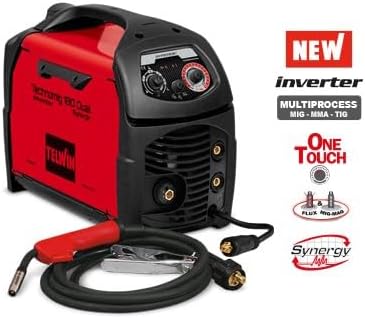
Image: The Telwin Technomig 180 Dual Synergic welding machine, showcasing its compact red and black casing, control panel, and connection points for the welding torch and ground clamp.
Ezaugarri nagusiak:
- Microprocessor-controlled inverter technology.
- Multiprocess capabilities: MIG-MAG, FLUX, BRAZING, MMA, TIG DC-Lift.
- 'ONE TOUCH' synergistic adjustment for simplified parameter setting.
- Manual arc length adjustment for welder's style.
- Polarity reversal for GAS MIG-MAG/BRAZING welding.
- Thermostatic, overvoltage, azpiantage, motor-generator (+/- 15%) protections.
- Arc-force adjustment in MMA.
- Euro torch connection.
Dakarten osagaiak:
- MIG-MAG torch
- Lana clamp
- Kablea
4. Konfigurazioa
Before beginning any welding operation, ensure the machine is set up correctly.
- Potentzia-konexioa: Connect the welding machine to a suitable 230V electrical supply. Ensure the power outlet is properly grounded and capable of handling the machine's power requirements.
- Lan Clamp Konexioa: Erantsi lana clamp cable to the appropriate terminal on the welding machine. Securely connect the work clamp lan-piezari, kontaktu elektriko ona bermatuz.
- Zuziaren konexioa: Connect the MIG-MAG torch to the Euro torch connection on the front panel. Ensure it is securely fastened.
- Gas Connection (for MIG-MAG/TIG): If performing MIG-MAG or TIG welding, connect the gas hose from your shielding gas cylinder to the gas inlet on the machine. Ensure all gas connections are tight to prevent leaks.
- Wire Spool Installation (for MIG-MAG/FLUX): Open the wire compartment and install the appropriate welding wire spool. Thread the wire through the feeder mechanism and into the torch liner according to the machine's internal diagrams.
- Polaritatearen aldaketa: For GAS MIG-MAG/BRAZING welding, ensure the polarity is set correctly. Refer to the machine's internal diagram or control panel for specific instructions on reversing polarity if needed.
5. Funtzionamendu-argibideak
Follow these steps for safe and effective operation of your Telwin Technomig 180 Dual Synergic.
- Piztu: Turn on the main power switch located on the machine.
- Process Selection: Select the desired welding process (MIG-MAG, FLUX, BRAZING, MMA, or TIG DC-Lift) using the control panel.
- Synergic Parameter Adjustment ('ONE TOUCH'): For MIG-MAG, FLUX, and BRAZING, use the 'ONE TOUCH' technology. Simply set the material thickness on the control panel. The machine will automatically adjust the welding parameters (voltage, wire speed) for optimal performance.
- Manual Arc Length Adjustment: The operator can manually intervene to adjust the arc length. This allows for fine-tuning the weld seam according to personal welding style and specific application requirements.
- MMA Arc-Force Adjustment: When operating in MMA mode, the arc-force can be adjusted to prevent the electrode from sticking and to improve arc stability.
- Soldadura hasi: Once parameters are set, don your PPE and begin welding. Always perform test welds on scrap material before working on your main project.
- Itzali: After completing your work, turn off the machine and disconnect the power supply.
6. Mantentzea
Mantentze-lan erregularrak zure soldadura-makinaren iraupena eta errendimendu optimoa bermatzen ditu.
- Garbiketa: Periodically clean the exterior of the machine with a dry cloth. Use compressed air to clear dust from ventilation openings, ensuring proper airflow and cooling.
- Kableen ikuskapena: Regularly inspect all welding cables, torch, and work clamp for cuts, abrasions, or loose connections. Replace damaged components immediately.
- Torch Nozzle and Contact Tip: For MIG-MAG welding, regularly clean or replace the torch nozzle and contact tip as they wear out.
- Hari-elikagailua: Keep the wire feeder mechanism clean and free of debris. Ensure the drive rollers are appropriate for the wire size and type being used.
- Biltegiratzea: Store the welding machine in a clean, dry environment, protected from dust and moisture.
7. Arazoak
Atal honek aurki ditzakezun arazo ohikoenei heltzen die.
- Potentziarik gabe: Check the main power supply, circuit breaker, and the machine's power cable. Ensure the power switch is in the 'ON' position.
- Arkurik ez: Verify that the work clamp is securely attached to the workpiece and that the welding torch is properly connected. Check for correct process selection and parameter settings.
- Soldadura kalitate eskasa: Adjust welding parameters (material thickness, arc length). Ensure the correct shielding gas (if applicable) and wire type are being used. Check for proper wire feed tension and a clean contact tip.
- Gehiegizko berotzea: The machine is equipped with thermostatic protection. If the overload indicator lights up, allow the machine to cool down. Ensure ventilation openings are clear and not obstructed. Reduce the duty cycle or welding current if consistently overheating.
- Errore-kodeak: If the machine displays an error code, consult the full Telwin service manual or contact Telwin support for specific diagnostics.
8. Zehaztapenak
| Fabrikatzailea | Telwin |
| Modelo zenbakia | 816075 |
| Neurriak (L x W x H) | 43 x 17.5 x 34 cm |
| Pisua | 11 kilogramo |
| Potentzia Elektrikoa | 230V |
| Soinu Maila | 1 Decibel (nominal) |
| Eraginkortasunaren balorazioa | A |
| Dakarten osagaiak | MIG-MAG torch, work clamp, cable |
| ASIN | B0989TKNPC |
| Eskuragarri dagoen lehen data | 27ko uztailaren 2021a |
9. Bermea eta Laguntza
For warranty information, please refer to the documentation provided with your purchase or visit the official Telwin website. In case of technical issues or for further assistance, please contact Telwin customer support directly. Ensure you have your model number (816075) and purchase details available when contacting support.