
Produktua amaituview
The EWO'S XRT140 Universal Remote Control is designed as a direct replacement for various VIZIO Smart TV remotes. This product has been professionally inspected and tested to ensure it functions and appears like new. It offers seamless control over your VIZIO Smart TV, providing a reliable and user-friendly experience.

Irudia: Aurrealdea eta albokoa view of the EWO'S XRT140 Universal Remote Control, showcasinbere diseinu ergonomikoa eta botoien kokapena.
Konfigurazio Gida
The EWO'S XRT140 remote control is designed for immediate use with compatible VIZIO Smart TVs. No pairing or programming is required.
Bateriaren instalazioa
- Kokatu bateriaren konpartimendua urrutiko agintearen atzealdean.
- Ireki bateriaren konpartimenduaren estalkia.
- Insert two (2) 1.5V AAA batteries, ensuring the positive (+) and negative (-) terminals align correctly with the indicators inside the compartment.
- Itxi bateriaren konpartimenduaren estalkia ondo.
Once batteries are installed, the remote is ready to operate your VIZIO Smart TV.
Urrutiko agintea erabiltzea
This section details the functions of the buttons on your EWO'S XRT140 Universal Remote Control.
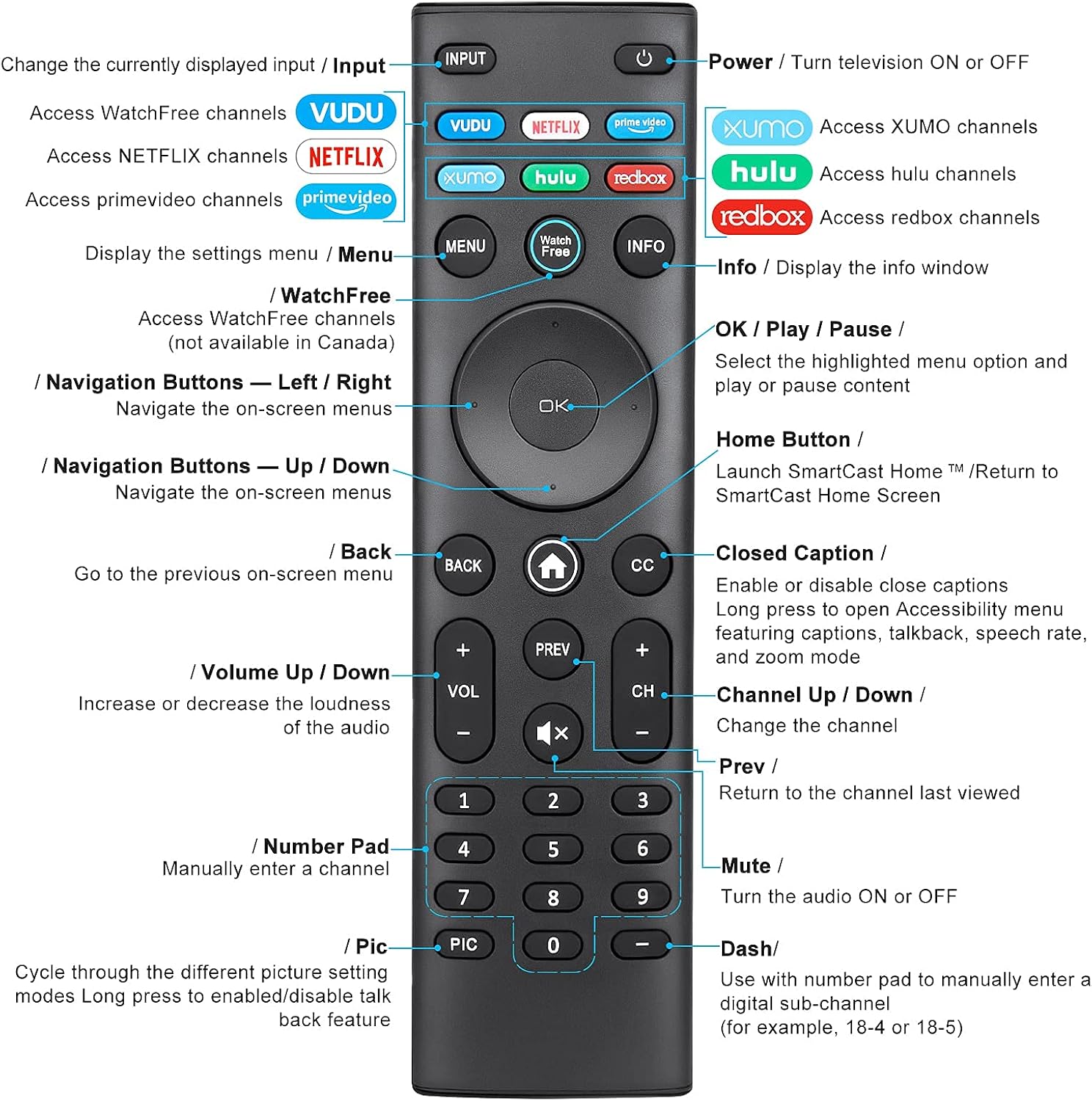
Image: Detailed diagram of the EWO'S XRT140 remote control, labeling each button with its corresponding function.
Botoiaren funtzioak:
- Sarrera: Change the currently displayed input source.
- INDARRA (⏻): Turn the television ON or OFF.
- VOODOO: Access VUDU channels.
- NETFLIX: Access Netflix channels.
- prime video: Access Prime Video channels.
- XUMO: Access XUMO channels.
- hulu: Access Hulu channels.
- redbox: Access Redbox channels.
- MENUA: Display the settings menu.
- WatchFree: Access WatchFree channels (Note: May not be available in all regions, e.g., Canada).
- INFORMAZIOA: Display the info window.
- Ados / Erreproduzitu / Pausatu: Select the highlighted menu option and play or pause content.
- Nabigazio botoiak (Gora/Behera/Ezkerra/Eskuina): Nabigatu pantailako menuetan.
- Home Button (⌂): Launch SmartCast Home or return to the SmartCast Home Screen.
- ITZULI: Go to the previous on-screen menu.
- CC (Closed Caption): Enable or disable closed captions. Long press to open Accessibility menu featuring captions, talkback, speech rate, and zoom mode.
- VOL +/- (Volume Up/Down): Handitu edo txikitu audioaren ozentasuna.
- Prev: Return to the channel last viewed.
- CH +/- (Channel Up/Down): Aldatu kanala.
- MUTE (🔇): Turn the audio ON or OFF.
- Zenbaki-teklatua (0-9): Manually enter a channel number.
- PIC: Cycle through different picture setting modes. Long press to enable/disable talk back feature.
- DASH (-): Use with the number pad to manually enter a digital sub-channel (e.g., 18-4 or 18-5).
Ezaugarri nagusiak
- Berehalako erantzuna: This remote control boasts a quick transmission and response time of 0.2 seconds, ensuring minimal delay between your command and the TV's action.
- Botoi iraunkorrak: The buttons are rigorously tested to support over 150,000 clicks, providing long-lasting reliability.
- Barruti hedatua: The remote transmits a signal effectively over long distances, up to 12 meters (40 feet), allowing for flexible viewposizioak egitea.
- Premium diseinua: Upgraded with a high-end glossy finish, the remote is made from durable ABS material, making it safe for use by children.
- Lasterbide-botoi dedikatuak: Features 7 convenient shortcut buttons for popular streaming services like VUDU, Netflix, Prime Video, XUMO, Hulu, and Redbox, plus a WatchFree button for quick access.
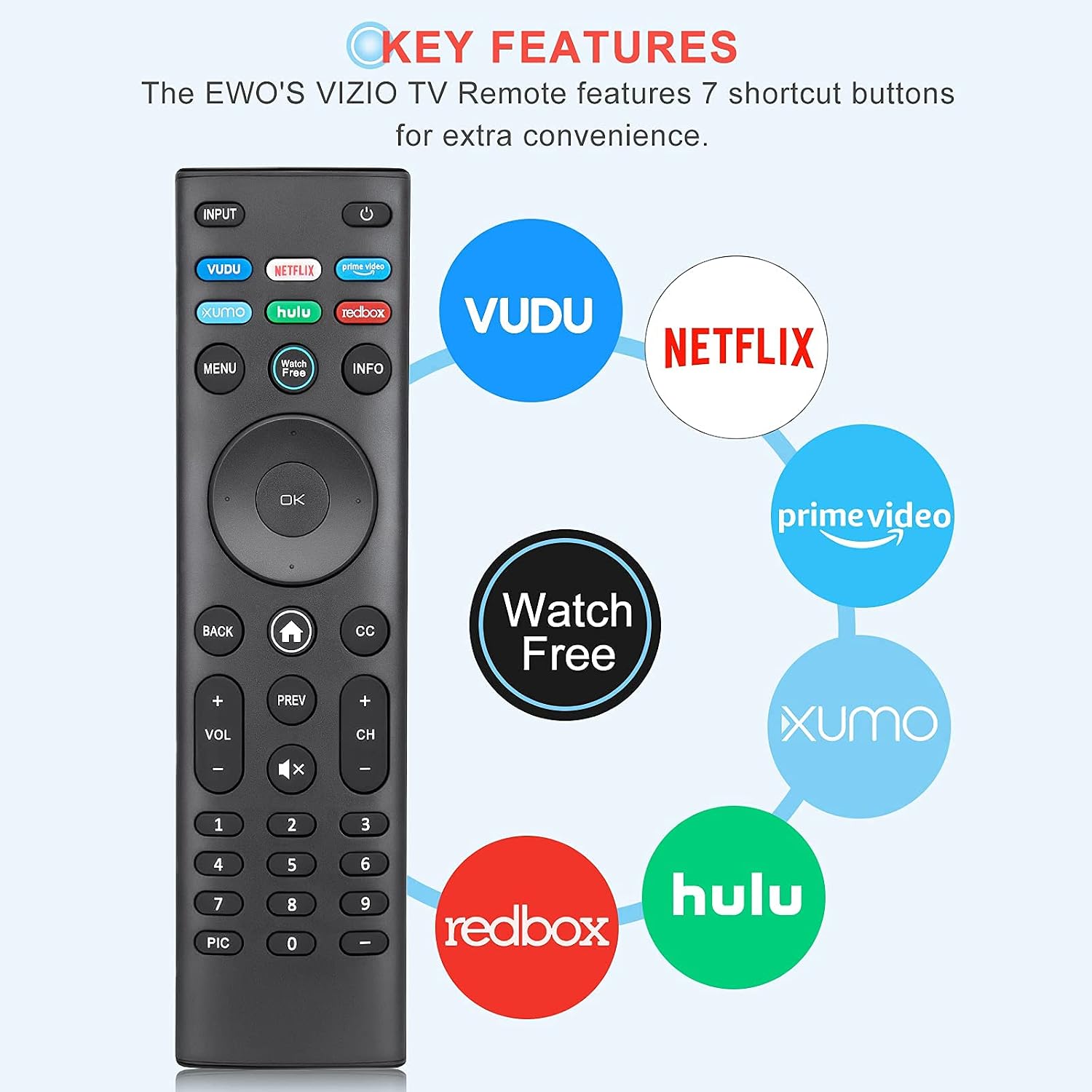
Image: The EWO'S XRT140 remote control with its 7 shortcut buttons for streaming services highlighted, emphasizing convenience.

Image: A hand holding the EWO'S XRT140 remote, with text indicating its fast response time and high click durability.

Image: An illustration demonstrating the EWO'S XRT140 remote's ability to transmit signals over 40 feet, highlighting its long-distance capability.
Bateragarritasuna
The EWO'S XRT140 Universal Remote Control is designed for broad compatibility with VIZIO Smart TVs and various VIZIO remote models.
Compatible VIZIO TV Series:
- All VIZIO LED LCD HD UHD HDR Smartcast 4K 3D Smart TVs
- Including D-Series, E-Series, M-Series, P-Series, PX-Series, V-Series, and OLED-Series.

Image: The EWO'S XRT140 remote alongside various VIZIO SmartCast TV models, illustrating its broad compatibility.
Compatible VIZIO Remote Models:
The XRT140 is a universal remote control compatible with, but not limited to, the following VIZIO remote models:
- XRT112
- XRT122
- XRT302
- XRT135
- XRT510
- XRT500
- XRT100
- XRT136
- VR1
- VR2
- VR10
- VR15

Image: The EWO'S XRT140 remote displayed next to several other VIZIO remote models, indicating its universal compatibility.
Mantentzea
Zaintza eta mantentze egokiak zure urrutiko agintearen bizitza luzatuko du.
Garbiketa:
- Garbitu urrutiko agintea zapi leun eta lehor batekin.
- Zikinkeria egoskorrerako, apur bat lehortuampGarbitu zapi bat urarekin edo garbitzaile leun eta ez-urratzaile batekin. Ez ihinztatu garbitzailea zuzenean urrutiko agintearen gainean.
- Saihestu produktu kimiko gogorrak, disolbatzaileak edo garbiketa-oihal urratzaileak erabiltzea, hauek urrutiko agintearen gainazala edo barneko osagaiak kaltetu baititzakete.
Bateria zaintzea:
- Replace batteries when the remote's performance degrades or it stops responding.
- Always replace both batteries at the same time with new ones of the same type (AAA).
- If the remote will not be used for an extended period (e.g., several weeks or months), remove the batteries to prevent leakage and potential damage to the remote.
Arazoak konpontzea
Urrutiko agintearekin arazoak badituzu, jarraitu arazoak konpontzeko ohiko urrats hauek:
| Arazoa | Kausa posiblea | Irtenbidea |
|---|---|---|
| Urrunekoak ez du erantzuten | Bateriak agortuta edo gaizki sartuta | Ordeztu bateriak 1.5 V-ko AAA bateria berriekin, polaritate zuzena ziurtatuz. |
| Urruneko funtzionatzen du tarteka | Low battery power; Obstruction between remote and TV; Remote sensor on TV is blocked. | Replace batteries. Ensure a clear line of sight between the remote and the TV's IR sensor. Remove any objects blocking the TV's sensor. |
| Botoi espezifikoak ez dira funtzionatzen | Dirt or debris under the button; Button malfunction. | Clean the remote surface around the button. If the issue persists, the button may be faulty. |
| Remote range is reduced | Low battery power; Interference from other electronic devices. | Replace batteries. Move other electronic devices away from the TV or remote. |
Produktuaren zehaztapenak
| Zehaztapena | Xehetasuna |
|---|---|
| Marka | EWO'S |
| Eredua | XRT140 |
| Gailu bateragarriak | Television (VIZIO Smart TVs) |
| Gehienezko irismena | 40 oin (gutxi gorabehera 12 metro) |
| Bateria mota | 2 x AAA (ez dago barne) |
| Elementuaren pisua | 2.39 ontza |
| Paketearen neurriak | 8.19 x 3.66 x 0.83 hazbete |
| ASIN | B098YWCB68 |
| UPC | 656942198109 |
| Eskuragarri dagoen lehen data | 8ko uztailaren 2021a |
Bermea eta Laguntza
As an Amazon Renewed product, the EWO'S XRT140 Universal Remote Control is backed by the Amazon Renewed Guarantee. This ensures that the product has been professionally inspected and tested to work and look like new.
If you are not satisfied with your purchase, renewed products are eligible for replacement or refund under the Amazon Renewed Guarantee. Please refer to the Amazon Renewed program terms and conditions for specific details regarding returns, replacements, and refunds.
For further assistance or inquiries, please contact Amazon customer support or refer to the Amazon Renewed Store for more information.
Amazon Renewed Store Link: Bisitatu Amazon Renewed Store