
1. Sarrera
This manual provides detailed instructions for the Tyler 16-inch Portable LCD TV Monitor, Model T709. Please read this manual thoroughly before using the product to ensure proper operation and to maximize its lifespan. Keep this manual for future reference.
2. Segurtasun informazioa
- Ez jarri unitatea euripean edo hezetasunean, suteak edo deskarga elektrikoak saihesteko.
- Ez ireki c-a.asing. Konponketa guztiak langile kualifikatuen esku utzi.
- Ziurtatu aireztapen egokia dagoela. Ez blokeatu aireztapen-irekidurak.
- Use only the power adapter and car charger provided by the manufacturer.
- Saihestu muturreko tenperaturak eta eguzki-argia zuzena.
- Handle the screen with care to prevent damage.
3. Paketearen edukia
Egiaztatu behean zerrendatutako elementu guztiak zure paketean sartuta daudela:
- Tyler 16-inch Portable LCD TV Monitor (Model T709)
- Urruneko Kontrola
- Urruneko Kontrolerako bateriak
- AC/DC korronte egokitzailea
- Car Charger Adapter (12V)
- Antenna Set (for digital TV and FM receivers)
- RCA Cable (for analogue video input)

Image: All components included with the Tyler 16-inch Portable TV Monitor, including the TV, remote control, batteries, AC/DC adapter, car charger, antenna, and RCA cable.
4. Produktua amaitu daview
The Tyler 16-inch Portable LCD TV Monitor (Model T709) is designed for versatile entertainment on the go. It features a 16-inch widescreen LED display, built-in rechargeable battery, and multiple connectivity options.
Aurrealdea View

Irudia: Aurrealdea view of the Tyler 16-inch Portable TV Monitor, showcasing the screen, integrated stand, and the included remote control and antenna.
Side and Rear Connections
The unit provides various ports for connecting external devices:

Irudia: Xehetasun handikoa view of the side panel connections, including the USB port, Analogue Video port, HDMI digital video and audio port, and FM radio antenna input.
- USB ataka: For external audio/video playback.
- Analogue Video Port: For connecting older devices.
- HDMI ataka: For high-definition digital video and audio input.
- FM Radio Antenna Input: FM irratia jasotzeko.
- DC 12V sarrera: For power adapter or car charger.
- AV In/Out: Dual AV inputs for DVD players or game systems.
- Aurikularrak Jack: Entzun pribaturako.
5. Konfigurazioa
5.1 Hasierako karga
Before first use, fully charge the built-in battery. Connect the AC/DC power adapter to the DC 12V input on the TV and plug it into a wall outlet. The charging indicator will illuminate. A full charge typically takes several hours.
5.2 Antena-konexioa
For receiving digital TV or FM radio signals, connect the included antenna to the appropriate antenna input port on the TV. Extend the antenna fully for optimal reception.
5.3 Piztu/Itzaltzea
Sakatu BOTEREA button on the TV or the remote control to turn the unit on or off.
5.4 Kanpoko gailuak konektatzea
- HDMI: Connect an HDMI cable from your device (e.g., Roku, Firestick, game console) to the HDMI port on the TV.
- USBa: Sartu USB unitate bat USB atakan multimedia erreproduzitzeko.
- RCA (AV In): Use the provided RCA cable to connect devices like DVD players to the AV In ports.
5.5 Euskarria doitzea
The TV features a built-in steel stand that can be adjusted for optimal viewing angles. Simply pull out the stand from the back of the unit and position it as desired. The stand allows for a wide range of rotation.

Image: The rear of the TV demonstrating the adjustable, rotating stand for flexible positioning.
6. Funtzionamendu-argibideak
6.1 Urruneko kontrolaren funtzioak
The included remote control provides full functionality for the TV. Ensure batteries are correctly inserted.

Image: The Tyler multimedia remote control, showing various buttons for power, channel, volume, menu navigation, and input selection.
- POTENTZIA: Telebista pizten edo itzaltzen du.
- MENUA: Ezarpenen menu nagusira sartzen da.
- CH +/-: Kanalak aldatzen ditu.
- VOL +/-: Bolumena doitzen du.
- SARRERA/ITURRIA: Selects input source (HDMI, AV, USB, TV).
- Ados/SARTU: Hautaketak berresten ditu.
- MUTU: Audioa desaktibatu/aktibatzen du.
- INFORMAZIOA: Displays channel information.
6.2 Channel Scan (First Time Setup)
- Ziurtatu antena konektatuta dagoela.
- Piztu telebista.
- Sakatu MENUA urruneko botoia.
- Navigate to the "Channel" or "Setup" menu.
- Select "Auto Scan" or "Auto Tune" and confirm. The TV will search for available digital channels. This process may take several minutes.
6.3 Multimedia erreprodukzioa USB bidez
Sartu euskarri bateragarria duen USB flash unitate bat files (AVI, MOV, MPEG, MP4, MP3, JPEG, etc.) into the USB port. Select "USB" as the input source using the SARRERA button. Navigate through your fileurrutiko agintea erabiltzen ari da.
6.4 FM irratiaren funtzionamendua
Select "FM Radio" as the input source. Use the channel buttons to tune to different radio stations. Perform an auto-scan in the FM radio menu for the first time to find available stations.
6.5 Entzungailuen erabilera
Connect standard 3.5mm headphones to the headphone jack for private listening. The built-in speakers will automatically mute when headphones are connected.
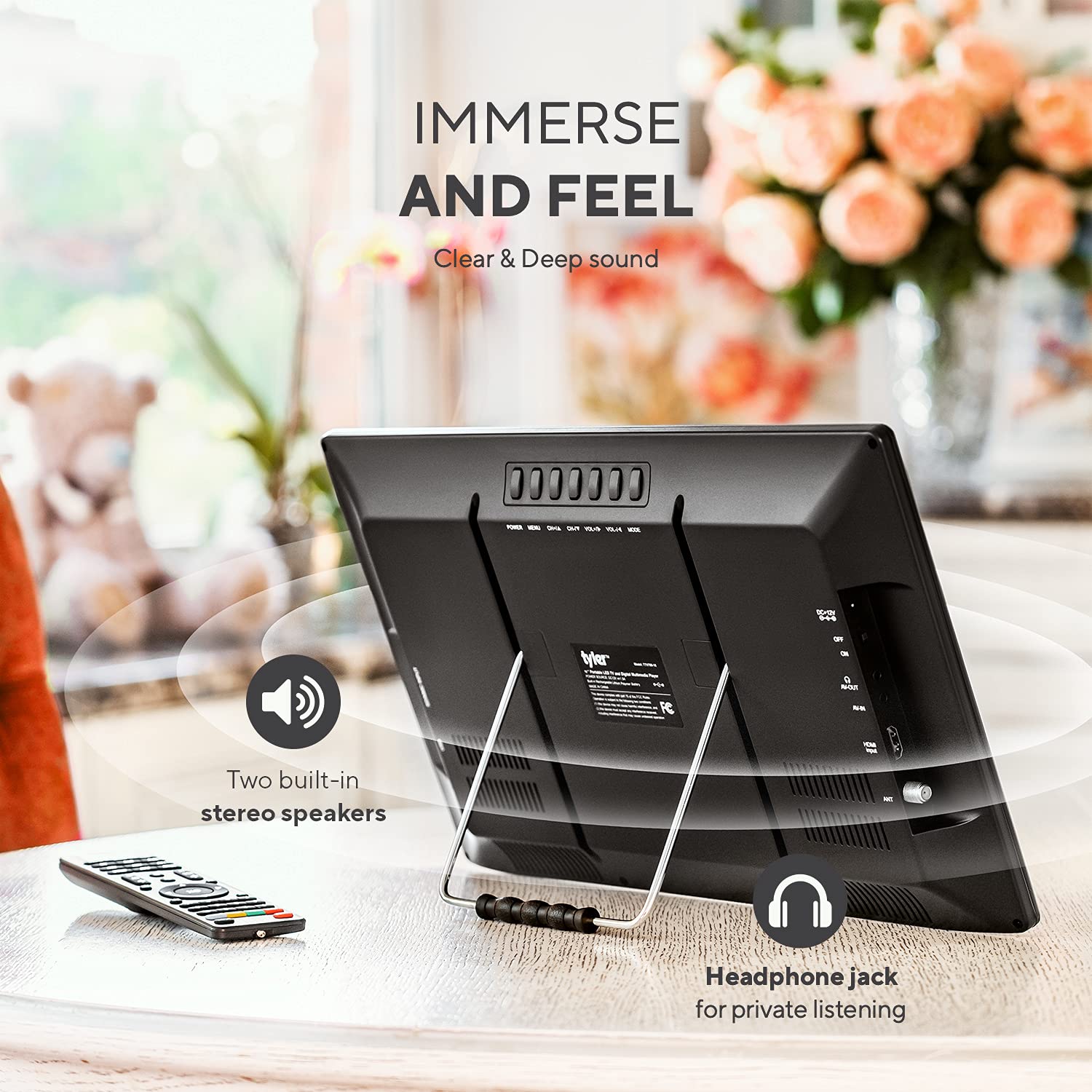
Image: The rear of the TV, indicating the location of the headphone jack for private listening and the two built-in stereo speakers.
7. Mantentzea
7.1 Unitatea garbitzea
Garbitu pantaila eta casinOihal leun, lehor eta lihorik gabeko batekin garbitu. Orba egoskorrak izanez gero, garbitu apur batampGarbitu zapiarekin urarekin. Ez erabili garbitzaile urratzailerik, argizaririk edo disolbatzailerik.
7.2 Bateria zaintzea
- Bateriaren iraupena luzatzeko, saihestu bateria maiz erabat deskargatzea.
- If storing the unit for an extended period, charge the battery to approximately 50% every 3-6 months.
- Ez jarri bateria bero edo hotz handien eraginpean.
8. Arazoak
| Arazoa | Kausa posiblea | Irtenbidea |
|---|---|---|
| Botererik ez | Battery discharged; Power adapter not connected; Remote control batteries dead. | Charge the battery; Connect the power adapter; Replace remote control batteries. |
| No signal/Poor picture quality | Antenna not connected or positioned correctly; No channel scan performed; Weak broadcast signal. | Connect/adjust antenna; Perform auto channel scan; Try repositioning the TV or antenna. |
| Soinurik ez edo bolumen txikia | Volume too low; Mute activated; External speakers/headphones not connected properly. | Increase volume; Deactivate mute; Check external audio connections. Note: Built-in speakers are designed for portability and may not offer high fidelity. |
| HDMI input not working | Incorrect input source selected; Faulty HDMI cable; External device not powered on. | Select correct HDMI input; Try a different HDMI cable; Ensure external device is on. |
| Pixel hilak edo lerroak pantailan | Manufacturing defect or physical damage. | Jarri harremanetan bezeroarentzako laguntza eskatzeko. |
| Urruneko kontrolak ez du erantzuten | Bateriak agortuta edo gaizki sartuta daude; urrutiko agintearen eta telebistaren arteko oztopoa. | Aldatu bateriak; Ziurtatu telebistaren IR hargailuarekiko ikusmen-lerro garbia dagoela. |
9. Zehaztapenak
| Ezaugarri | Xehetasuna |
|---|---|
| Modelo zenbakia | T709 |
| Pantailaren tamaina | 16 hazbete |
| Bistaratzeko Teknologia | LCD, LED |
| Ebazpena | 1080p |
| Freskatze tasa | 60 Hz |
| Aspektu-erlazioa | 16:9 |
| Konektibitatea | HDMI, USB, VGA, RCA (AV In/Out), Headphone Jack, FM Antenna |
| Energia iturria | AC/DC Adapter, 12V Car Charger, Built-in Lithium Ion Battery |
| Bateriaren iraupena | Approximately 4+ hours (TV playback), 25 minutes (HDMI with DVD player) |
| Produktuaren neurriak | 1"D x 1"W x 2"H (Note: These dimensions are as provided in product data and may refer to packaging or a specific component.) |
| Pisua | 4.35 kilo |
| Fabrikatzailea | Tyler |
10. Bermea eta Laguntza
10.1 Bermearen informazioa
This product is covered by a manufacturer's warranty. Please refer to the warranty card included in your package or visit the official Tyler webwebgunean bermearen baldintza zehatzak ikusteko. Gorde erosketaren frogagiria bermearen erreklamazioetarako.
10.2 Bezeroarentzako laguntza
For technical assistance, troubleshooting not covered in this manual, or warranty inquiries, please contact Tyler customer support. Contact details can typically be found on the manufacturer's webgunean edo produktuaren ontzian.
Oharra: Eskuliburu honetan ez da harremanetarako informazio zehatzik ematen. Mesedez, kontsultatu produktuaren ontziratzea edo fabrikatzailearen eskuliburua. webwebgunean laguntza-xehetasun eguneratuenak lortzeko.