
Sarrera
This manual provides comprehensive instructions for the setup, operation, and maintenance of your POLONO PL60 Thermal Label Printer. Please read this guide thoroughly before using the printer to ensure optimal performance and longevity.
Paketearen edukia
Egiaztatu behean zerrendatutako elementu guztiak zure paketean sartuta daudela:
- 1 Grey POLONO PL60 Thermal Label Printer
- 1 Elikatze-kablea
- 1 USB kable
- 1 U Disk (containing printer driver, installation guide, setup guide, and user manual)
- 1 Hasierako gida azkarra
- 10pcs 4"x6" Labels (sample)

Image: All components included in the POLONO PL60 printer package, including the printer, cables, U disk, quick start guide, and sampetiketak.
Konfigurazio Argibideak
- Connect Power and USB Cable: Connect the power cord to the printer and a power outlet. Connect the USB cable from the printer to your computer (Windows or Mac).

Image: Step 1 of setup, showing the power and USB cables being connected to the printer.
- Instalatu kontrolatzailea: Insert the included U Disk into your computer. Install the printer driver. Alternatively, download the latest driver from the official POLONO website. The printer is compatible with Windows and Mac operating systems. Note: This printer does not support Bluetooth or Chromebook.

Image: The POLONO PL60 printer connected to a laptop, indicating compatibility with Mac and Windows systems.
- Kargatu etiketak: Open the printer cover. Place the thermal labels into the label compartment, ensuring the print side faces up. Adjust the label guides to fit the label width snugly. Close the cover.

Image: Step 3 of setup, demonstrating how to load labels into the printer's compartment.
- Automatic Label Alignment: After loading labels and closing the cover, press the feed button on the printer. The printer will automatically detect the label size and align the labels for printing.

Image: The POLONO PL60 printer with labels loaded, showing the automatic label detection feature.
Funtzionamendu-argibideak
Etiketak inprimatzea
The POLONO PL60 printer uses advanced thermal direct technology, eliminating the need for ink or toner. It supports label widths from 1.57 inches (40 mm) to 4.65 inches (118 mm).
- Prestatu zure dokumentua: Ensure your label design or shipping label is correctly formatted for a 4x6 inch label (or other supported sizes).
- Hautatu inprimagailua: In your computer's print dialog, select "POLONO PL60" as your printer.
- Inprimatzeko ezarpenak: Adjust print settings as needed. For optimal print quality, you may need to adjust the print density/darkness and speed in the printer preferences. Slower speeds generally result in better print quality.
- Initiate Print: Click "Print" to send the label to the printer. The printer can achieve speeds of 150mm/s, printing approximately 72 labels per minute.

Image: The POLONO PL60 printer printing a label, highlighting its high efficiency and print quality.
Adjusting Print Darkness and Speed (Windows Example)
To customize print quality, follow these steps:
- Go to your computer's Ezarpenak > Inprimagailuak eta eskanerrak.
- Hautatu POLONO Label Printer eta egin klik Kudeatu.
- Joan zaitez Inprimagailuaren hobespenak.
- urtean Ezarpen aurreratua leihoa, egin klik gainean Abiadura eta hautatu Customize Print Speed. Adjust the slider to a slower speed for better print quality.
- Similarly, adjust Iluntasuna settings to achieve desired label contrast.
Video: Instructions on how to adjust the print darkness settings for the POLONO PL60 printer.
Onartutako etiketa tamainak
The printer supports various label sizes, including:
- 4"x6"
- 3"x2"
- 3"x1"
- 2"x1"
- 2-5/16" x 4"
- 2.25"x1.25"
- 2-inch round labels
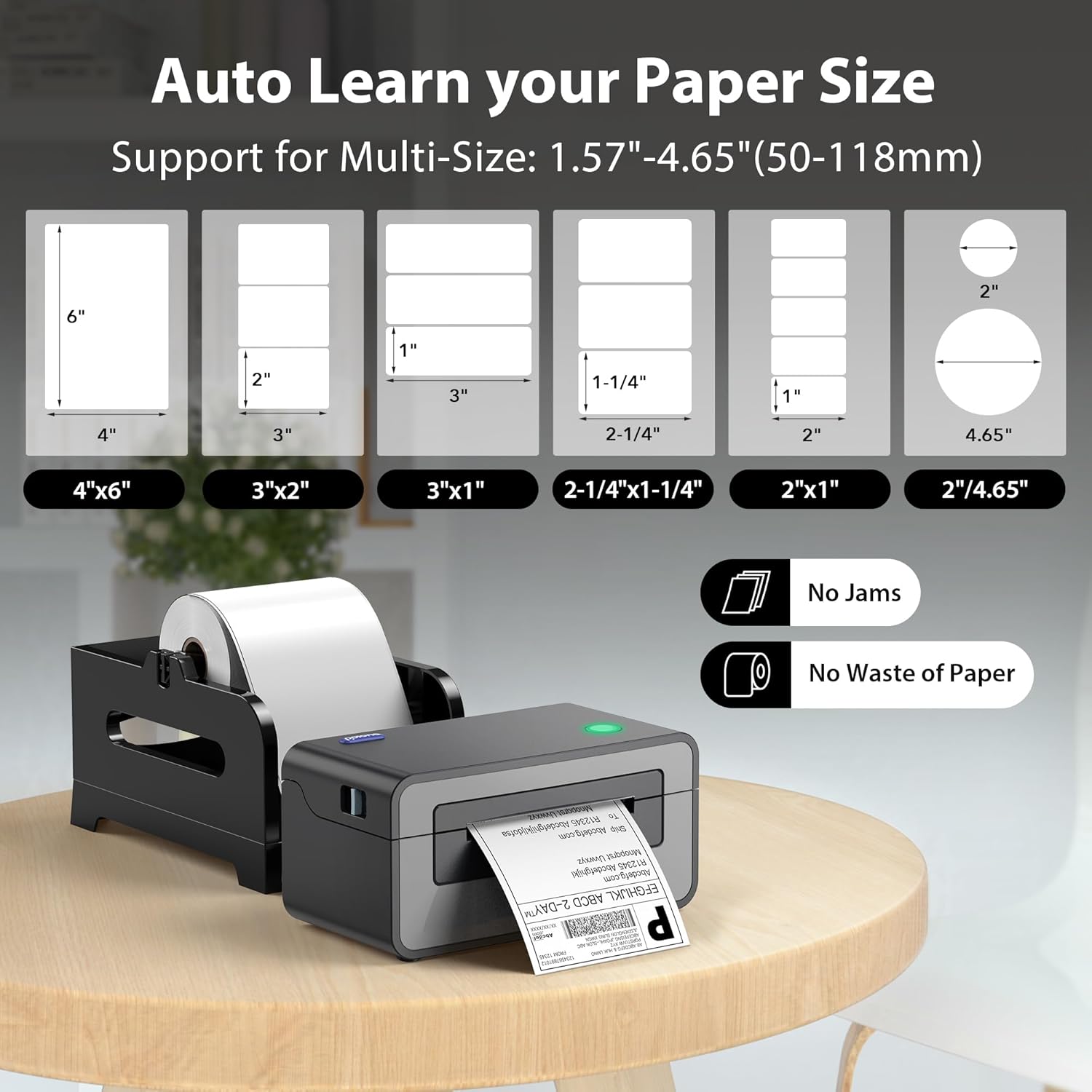
Image: Visual representation of different label sizes that the POLONO PL60 printer can automatically detect and print.
Mantentzea
The POLONO PL60 is a thermal direct printer, meaning it does not require ink cartridges or toner. This simplifies maintenance significantly.
- Inprimatzeko burua garbitzea: Periodically clean the print head with an alcohol wipe to ensure clear print quality. Refer to the detailed user manual on the U Disk for specific cleaning instructions.
- Garbiketa orokorra: Keep the printer free from dust and debris. Use a soft, dry cloth to wipe the exterior.
Arazoak konpontzea
Ohiko arazoak eta irtenbideak
- Printer Not Responding / Not Printing:
- Ensure the power cord and USB cable are securely connected.
- Verify the printer is turned on (indicated by the LED light).
- Check if the correct printer driver is installed and updated.
- For Mac users experiencing issues, try uninstalling the driver, deleting the printer from your computer settings, then reinstalling the driver from the provided U Disk and re-adding the printer.
- Inprimatze-kalitate desagertzen edo eskasa:
- Adjust the print darkness setting in your printer preferences (refer to "Adjusting Print Darkness and Speed" section).
- Ziurtatu kalitate handiko etiketa termikoak erabiltzen dituzula.
- Garbitu inprimatze-burua Mantentze-lanak atalean azaltzen den bezala.
- Labels Not Feeding Correctly / "Out of Labels" Error:
- Ensure labels are loaded correctly with the print side up.
- Adjust the label guides to fit the label width.
- Press the feed button to allow the printer to automatically detect and align the labels.
Zehaztapenak
| Ezaugarri | Xehetasuna |
|---|---|
| Marka | POLONO |
| Ereduaren izena | PL60 |
| Konektibitate Teknologia | USBa |
| Inprimatzeko Teknologia | Termikoak |
| Kolorea | Grisa |
| Inprimagailuaren irteera | Monokromoa |
| Inprimatzeko abiadura maximoa (monokromoa) | 150mm/s (72 labels/minute) |
| Elementuaren pisua | 1.9 kilogramo |
| Produktuaren neurriak (L x W x H) | 11.5" x 6" x 6" |
| Ebazpena | 203 x 203 DPI |
| Gehienezko euskarriaren tamaina | 4 x 6 hazbete |
| Onartutako paper-tamainak | 4"x6", 3"x2", 3"x1", 2"x1", 2.25"x1.25", 2-5/16" x 4", 2" Circle Inches |
| Gailu bateragarriak | Laptops, Mac, PC, Windows |
Bermea eta Laguntza
The POLONO PL60 Thermal Label Printer comes with a Urtebeteko fabrikatzailearen berme mugatua.
For further assistance, detailed user manuals, and driver downloads, please refer to the included U Disk or visit the official POLONO webgunea.
Era berean, sar zaitezke Erabiltzailearen gida (PDF) informazio gehigarrirako.


