
Sarrera
This manual provides essential information for setting up, operating, and maintaining your NiPoGi Mini PC Stick T6 PRO 6-128. Please read it carefully before using the device to ensure optimal performance and longevity. The NiPoGi Mini PC Stick is a compact and powerful micro desktop computer designed for various tasks, including web browsing, media consumption, office work, and light gaming.
Paketearen edukia
Egiaztatu elementu guztiak paketean daudela:
- 1 x NiPoGi Mini PC Stick
- 1 x korronte egokitzailea
- 1 x HDMI Extension Cable
- 1 x Erabiltzailearen eskuliburua
- 1 x VESA Mount Bracket
Produktua amaituview
The NiPoGi Mini PC Stick T6 PRO 6-128 is a highly portable and efficient computing solution. Its compact design allows it to be easily carried for travel or business. It features a robust cooling system and a variety of connectivity options.

Irudia: Amaituview of the NiPoGi Mini PC Stick, highlighting its various ports including USB 3.0, HDMI, and Ethernet, along with the power button.
Ezaugarri nagusiak:
- Sistema eragilea: Pre-installed Windows 10 Pro (upgradeable to Windows 11).
- Prozesadorea: Intel Celeron J4125 Quad-Core (up to 2.7 GHz).
- Memoria: 6 GB DDR4 RAM.
- Biltegiratzea: 128GB eMMC.
- Grafikoak: Intel UHD Graphics 600 with 4K UHD @60Hz support via HDMI 2.0.
- Konektibitatea: Dual-Band Wi-Fi (2.4G/5G), Gigabit Ethernet, Bluetooth 4.2.
- Portuak: 2x USB 3.0 ports, 1x HDMI port, 1x Gigabit Ethernet port.
- Ezaugarri bereziak: Supports Wake on LAN, PXE, Auto Power On, RTC Wake.

Irudia: The compact size of the Mini PC Stick, measuring approximately 4.7 x 1.9 x 0.7 inches (12 x 5 x 1.8 cm).
Hozteko sistema:
The device incorporates a built-in fan designed for rapid heat dissipation and low noise operation, ensuring stable performance during extended use.
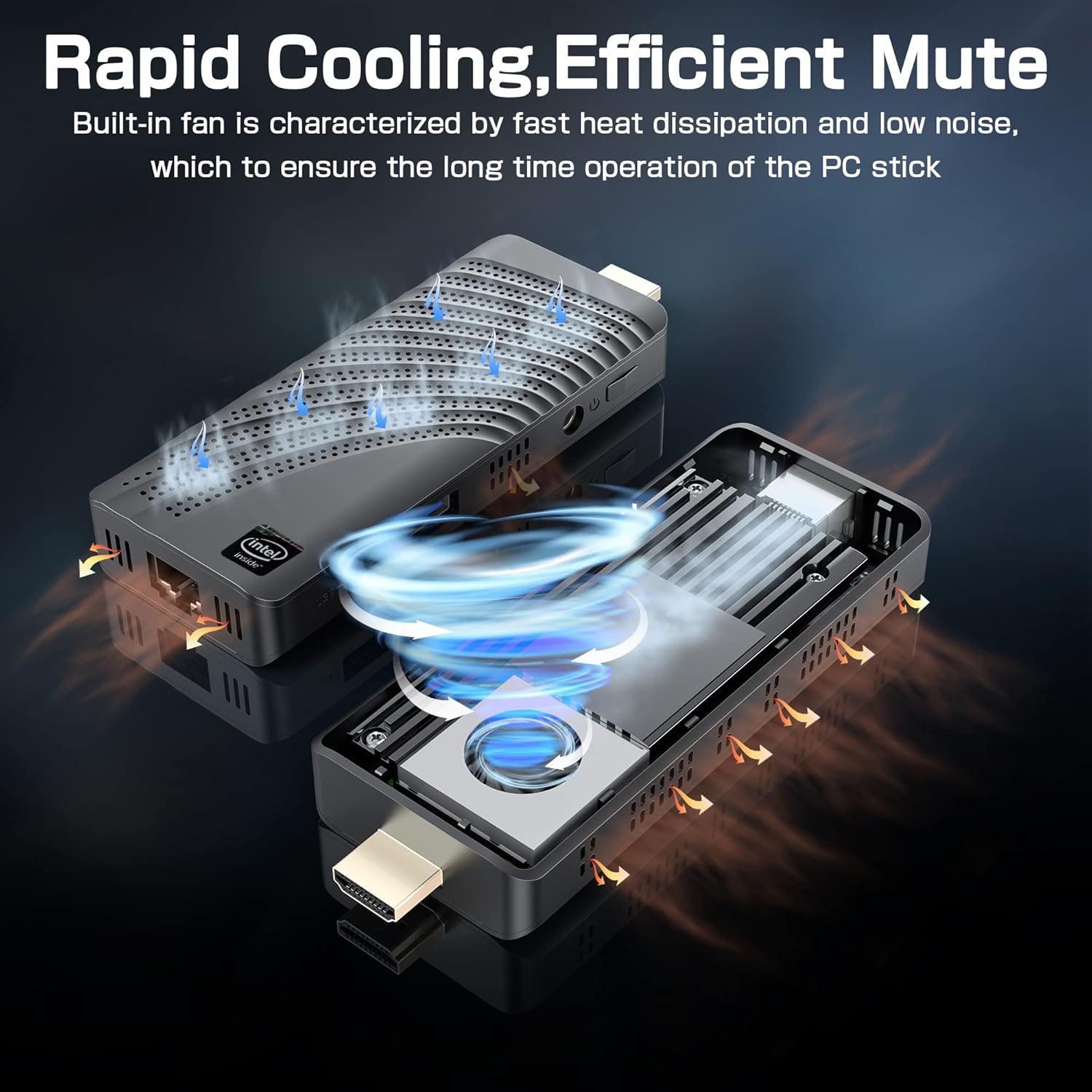
Irudia: An illustration showing the internal fan design and airflow for efficient cooling within the Mini PC Stick.
Konfigurazio Gida
Follow these steps to set up your NiPoGi Mini PC Stick:
- Konektatu pantailara: Plug the Mini PC Stick directly into an HDMI port on your monitor or TV. If space is limited, use the provided HDMI extension cable.

Irudia: A visual guide demonstrating how to connect the Mini PC Stick to a monitor using the HDMI port, with an option to use an extension cable.
- Konektatu energia: Connect the power adapter to the DC-in port on the Mini PC Stick and then plug it into a power outlet.
- Konektatu periferikoak: Connect your USB keyboard and mouse to the available USB 3.0 ports. Alternatively, pair Bluetooth devices (keyboard, mouse, speakers) after initial setup.
- Piztu: Press the power button on the side of the Mini PC Stick. The device will boot up, and the Windows 10 Pro operating system will load.
- Hasierako Windows konfigurazioa: Jarraitu pantailan agertzen diren argibideei Windows 10 Pro konfigurazioa osatzeko, hizkuntza, eskualdea, sareko konexioa eta erabiltzaile-kontua sortzea barne.
Funtzionamendu-argibideak
Sareko konexioa:
- Wi-Fi: The Mini PC Stick supports dual-band 2.4G/5G Wi-Fi. During Windows setup or via network settings, connect to your preferred wireless network.
- Ethernet: For a stable wired connection, plug an Ethernet cable into the Gigabit Ethernet port on the device.

Irudia: Icons representing Dual-band WiFi and Gigabit Ethernet connectivity options for the Mini PC Stick.
Bluetooth gailuak:
The Mini PC Stick features Bluetooth 4.2, allowing connection to various peripherals such as keyboards, mice, and speakers. Access Bluetooth settings in Windows to pair new devices.

Irudia: The Mini PC Stick demonstrating its Bluetooth 4.2 compatibility with over 10 types of devices, including monitors, TVs, speakers, and various input devices.
4K UHD Output:
The device supports 4K UHD resolution at 60Hz via its HDMI 2.0 port, providing a clear and smooth visual experience for compatible displays.

Irudia: A visual representation of the advanced image decoding and processing techniques, showcasing smooth and natural 4K HD picture quality.
Ezaugarri aurreratuak:
- Esnatu LAN sarean: Allows the device to be powered on remotely over a network.
- PXE abiarazte: Enables booting from a network server.
- Pizte automatikoa: Configures the device to automatically power on when connected to power.
- RTC Wake: Schedules the device to wake up at a specific time.
These features can typically be configured in the BIOS settings. Refer to the Windows documentation for specific instructions on accessing and modifying these settings.
Mantentzea
- Garbiketa: Use a soft, dry cloth to clean the exterior of the device. Avoid liquid cleaners. Ensure ventilation holes are free from dust to maintain optimal cooling.
- Software eguneraketak: Egiaztatu eta instalatu aldizka Windows eguneraketak sistemaren egonkortasuna, segurtasuna eta errendimendua bermatzeko.
- Ingurumen-baldintzak: Operate the Mini PC Stick in a well-ventilated area, away from direct sunlight, heat sources, and excessive moisture.
Arazoak konpontzea
Ez dago pantailarik:
- Ensure the HDMI cable is securely connected to both the Mini PC Stick and the display.
- Egiaztatu pantaila HDMI sarrera-iturri zuzenera konfiguratuta dagoela.
- Try a different HDMI cable or display if possible.
Potentziarik gabe:
- Check if the power adapter is correctly plugged into the device and a working power outlet.
- Ensure the power button has been pressed.
- Saiatu beste korronte bat.
Sarearen konexio arazoak:
- Wi-Fi: Check if Wi-Fi is enabled in Windows settings. Restart your router. Ensure you are within range of your Wi-Fi network.
- Ethernet: Verify the Ethernet cable is properly connected. Check your router/modem status.
Errendimendu motela:
- Itxi atzeko planoan exekutatzen ari diren beharrezkoak ez diren aplikazioak.
- Ensure the device has adequate ventilation and is not overheating.
- Run Windows updates and disk cleanup.
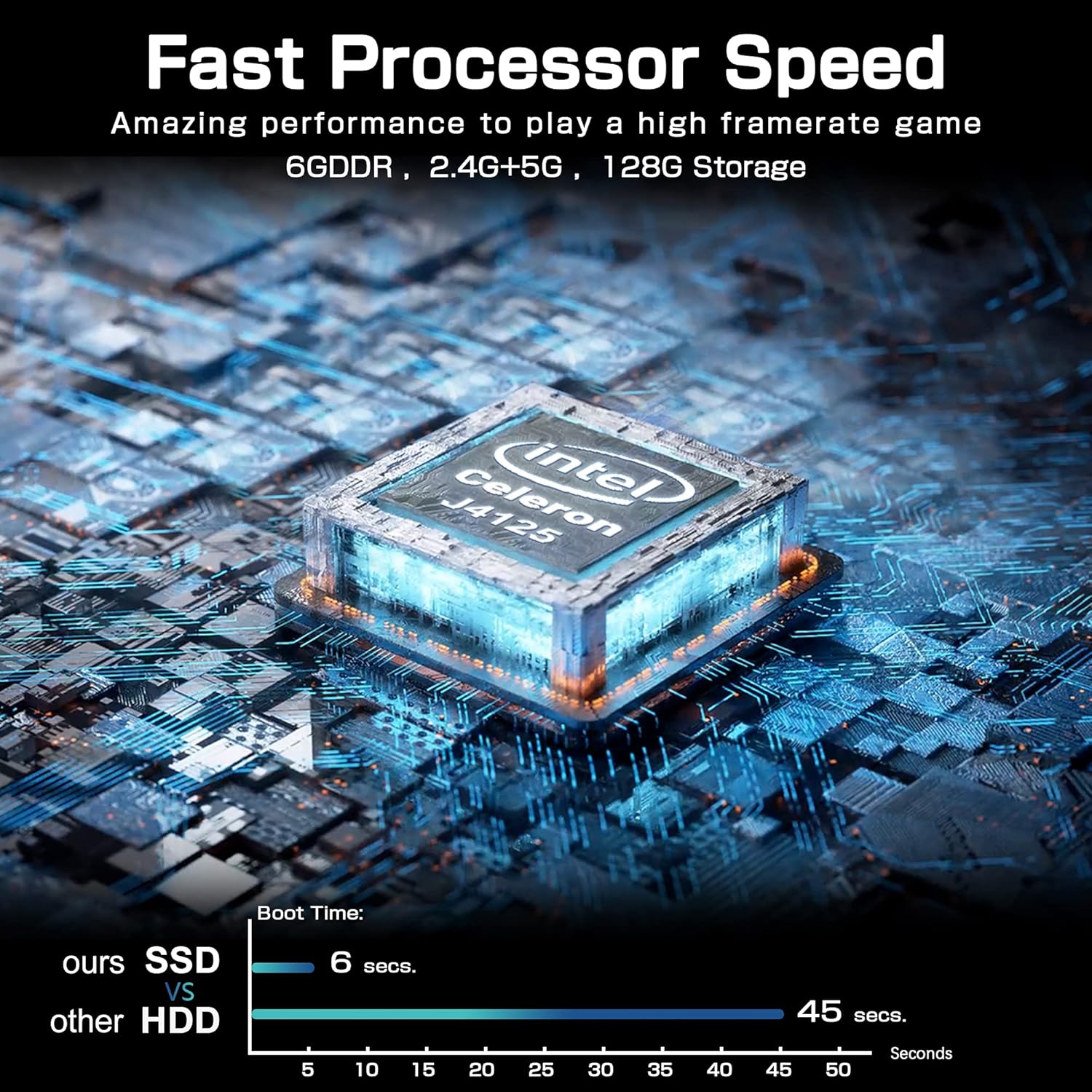
Irudia: A comparison chart illustrating the fast boot time of the Mini PC Stick (6 seconds) compared to traditional HDD systems (45 seconds).
Zehaztapenak
Detailed technical specifications for the NiPoGi Mini PC Stick T6 PRO 6-128:
| Ezaugarri | Zehaztapena |
|---|---|
| Marka | NiPoGi |
| Modelo zenbakia | T6 PRO 6-128 |
| Sistema eragilea | Windows 10 Pro |
| CPU eredua | Intel Celeron J4125 |
| CPU Abiadura | 2.7 GHz (Burst) |
| Prozesadore kopurua | 4 |
| Koprozesadore grafikoa | Intel UHD Graphics 600 |
| RAM memoria instalatuaren tamaina | 6 GB |
| RAM Memoria Teknologia | DDR4 SDRAM |
| Biltegiratze Ahalmena | 128 GB eMMC |
| Disko gogorreko interfazea | USB 3.0 |
| Bideo Irteerako Interfazea | HDMI |
| HDMI portuak guztira | 1 |
| USB portuak guztira | 2 |
| Konektibitate Teknologia | Ethernet, WiFi Built-in, Bluetooth, USB |
| Haririk gabeko mota | 802.11a/b/g/n/ac (Dual-Band Wi-Fi) |
| Bluetootha | Bluetooth 4.2 |
| Gehienezko pantailaren bereizmena | 3840 x 2160 (4K UHD) |
| Produktuaren neurriak (L x W x H) | 10 x 4 x 3 cm (3.94 x 1.57 x 1.18 hazbete) |
| Elementuaren pisua | 390 gramo (0.86 libera) |
| Ezaugarri bereziak | Auto Power On, Wake On LAN, PXE, RTC Wake |
Bermea eta Laguntza
For warranty information and technical support, please refer to the documentation included with your product or visit the official NiPoGi webgunea. Bermearen baldintza espezifikoak eskualdearen eta saltzailearen arabera alda daitezke.