
1. Sarrera
The Temtop LKC-1000S+ is a versatile 10-in-1 air quality detector designed to monitor various environmental parameters. This device provides accurate measurements for PM2.5, PM10, particle count, HCHO (Formaldehyde), TVOC, AQI (Air Quality Index), temperature, and humidity. It features a clear TFT screen for easy readability, data export capabilities, and a histogram display for historical data. This manual will guide you through the proper use and maintenance of your LKC-1000S+ detector.
2. Produktuaren ezaugarriak
- 10-in-1 Monitorizazioa: Measures PM2.5, PM10, Particles, HCHO, TVOC, AQI, Temperature, and Humidity.
- Sentsoreen teknologia aurreratua: Equipped with a 3rd generation Temtop laser particle sensor and optimized PSO algorithm for accurate and stable particle measurements, with a sensor life of up to 20,000 hours.
- High-Precision Formaldehyde Detection: Features a pre-calibrated electrochemical sensor for precise capture of formaldehyde molecules.
- Erabiltzaileentzako pantaila: Large TFT screen with rich display options and a battery indicator light for clear readability.
- Historical Data Analysis: New histogram function displays concentration changes of tested objects over the past 12 hours.
- Datuen esportazioa: Supports data export for detailed analysis and record-keeping.

Image: The Temtop LKC-1000S+ detector highlighting its 10-in-1 air quality monitoring functions, including PM2.5, PM10, Particles, HCHO, TVOC, AQI, Temperature, Humidity, and Data Export.
3. Paketearen edukia
Mesedez, egiaztatu elementu guztiak paketean daudela:
- Temtop LKC-1000S+ Air Quality Monitor
- USB kargatzeko kablea (Mikro USB)
- Argibide eskuliburua
- Biltegiratze-kutxa
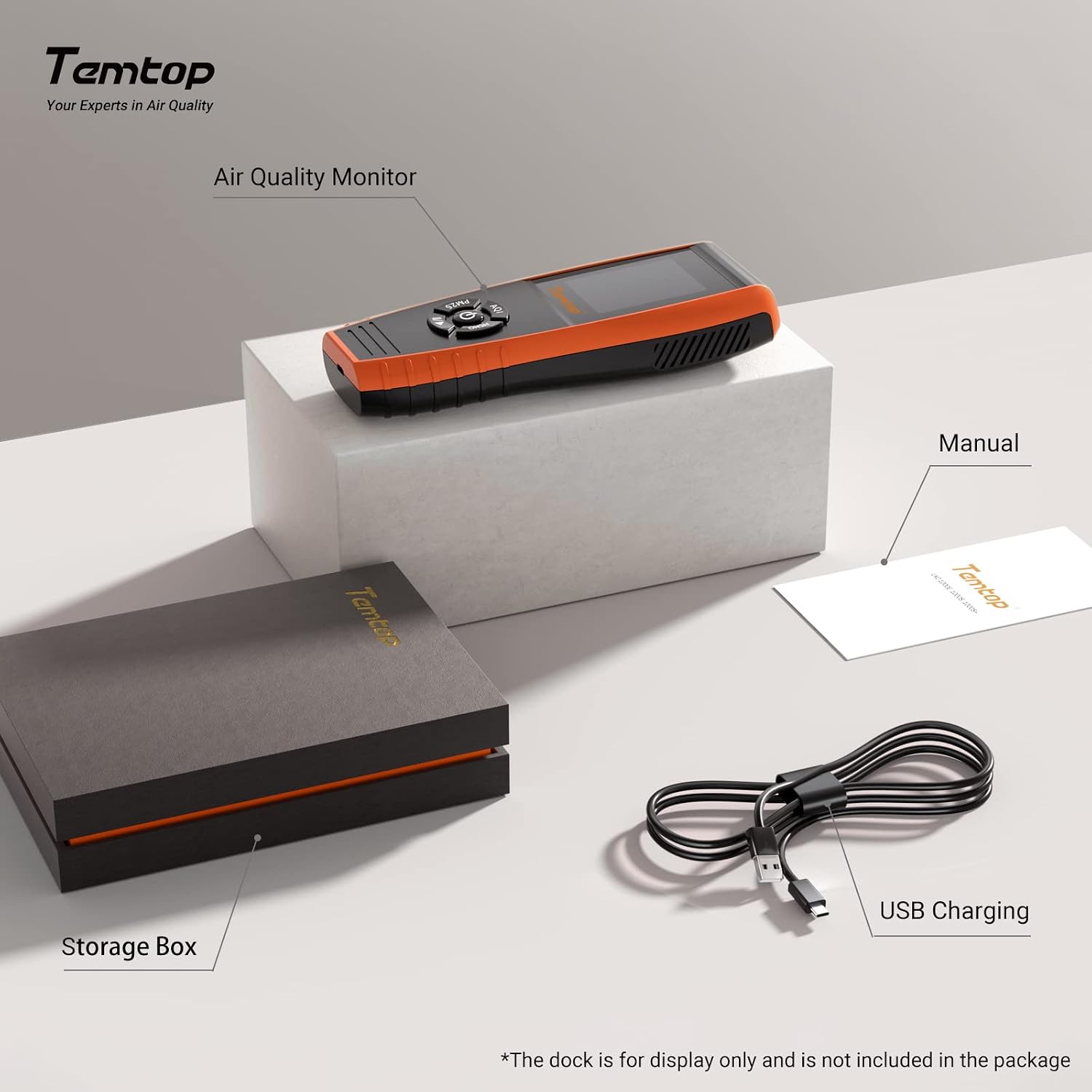
Image: The Temtop LKC-1000S+ air quality monitor, its storage box, the instruction manual, and the USB charging cable.
4. Gailua amaitu daview
Familiarize yourself with the components and controls of your LKC-1000S+ detector:

Image: Labeled diagram of the Temtop LKC-1000S+ device, indicating the Air Outlet, Air Inlet, LCD Screen, AQI/Temp & Humi button, PM2.5/PM10/Particles button, HCHO/TVOC button, and USB Port.
- Aire irteera: Where processed air exits the device.
- Aireko sarrera: Where ambient air enters the device for sampling.
- LCD pantaila: Displays all measurement readings and device status.
- AQI / Temp & Humi Button: Press to cycle through Air Quality Index, Temperature, and Humidity displays. Double-click for histogram.
- PM2.5 / PM10 / Particles Button: Press to cycle through PM2.5, PM10, and Particle count displays. Double-click for histogram.
- HCHO / TVOC Button: Press to cycle through Formaldehyde and TVOC displays. Double-click for histogram.
- USB ataka: Micro USB port for charging and data export.

Irudia: Leherketa bat view illustrating the internal components of the Temtop LKC-1000S+, detailing the Dart electrochemical HCHO sensor, Sensirion temperature and humidity sensor, and the 3rd Generation Temtop Laser PM2.5 Sensor.
5. Konfigurazioa
- Hasierako karga: Before first use, fully charge the device using the provided USB cable and a standard USB power adapter (not included). The battery indicator on the screen will show charging status.
- Piztu: Press and hold the power button (usually located in the center of the control panel) for a few seconds until the screen illuminates.
- Hasierako Kalibrazioa: For optimal accuracy, allow the device to run for at least 5-10 minutes in a well-ventilated area after powering on, especially for HCHO and TVOC readings. This allows the sensors to stabilize.
6. Funtzionamendua
6.1 Taking Readings
Once powered on, the device will automatically begin monitoring. The main screen displays real-time readings for various parameters.
- Use the dedicated buttons (AQI / Temp & Humi, PM2.5 / PM10 / Particles, HCHO / TVOC) to switch between different measurement displays.
- The screen will show the current concentration or value for the selected parameter.
6.2 Pantaila ulertzea
The large TFT screen provides clear information:
- Martxan jartzeko egoera: Indicates the device is actively monitoring.
- Bateria adierazlea: Bateriaren iraupena erakusten du.
- Neurketa Unitateak: Clearly displayed (e.g., ug/m³ for PM2.5/PM10, mg/m³ for HCHO/TVOC).
- AQI Level: Provides an overall air quality assessment (e.g., Good, Moderate, Unhealthy).
6.3 Histogram Function
To view the historical data histogram for a specific parameter:
- Double-click the corresponding button (AQI / Temp & Humi, PM2.5 / PM10 / Particles, or HCHO / TVOC).
- The screen will display a graph showing the concentration changes over the past 12 hours.
7. Parameter Comparison
The LKC-1000S+ offers a comprehensive set of monitoring capabilities compared to other models:

Image: A comparison table detailing the monitoring parameters available across different Temtop air quality monitor models, including PM2.5, PM10, HCHO, Particle Count, AQI, TVOC, Temperature & Humidity, Histogram, and Data Export.
| Parametroa | LKC-1000S+ | LKC-1000S | LKC-1000E | P600 |
|---|---|---|---|---|
| PM2.5 | ✓ | ✓ | ✓ | ✓ |
| PM10 | ✓ | ✓ | ✓ | ✓ |
| HCHO | ✓ | ✓ | ||
| Partikula kopurua | ✓ | ✓ | ✓ | |
| AQI | ✓ | ✓ | ✓ | |
| TVOC | ✓ | ✓ | ||
| Temp & Humi | ✓ | ✓ | ✓ | |
| Histograma | ✓ | ✓ | ||
| Datuen esportazioa | ✓ |
8. Air Quality Index Interpretation
The device provides an Air Quality Index (AQI) and specific parameter levels based on EPA & WHO Air Quality Standards. Refer to the tables below for interpretation:

Image: Detailed tables outlining the Air Quality Index (AQI) categories and corresponding concentration ranges for PM2.5, PM10, HCHO, and TVOC, based on EPA and WHO standards.
| PM2.5 (ug/m³) | PM10 (ug/m³) | AQI* | Aurkibidea |
|---|---|---|---|
| 0-12 | 0-54 | 0-50 | Ona |
| 12.1-35.4 | 55-154 | 51-100 | Moderatua |
| 35.5-55.4 | 155-254 | 101-150 | Osasungaitza talde sentikorrentzat |
| 55.5-150.4 | 255-354 | 151-200 | Osasungaitza |
| 150.5-250.4 | 355-424 | 201-300 | Oso Osasungaitza |
| ≥250.5 | ≥425 | ≥301 | Arriskutsuak |
| HCHO (mg/m³) | Maila | TVOC (mg/m³) | Maila |
|---|---|---|---|
| 0-0.1 | Ona | 0-0.5 | Ona |
| >0.1 | Pobrea | >0.5 | Pobrea |
9. Data Storage & Export
The LKC-1000S+ is equipped with internal memory and a data export function:

Image: The Temtop LKC-1000S+ monitor next to a laptop screen showing exported data in a spreadsheet format, illustrating the device's data storage and export capabilities.
- Memoria: The device's memory allows for at least 3 months of continuous data recording.
- Datuen esportazioa: Connect the device to a computer using the provided USB cable to export recorded data. Specific software or drivers may be required, refer to the official Temtop webxehetasunak lortzeko gunea.
10. Mantentzea
To ensure the longevity and accuracy of your air quality detector, follow these maintenance guidelines:
- Garbiketa: Erabili zapi leun eta lehor bat gailuaren kanpoaldea garbitzeko. Ez erabili garbitzaile edo disolbatzaile urratzailerik.
- Sentsoreen zainketa: Avoid exposing the air inlets and outlets to dust, lint, or liquids, as this can affect sensor performance. Do not attempt to clean the internal sensors.
- Biltegiratzea: When not in use for extended periods, store the device in its original storage box in a cool, dry place away from direct sunlight and extreme temperatures.
- Kargatzen: Kargatu bateria aldizka, maiz erabiltzen ez bada ere, bateriaren osasuna mantentzeko.
11. Arazoak
If you encounter issues with your Temtop LKC-1000S+, consider the following:
- Irakurketa okerrak: Ensure the device has been allowed sufficient time to stabilize after power-on. Move the device to a different location to rule out localized anomalies. Avoid placing it near strong air currents, heat sources, or chemical fumes.
- Gailua ez da pizten: Check if the battery is charged. Connect the device to a power source using the USB cable and try again.
- Pantailak ez du erantzuten: Try restarting the device by holding the power button. If unresponsive, allow the battery to fully discharge and then recharge before attempting to power on again.
- Datuak esportatzeko arazoak: Ensure the USB cable is securely connected to both the device and the computer. Verify that any necessary drivers or software are installed on your computer.
For persistent issues, please contact Temtop customer support.
12. Zehaztapenak
| Ezaugarri | Xehetasuna |
|---|---|
| Bateria | 1 litio ioizko bateria |
| Hizkuntza | ingelesa |
| Produktuaren neurriak | 17.7 x 3.2 x 6.5 cm |
| Elementuaren pisua | 0.47 kilogramo |
| Fabrikatzailea | Temptop |
| Modelo zenbakia | LKC-1000S+ |
| Jatorrizko Herrialdea | Txina |
| Energia iturria | Bateriaren bidez |
| Kolorea | Laranja, Beltza |
| Alarma | Ikusgarria |
| Sentsore mota | elektrokimikoa |
| Unitate kopurua | 1.0 zenbaketa |
| Elementu kopurua | 1 |
13. Bermea eta Laguntza
Temtop provides the following support for your LKC-1000S+ Air Quality Detector:
- Bermea: A 12-month warranty is available from the date of purchase.
- Itzulketak eta trukeak: Free returns and exchanges are available within 3 months of purchase.
For technical support, warranty claims, or further assistance, please refer to the contact information provided on the official Temtop webgunea edo zure erosketa-dokumentazioa.