
1. Sarrera
The DATOUBOSS 2000W Pure Sine Wave Inverter is a high-performance device designed to convert direct current (DC) power from sources like batteries or solar panels into alternating current (AC) power, suitable for operating various household appliances, precision instruments, and electronic devices. This inverter provides a pure sine wave output, ensuring compatibility with sensitive electronics and reducing harmonic distortion. It is equipped with advanced features such as an LCD display for real-time monitoring and a remote control for convenient operation.

Figure 1.1: DATOUBOSS 2000W Pure Sine Wave Inverter, showing the main unit, remote control, and connection cables.
2. Segurtasun informazioa
Please read all safety instructions carefully before installing or operating the inverter. Failure to follow these instructions may result in electric shock, fire, or serious injury.
- Aireztapena: Ziurtatu aireztapen egokia dagoela inbertsorearen inguruan. Ez blokeatu aireztapen-irekidurak.
- Ingurumena: Instalatu inbertsore-makina leku lehor, fresko eta ondo aireztatu batean, eguzki-argitik, bero-iturrietatik eta material sukoietatik urrun.
- Konexioak: All connections must be tight and secure to prevent loose connections that can cause overheating or arcing.
- Lurreratzea: Inbertsoreak behar bezala lurrera konektatuta egon behar du.
- liburukiatage Bateragarritasuna: Ziurtatu sarrerako DC bolumenatage matches the inverter's specifications (48V DC for this model).
- Karga-gaitasuna: Do not exceed the inverter's rated output power (2000W continuous, 4000W peak).
- Mantentzea: Ez saiatu inbertsorea zeuk desmuntatzen edo konpontzen. Deitu zerbitzu-langile kualifikatuei.
3. Produktuaren ezaugarriak
This inverter incorporates several advanced features for optimal performance and safety:
- Uhin sinusoidal hutsaren irteera: Korronte alterno garbi eta egonkorra eskaintzen du, elektronika sentikorrerako egokia.
- Errendimendu handia: Delivers 2000W continuous power with a 4000W peak surge capability.
- Multi-functional LCD Display: Sarrerako bolumena erakusten dutage, irteera voltage, temperature, battery power, frequency, and overload status.
- Urruneko kontrola: Allows convenient power ON/OFF operation from up to 10 meters away.
- Multiple Protection Circuits: Includes protection against low input voltage, gehiegizko bolumenatage, overload, over-temperature, and short circuit.
- Quiet Operation & Durable Design: Features dual cooling fans for efficient heat dissipation and a robust casing for extended lifespan.


3.1. irudia: Xehetasuna view of the multi-functional LCD display and the remote control unit.


Figure 3.2: Illustration of the efficient cooling system and the multi-layer protection features.
4. Paketearen edukia
Mesedez, egiaztatu paketearen edukia jasotzean, elementu guztiak bertan daudela eta kalterik gabe daudela ziurtatzeko:
- DATOUBOSS 2000W Pure Sine Wave Inverter (48V DC to 100V/110V AC)
- Urruneko Aginte Unitatea
- DC Input Cables (Red and Black)
- Erabiltzailearen eskuliburua (dokumentu hau)

Figure 4.1: Included high-quality red and black DC input cables.
5. Konfigurazioa eta instalazioa
Jarraitu urrats hauek konfigurazio eta instalazio egokia egiteko:
- Aukeratu kokapena: Select a cool, dry, and well-ventilated area for the inverter. Ensure it is away from direct sunlight, heat sources, and any flammable materials.
- Muntaketa: Securely mount the inverter on a stable surface using appropriate fasteners. Ensure there is sufficient space around the unit for airflow.
- Connect DC Input Cables:
- Connect the red (+) cable to the positive terminal of the inverter and the positive terminal of your 48V DC power source (battery/solar array).
- Connect the black (-) cable to the negative terminal of the inverter and the negative terminal of your 48V DC power source.
- Ziurtatu konexio guztiak estu eta seguru daudela.
- Lurreratzea: Connect the inverter's grounding terminal to a reliable earth ground.
- Connect AC Output Devices: Plug your AC appliances into the inverter's AC output sockets. Ensure the total power consumption of your devices does not exceed 2000W.
- Remote Control Pairing (if needed): If the remote control is not automatically paired, press and hold the power button on the inverter while simultaneously pressing the ON/OFF button on the remote control until the remote indicator light flashes, indicating successful pairing.

Figure 5.1: Connection diagram illustrating DC input from battery or solar panel and AC output to various devices like lights, phones, computers, and refrigerators.
6. Funtzionamendu-argibideak
Once the inverter is properly installed, follow these steps to operate it:
- Piztu: Press the power button on the inverter or the "ON" button on the remote control. The LCD display will light up, showing various parameters.
- Monitorearen pantaila: LCD pantailak denbora errealeko informazioa ematen du:
- Sarrera boltage (DC): liburukia erakusten dutage from your battery or solar panel.
- Irteera boltage (AC): Displays the converted AC voltage (100V/110V).
- Power Output (W): Konektatutako gailuen uneko energia-kontsumoa adierazten du.
- Maiztasuna (Hz): Shows the output frequency (50Hz/60Hz).
- Tenperatura: Monitors the internal temperature of the inverter.
- Bateria maila: Provides an estimated battery charge level.
- Overload/Error Indicators: Alerts you to potential issues.
- Konektatu etxetresna elektrikoak: Plug your desired AC appliances into the inverter's output sockets.
- Itzali: To turn off the inverter, press the power button on the inverter or the "OFF" button on the remote control. Disconnect appliances before prolonged shutdown.
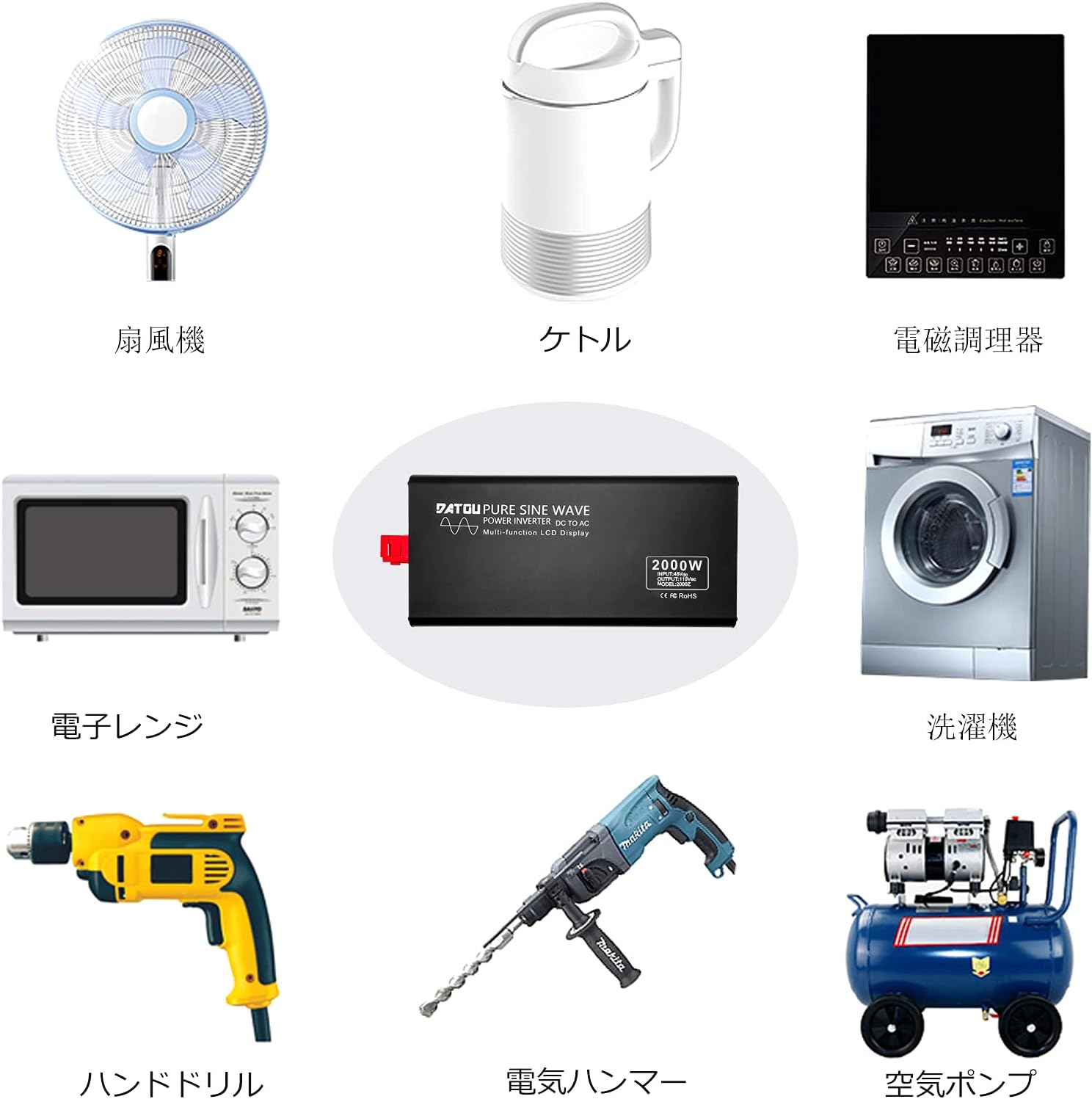
Figure 6.1: The inverter can power a wide range of appliances including fans, kettles, induction cookers, microwave ovens, hand drills, electric hammers, air pumps, air conditioners, washing machines, and refrigerators.
7. Mantentzea
Mantentze-lan erregularrak zure inbertsorearen iraupena eta errendimendu optimoa bermatzen ditu:
- Garbiketa: Aldian-aldian garbitu inbertsorearen kanpoaldea oihal lehor eta leun batekin. Ez erabili garbitzaile likidorik edo disolbatzailerik.
- Aireztapena: Ensure the cooling fans and ventilation openings are free from dust and debris. Clean them gently with compressed air if necessary.
- Konexioak: Regularly check all electrical connections (DC input and AC output) for tightness. Loose connections can cause overheating.
- Biltegiratzea: If storing the inverter for an extended period, disconnect it from all power sources and store it in a cool, dry place.
8. Arazoak
Atal honetan ohiko arazoei eta haien irtenbideei buruzko informazioa aurkituko duzu:
| Arazoa | Kausa posiblea | Irtenbidea |
|---|---|---|
| Inverter does not power on. | No DC input power; Loose connections; Blown fuse; Low battery voltage. | Check battery connections and charge level; Verify all cables are securely connected; Check and replace fuses if necessary. |
| KA irteerarik ez. | Overload protection activated; Over-temperature protection; Short circuit. | Reduce connected load; Allow inverter to cool down; Check for short circuits in connected appliances. |
| LCD pantailak errorea erakusten du. | Specific error code (e.g., "OV" for over-voltage, "LV" for low voltage, "OL" for overload, "OT" for over-temperature). | Refer to the specific error code on the display and consult the corresponding protection feature in Section 3. Address the underlying issue (e.g., adjust input voltage, reduce load, allow cooling). |
| Urruneko kontrola ez dabil. | Not paired; Out of range; Battery low in remote. | Re-pair the remote control (see Section 5); Ensure remote is within 10m range; Replace remote control battery. |
| Haizagailuaren zarata handia da. | High load; High ambient temperature. | This is normal operation as fans activate to cool the unit under load. Ensure proper ventilation. |
9. Zehaztapenak
| Parametroa | Balioa |
|---|---|
| Eredua | 2000W 48V uhin sinusoidal hutseko inbertsorea |
| Etengabeko boterea | 2000W |
| Potentzia gailurra | 4000W |
| DC sarrerako bolumenatage | 48V DC |
| CA irteera boltage | 100V / 110V AC |
| Irteerako maiztasuna | 50Hz / 60Hz (selectable/fixed based on model variant) |
| Uhin forma | Pure Sine Wave (THD ≤ 3%) |
| Urruneko Kontrolaren barrutia | Gehienez 10 metro |
| Produktuaren neurriak | 36 x 17.3 x 7.9 cm |
| Produktuaren pisua | 4 kg |
10. Bermea eta Laguntza
DATOUBOSS products are designed for reliability and performance. For warranty information, technical support, or service inquiries, please contact DATOUBOSS customer service through the retailer where you purchased the product or visit the official DATOUBOSS store on Amazon:
DATOUBOSS Official Store on Amazon.co.jp
Please have your product model and purchase date ready when contacting support.