1. Sarrera
This manual provides essential information for setting up, operating, maintaining, and troubleshooting your Alienware X17 R1 Gaming Laptop. Please read this manual thoroughly to ensure optimal performance and longevity of your device.

Figure 1: Alienware X17 R1 Gaming Laptop
2. Paketearen edukia
Ensure all items are present in your Alienware X17 R1 package:
- Alienware X17 R1 Notebook
- Elikatze-moldagailua
- Elikatze kablea
- Erabiltzailearen eskuliburua (dokumentu hau)
3. Produktua amaitu daview
3.1 Design and Dimensions
The Alienware X17 R1 features a sleek, thin design in Lunar Light (white) with Dark Side of the Moon (black) accents for the keyboard and deck. Its dimensions are approximately 11.79 x 15.72 x 0.82 inches (LxWxH) and it weighs around 7.05 pounds.

Figure 2: Alienware X17 R1 Side Profile
3.2 Portuak eta konektoreak
The Alienware X17 R1 is equipped with a comprehensive set of ports, primarily located at the rear for efficient cable management and thermal performance.
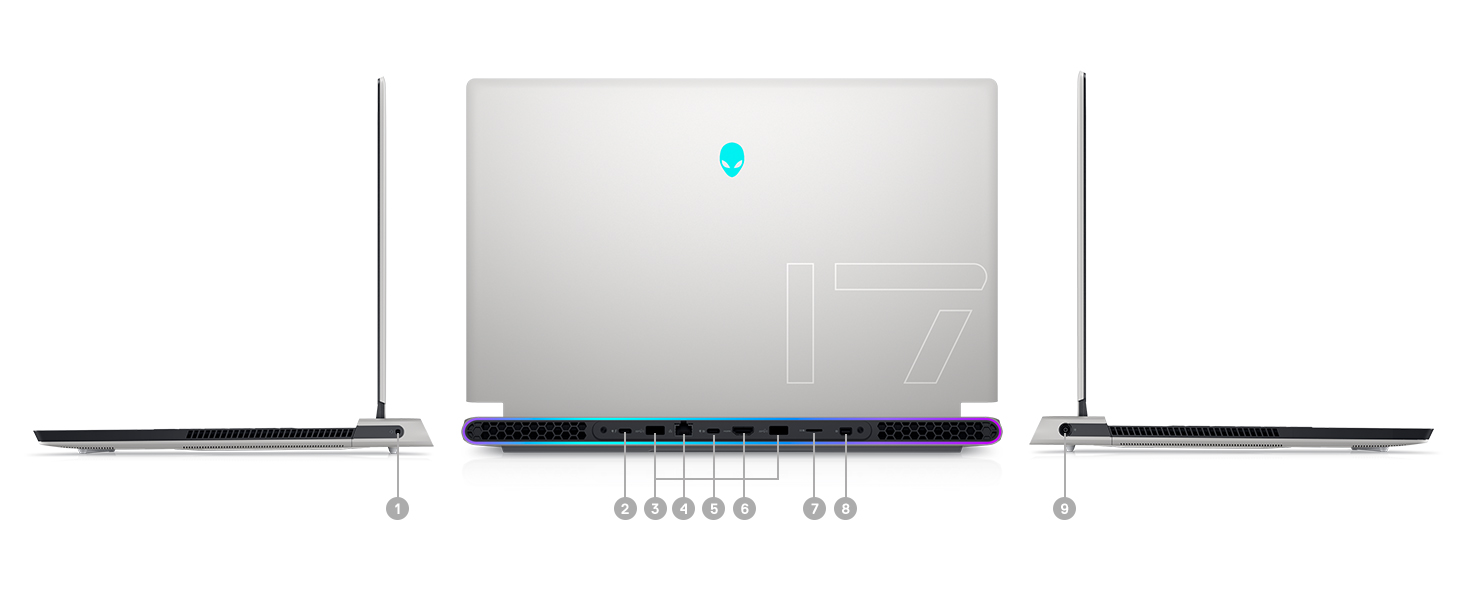
Figure 3: Rear Ports and Connectors
- Power/DC-in Port
- Mini Display Port 1.4
- HDMI 2.1 (for up to 4K/120Hz output)
- Type-C USB 3.2 Gen 2 Port with Power Delivery (5V/3A)
- Killer E3100 RJ-45 2.5G Ethernet
- Mikro SD txartelaren irakurgailua
- USB 3.2 Gen 1 Type-A with Powershare
- Type-C Thunderbolt™ 4/USB 3.2 Gen 2 Port with Power Delivery (5V/3A)
- Global Headset Jack
3.3 Teklatua eta ukipen-panela
The laptop features an AlienFX keyboard with per-key RGB lighting and an AlienFX Lighting design supporting 16.8 million colors. The touchpad is glass, offering solid tracking and responsive gestures.

Figure 4: AlienFX Keyboard and Touchpad
3.4 Bistaratzea
The 17.3-inch Full HD (1920 x 1080) display boasts a 360Hz refresh rate and 1ms response time, enhanced with ComfortView Plus, NVIDIA G-SYNC, and Advanced Optimus for a smooth visual experience.

5 irudia: 360Hz-ko pantaila
3.5 Hozte-sistema
The Alienware X17 R1 incorporates advanced thermal management with its Cryo-Tech™ Technologies. This includes an exclusive Quad Fan design and Element 31, an encapsulated gallium-silicone thermal interface material, to ensure efficient heat dissipation during intensive use.

Figure 6: Cryo-Tech Cooling System
Video 1: Official Alienware X17 R1 Product Overview, highlighting key features including the cooling system.
4. Konfigurazioa
4.1 Hasierako piztea
- Unpack your Alienware X17 R1 laptop and all accessories.
- Connect the power adapter to the laptop's power port and then to a power outlet.
- Open the laptop lid and press the power button (Alienware head logo) to turn on the device.
- Jarraitu pantailan agertzen diren argibideei Windows 11 konfigurazio prozesua osatzeko.
4.2 Periferikoak konektatzea
Utilize the various ports on the rear and sides of the laptop to connect external monitors, keyboards, mice, and other accessories. For optimal display performance, use the HDMI 2.1 or Mini Display Port 1.4 for external monitors.

Figure 7: Connecting External Peripherals
5. Zure ordenagailu eramangarria erabiltzea
5.1 Energiaren kudeaketa
The Alienware X17 R1 offers tailored power states to optimize performance or battery life. These can be managed through the Alienware Command Center software:
- Modu lasaia: Reduces fan noise and power consumption.
- Modu orekatua: Offers a balance between performance and acoustics.
- Abiadura osoko modua: Maximizes fan speed for peak performance.
- Bateria aurrezteko modua: Optimizes settings for extended battery life.
- Errendimendu modua: Prioritizes performance for demanding tasks.
5.2 Windows Hello
The laptop supports Windows Hello for secure and convenient login using facial recognition via the integrated webkamara.
5.3 Alienware Komando Zentroa
This software allows you to customize various aspects of your laptop, including RGB lighting, power profiles, and overclocking settings. It is recommended to keep the software updated for the best experience.

Figure 8: Alienware Command Center
6. Mantentzea
6.1 Garbiketa
- Erabili zapi leun eta lihorik gabeko bat pantaila eta kanpoko gainazalak garbitzeko.
- Marka egoskorretarako, arinki garbituampGarbitu oihal bat urarekin edo pantailarentzat segurua den garbitzaile batekin.
- Garbitu aireztapen-hodiak aldizka hautsa pilatzea saihesteko, hozte-errendimenduan eragina izan baitezake.
6.2 Software eguneraketak
Keep your operating system, drivers, and Alienware Command Center software updated to ensure optimal performance, security, and compatibility. Use the Alienware Update utility or visit the Dell support webazken eguneraketak ikusteko gunea.
6.3 Berritu daitezkeen osagaiak
The Alienware X17 R1 offers upgradable slots for memory and storage:
- 2 x RAM Slots (DDR4)
- 1 x M.2 PCIe Gen 4 SSD Slot
- 1 x M.2 PCIe Gen 3 SSD Slot
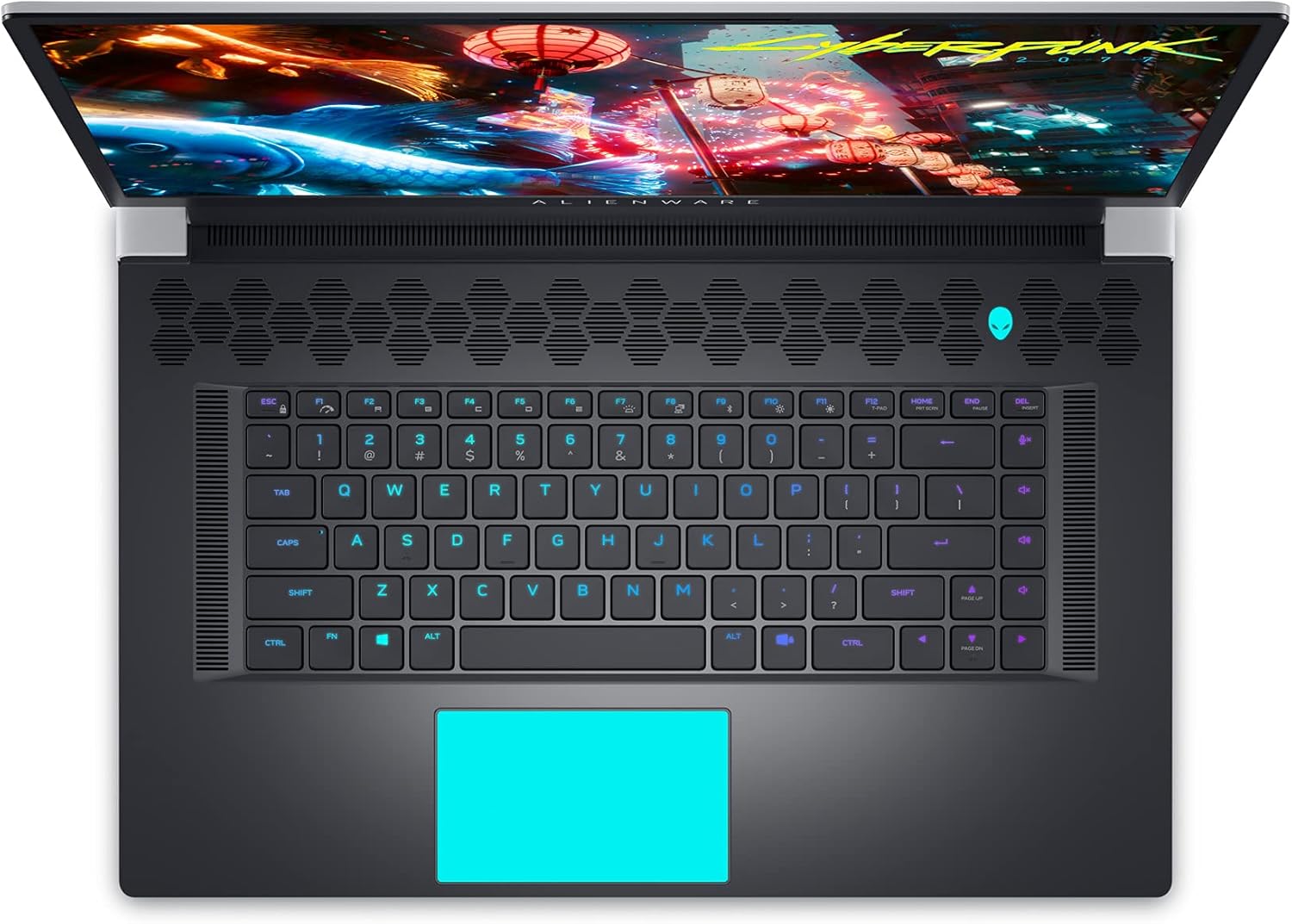
Figure 9: Internal Components and Upgradable Slots
7. Arazoak
If you encounter issues with your Alienware X17 R1, try the following basic troubleshooting steps:
- Potentziarik gabe: Ensure the power adapter is securely connected to both the laptop and the power outlet. Try a different outlet.
- Bistaratzeko arazoak: If the screen is blank, try connecting an external monitor to verify if the issue is with the laptop's display or the graphics card. Update graphics drivers.
- Errendimenduaren atzerapena: Check your power management settings in Alienware Command Center. Ensure all drivers are up to date. Monitor temperatures to prevent thermal throttling.
- Konektibitate arazoak: For Wi-Fi or Ethernet issues, restart your router and the laptop. Check network adapter drivers.
- Softwarearen akatsak: Restart the application or the laptop. Ensure your operating system and applications are updated.
For more advanced troubleshooting or persistent issues, refer to the Dell support webwebgunean edo jarri harremanetan bezeroarentzako zerbitzuarekin.
8. Zehaztapenak
| Ezaugarri | Zehaztapena |
|---|---|
| Ereduaren izena | Alienware x17 R1 |
| Prozesadorea | 11th Generation Intel Core i7-11800H (8 Cores, up to 4.6 GHz) |
| RAM | 32 GB DDR4 3200MHz |
| Biltegiratzea | 1 TB M.2 PCIe NVMe Solid State Drive |
| Txartel grafikoa | NVIDIA GeForce RTX 3080 16GB GDDR6 |
| Bistaratzea | 17.3-inch FHD (1920 x 1080) 360Hz 1ms with ComfortView Plus, NVIDIA G-SYNC and Advanced Optimus |
| Sistema eragilea | Windows 11 Home |
| Haririk gabeko konexioa | Killer AX 1675 + Bluetooth 5.2 |
| Portuak | 3x USB 3.0, 2x Type-C (Thunderbolt 4/USB 3.2 Gen 2), HDMI 2.1, Mini DisplayPort 1.4, Ethernet, Micro SD, Headset Jack |
| Elementuaren pisua | 7.05 kilo |
| Produktuaren neurriak | 11.79 x 15.72 x 0.82 hazbete |
| Kolorea | Lunar Light (White) |
9. Bermea eta Laguntza
Your Alienware X17 R1 laptop is covered by Dell's standard warranty. For detailed warranty information, technical support, or service requests, please visit the official Dell support webwebgunera edo jarri harremanetan bezeroarentzako arreta-zerbitzura. Laguntza azkarragoa lortzeko, gorde erosketa-agiria eta produktuaren serie-zenbakia eskura.
Dell laguntza Webgunea: www.dell.com/support