
1. Segurtasun informazioa
Please read all instructions carefully before assembly and use. Failure to follow these instructions may result in injury or product damage. Keep this manual for future reference.
- This desk requires assembly. Ensure all components are correctly installed before use.
- The maximum weight capacity for this desk is 220 pounds (100 kg). Do not exceed this limit.
- When adjusting the desk height, ensure there are no obstructions above or below the desk that could interfere with its movement.
- Mantendu haurrak eta maskotak mahaitik urrun funtzionamenduan zehar.
- Do not attempt to manually force the desk up or down. Use only the electric control panel.
- Ensure the power cord is properly connected and routed to prevent tripping hazards or damage.
- For optimal stability, ensure the desk is placed on a level surface.
Important Note: When using the LED control panel to adjust height, the three height keys must be pressed and held continuously until the desired height is reached.
2. Paketearen edukia
Muntaketa hasi aurretik, egiaztatu osagai guztiak daudela. Piezarik falta edo hondatuta badago, jarri harremanetan bezeroarentzako arreta-zerbitzuarekin.
- Desktop (71"x32" Black Top)
- Desk Frame (Black Frame)
- 4 Hankak
- Kontrol panela
- Korronte egokitzailea eta kablea
- Muntaketa-osagaiak (torlojuak, azkoinak, etab.)
- Argibide eskuliburua
3. Muntatzeko jarraibideak
Assembly typically requires two people. Please follow these steps carefully. A power drill may be helpful for some steps, but is not strictly required.
- Deskonprimitu osagaiak: Kontu handiz atera pieza guztiak paketetik eta jarri gainazal garbi eta leun batean marradurak saihesteko.
- Lotu hankak markoari: Securely attach the four legs to the desk frame using the provided hardware. Ensure all connections are tight.
- Mahaigaina instalatu: Place the desktop upside down on a soft surface. Carefully align the assembled frame with the pre-drilled holes on the underside of the desktop. Secure the frame to the desktop using the appropriate screws.
- Kontrol panela muntatzea: Attach the LED control panel to the underside of the desktop, typically on the front edge, using the provided screws.
- Konektatu kableak: Connect the motor cables from the legs to the control box. Connect the control panel cable to the control box. Finally, connect the power adapter to the control box and plug it into a power outlet. Ensure all cables are neatly managed to avoid interference with desk movement.
- Hasierako konfigurazioa: Once assembled, carefully flip the desk upright. Perform an initial height calibration by pressing and holding the 'Down' button until the desk reaches its lowest point, then release. The desk is now ready for operation.

Figure 3.1: Fully assembled FLEXISPOT 4 Leg Standing Desk.
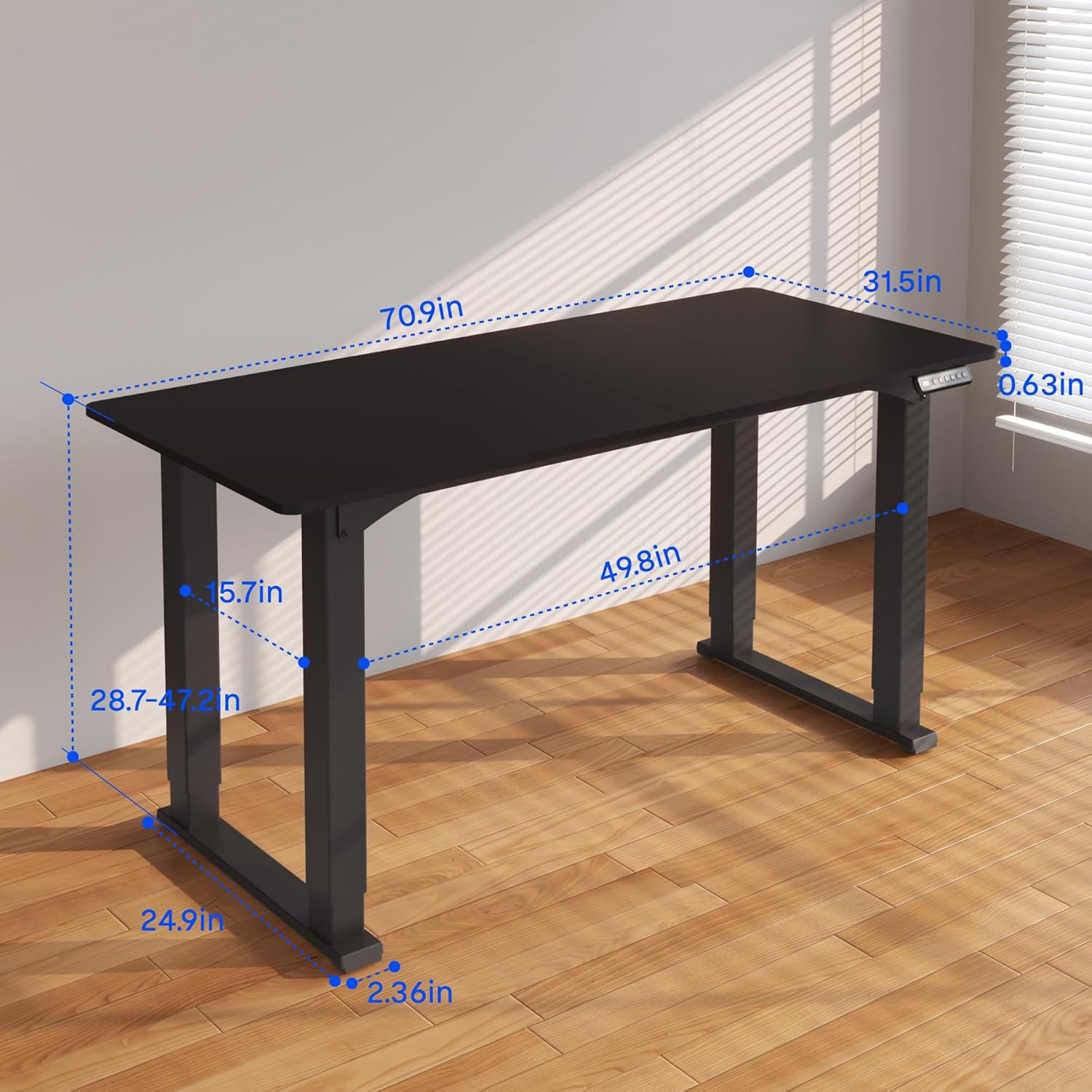
Figure 3.2: Detailed dimensions of the desk, including height range and desktop size.
4. Funtzionamendu-argibideak
The FLEXISPOT 4 Leg Standing Desk features an intuitive LED control panel for easy height adjustments and memory settings.
4.1. Kontrol panela baino gehiagoview

Figure 4.1: Digital Keypad with memory functions and up/down controls.
- Gora/Behera geziak (▲ / ▼): Press and hold to adjust the desk height upwards or downwards. The current height is displayed on the LED screen.
- Memoria botoiak (1, 2, 3): These buttons allow you to save and recall preferred height settings.
- Memoria Ezartzeko Botoia (M): Used to program a height into a memory slot.
4.2. Altuera doitzea
To adjust the desk height, press and hold the ▲ (Up) or ▼ (Down) arrow button until the desk reaches your desired position. The desk will move smoothly between 28.7 inches and 47.2 inches.
4.3. Saving Memory Presets
You can save up to three preferred height settings for quick recall:
- Egokitu mahaia nahi duzun altuerara Gora/Behera geziak erabiliz.
- Sakatu 'M' botoia. LED pantailak 'S-' erakutsiko du.
- Within 3 seconds, press one of the memory buttons (1, 2, or 3). The LED display will show 'S-1', 'S-2', or 'S-3' to confirm the setting has been saved.
4.4. Memoria aurrezarpenak berreskuratzea
To move the desk to a saved height, press and eutsi the corresponding memory button (1, 2, or 3) until the desk reaches the programmed height.
4.5. Talkaren aurkako sistema
The desk is equipped with an anti-collision system to prevent damage. If the desk encounters an obstruction during movement, it will stop and reverse slightly. Remove the obstruction before resuming operation.

Figure 4.2: Anti-collision system in action, preventing damage from obstructions.
5. Mantentzea
Regular maintenance ensures the longevity and smooth operation of your standing desk.
- Garbiketa: Garbitu mahaigaina eta markoa zapi leun batekinamp oihal. Saihestu produktu kimiko gogorrak edo garbitzaile urratzaileak.
- Kableen kudeaketa: Periodically check and organize cables to prevent tangles and ensure they do not interfere with the desk's movement.
- Loturaren egiaztapena: Noizean behin, egiaztatu torloju eta azkoin guztiak ondo estututa daudela ziurtatzeko. Beharrezkoa bada, berriro estutu.
- Motor zainketa: The electric motors are maintenance-free. Do not attempt to lubricate or disassemble them.
6. Arazoak
Zure mahaiarekin arazoak badituzu, jo ezazu honako arazo eta irtenbide ohikoenei:
- Mahaia ez da mugitzen:
- Egiaztatu elikatze-kablea ondo konektatuta dagoen mahaian eta hormako entxufean.
- Ziurtatu motor-kable guztiak kontrol-kutxara behar bezala konektatuta daudela.
- Perform a reset: Press and hold the 'Down' button until the desk reaches its lowest point and slightly retracts, then release.
- Mugimendu irregularra edo dardarka:
- Ensure the desk is on a level surface. Adjust the leveling feet if necessary.
- Check that all assembly screws and bolts are tightened securely.
- Verify that the weight on the desk does not exceed the maximum capacity of 220 lbs and is evenly distributed.
- Errore-kodeak pantailan:
- If an error code appears, try performing a reset as described above.
- If the error persists, disconnect power for 10 minutes, then reconnect and try again.
- Consult the manufacturer's website or contact customer support with the specific error code.
- Memoria aurrezarpenak ez funtzionatzen:
- Ziurtatu sakatuta zaudela eta eusten the memory button until the desk reaches the saved height.
- Re-program the memory presets if they are not recalling correctly.
Urrats hauek arazoa konpontzen ez badute, jarri harremanetan FLEXISPOT bezeroarentzako arreta-zerbitzuarekin laguntza gehiago jasotzeko.
7. Zehaztapenak
| Ezaugarri | Zehaztapena |
|---|---|
| Marka | FLEXISPOT |
| Modelo zenbakia | QS2B-1880-AU |
| Mahaigainaren Tamaina | 71"D x 32"W (approx. 180.3cm x 81.3cm) |
| Altuera erregulagarria | 28.7" to 47.2" (approx. 72.9cm to 119.9cm) |
| Gehienezko pisu-gaitasuna | 220 lb (100 kg) |
| Markoaren materiala | Metala |
| Goiko materiala | Egurra |
| Kolorea | Marko beltza eta goiko aldea beltza |
| Kontrol mota | LED Digital Keypad with Memory Presets |
| Ezaugarri bereziak | 4-Leg Design, Anti-Collision System, Corded Operation |
| Muntaia Beharrezkoa | Bai |
8. Bermea eta Laguntza
FLEXISPOTek berme-estaldura osoa eskaintzen du zure lasaitasunerako:
- 5 urteko bermea: Covers the desk frame and motor components.
- 2 urteko bermea: Covers the control panel and other electronic parts.
For warranty claims, technical support, or any questions regarding your FLEXISPOT product, please visit the official FLEXISPOT website or contact their customer service department. Please have your model number (QS2B-1880-AU) and proof of purchase available when contacting support.