
DEKCO DC5L
DEKCO 2K WiFi Surveillance Security Camera User Manual
Eredua: DC5L
Sarrera
Thank you for choosing the DEKCO 2K WiFi Surveillance Security Camera. This manual provides comprehensive instructions for the installation, operation, and maintenance of your new security camera. Designed for outdoor and home use, this camera offers advanced features such as Pan-Tilt 360° View, 3MP resolution, motion detection with siren, two-way audio, full-color night vision, and IP66 waterproofing. Please read this manual thoroughly before use to ensure proper functionality and safety.
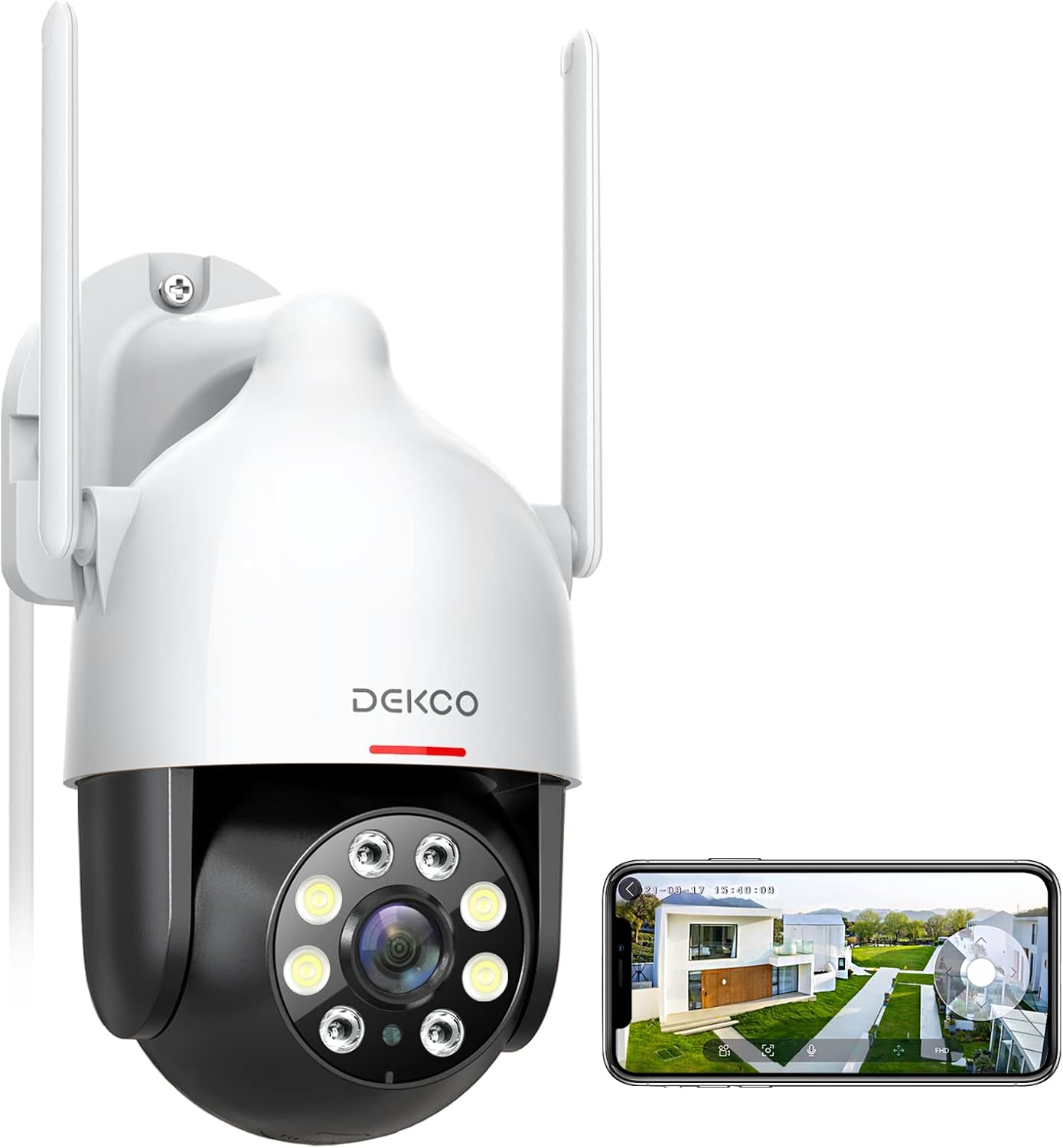
Image: The DEKCO 2K WiFi Surveillance Security Camera, a white and black dome-shaped camera with two antennas, shown next to a smartphone displaying its live feed.
Segurtasun Informazioa
- Ensure the power adapter is suitable for your local power supply and is properly grounded.
- Ez jarri kamera muturreko tenperaturetan, hezetasunean edo ingurune korrosiboetan.
- Saihestu kamera eremu elektromagnetiko indartsuen ondoan jartzea.
- Ez saiatu kamera desmuntatzen edo aldatzen. Mantendu konponketa guztiak langile kualifikatuen esku.
- Gorde kamera eta haren osagarriak haurren eskura ez dauden lekuetan.
- Clean the camera with a soft, dry cloth. Do not use harsh chemicals or abrasive cleaners.
- Ziurtatu muntatzeko gainazala kameraren pisua eusteko bezain sendoa dela.
Kutxan dagoena
The DEKCO 2K WiFi Surveillance Security Camera package includes the following components:
- DEKCO 2K WiFi Surveillance Security Camera (Wired Camera)
- Power Cord & Adapter for Supply-Powered
- Installation Screw Package
- Erabiltzailearen eskuliburua (dokumentu hau)
Bideoa: Amaiera batview of the DEKCO Outdoor Security Camera DC5L, demonstrating its features and components. This video is provided by the seller, DEKCO-US.
Konfigurazioa
1. Instalazio fisikoa
Aukeratu kamerarentzako kokapen egokia, argi dagoela ziurtatuz view of the area you wish to monitor and is within range of your 2.4GHz WiFi network. Use the provided installation screw package to securely mount the camera to a wall or other stable surface. Ensure the camera is positioned to allow for optimal pan and tilt movement.

Image: A diagram illustrating the optimal placement of the DEKCO camera to cover a wide area including a garage, front door, and yard, demonstrating its 360-degree viewing gaitasuna.
2. Energia-konexioa
Connect the provided power adapter to the camera and plug it into a power outlet. The camera is corded electric and requires continuous power. It is not battery-operated.
3. Aplikazioaren deskarga eta hasierako konfigurazioa
Download the free "DEKCO" app from your mobile phone's app store (available for iOS/Android). Follow the in-app instructions to add your camera. Ensure your mobile device is connected to a 2.4GHz WiFi network during the setup process, as the camera does not support 5GHz WiFi.
4. Mikro SD txartelaren instalazioa (aukerakoa)
The camera supports a micro SD card (not included) up to 128GB for local storage. Locate the SD card slot on the camera (refer to the product diagram or app instructions for exact location) and insert the card with the contacts facing down. This allows for 24/7 recording and playback without cloud subscription.

Image: The DEKCO camera showing its micro SD card slot, alongside a smartphone screen displaying a timeline of recorded video, indicating 24/7 recording capability.
Funtzionamendu-argibideak
1. Bizi View eta Pan-Tilt Kontrola
Open the DEKCO app to access the live view of your camera. Use the on-screen controls to remotely pan the camera horizontally up to 350 degrees and tilt vertically up to 90 degrees, providing comprehensive coverage without blind spots.
2. Smart Motion Tracking and Alerts
Enable motion tracking in the app settings. The camera will automatically detect and track moving objects, recording the activity. You will receive instant alerts directly to your mobile device when motion is detected. Customize sensitivity settings to minimize false alarms.

Image: A child and a dog in a grassy area, with a green box highlighting the child, demonstrating the camera's humanoid tracking feature.
3. Gaueko ikusmen moduak
Kamerak gaueko ikusmen aukera ugari eskaintzen ditu:
- Infragorri modua: Iluntasun osoan irudi zuri-beltzez garbiak eskaintzen ditu.
- Kolore osoko modua: Utilizes built-in floodlights to display full-color images at night.
- Auto (Smart) Mode: Automatikoki aldatzen da infragorriaren eta kolore osokoaren artean, detektatutako mugimenduaren edo argi-baldintzen arabera.

Image: A split image showing a scene at night, with the top half demonstrating full-color night vision (spotlight ON) and the bottom half showing infrared night vision (spotlight OFF).
4. Bi norabideko audioa
The integrated microphone and speaker allow for real-time two-way communication. Use this feature to speak with visitors or deter unwanted individuals directly through the app.

Image: A woman holding a smartphone, displaying the DEKCO app interface with options for instant alerts and voice-changing function, illustrating the two-way audio feature.
5. Video Quality and Digital Zoom
The camera records in 2K resolution, providing clear and detailed images. While there is no optical zoom, you can digitally zoom up to 4X within the app to view finer details in the live feed or recorded footage.

Image: A father and son playing soccer in a park, with "2K QHD" overlay, emphasizing the clear video details captured by the camera.

Image: A young boy smiling with two husky puppies in a grassy area, with "2K QHD" overlay, highlighting the camera's ability to capture clear details.
6. Laguntzaile Adimendunaren Integrazioa
The DEKCO camera is compatible with popular smart home platforms like Amazon Alexa and Google Assistant. You can integrate the camera to view zuzeneko jarioak ahots-komandoak erabiliz pantaila adimendun bateragarrietan.
Mantentzea
- Garbiketa: Periodically clean the camera lens and housing with a soft, lint-free cloth to ensure optimal image clarity. Do not use abrasive materials or chemical cleaners.
- Eguraldiaren babesa: The camera has an IP66 weatherproof rating, meaning it is protected against dust and powerful water jets. While designed for outdoor use, extreme weather conditions (e.g., prolonged heavy rain, snow, or direct sunlight) may affect performance over time. Ensure proper installation to prevent water ingress.
- Firmware eguneraketak: Check the DEKCO app regularly for available firmware updates. Keeping your camera's firmware up-to-date ensures optimal performance, security, and access to new features.
Arazoak konpontzea
| Arazoa | Kausa posiblea | Irtenbidea |
|---|---|---|
| Camera offline/Cannot connect to WiFi | Incorrect WiFi password; Camera too far from router; 5GHz WiFi network used; Weak WiFi signal. | Ensure correct 2.4GHz WiFi password. Move camera closer to router or use a WiFi extender. Re-add camera to app. |
| Mugimendu faltsuen alerta maiz | High motion detection sensitivity; Moving branches/objects in view; Insects attracted to IR lights. | Adjust motion detection sensitivity in the app. Reposition camera to avoid irrelevant motion sources. |
| Poor video resolution/quality | Weak WiFi signal; Dirty lens. | Hobetu WiFi seinalearen indarra. Garbitu kameraren lentea. |
| Pan/Tilt mechanism not responding or stuck | Power interruption; Mechanical obstruction; Motor wear. | Restart the camera by unplugging and replugging. Check for physical obstructions. If issue persists, contact support. |
| Ez dago SD txartelean grabaziorik | SD card not inserted correctly; SD card full or corrupted; Incorrect recording settings. | Reinsert SD card. Format SD card via app. Check recording settings in app. Ensure SD card is up to 128GB. |
Zehaztapenak
| Ezaugarri | Xehetasuna |
|---|---|
| Modelo zenbakia | DC5L |
| Bideo Harrapaketa Ebazpena | 2K (3MP) |
| Konektibitate Teknologia | Wi-Fi (2.4 GHz bakarrik) |
| Pan Angelua | 350 gradu |
| Inklinazio angelua | 90 gradu |
| Gaueko Ikusmena | Full-Color, Infrared, Auto (Smart) |
| Audioa | Bi norabideko audioa (mikrofono eta bozgorailu integratuak) |
| Biltegiratze-aukerak | Micro SD Card (up to 128GB, not included), Encrypted Cloud Storage |
| Eguraldi Erresistentzia | IP66 (iragazgaitza) |
| Energia iturria | Kabledun Elektrikoa (12 Volt, 3 watt) |
| Kontrol-metodoa | Mobile App (DEKCO App) |
| Gailu bateragarriak | Smartphone-a (iOS/Android) |
| Smart Home Integrazioa | Works with Alexa, Hey Google |
| Elementuaren pisua | 1.37 kilo |
| Kablearen luzera | 3 metro |
Bermea eta Laguntza
DEKCO provides lifetime support for DEKCO brand products. If you encounter any issues or have questions regarding your DEKCO 2K WiFi Surveillance Security Camera, please contact the "DekcoCare" Online Support Team. Refer to the product packaging or the DEKCO official webharremanetarako informazioa lortzeko gunea.
Ask a question about this manual
Ask about setup, troubleshooting, compatibility, parts, safety, or missing instructions. Manuals+ will review the question and use this page’s manual context to help answer it.