
Mytee S300-H
Mytee S300-H Tempo Heated Spotter User Manual
Model: S300-H | Brand: Mytee
1. Sarrera
This manual provides comprehensive instructions for the safe and effective operation, maintenance, and troubleshooting of your Mytee S300-H Tempo Heated Spotter. Please read this manual thoroughly before operating the unit and retain it for future reference.
1.1 Segurtasun informazioa
Always observe basic safety precautions when using electrical appliances to reduce the risk of fire, electric shock, or injury. This includes:
- Irakurri argibide guztiak erabili aurretik.
- Konektatu behar bezala lurreko hartune batera soilik.
- Ez sartu unitatea uretan.
- Ez erabili kable edo entxufe hondatu batekin.
- Mantendu haurrak eta maskotak unitatetik urrun funtzionamenduan zehar.
- Use only recommended cleaning solutions.
2. Produktua amaitu daview
The Mytee S300-H Tempo Heated Spotter is a compact and powerful heated carpet extractor designed for efficient spot cleaning and interior maintenance. Its features include:
- Powerful Vacuum Motor: Produces 85 inches of water lift for maximum extraction, reducing drying times with its two-stage diseinua.
- Erabiltzaileentzako diseinua: Features one-switch operation and easy-to-open caps for solution and recovery tanks, enhancing convenience and safety.
- Eraikuntza iraunkorra: Built with Mytee’s robust roto-molded housing for long-lasting performance, and includes an Air Lite Upholstery Tool.
- Eramangarria eta trinkoa: With a 1-gallon tank capacity and weighing only 26 pounds, it is easy to transport and store.
2.1 Osagaiak
Familiarize yourself with the main components of your S300-H Tempo Heated Spotter:

1. irudia: Osoa view of the Mytee S300-H Tempo Heated Spotter, showing the main unit, vacuum hose, solution hose, and upholstery tool.

2. irudia: Aldea view of the unit, highlighting the control panel with power switches and the quick-connect fitting for the solution hose.
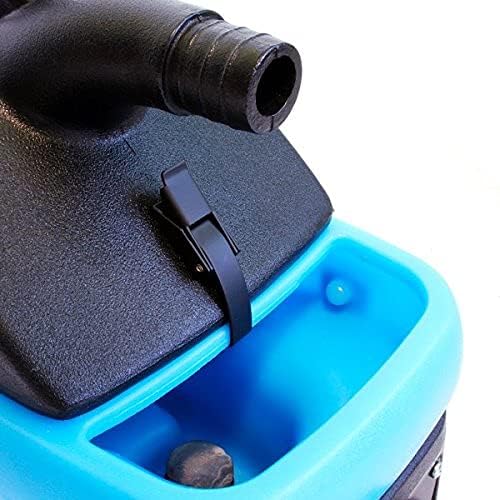
3. irudia: Close-up of the easy-to-open cap for the solution tank, located on the top of the unit.
3. Konfigurazioa
3.1 Hasierako muntaketa
- Osagai guztiak ontzitik atera.
- Ensure all hoses and the upholstery tool are present.
- Attach the vacuum hose to the vacuum port on the unit.
- Connect the solution hose to the quick-connect fitting on the unit and to the upholstery tool.
3.2 Soluzio-tangaren betetzea
- Open the solution tank cap (refer to Figure 3).
- Bete depositua ur garbiarekin eta gomendatutako alfonbra garbitzeko soluzioarekin, soluzioaren fabrikatzailearen argibideen arabera. Ez bete gehiegi.
- Securely close the solution tank cap.
4. Funtzionamendu-argibideak
4.1 Piztea
- Entxufatu korronte-kablea lurreko hartune elektriko batean.
- Turn on the "Vacuum" switch.
- Turn on the "Pump" switch.
- If heated cleaning is desired, turn on the "Heater" switch. Allow a few minutes for the water to heat up.
4.2 Garbiketa-prozesua
- Pre-test the cleaning solution on an inconspicuous area of the material to be cleaned for colorfastness.
- Position the upholstery tool over the area to be cleaned.
- Press the trigger on the upholstery tool to spray the cleaning solution onto the surface.
- While spraying, pull the tool slowly across the surface to extract the dirty solution. Overlap passes slightly.
- For heavily soiled areas, repeat the process. For best results, perform a final pass without spraying solution to maximize extraction of moisture.
- Monitor the recovery tank for dirty water.
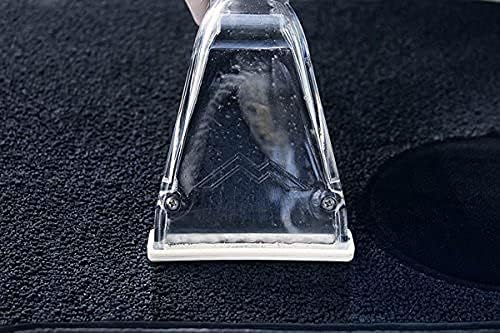
4. irudia: The upholstery tool in action, demonstrating the cleaning process on a carpeted surface.
4.3 Emptying the Recovery Tank
- Turn off all switches and unplug the unit.
- Locate the recovery tank drain.
- Carefully drain the dirty water into a suitable receptacle.
- Rinse the recovery tank with clean water if necessary.
5. Mantentzea
5.1 Ohiko garbiketa
- After each use, empty and rinse both the solution and recovery tanks thoroughly.
- Flush the solution lines by running clean water through the system.
- Clean the upholstery tool, removing any debris from the nozzle and extraction head.
- Garbitu iragarkiarekin unitatearen kanpoaldeaamp oihal.
5.2 Biltegiratzea
Store the unit in a clean, dry place, away from extreme temperatures. Ensure all tanks are empty and hoses are properly coiled to prevent damage.
6. Arazoak
| Arazoa | Kausa posiblea | Irtenbidea |
|---|---|---|
| Unitatea ez da pizten. | Not plugged in; circuit breaker tripped; faulty power switch. | Check power connection; reset circuit breaker; contact service center. |
| No spray from upholstery tool. | Solution tank empty; pump switch off; clogged nozzle; kinked solution hose. | Refill solution tank; turn on pump switch; clean nozzle; straighten hose. |
| Xurgapen txikia. | Recovery tank full; vacuum hose clogged or disconnected; vacuum motor issue. | Empty recovery tank; check hose connections and clear obstructions; contact service center. |
| Berogailua ez dabil. | Heater switch off; electrical issue. | Turn on heater switch; ensure adequate power supply; contact service center. |
| Unitatetik ura isurtzen da. | Loose hose connection; damaged tank or seal; internal component issue. | Check all connections; inspect tanks and seals for damage; contact service center. |
For issues not listed or if solutions do not resolve the problem, please contact Mytee customer support.
7. Zehaztapenak
| Ezaugarri | Xehetasuna |
|---|---|
| Modelo zenbakia | S300-H |
| Fabrikatzailea | Nirea |
| Elementuaren pisua | 26 kilo |
| Paketearen neurriak | 24.25 x 22 x 10 hazbete |
| Tankaren Edukiera | 1 Gallon (Solution & Recovery) |
| Ur Igogailua | 85 hazbetekoa |
| Hutseko Motorra | Bi-stage |
| Kolorea | White (Unit housing is black and blue) |
| ASIN | B09GPR8VY3 |
8. Bermea eta Laguntza
8.1 Bermearen informazioa
Mytee offers a limited lifetime warranty on the body of the S300-H Tempo Heated Spotter. Additionally, there is a one-year warranty covering the pump, vacuum motor, and heating system. Please retain your proof of purchase for warranty claims.
8.2 Bezeroarentzako laguntza
For technical assistance, warranty service, or to locate a service center, please visit the official Mytee website or contact their customer support directly. Mytee maintains a national network of authorized service centers to assist you.
Ask a question about this manual
Ask about setup, troubleshooting, compatibility, parts, safety, or missing instructions. Manuals+ will review the question and use this page’s manual context to help answer it.