
1. Sarrera
This Urmet 1098/858 IP 5M NVR Kit is a comprehensive video surveillance system designed to protect your property and ensure the safety of its occupants. The kit includes an 8-channel 4K PoE Network Video Recorder (NVR) and two 5-megapixel IP bullet cameras, enabling real-time monitoring and recording.
Utilizing IP technology, this system offers enhanced flexibility and versatility compared to traditional surveillance setups. Cameras can be installed in various locations, and the system supports remote monitoring from compatible devices.
Key features include 4K video resolution, a 5-meter night vision range, autofocus (AF) functionality for clear imaging, and H.265 video compression for efficient data storage and transmission. The kit also provides essential accessories such as junction boxes for tidy installation and a privacy sign.
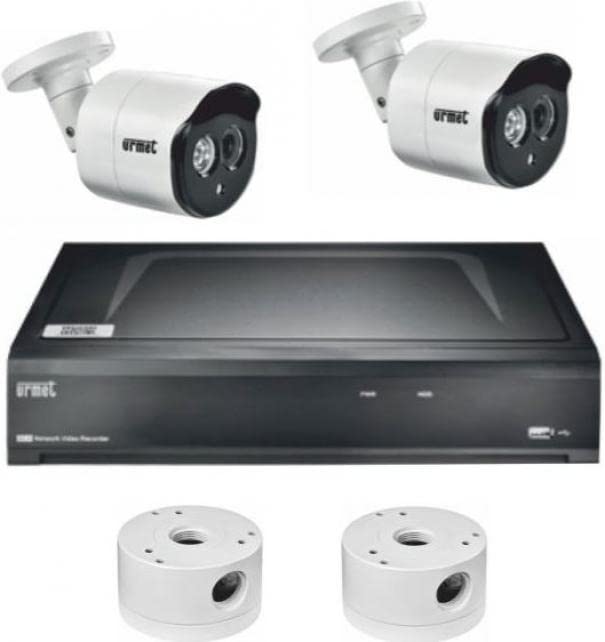
1. irudia: Urmet 1098/858 IP 5M NVR Kit components. This image displays the main components of the surveillance kit, including the NVR unit and two bullet-style IP cameras.
2. Segurtasun informazioa
- Irakurri arretaz argibide guztiak instalatu eta martxan jarri aurretik.
- Ziurtatu elikadura hornidura boltage matches the specified requirements for the NVR.
- Do not expose the NVR or cameras to water, moisture, or extreme temperatures.
- Avoid placing the NVR in areas with poor ventilation.
- Use only Urmet-approved accessories and power adapters.
- Installation should be performed by qualified personnel, especially for outdoor wiring.
- Deskonektatu korrontea mantentze-lan edo garbiketa egin aurretik.
- Observe local regulations regarding video surveillance and privacy.
3. Paketearen edukia
Egiaztatu behean zerrendatutako elementu guztiak zure paketean daudela:
- 1x Urmet 1098/328P 4K 8-Channel H.265 PoE NVR
- 2x Urmet 1099/501A 5MP IP Bullet Cameras (2.7-13.5mm AF varifocal lens)
- 2x Urmet 3000/108 Small Size Junction Boxes
- 1x Urmet 3000/84 Privacy Sign
- 1x NVRrako korronte egokitzailea
- 1x USB sagua
- Muntatzeko hardwarea (torlojuak, hormako takoak)
- Quick Start Guide (this document serves as the full manual)
4. Konfigurazioa
4.1 NVR Installation
- Lekua: Choose a secure, well-ventilated location for the NVR, away from direct sunlight, heat sources, and moisture.
- Konektatu monitorearekin: Konektatu monitore bat NVR-aren HDMI edo VGA irteera atakara.
- Sagua konektatu: Konektatu barneko USB sagua NVR-ko USB ataka batera.
- Sare-konexioa: Connect the NVR to your local network using an Ethernet cable. This is required for remote access and firmware updates.
- Piztu: Konektatu korronte-egokitzailea NVRra eta gero korronte-entxufe batera. NVRa automatikoki abiaraziko da.
4.2 Kameraren instalazioa
- Muntatzeko kokapena: Select appropriate locations for the bullet cameras, considering the desired field of view and protection from environmental elements.
- Muntaketa: Erabili emandako muntaketa-hardwarea kamerak horman edo sabaian ondo lotzeko.
- Kableatua: Connect each camera to one of the NVR's PoE (Power over Ethernet) ports using an Ethernet cable. The NVR will provide both power and data connectivity.
- Bilgune-kutxa: For outdoor installations, use the Urmet 3000/108 junction boxes to protect cable connections from weather and tampering. Mount the junction box first, then route the camera cable through it.
- Adjusting Lens: The 1099/501A cameras feature a varifocal lens (2.7-13.5mm) with autofocus. After initial power-up, access the camera settings via the NVR interface to adjust the zoom and focus for optimal clarity.
4.3 Hasierako NVR konfigurazioa
- Lehenengo abioa: Upon first power-up, the NVR will guide you through an initial setup wizard.
- Pasahitza konfiguratzea: Create a strong administrator password for the NVR. This is crucial for security.
- Sarearen ezarpenak: Configure network settings (DHCP or static IP). Ensure the NVR has internet access for remote viewtzea eta eguneraketak.
- Data eta ordua: Ezarri data, ordua eta ordu-zona zuzenak.
- Disko gogorraren hasieratzea: If a new hard drive is installed, the NVR will prompt you to initialize or format it for recording.
- Kameraren detekzioa: The NVR should automatically detect and add the connected PoE cameras. If not, refer to the troubleshooting section or manually add cameras via the NVR's camera management menu.
5. Funtzionamendua
5.1 Bizi View
After setup, the NVR will display the live video feeds from all connected cameras on the monitor. You can switch between single-camera view, kamera anitzeko sareta view, and other display modes using the NVR's on-screen menu and mouse.
5.2 Grabaketa
- Grabaketa jarraitua: The NVR is configured for continuous recording by default, capturing footage 24/7.
- Mugimendua detektatzeko grabazioa: You can configure specific cameras to record only when motion is detected. This saves storage space and makes reviewing footage more efficient. Set up motion detection zones and sensitivity in the NVR's recording settings.
- Programatutako grabazioa: Define specific time schedules for recording, combining continuous and motion-triggered modes as needed.
5.3 Erreprodukzioa
Berrizview foo grabatuatage:
- From the NVR's main menu, select "Playback."
- Choose the desired camera(s) and date.
- Use the timeline to navigate through recorded events. You can fast-forward, rewind, and pause playback.
- Export specific video clips to a USB drive if needed.
5.4 Urruneko monitorizazioa
The Urmet NVR supports remote viewing via a mobile application or PC software. Refer to the specific Urmet software documentation for detailed instructions on setting up remote access, which typically involves:
- Downloading the official Urmet app/software.
- Registering an account.
- Adding the NVR to your account using its serial number or QR code.
- Ensuring the NVR has a stable internet connection.
5.5 Sistemaren ezarpenak
The NVR's main menu provides access to various system settings, including:
- Ezarpen orokorrak: Date/time, language, display resolution.
- Sarearen ezarpenak: IP address, port forwarding (if required for advanced setups).
- Erabiltzaileen kudeaketa: Create and manage user accounts with different access privileges.
- Biltegiratze kudeaketa: Monitor hard drive status, configure overwrite settings.
- Ekitaldien Kudeaketa: Configure alarms, notifications (e.g., email alerts for motion detection).
6. Mantentzea
6.1 Garbiketa
- Kamerak: Periodically clean the camera lenses with a soft, dry cloth to remove dust, dirt, or water spots that may impair image quality. Do not use harsh chemicals.
- NVR: Keep the NVR unit free of dust. Use a soft brush or compressed air to clean ventilation openings to prevent overheating.
6.2 Firmware eguneraketak
Urmet may release firmware updates to improve system performance, add features, or address security vulnerabilities. It is recommended to check for and apply updates periodically:
- Access the NVR's system settings and look for a "Firmware Update" or "System Upgrade" option.
- Ensure the NVR has a stable internet connection during the update process.
- Follow the on-screen instructions carefully. Do not power off the NVR during an update.
6.3 Biltegiratze kudeaketa
Regularly check the status of the hard drive(s) in the NVR via the storage management settings. Ensure there is sufficient space for recording, and verify that the overwrite function is enabled if you wish for older footage to be automatically deleted to make space for new recordings.
7. Arazoak
| Arazoa | Kausa posiblea | Irtenbidea |
|---|---|---|
| No video signal on monitor |
|
|
| Cameras not displaying video |
|
|
| Urruneko sarbidea ez dabil |
|
|
| Poor image quality / blurry image |
|
|
8. Zehaztapenak
| Ezaugarri | Xehetasuna |
|---|---|
| Marka | Urmet |
| Modelo zenbakia | 1098/858 |
| Fabrikatzailea | URMET |
| Konektibitate Teknologia | Kable bidezkoa (PoE) |
| Bideo Harrapaketa Ebazpena | 4K |
| Ezaugarri bereziak | H.265, AF (Autofocus), Remote Monitoring |
| Kanal kopurua | 8 |
| Biltegiratze Ahalmena | 2 TB (Internal HDD) |
| Gailu bateragarriak | IP Kamerak |
| Kamera mota | Bullet (Front) |
| Gaueko Ikusmenaren barrutia | 5 metro |
| Fotograma-tasa | 25 fps |
| Grabaketa modua | Etengabea |
| Hardware interfazea | Ethernet |
| Lente mota | Varifocal (2.7-13.5mm on cameras) |
| Supported Video Input | VGA, HDMI |
| Seinalearen formatua | Digitala |
| Sentsore Optikoen Teknologia | CMOS with Starlight |
| Elementuaren pisua | 7.2 kilogramo |
| Jatorrizko Herrialdea | Italia |
9. Bermea eta Laguntza
This Urmet product is covered by a standard manufacturer's warranty. The specific terms and duration of the warranty may vary by region and retailer. Please retain your proof of purchase for warranty claims.
For technical assistance, troubleshooting beyond this manual, or warranty inquiries, please contact Urmet customer support through their official webwebgunea edo zure erosketarekin emandako harremanetarako informazioa.


