
1. Produktua amaitu daview
The Anderic OEM NSRCFNA21 Smart Remote is an original equipment manufacturer (OEM) replacement remote control specifically designed for various Insignia TV models. This remote provides seamless functionality and user-friendly operation, ensuring reliable control over your television.
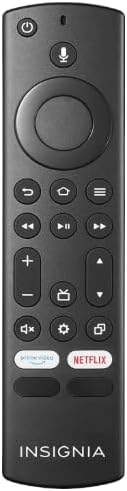
1.1. irudia: The Anderic OEM NSRCFNA21 Smart Remote. This image displays the front view of the black remote control, featuring various buttons for power, voice control, navigation, volume, channel, and dedicated streaming service buttons.
Ezaugarri nagusiak hauek dira:
- Original Quality: An authentic OEM product, ensuring performance and reliability comparable to the remote originally supplied with your TV.
- Erabiltzaileentzako diseinua: Intuitive buttons and controls for easy navigation, volume adjustment, channel changes, and access to various TV functions.
- Errendimendu fidagarria: Provides a stable and responsive connection for accurate command execution.
2. Konfigurazio eta parekatze argibideak
To ensure proper functionality, the remote control must be paired with your Insignia TV. Follow these steps carefully:
- Berrezarri telebista: Unplug your Insignia TV from its power source. Wait for approximately 30 seconds.
- Telebista piztu: Plug the TV back into the power source and turn it on. Allow the TV to fully boot up.
- Hasi parekatzea: Once the TV has completely booted up and is displaying content, press and hold the Hasiera button on the Anderic NSRCFNA21 remote control for up to 30 seconds.
- Remote Update (if prompted): Your TV may display a message indicating that the remote needs an update. If prompted, allow the TV to proceed with the update. This process may take 1 to 3 minutes to complete.
- Egiaztapena: After the update (if any) and pairing process, test the remote's functions (e.g., volume, channel, navigation) to confirm successful pairing.
If the remote does not pair after following these steps, repeat the process or refer to the troubleshooting section.
3. Urruneko agintea funtzionatzea
The Anderic NSRCFNA21 remote control features an intuitive layout for easy operation of your Insignia TV. Below are the general functions of the primary buttons:
- Pizteko botoia: Telebista pizten edo itzaltzen du.
- Ahots kontrolatzeko botoia: Activates voice commands for searching content or controlling the TV.
- Navigation Pad (Directional Buttons and Select): Menuetan zehar mugitzeko eta elementuak hautatzeko erabiltzen da.
- Hasierako botoia: Telebistaren hasierako pantaila nagusira itzultzen da.
- Atzera botoia: Aurreko pantailara edo menura itzultzen da.
- Menu/Options Button: Accesses additional menu options or settings.
- Bolumena igo/behera: Adjusts the TV's audio volume.
- Kanal gora/behera: Telebistako kateak aldatzen ditu.
- Mututu botoia: Telebistaren audioa aktibatzen edo isilarazten du.
- Ezarpenen botoia: Telebistaren ezarpenen menua irekitzen du.
- Sarrera/Iturburu botoia: Changes the TV's input source (e.g., HDMI 1, HDMI 2).
- Streaming Zerbitzurako Botoi Dedikatuak: Provides quick access to popular streaming applications (e.g., Amazon Prime Video, Netflix).
4. Bateragarritasuna
The Anderic OEM NSRCFNA21 Smart Remote is compatible with the following Insignia TV models:
- NS24DF310NA21
- NS39DF310NA21
- NS50DF710NA21
- NS55DF710NA21
This remote also replaces the following models:
- NSRCFNA19 Rev B Fire
- NSRCFNA19revB
- NSRCFNA21 Fire
- NSRCFNA21 Rev E
- NSRCFNA21-Rev-E
Ensure your TV model is listed above for optimal performance.
5. Mantentzea
Proper maintenance can extend the life and functionality of your remote control.
- Bateria ordezkatzea: The remote requires two AAA batteries. Replace batteries when the remote's responsiveness decreases or it stops functioning. Ensure correct polarity when inserting new batteries.
- Garbiketa: Use a soft, dry cloth to clean the remote's surface. Avoid using liquid cleaners or abrasive materials, as these can damage the remote.
- Biltegiratzea: Gorde urrutiko agintea leku lehor batean, muturreko tenperaturetatik eta eguzki-argitik babestuta.
6. Arazoak
If you encounter issues with your Anderic NSRCFNA21 Smart Remote, try the following troubleshooting steps:
- Urrunekoek ez dute erantzuten:
- Check the batteries. Replace them with fresh AAA batteries, ensuring correct polarity.
- Ziurtatu urrutiko agintearen eta telebistaren sentsorearen artean oztoporik ez dagoela.
- Saiatu berriro parekatze prozesua 2 atalean deskribatutako moduan.
- Aldizkako funtzionaltasuna:
- Honek bateriaren energia baxua adieraz dezake. Ordeztu bateriak.
- Ensure you are within the effective range of the TV's sensor.
- Pairing Fails:
- Confirm your TV model is listed in the compatibility section (Section 4).
- Ensure the TV is fully booted up before attempting to hold the Home button.
- Try unplugging the TV for a longer period (e.g., 1-2 minutes) before plugging it back in and re-attempting pairing.
If problems persist after attempting these steps, contact customer support for further assistance.
7. Zehaztapenak
| Marka | Anderikoa |
| Modelo zenbakia | NSRCFNA21 Rev B |
| Gailu bateragarriak | Insignia telebistak |
| Energia iturria | 2 AAA bateria (beharrezkoak) |
| Elementuaren pisua | 1.76 ontza |
| Paketearen neurriak | 6.3 x 2.95 x 0.67 hazbete |
| Kolorea | Beltza |
| Fabrikatzailea | Danen Elektronika eta abar, Inc. |
8. Bermea eta Laguntza
For warranty information or technical support, please contact the manufacturer, Anderic (Dan's Electronics Etc., Inc.). Refer to the product packaging or the official Anderic webwebgunean harremanetarako datu zehatzak eta berme-baldintzak ikusteko.
Bisita dezakezu Anderic denda Amazonen informazio gehiagorako.