
TAOPON smartwatch zl02
TAOPON erloju adimendunaren erabiltzailearen eskuliburua
Model: smartwatch zl02
Sarrera
Thank you for choosing the TAOPON Smart Watch. This device is designed to enhance your daily life with its comprehensive features, including fitness tracking, health monitoring, and smart notifications. This manual provides detailed instructions to help you set up, operate, and maintain your smartwatch for optimal performance.

Figure 1: TAOPON Smart Watch Overview
Kutxan dagoena
- TAOPON Smart Watch (with Watch Band)
- Kargatzeko kablea
- Erabiltzailearen eskuliburua
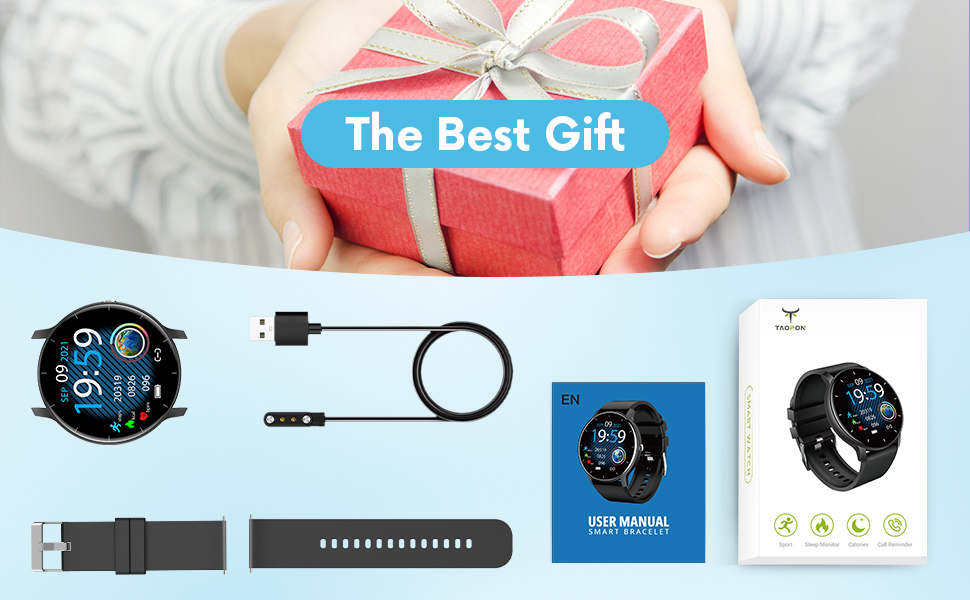
2. irudia: paketearen edukia
Konfigurazio Gida
1. Erloju adimenduna kargatzea
Before first use, fully charge your smartwatch. Connect the magnetic charging cable to the charging points on the back of the watch and plug the USB end into a power adapter (not included) or a computer's USB port. A full charge typically takes about 2 hours and provides up to 7 days of typical use or 30 days of standby time.

3 irudia: Erloju adimenduna kargatzen
2. Aplikazioaren instalazioa eta parekatzea
To unlock the full potential of your TAOPON Smart Watch, download and install the "Da Fit" app on your smartphone. The app is compatible with iOS 9.0 & Android 5.0 or higher.
- Scan the QR code in the manual or search for "Da Fit" in your phone's app store (App Store for iOS, Google Play Store for Android).
- Install the "Da Fit" app.
- Ireki aplikazioa eta jarraitu pantailako argibideei kontu bat sortzeko edo saioa hasteko.
- Gaitu Bluetootha zure telefonoan.
- In the "Da Fit" app, navigate to the device section and search for your smartwatch. Select "smartwatch zl02" to pair.
- Berretsi parekatze eskaera bai telefonoan bai erloju adimendunean.
Behin parekatuta, erlojuak ordua eta datuak zure telefonoarekin sinkronizatuko ditu.
Funtzionamendu-argibideak
Oinarrizko Nabigazioa
- Ukipen-pantaila: Swipe left/right or up/down to navigate through menus and features.
- Alboko botoia: Press to quickly return to the home screen or turn the screen on/off.
- Esnatzera igo: The display will automatically light up when you raise your wrist.
Erloju-esferak pertsonalizatzea
Your smartwatch offers a variety of pre-installed dials. You can also personalize your watch face by setting your favorite photo as the dial through the "Da Fit" app.

Figure 4: Watch Dial Customization
Fitness Jarraipena
The watch supports 8 sports modes to track your activities:
- Oinez
- Korrika
- Txirrindularitza
- Soka Saltoa
- Badmintona
- Saskibaloia
- Futbola
- Swimming (IP67 waterproof, suitable for hand washing or rainy days, not for prolonged submersion or hot water)
During exercise, the watch tracks calorie consumption, steps, distance, minutes of activity, and heart rate. Connect to your mobile phone's GPS via the app to record your movement track.

Figure 5: Multiple Sports Modes Tracking
Osasunaren Jarraipena
The smartwatch accurately tracks real-time health data:
- Bihotz taupadaren jarraipena: Records your heart rate throughout the day. You can also measure it in real-time by tapping the heart rate icon on the watch.
- Odoleko oxigenoaren monitorizazioa: Provides SpO2 readings.
- Odol-presioaren kontrola: Measures blood pressure levels.
- Loaren monitorea: Tracks deep sleep, light sleep, and overall sleep duration, showing trends in sleep quality over a week.

Figure 6: Comprehensive Health Monitoring
Smart Features and Tools
The TAOPON Smart Watch offers various convenient tools:
- Mezuen jakinarazpenak: Receive call reminders, SMS, Facebook, Twitter, LinkedIn, WhatsApp, Line, Instagram, etc., by connecting to the "Da Fit" APP. You can reject calls directly from the watch.
- Urruneko kamera: Control your phone's camera remotely from your watch.
- Musika kontrola: Play, pause, skip tracks on your phone's music player.
- Eguraldi Iragarpena: Lortu eguraldiaren eguneraketak denbora errealean.
- pedometer: Eguneroko urratsak zenbatzen ditu.
- Sedentarioaren abisua: Jarduerarik gabeko aldi baten ondoren mugitzeko abisatzen dizu.
- Tenporizadorea: Barneko tenporizadore funtzioa.
- Deep Breathing Guide: Assists with guided breathing exercises.
- alarmak: Set up to 3 alarms directly on the watch.
- Distira erregulagarria: Pertsonalizatu pantailaren distira optimoa izan dadin viewing.
- Antzerki modua: Reduces screen brightness and disables vibrations for undisturbed viewing.

Figure 7: Remote Camera

Figure 8: Music Control
Mantentzea
- Garbiketa: Regularly wipe your smartwatch and band with a soft, damp oihal. Saihestu produktu kimiko gogorrak edo material urratzaileak.
- Uraren erresistentzia: The watch is IP67 waterproof, meaning it is effective against splashes and can be worn during hand washing or rainy days. It is not recommended for showering with hot water, diving, or prolonged submersion.
- Bateria zaintzea: Bateriaren iraupena luzatzeko, saihestu tenperatura muturrekoak eta ez utzi bateria maiz erabat agortzen. Kargatu erlojua aldizka.
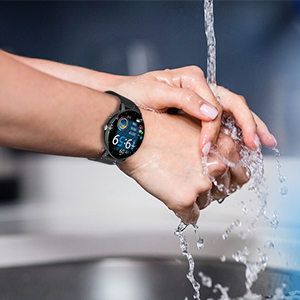
9 irudia: IP67 urarekiko erresistentzia
Arazoak konpontzea
- Erlojua ez da pizten: Ziurtatu erlojua guztiz kargatuta dagoela. Konektatu kargatzeko kableari eta energia-iturri bati gutxienez 30 minutuz.
- Ezin da telefonoarekin parekatu:
- Ziurtatu Bluetooth-a gaituta dagoela telefonoan eta erlojua irismen-eremuan dagoela.
- Berrabiarazi telefonoa eta erloju adimenduna.
- Check if the "Da Fit" app is updated to the latest version.
- If previously paired, try unpairing the device from your phone's Bluetooth settings and re-pairing through the app.
- Osasun-datu okerrak:
- Ziurtatu erlojua eskumuturrean ondo eramaten duzula, eskumuturreko hezurretik hatz baten zabalerara gutxi gorabehera.
- Mantendu sentsorea garbi eta hondakinik gabe.
- Note that health monitoring features are for reference only and should not be used for medical diagnosis.
- Jaso ez diren jakinarazpenak:
- Check app permissions in your phone settings to ensure "Da Fit" has access to notifications.
- Verify that notification settings are enabled within the "Da Fit" app for specific applications.
- Ziurtatu erlojua Bluetooth bidez telefonora konektatuta dagoela.
Zehaztapenak
| Ezaugarri | Xehetasuna |
|---|---|
| Modelo zenbakia | smartwatch zl02 |
| Pantailaren tamaina | 1.28 hazbete (pantailaren diagonala ikusgai: 2" / 4 cm) |
| Ebazpena | 240*240 pixel |
| Bateria Edukiera | 200mAh Litio Polimeroa (barne) |
| Bateriaren iraupena | 7 days (typical use), 30 days (standby) |
| Iragazgaitzaren balorazioa | IP67 |
| Bateragarritasuna | iOS 9.0 & Android 5.0 or higher |
| Konektibitatea | Bluetootha |
| Elementuaren pisua | 110 gramo (3.88 ontza) |
| Produktuaren neurriak | 6.18 x 4.02 x 1.06 hazbete |
| Fabrikatzailea | TAOPON |
Segurtasun informazio garrantzitsua
- Ez saiatu gailua desmuntatzen, konpontzen edo aldatzen.
- Mantendu gailua muturreko tenperaturetatik, eguzki-argitik zuzenean eta sugar irekietatik urrun.
- Saihestu kolpe bortitzak edo gailua erortzea.
- Mantendu haurren eskura.
- Dispose of the device and its battery according to local regulations. Do not dispose of with household waste.
- Consult a medical professional before starting any new exercise regimen or if you have any health concerns. The health monitoring data is for reference only.
Bermea eta Laguntza
For warranty information, technical support, or customer service inquiries, please refer to the contact details provided on the product packaging or the official TAOPON webgunea. Gorde erosketaren egiaztagiria bermearen erreklamazioetarako.
Ask a question about this manual
Ask about setup, troubleshooting, compatibility, parts, safety, or missing instructions. Manuals+ will review the question and use this page’s manual context to help answer it.