
1. Produktua amaitu daview
The Beelink EQR5 Mini PC is a compact and powerful desktop computer designed for a wide range of tasks, from office work and 4K video playback to photo and video editing. It features an AMD Ryzen 5 5500U processor, 16GB of DDR4 RAM, and a 500GB NVMe M.2 SSD, ensuring smooth and efficient performance. This mini PC comes pre-installed with Windows 11, offering a clean and bloatware-free experience.
Its small footprint and built-in power supply unit help reduce cable clutter, making it an ideal solution for any workspace. The EQR5 also boasts extensive connectivity options, including WiFi 6, Bluetooth 5.2, and multiple USB and HDMI ports, supporting dual 4K display output for enhanced productivity.
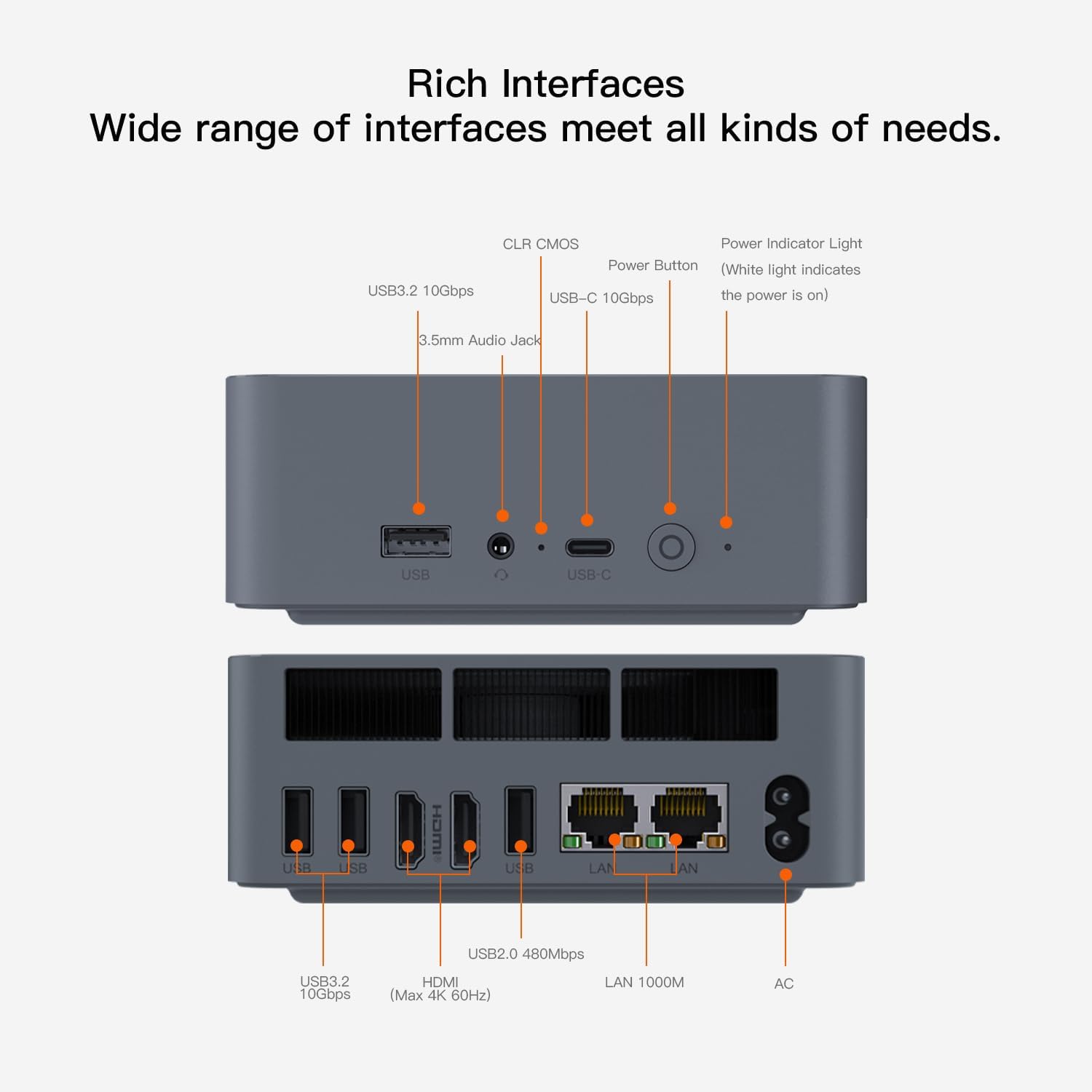
1.1. irudia: Aurrealdea view of the Beelink EQR5 Mini PC, showcasinbere diseinu trinkoa eta aurrealdeko atakak esker.
2. Konfigurazio gida
Follow these steps to set up your Beelink EQR5 Mini PC:
- Deskargatzea: Carefully remove all components from the packaging. Verify that you have the Mini PC, power adapter, HDMI cables, and VESA mount bracket.
- Konektatu periferikoak:
- Connect your monitor(s) to the HDMI ports on the rear of the Mini PC using the provided HDMI cables. The device supports dual 4K display output.
- Plug in your keyboard and mouse into the available USB ports.
- For wired network access, connect an Ethernet cable to one of the Gigabit Ethernet LAN ports.
- Potentzia-konexioa: Connect the power adapter to the DC input port on the rear of the Mini PC, then plug the adapter into a power outlet.
- Piztu: Press the power button located on the front of the Mini PC. The power indicator light will illuminate.
- Hasierako Windows konfigurazioa: Follow the on-screen instructions to complete the Windows 11 setup process. This includes selecting your region, connecting to a network (if not already wired), and creating a user account.
- Optional VESA Mounting: If desired, use the included VESA mount bracket and screws to attach the Mini PC to the back of a compatible monitor or to a wall.

2.1. irudia: Atzekoa view of the Beelink EQR5 Mini PC, highlighting the HDMI, USB, LAN, and DC input ports for connecting peripherals and power.
2.1. bideoa: An introductory video demonstrating the Beelink SER3 mini PC, which shares similar setup procedures with the EQR5 model. This video provides a visual guide to the initial unboxing and connection process.
3. Funtzionamendu-argibideak
The Beelink EQR5 is designed for user-friendly operation. Here are some key features and tips:
- Funtzionamendu isila: The MSC2.0 cooling system ensures near-silent operation (approximately 32dB), allowing you to focus on your work or entertainment without distraction.
- Pantaila bikoitza: Utilize the two HDMI ports to connect two 4K monitors simultaneously, expanding your workspace for multitasking. Configure display settings through Windows.
- Haririk gabeko konektagarritasuna: The Mini PC supports WiFi 6 (802.11ax) for fast and stable internet access, and Bluetooth 5.2 for connecting wireless peripherals like headphones or speakers.
- USB atakak: Use the multiple USB 3.2 and USB 2.0 ports for connecting external drives, printers, and other accessories. The Type-C port supports data transfer.
- Built-in PSU: The integrated 85W power supply unit simplifies your setup by reducing external cable clutter.

3.1. irudia: Illustration of the Beelink EQR5 Mini PC operating at a low noise level, emphasizing its quiet performance for an undisturbed work environment.

3.2. irudia: A visual representation of the Beelink EQR5 Mini PC connected to two monitors, demonstrating its dual 4K display capabilities for enhanced productivity.
4. Mantentzea
Proper maintenance ensures the longevity and optimal performance of your Beelink EQR5 Mini PC:
- Garbiketa: Regularly clean the exterior of the Mini PC with a soft, dry cloth. Ensure ventilation grilles are free from dust to maintain efficient heat dissipation.
- Software eguneraketak: Keep your Windows 11 operating system and drivers updated to ensure security and performance. Access Windows Update through Settings.
- Biltegiratze hedapena: The Mini PC supports expandable storage. It comes with a 500G M.2 PCIe 4 NVME 2280 SSD and has additional M.2 PCIe 4.0 slots (up to 4TB each) for further expansion. You can also upgrade the dual-channel DDR4 RAM up to 64GB (2 x 32GB).
- CLR CMOS: A CLR CMOS button is available for resetting BIOS settings if needed. Consult the user manual for specific instructions on its use.

4.1. irudia: Barnekoa view of the Beelink EQR5 Mini PC, showing the dual DDR4 RAM slots and the M.2 NVMe SSD slot, illustrating its expandable storage and memory capabilities.
4.1. bideoa: A tutorial demonstrating the process of replacing an SSD in a Beelink Mini PC. This video is relevant for users looking to upgrade or replace their storage drive.
5. Arazoak
If you encounter issues with your Beelink EQR5 Mini PC, try the following solutions:
- Ez dago pantailarik:
- Ensure all HDMI cables are securely connected to both the Mini PC and the monitor(s).
- Egiaztatu monitoreak piztuta dagoela eta sarrera-iturri zuzenera konfiguratuta dagoela.
- Try connecting to a different HDMI port or using a different cable.
- Potentziarik gabe:
- Check that the power adapter is firmly connected to the Mini PC and the power outlet.
- Ziurtatu korronte-hartunea funtzionala dela.
- Sarearen konexio arazoak:
- Kable bidezko konexioetarako, egiaztatu Ethernet kablearen eta bideratzailearen egoera.
- For WiFi, ensure the WiFi 6 module is enabled in Windows settings and you are connected to the correct network.
- Sistemak ez du erantzuten: If the system becomes unresponsive, press and hold the power button for 5-10 seconds to force a shutdown, then restart the PC.
- BIOSa berrezartzea: If experiencing persistent boot issues, use the CLR CMOS button (refer to the user manual for location and procedure) to reset BIOS settings to default.
6. Produktuaren zehaztapenak
| Ezaugarri | Zehaztapena |
|---|---|
| Prozesadorea | AMD Ryzen 5 5500U (6C/12T, 2.1GHz up to 4GHz) |
| Grafikoak | AMD Radeon Graphics (7core, 1800 MHz) |
| RAM | 16GB DDR4 (2x8GB, expandable to 64GB) |
| Biltegiratzea | 500GB M.2 PCIe 4 NVMe 2280 SSD (expandable up to 4TB per slot) |
| Sistema eragilea | Windows 11 |
| Haririk gabeko konexioa | WiFi 6 (802.11ax), Bluetooth 5.2 |
| Kable bidezko konektibitatea | 2 x Gigabit Ethernet LAN (1000M RJ45) |
| Bideo Irteera | 2 x HDMI (Dual 4K display output) |
| USB atakak | 3 x USB 3.2, 1 x USB 2.0, 1 x Type-C (data) |
| Audioa | 3.5mm Audio Jack |
| Elikatze Hornidura | Built-in 85W PSU (DC Input: 100-240V AC, 50/60Hz) |
| Neurriak | 4.96 x 4.45 x 1.57 hazbete (126 x 113 x 40 mm) |
| Pisua | 2.05 kilo |

6.1. irudia: Visual representation of the Beelink EQR5 Mini PC with its dimensions, highlighting its compact form factor.
7. Bermea
The Beelink EQR5 Mini PC comes with a Urtebeteko bermea kezkarik gabe. All products undergo strict inspection before shipping to ensure quality and reliability.
8. Bezeroarentzako arreta
For any questions or assistance regarding your Beelink EQR5 Mini PC, please do not hesitate to contact us. We offer bizitza osorako laguntza teknikoa eta 24 orduko bezeroarentzako arreta.
You can typically find contact information through the seller's page on the platform where you purchased the device or through the official Beelink webgunea.
8.1. bideoa: A short video from Beelink Direct explaining how to contact their customer support for assistance with your product.