
Linksys MX5503-CA
Linksys MX5500 Velop Atlas WiFi 6 sare sistema (3ko paketea) argibideen eskuliburua
Model: MX5503-CA
Sarrera
This instruction manual provides detailed guidance for the Linksys MX5500 Velop Atlas WiFi 6 Mesh System (3-Pack). It covers the installation process, operational features, maintenance tips, and troubleshooting steps to help you establish and manage a robust and reliable home wireless network.

Image: Three Linksys MX5500 Velop Atlas WiFi 6 mesh nodes.
Konfigurazioa eta Instalazioa
Follow these steps to set up your Linksys Velop Atlas WiFi 6 Mesh System. The Linksys App is required for initial configuration.
- Download the Linksys App: Bilatu "Linksys" in your device's app store and install the official Linksys app.
- Connect the Primary Node:
- Connect one MX550x node to your modem (or existing router) using the provided Ethernet cable.
- Plug the power adapter into the node and an electrical outlet.
- Wait for the node's LED indicator to show a stable blue light, indicating it's ready for setup.
- Launch the App and Follow Instructions:
- Open the Linksys app on your smartphone or tablet.
- Follow the on-screen prompts to create your Linksys account (if you don't have one) and configure your new WiFi network name (SSID) and password.
- Add Additional Nodes:
- Place the remaining Velop nodes in desired locations within your home, ensuring they are within range of another node or the primary node.
- Plug in the power adapters for these nodes.
- In the Linksys app, select the option to "Add Another Node" and follow the instructions to integrate them into your mesh network.
- For optimal performance, consider using an Ethernet cable to connect nodes (Ethernet backhaul) if available.
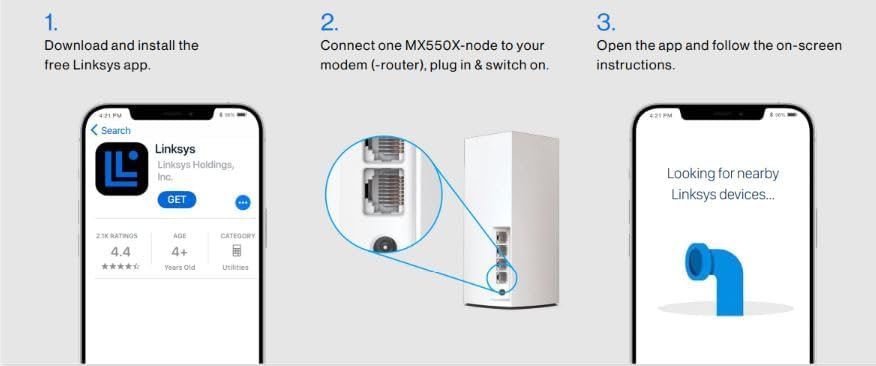
Image: Visual guide for initial setup using the Linksys App.

Image: Linksys App interface for easy setup and control.
Funtzionamendua eta ezaugarriak
The Linksys Velop Atlas WiFi 6 Mesh System offers advanced features for managing your home network.
Intelligent Mesh Technology
The system utilizes Intelligent Mesh technology to provide seamless and consistent WiFi coverage throughout your home. Nodes communicate with each other to optimize network traffic and ensure devices connect to the strongest available signal as you move.

Image: Intelligent Mesh technology for expanded WiFi coverage.
Linksys App Control
The Linksys App provides comprehensive control over your mesh network:
- Gurasoen kontrolak: Manage internet access for specific devices, schedule internet pauses, and block unwanted webguneak.
- Gonbidatuen sarbidea: Create a separate, secure WiFi network for guests without sharing your main network password.
- Gailuaren lehentasuna: Allocate bandwidth to specific devices for critical activities like streaming or gaming.
- Sarearen jarraipena: View connected devices, internet speed, and network status.

Image: Linksys App features for network management.
WiFi 6 Advantages
This system supports WiFi 6 (802.11ax), offering several benefits:
- Abiadura handiagoak: Experience faster data transfer rates for all your connected devices.
- Edukiera Handitua: Efficiently handles more devices simultaneously, reducing congestion in busy networks.
- Eraginkortasun hobetua: Better battery life for WiFi 6 compatible devices.

Image: Ultra-Fast WiFi 6 for enhanced streaming and gaming.

Image: WiFi 6 supporting more devices simultaneously.
Mantentzea
Regular maintenance ensures the longevity and optimal performance of your Linksys Velop system.
- Automatic Firmware Updates: The system is designed to receive automatic firmware updates. Ensure this feature is enabled in the Linksys App to benefit from the latest security patches and performance enhancements.
- Garbiketa fisikoa: Keep the nodes free from dust and obstructions. Use a soft, dry cloth to clean the exterior. Do not use liquid cleaners.
- Kokapen egokiena: Ensure nodes are placed in open areas, away from large metal objects, thick walls, and other electronic devices that may cause interference.
- Berrabiaraztea: Periodically rebooting your nodes (unplugging and replugging after 30 seconds) can help resolve minor network issues and refresh connections.

Image: Security features including automatic updates.
Arazoak konpontzea
If you encounter issues with your Linksys Velop system, try the following steps:
- Ez dago Interneteko konexiorik:
- Egiaztatu zure modema behar bezala funtzionatzen duen.
- Ensure the Ethernet cable from the modem to the primary Velop node is securely connected.
- Reboot your modem and then your primary Velop node.
- Weak WiFi Signal or Slow Speeds:
- Relocate nodes to improve coverage, ensuring they are not too far apart.
- Gutxitu beste gailu elektroniko batzuekiko interferentziak (adibidez, mikrouhin-labeak, haririk gabeko telefonoak).
- Check for obstructions like thick walls or large metal objects.
- Ensure all nodes are powered on and their LED indicators are solid blue.
- Gailua ez da konektatzen:
- Egiaztatu WiFi pasahitza.
- Reboot the device attempting to connect.
- Temporarily disable and re-enable WiFi on the device.
- Node LED Status:
- Urdin trinkoa: Good connection, working normally.
- Gorri trinkoa: Ez dago Interneteko konexiorik.
- Pulsing Blue: Starting up or searching for a node.
- Gorri tatsua: Node is too far from another node or has a weak connection.
- Fabrikaren berrezarpena: If issues persist, a factory reset may be necessary. Refer to the Linksys support website for specific instructions on how to perform a factory reset, as this will erase all custom settings.
Zehaztapenak
Key technical specifications for the Linksys MX5500 Velop Atlas WiFi 6 Mesh System (Model MX5503-CA):
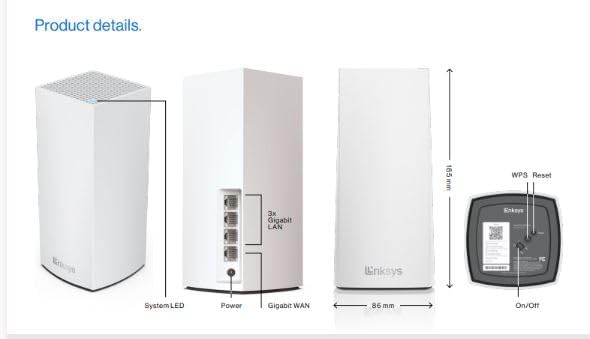
Image: Product details including dimensions and port configuration.
| Ezaugarri | Xehetasuna |
|---|---|
| Marka | Linksys |
| Modelo zenbakia | MX5503-CA |
| Ereduaren izena | AX5400 |
| Haririk gabeko estandarra | 802.11ax (WiFi 6) |
| Maiztasun Banda Klasea | Banda Bikoitza |
| Datuen transferentzia-tasa | Up to 5.4 Gigabits Per Second (AX5400) |
| Portu kopurua | 3 Gigabit Ethernet ports per node (1 WAN, 2 LAN or 3 LAN if used as child node) |
| Estaldura (3ko paketea) | Gehienez 8,100 metro koadro. |
| Onartutako gailuak | 90 gailu baino gehiago |
| Antena Mota | Barnekoa |
| Ezaugarri bereziak | Intelligent Mesh, 160 MHz channels, Qualcomm Immersive Home 214 Platform chipset, Easy setup via Linksys App |
| Dakarten osagaiak | Linksys MX5503 nodes, Power Adapters, Ethernet Cable, Quick Installation Guide |
Bermea eta Laguntza
For detailed warranty information, please refer to the warranty documentation included with your product or visit the official Linksys webgunea.
If you require further assistance or technical support, please visit the Linksys support portal or contact their customer service. The Linksys App also provides access to support resources.
Ask a question about this manual
Ask about setup, troubleshooting, compatibility, parts, safety, or missing instructions. Manuals+ will review the question and use this page’s manual context to help answer it.