
1. Sarrera
This manual provides essential information for the safe and efficient use of your Samsung QM85R 85-inch 4K UHD LCD Display. Please read this manual thoroughly before operating the device and retain it for future reference. The Samsung QM85R is a commercial-grade display designed for continuous operation, featuring a 4K UHD resolution and integrated MagicINFO S6 and SSSP 6.0 for advanced content management.
2. Segurtasun informazioa
Bete beti segurtasun-neurri hauek deskarga elektrikoak, suteak edo pantailari kalteak saihesteko.
- Energia iturria: Use only the specified power supply. Ensure the power cord is securely plugged into an appropriate outlet.
- Aireztapena: Ez blokeatu aireztapen-irekidurak. Ziurtatu pantailaren inguruan nahikoa leku aire-fluxu egokia izan dadin eta gehiegi berotzea saihesteko.
- Likidoaren esposizioa: Keep the display away from liquids. Do not expose it to rain or moisture.
- Garbiketa: Disconnect the power cord before cleaning. Use a soft, dry cloth. Avoid using liquid or aerosol cleaners directly on the screen.
- Muntaketa: If wall-mounting, ensure the wall mount is compatible with the display's weight and VESA standards. Professional installation is recommended for large displays.
- Zerbitzua: Ez saiatu produktu hau zuk zeuk ematen. Bidali zerbitzu guztiak zerbitzu kualifikatuko langileengana.
3. Paketearen edukia
Please check that the following items are included with your display. If any items are missing, contact your vendor.
- Samsung QM85R 85-inch 4K UHD LCD Display
- Elikatze kablea
- Urruneko agintea pilekin
- Erabiltzailearen eskuliburua (dokumentu hau)
- Berme Txartela (eskualdearen arabera alda daiteke)
4. Konfigurazioa
4.1 Instalazio fisikoa
The Samsung QM85R display can be installed using a compatible wall mount or a floor stand (sold separately). Due to its size and weight (approximately 140.4 pounds), professional installation is highly recommended.
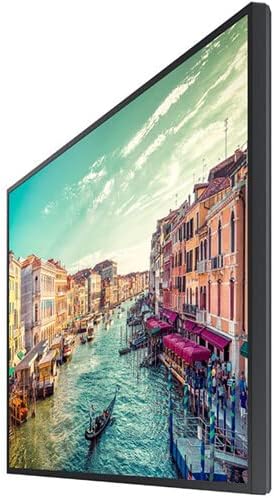
1. irudia: Aldea view of the Samsung QM85R display. Note the slim design suitable for various mounting options.
4.2 Konektatzeko kableak
Before connecting any cables, ensure the display and all connected devices are powered off.
- Potentzia-konexioa: Konektatu elikatze-kablea pantailaren elikatze-sarrerara eta gero lurrera konektatutako entxufe elektriko batera.
- Bideoaren sarrera: Connect your video source (e.g., PC, media player) to one of the display's HDMI or DisplayPort inputs using appropriate cables. The display supports 4K UHD (3840x2160) resolution.
- Sare-konexioa: For MagicINFO S6 and SSSP 6.0 functionality, connect an Ethernet cable to the display's LAN port for network access.
- Beste konexio batzuk: Connect any other peripheral devices as required (e.g., USB devices, audio output).
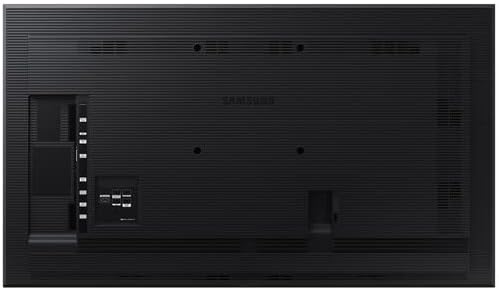
2. irudia: Atzekoa view of the Samsung QM85R display, illustrating the location of power, video, and network ports.
4.3 Hasierako piztea
After all connections are made, power on the display using the power button on the remote control or the display itself. Follow any on-screen prompts for initial setup, such as language selection and network configuration.
5. Funtzionamendua
5.1 Oinarrizko kontrolak
Use the provided remote control to access the display's functions:
- Pizteko botoia: Pantaila aktibatu edo itzali egiten du.
- Iturriaren botoia: Cycles through available input sources (HDMI1, HDMI2, DisplayPort, etc.).
- Menuko botoia: Pantailan bistaratzeko (OSD) menua irekitzen du.
- Nabigazio botoiak (Gora/Behera/Ezkerra/Eskuina): Nabigatu menuko aukeretan.
- Sartu botoia: Menuko hautaketak berresten ditu.
5.2 Pantailaren ezarpenak
Sartu OSD menura pantailaren hainbat ezarpen doitzeko:
- Irudi modua: Select from preset modes (e.g., Standard, Dynamic, Custom) or adjust individual settings like brightness, contrast, sharpness, and color temperature.
- Ebazpena: The display natively supports 3840x2160 (4K UHD) resolution. Ensure your source device is configured to output this resolution for optimal clarity.
- Freskatze-tasa: The display operates at a 75Hz refresh rate, providing smooth motion for compatible content.
- Audioa: Adjust volume, mute, and select audio output options if external speakers are connected.
5.3 Smart Signage Platform (SSSP 6.0) and MagicINFO S6
The QM85R features Samsung's integrated Smart Signage Platform (SSSP 6.0) powered by MagicINFO S6. This allows for advanced content management, scheduling, and remote control capabilities. Refer to the dedicated MagicINFO S6 user guide for detailed instructions on utilizing these features.
6. Mantentzea
6.1 Pantaila garbitzea
To maintain the display's appearance and performance:
- Pantaila: Garbitu pantaila astiro-astiro zapi leun eta pelusik gabeko batekin. Orbanik egoskorrak izanez gero, garbitu astiro-astiro.ampen the cloth with water or a specialized screen cleaner, then wipe dry immediately. Do not spray liquids directly onto the screen.
- Gorputza: Wipe the display's frame and back panel with a soft, dry cloth.
- Saihestu: Do not use abrasive cleaners, waxes, or solvents (e.g., alcohol, benzene, paint thinner) as they can damage the display surface.
6.2 Ingurumen-gogoetak
Ensure the display is operated within its specified temperature and humidity ranges to ensure longevity and optimal performance. Avoid direct sunlight exposure and extreme temperature fluctuations.
7. Arazoak
If you encounter issues with your display, refer to the following common problems and solutions before contacting support.
| Arazoa | Kausa posiblea | Irtenbidea |
|---|---|---|
| Botererik ez | Kable elektrikoa deskonektatuta; arazo bat dago entxufean. | Egiaztatu kablearen konexioa. Probatu entxufea beste gailu batekin. |
| Seinalerik ez | Incorrect input source selected; video cable disconnected. | Press the 'Source' button on the remote to select the correct input. Ensure video cables are securely connected. |
| Irudi kalitate eskasa | Incorrect resolution; display settings. | Ensure source device outputs 3840x2160 resolution. Adjust picture settings (brightness, contrast) in the OSD menu. |
| Urruneko kontrola ez dabil | Bateria agortuak; oztopoa. | Replace batteries. Ensure no obstructions between remote and display's IR receiver. |
8. Zehaztapenak
| Ezaugarri | Zehaztapena |
|---|---|
| Ereduaren izena | QM85R |
| Pantailaren tamaina | 85 hazbete |
| Ebazpena | 3840 x 2160 (4K UHD) |
| Freskatze tasa | 75Hz |
| Distira | 500 NIT |
| Funtzionamendu Orduak | 24/7 |
| Eraikitako Ezaugarriak | MagicINFO S6, SSSP 6.0 |
| Produktuaren neurriak (LxWxH) | 82.52 x 49.02 x 10.51 hazbete |
| Elementuaren pisua | 140.4 kilo |
| Kolorea | Beltza |
| Fabrikatzailea | Samsung |
9. Bermea eta Laguntza
Your Samsung QM85R display is covered by a manufacturer's warranty. For specific warranty terms and conditions, please refer to the warranty card included with your product or visit the official Samsung webgunea. Laguntza teknikoa lortzeko, eskuliburu honetatik haratagoko arazoak konpontzeko edo zerbitzuari buruzko kontsultak egiteko, jarri harremanetan Samsung Bezeroarentzako Arreta Zerbitzuarekin.
Lineako laguntza: Bisitatu www.samsung.com/us/support/
Telefono-laguntza: Refer to your regional Samsung support contact information.