
1. Sarrera
Thank you for choosing the FLEXISPOT EG1 Electric Standing Desk. This manual provides essential information for the safe and efficient assembly, operation, and maintenance of your new height-adjustable desk. The EG1 desk is designed to promote a healthier work environment by allowing seamless transitions between sitting and standing positions, enhancing focus and comfort throughout your workday.
The FLEXISPOT EG1 features a wide height adjustment range, a smooth one-piece desktop, and an intuitive control panel for ease of use. Please read this manual thoroughly before assembly and operation to ensure proper functionality and longevity of your product.
2. Segurtasun informazioa
- Ziurtatu osagai guztiak daudela eta kalterik gabe muntatu aurretik. Ez erabili piezaren bat falta bada edo kaltetuta badago.
- Mantendu haurrak eta maskotak mahaitik urrun funtzionamenduan zehar, lesioak saihesteko.
- Do not place hands or other objects near moving parts (e.g., lifting columns) during height adjustment.
- Ziurtatu mahaia gainazal mailakatu batean jartzen dela egonkortasuna mantentzeko.
- Ez gainkargatu mahaia. Kontsultatu zehaztapenak gehienezko pisu-ahalmena jakiteko.
- Erabili emandako korronte-egokitzailea eta kableak soilik.
- Deskonektatu elektrizitatea garbitu edo mantendu aurretik.
- Saihestu likidoak kontrol-panelean edo osagai elektrikoetan isurtzea.
- This desk is equipped with an anti-collision rebound function. However, always be aware of surroundings during movement.
3. Paketearen edukia
The FLEXISPOT EG1 Electric Standing Desk is shipped in two separate packages to ensure better protection during transit. Please verify that all components listed below are present before beginning assembly.
- Mahaigaina (pieza 1)
- Desk Frame (includes legs, motor, control box)
- Kontrol panela
- Korronte egokitzailea eta kablea
- Muntaketa-osagaiak (torlojuak, arandelak, tresnak)
- Argibide eskuliburua

Image: The FlexiSpot EG1 desk components are shipped in two distinct packages: one containing the desktop and another for the desk frame, ensuring secure delivery.
4. Konfigurazioa eta Muntaketa
Assembly of the FLEXISPOT EG1 desk is designed to be straightforward with pre-drilled holes and a complete set of tools included. Follow these general steps for assembly:
- Deskonprimitu osagaiak: Kontu handiz atera pieza guztiak paketetik eta jarri gainazal garbi eta leun batean marradurak saihesteko.
- Mahaiaren markoa muntatu: Attach the lifting columns to the crossbar, ensuring all screws are securely tightened.
- Oinak lotu: Secure the foot pads to the bottom of the lifting columns. The anti-slip foot pads provide stability and protect your floor.
- Mahaigaina muntatu: Carefully place the desktop upside down on a soft surface. Align the assembled desk frame with the pre-drilled holes on the desktop and secure it with the provided screws.
- Kontrol panela instalatu: Jarri kontrol-panela mahaigainaren azpialdean, leku eroso batean.
- Konektatu kableak: Connect the motor cables, control panel cable, and power adapter to the control box. Ensure all connections are firm.
- Kableen kudeaketa: Use cable ties or clips (if provided) to organize and secure cables, preventing them from snagging during height adjustments.
- Lanpostuaren mahaia: Carefully flip the desk upright and place it in its desired location. Ensure there is adequate clearance for height adjustments.

Image: The desk features a smooth, one-piece desktop, eliminating gaps and burrs often found in spliced desktops, contributing to a clean and stable work surface.
5. Funtzionamendu-argibideak
The FLEXISPOT EG1 Electric Standing Desk is operated using a simple 2-button control panel, allowing for quick and easy height adjustments and memory presets.
5.1 Kontrol panelaren funtzioak

Image: The smart control panel features an LED display, up/down buttons for height adjustment, and four memory preset buttons for saving preferred desk heights.
- LED pantaila: Shows the current desk height in centimeters or inches.
- Gora/Behera botoiak (▲ / ▼): Press and hold to move the desk up or down. Release the button to stop at the desired height.
- Memoria aurrezarpenak (1, 2, 3, 4): Botoi hauek nahiago dituzun lau mahaigaineko altuera gorde eta berreskuratzeko aukera ematen dute.
5.2 Memoria aurrezarpenak ezartzea
- Egokitu mahaia nahi duzun altuerara Gora/Behera botoiak erabiliz.
- Press the 'M' or 'SET' button (if available, otherwise proceed to step 3). The display may flash.
- Press one of the numbered memory buttons (1, 2, 3, or 4) within a few seconds. The display will confirm the setting.
- To recall a saved height, simply press the corresponding numbered memory button. The desk will automatically move to that height.
5.3 Talkaren aurkako funtzioa
The desk is equipped with an anti-collision system. If the desk encounters an obstacle during height adjustment, it will automatically stop and reverse slightly to prevent damage. Always ensure the area around the desk is clear during operation.

Image: The desk offers a wide height range (71.5 to 116 cm), accommodating various users for comfortable sitting or standing positions.
6. Mantentzea
Regular maintenance ensures the longevity and optimal performance of your FLEXISPOT EG1 Electric Standing Desk.
- Garbiketa: Garbitu mahaigaina eta markoa zapi leun batekinamp oihal. Saihestu garbitzaile urratzaileak edo akabera kaltetu dezaketen produktu kimiko gogorrak. Ziurtatu mahaia deskonektatuta dagoela garbitu aurretik.
- Kableen kudeaketa: Periodically check cables for wear or damage. Ensure they are neatly organized and not pinched or tangled.
- Loturaren egiaztapena: Noizean behin, egiaztatu torloju eta azkoin guztiak ondo estutu direla. Beharrezkoa bada, berriro estutu.
- Mugimenduaren egiaztapena: Operate the desk through its full height range periodically to ensure smooth and consistent movement.
7. Arazoak
If you encounter issues with your FLEXISPOT EG1 desk, refer to the following troubleshooting guide:
| Arazoa | Kausa posiblea | Irtenbidea |
|---|---|---|
| Mahaia ez da mugitzen. | Power cable disconnected, control box error, motor issue. | Check power connections. Unplug and replug the desk for 10 seconds to reset. If problem persists, contact customer support. |
| Mahaia modu irregularrean mugitzen da edo zarata ezohikoa egiten du. | Karga irregularra, lotura solteak, oztopoak. | Ensure weight is evenly distributed. Check and tighten all assembly fasteners. Clear any obstructions. |
| Mahaia gelditzen da doikuntza bitartean. | Anti-collision activated, overload. | Remove any obstacles. Reduce weight on the desk if it exceeds maximum capacity. |
| Memoria aurrezarpenak ez dute funtzionatzen. | Aurrezarpenak ez dira behar bezala gorde. | Gorde berriro memoria-aurrezarpenak 5.2 ataleko argibideei jarraituz. |
8. Zehaztapenak
Key specifications for the FLEXISPOT EG1 Electric Standing Desk:
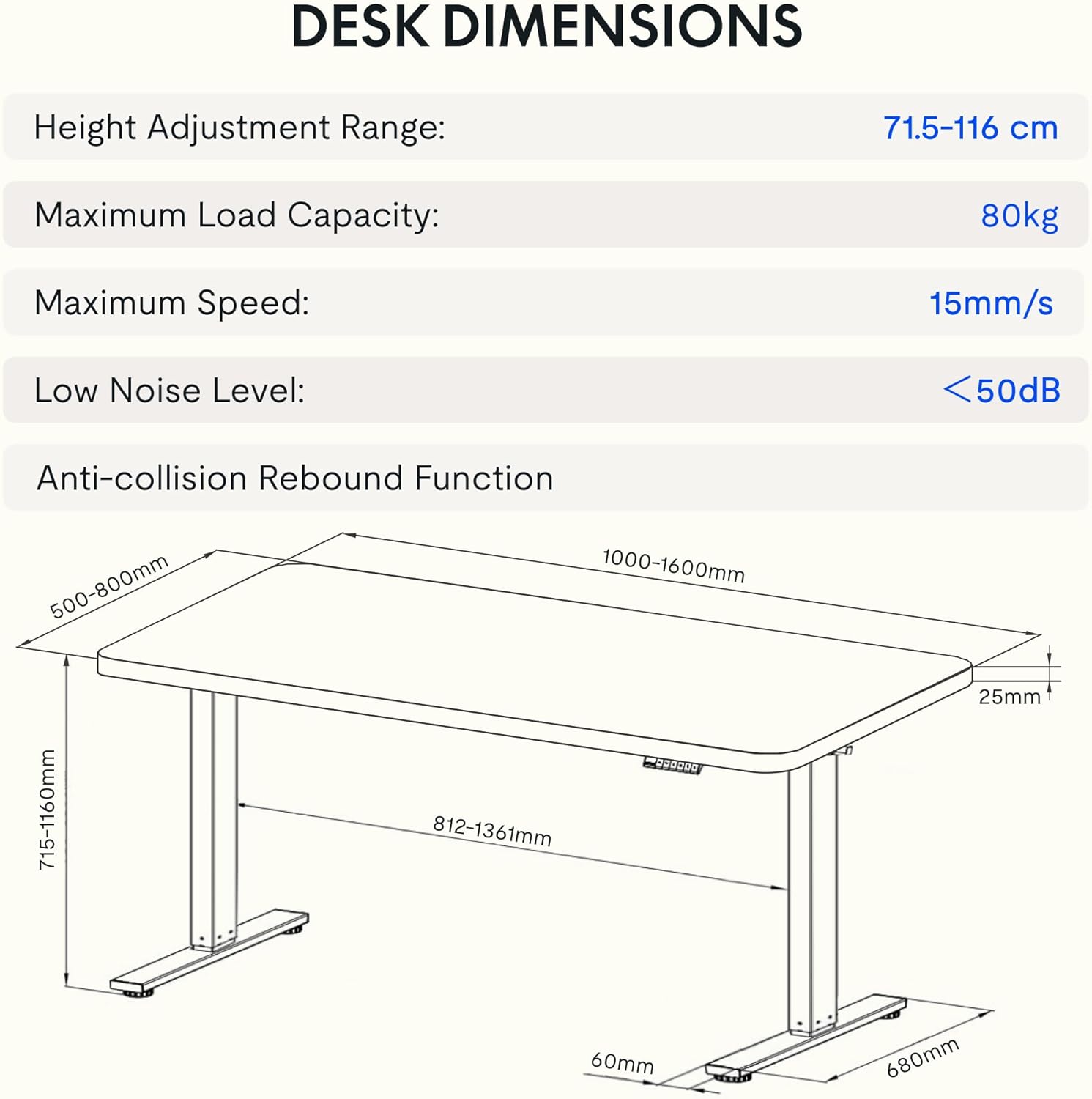
Image: Detailed diagram illustrating the desk's dimensions, height adjustment range (71.5-116 cm), maximum load capacity (80kg), maximum speed (15mm/s), and low noise level (<50dB).
| Ezaugarri | Zehaztapena |
|---|---|
| Modelo zenbakia | EG1B+TP1608-Black |
| Altuera doitzeko tartea | 71.5 - 116 cm (28 - 48 hazbete) |
| Gehienezko Karga Edukiera | 80 kg (176 lb) |
| Gehienezko Abiadura | 15 mm/s |
| Zarata Maila Baxua | < 50 dB |
| Mahaigaineko materiala | Wood (2.5 cm thickness) |
| Markoaren materiala | Altzairua |
| Produktuaren neurriak (L x W x H) | 31.5" x 62.99" x 11.02" (ontziratuta) |
| Elementuaren pisua | 30 kilogramo |
| Ezaugarri bereziak | Electric, Anti-collision Rebound Function, 4 Memory Presets |
9. Bermea eta Laguntza
FLEXISPOT is committed to providing high-quality ergonomic solutions. With over 20 years of experience, our products undergo rigorous testing and meet various European certifications (IGR, CE, TÜV).
For warranty information, technical support, or any questions regarding your FLEXISPOT EG1 Electric Standing Desk, please visit the official FLEXISPOT website or contact our customer service department. You can find more information and contact details on the FLEXISPOT denda Amazonen.