
1. Sarrera
This manual provides essential information for the safe and effective use of your Canon PowerShot G1 X Mark III Digital Camera. Please read this manual thoroughly before using the camera and retain it for future reference.

1.1. irudia: Aurrealdea view of the Canon PowerShot G1 X Mark III Digital Camera with the lens extended. This image displays the camera's compact body, the integrated zoom lens, and the Canon branding.
The PowerShot G1 X Mark III is an advanced compact camera featuring a 24.2MP APS-C CMOS sensor and a DIGIC 7 image processor. It is designed for high-quality still photography and Full HD video recording, offering a versatile 3x optical zoom lens and Dual Pixel CMOS AF for precise focusing.
2. Zer dago kutxan
Egiaztatu elementu hauek guztiak zure paketean sartuta daudela:
- Canon PowerShot G1 X Mark III Digital Camera
- Canon NB-13L Lithium-Ion Battery Pack (3.6V, 1250mAh)
- Canon CB-2LH Battery Charger for NB-13L Li-Ion Batteries
- Lentearen kapela
- Lentearen txapelaren soka
- NS-DC12 Neck Strap
- Strap Adapter for NS-DC12
- Mikro HDMI kablea
3. Konfigurazioa
3.1. Bateria kargatzea eta instalatzea
- Insert the NB-13L battery into the CB-2LH charger.
- Kargagailua entxufe batera konektatu. Karga-adierazlea piztuko da.
- Once charging is complete, the indicator will change or turn off. Remove the battery.
- Ireki kameraren bateriaren konpartimentuaren estalkia.
- Insert the charged battery into the camera, ensuring correct orientation. Close the cover securely.
3.2. Memoria Txartela sartzea
The camera supports SD, SDHC, and SDXC memory cards. For optimal performance, especially with video recording and continuous shooting, use a UHS Speed Class 3 (U3) card.
- Ireki memoria txartelaren zirrikituaren estalkia.
- Sartu memoria txartela etiketa kameraren aurrealdera begira duela, klik egin arte.
- Itxi ondo memoria txartelaren zirrikituaren estalkia.
3.3. Lepoko uhala lotzea
Thread the NS-DC12 neck strap through the strap adapters and then through the camera's strap mounts. Ensure both ends are securely fastened to prevent accidental drops.
3.4. Hasierako piztea eta oinarrizko ezarpenak
Sakatu ON/OFF button to power on the camera. Follow the on-screen prompts to set the date, time, and language. These settings are crucial for proper image file kudeaketa.
4. Kameraren funtzionamendua
4.1. Camera Controls Overview

4.1. irudia: Goikoa view of the camera, illustrating the mode dial, hot shoe, and various control dials for quick adjustments.

4.2. Irudia: Atzealdea view of the camera, highlighting the LCD screen, electronic viewfinder, and the arrangement of control buttons for menu navigation and settings.
Familiarize yourself with the camera's buttons and dials. The mode dial on the top allows selection of various shooting modes, including Program AE, Shutter-priority AE, Aperture-priority AE, Manual, and Automatic modes. Dedicated dials provide direct adjustment of exposure compensation and other settings.
4.2. Oinarrizko Argazkilaritza
Argazki bat ateratzeko:
- Turn the mode dial to your desired shooting mode (e.g., AUTO for automatic settings).
- Frame your subject using the electronic viewbilatzailea edo LCD pantaila.
- Press the shutter button halfway down to focus. The camera uses Dual Pixel CMOS AF for fast and accurate phase-detection autofocus.
- Sakatu obturadorearen botoia guztiz irudia ateratzeko.
4.3. Bideo Grabaketa
The camera supports Full HD 1080p video recording at up to 60 frames per second in MP4 format.
- Set the camera to video recording mode (if applicable, or press the dedicated video record button).
- Sakatu bideoa grabatzeko botoia grabatzen hasteko.
- Sakatu botoia berriro grabaketa gelditzeko.
4.4. Using the LCD Monitor and Electronic Viewaurkitzailea

4.3. irudia: Aldea view of the camera with the vari-angle touchscreen LCD extended, demonstrating its flexibility for various shooting angles.
The camera features a 3.0-inch vari-angle touchscreen LCD, allowing for flexible shooting angles and intuitive control. You can also use the built-in 2.36m-dot OLED electronic viewfinder for a clear view, batez ere baldintza argitsuetan.
4.5. Built-in Flash
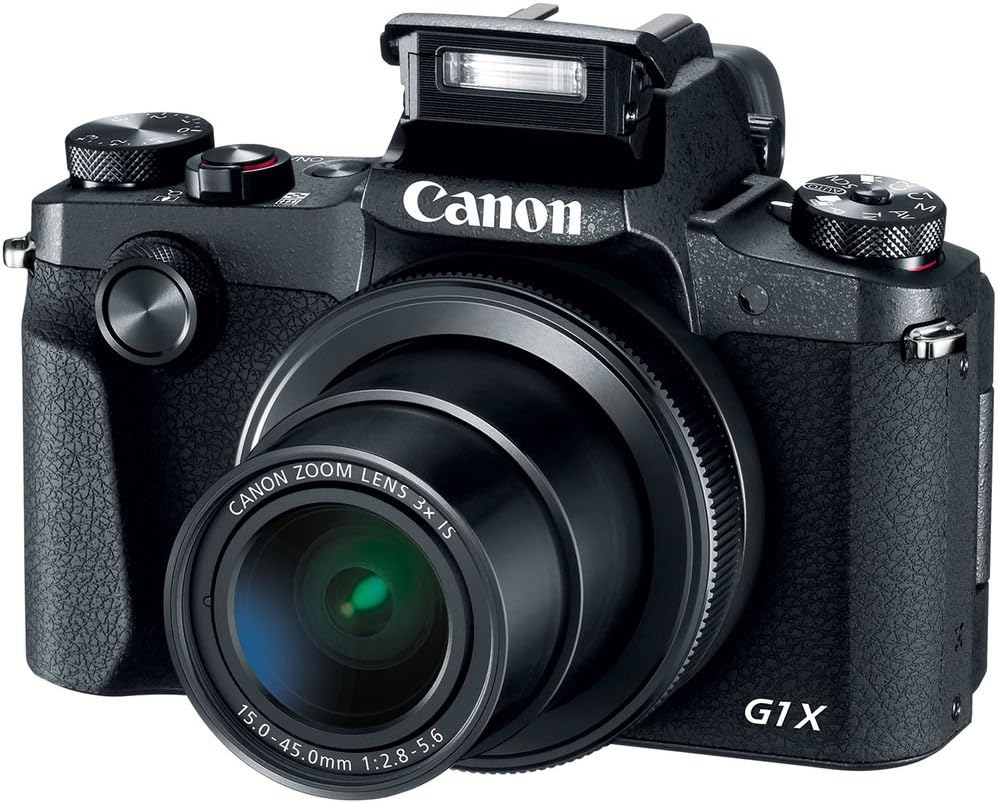
4.4. irudia: Aurrealdea view of the camera with the pop-up flash in the raised position, ready for use in low-light conditions.
The camera includes a built-in pop-up flash. To activate it, press the flash release button. Flash modes include Auto, On, Slow Synch, and Off. The hot shoe allows for external flash units.
4.6. Konektibitatea
The PowerShot G1 X Mark III offers Wi-Fi, NFC, and Bluetooth connectivity for transferring images to smart devices and remote control. Refer to the camera's menu for pairing instructions.
5. Mantentzea
5.1. Kamera garbitzea
- Erabili zapi leun eta lihorik gabeko bat kameraren gorputza garbitzeko.
- Lentearentzat eta LCD pantailarentzat, erabili lenteak garbitzeko oihal eta disoluzio espezializatu bat. Saihestu produktu kimiko gogorrak.
- Use a blower brush to remove dust from the lens and sensor area (when exposed).
5.2. Bateria zaintzea
- Kargatu bateria guztiz erabili aurretik.
- Gorde bateriak leku fresko eta lehor batean erabiltzen ez dituzunean.
- Saihestu bateriak tenperatura altuetan jartzea.
5.3. Biltegiratzea
When storing the camera for extended periods, remove the battery and memory card. Store the camera in a dry, dust-free environment, preferably in a camera bag.
6. Arazoak
| Arazoa | Balizko Kausa / Irtenbidea |
|---|---|
| Kamera ez da pizten. | Battery may be depleted or incorrectly inserted. Ensure battery is charged and properly seated. |
| Ezin dira argazkiak atera. | Memory card may be full, locked, or not inserted. Check card status and free space. |
| Irudiak lausoak dira. | Check focus settings. Ensure sufficient light. Use image stabilization or a tripod if necessary. |
| Flasha ez da pizten. | Flash may be set to 'Off' or in a mode where it does not fire automatically. Check flash settings. |
7. Zehaztapenak
- Sentsore: 24.2 MP APS-C CMOS Sensor
- Irudi prozesadorea: DIGIK 7
- Lentea: 24-72mm (35mm Equivalent) 3x Optical Zoom, f/2.8-5.6
- Irudiaren egonkortzea: Optikoa
- Fokatze automatikoa: Dual Pixel CMOS AF (Phase Detection)
- ISO barrutia: 100-25600 (Hedatua)
- Etengabeko filmaketa: Gehienez 9 fps
- Bideo Grabaketa: Full HD 1080p at 60 fps (MP4)
- Viewbilatzailea: 2.36m-dot OLED Electronic Viewaurkitzailea
- LCDa: 3.0" Vari-Angle Touchscreen LCD (1280 x 720 resolution)
- Konektibitatea: Built-In Wi-Fi, NFC, Bluetooth, Micro HDMI
- Biltegiratze euskarria: SD, SDHC, SDXC (UHS-I compatible)
- Bateria: NB-13L Lithium-Ion
- Neurriak (gutxi gorabehera): 4.53 x 3.00 x 2.36 hazbete (115 x 76 x 60 mm)
- Pisua (gutxi gorabehera): 14.0 oz (399 g) with battery and memory card
- Eraikuntza: Dust- and Water-Resistant
8. Bermea eta Laguntza
This product is covered by a 90-day limited warranty. For warranty claims or technical support, please refer to the official Canon support channels or contact your retailer.