
Sarrera
This manual provides essential instructions for the safe and effective use of your Fujifilm Instax Mini EVO Hybrid Instant Camera. The Instax Mini EVO combines digital imaging with instant film printing, offering a versatile photographic experience. Please read this manual thoroughly before using the camera and retain it for future reference.

1. irudia: Fujifilm Instax Mini EVO Instant Camera. This image displays the camera's front, featuring the lens, flash, and power button, with an instant print of a beetle on a leaf partially ejected from the top.
Produktua amaituview
Ezaugarri nagusiak
- Hybrid instant film camera functionality.
- Offers 10 lens effects and 10 film effects for a total of 100 creative expressions.
- Integrated selfie mirror for accurate self-portraits.
- Dual shutter buttons for both portrait and landscape orientations.
- Ability to save printed images to a smartphone via the free INSTAX MINI EVO App.
- Remote shooting control via smartphone using the INSTAX MINI EVO App.
- Print photos directly from a smartphone via Bluetooth.
- Supports image storage on a microSD card (not included).
- Produces high-quality, 2" x 3" INSTAX MINI instant photos.
Kameraren osagaiak

2. irudia: Instax Mini EVO Camera Features. This diagram labels the main physical components of the camera, including the two shutter buttons, print lever, selfie mirror, USB-C charging port, and microSD card slot.
- Portrait Mode Shutter Button: Used for capturing images in portrait orientation.
- Landscape Mode Shutter Button: Used for capturing images in landscape orientation.
- Print Lever: Activates the printing process for selected images.
- Selfie ispilua: Located on the front, assists in framing self-portraits.
- USB-C kargatzeko ataka: For connecting the camera to a power source for charging.
- MicroSD txartelaren zirrikitua: For inserting a microSD card to expand storage capacity.
- Lentearen markagailua: Rotates to select various lens effects.
- Filmaren markagailua: Rotates to select various film effects.
Dakarten osagaiak

3. irudia: What's in the Box. This image shows the camera, a wrist strap, a USB charging cable, and the printed user manual.
The package includes the Instax Mini EVO camera body, a wrist strap, and a USB charging cable. A detailed user manual is also provided.
Konfigurazioa
1. Bateria kargatzea
Before initial use, fully charge the camera's built-in lithium-ion battery.
- Connect the supplied USB-C cable to the camera's USB-C port (refer to Figure 2).
- Konektatu kablearen beste muturra USB elikatze-egokitzaile batera (ez dago barne) edo ordenagailuaren USB atakara.
- Kargatzeko adierazlearen argia piztuko da kargatzen ari den bitartean eta itzali egingo da kargatzen amaitutakoan.
2. MicroSD txartel bat sartzea (aukerakoa)
To expand storage for digital images, insert a microSD card (sold separately).
- Locate the microSD card slot on the camera (refer to Figure 2).
- Gently insert the microSD card with the contacts facing the correct direction until it clicks into place.
- Txartela kentzeko, bultzatu pixka bat barrurantz, atera arte.
3. Instax Mini filma kargatzea
The camera uses Instax Mini instant film (sold separately).
- Ireki kameraren atzealdean dagoen filmaren konpartimentuaren estalkia.
- Lerrokatu film-paketeko marka horia kamerako marka horiarekin.
- Sartu film-paketea zuzenean konpartimentuan. Ez sakatu film-paketea.
- Itxi filmaren konpartimentuaren estalkia. Kamerak automatikoki kanporatuko du film beltzaren estalkia.

4. irudia: Instax Mini Film Dimensions. This image illustrates the standard size of Instax Mini film, which is 86mm by 54mm.
4. Hasierako piztea
Sakatu eta eutsi pizteko botoia kamera pizteko. Jarraitu hasierako konfiguraziorako pantailan agertzen diren argibideei, hala nola data eta ordua ezartzea.
Funtzionamendu-argibideak
Argazkiak ateratzen
- Select Lens Effect: Rotate the lens dial around the camera's main lens to choose from 10 different lens effects (e.g., Light Leak, Fisheye, Soft Focus, Blur).
- Select Film Effect: Rotate the film dial on the top of the camera to choose from 10 different film effects (e.g., Vivid, Sepia, Retro, Canvas).
- Marraztu zure planoa: Use the LCD screen on the back of the camera to compose your image. For selfies, use the built-in selfie mirror on the front.
- Adjust Exposure (Optional): On the LCD screen, navigate to the exposure settings to brighten or darken your image before capture.
- Capture the Image: Press either the portrait mode shutter button (top) or the landscape mode shutter button (side) to take the photo.

5. irudia: Lens Effects. This image demonstrates four of the ten available lens effects: Light Leak, Fisheye, Soft Focus, and Blur, as they would appear on an instant print.

6. irudia: Film Effects. This image demonstrates four of the ten available film effects: Vivid, Sepia, Retro, and Canvas, as they would appear on an instant print.

7. irudia: Exposure Adjustment. This image shows the camera's LCD screen with options to adjust exposure levels before taking a photo.
Argazkiak inprimatzea
- After taking a photo, it will appear on the LCD screen. You can review it before printing.
- To print, pull the print lever located on the side of the camera (refer to Figure 2).
- The camera offers two print modes: INSTAX-Rich Mode for bright, immersive prints, and INSTAX-Natural Mode for a classic, cooler look. Select your preferred mode before printing.
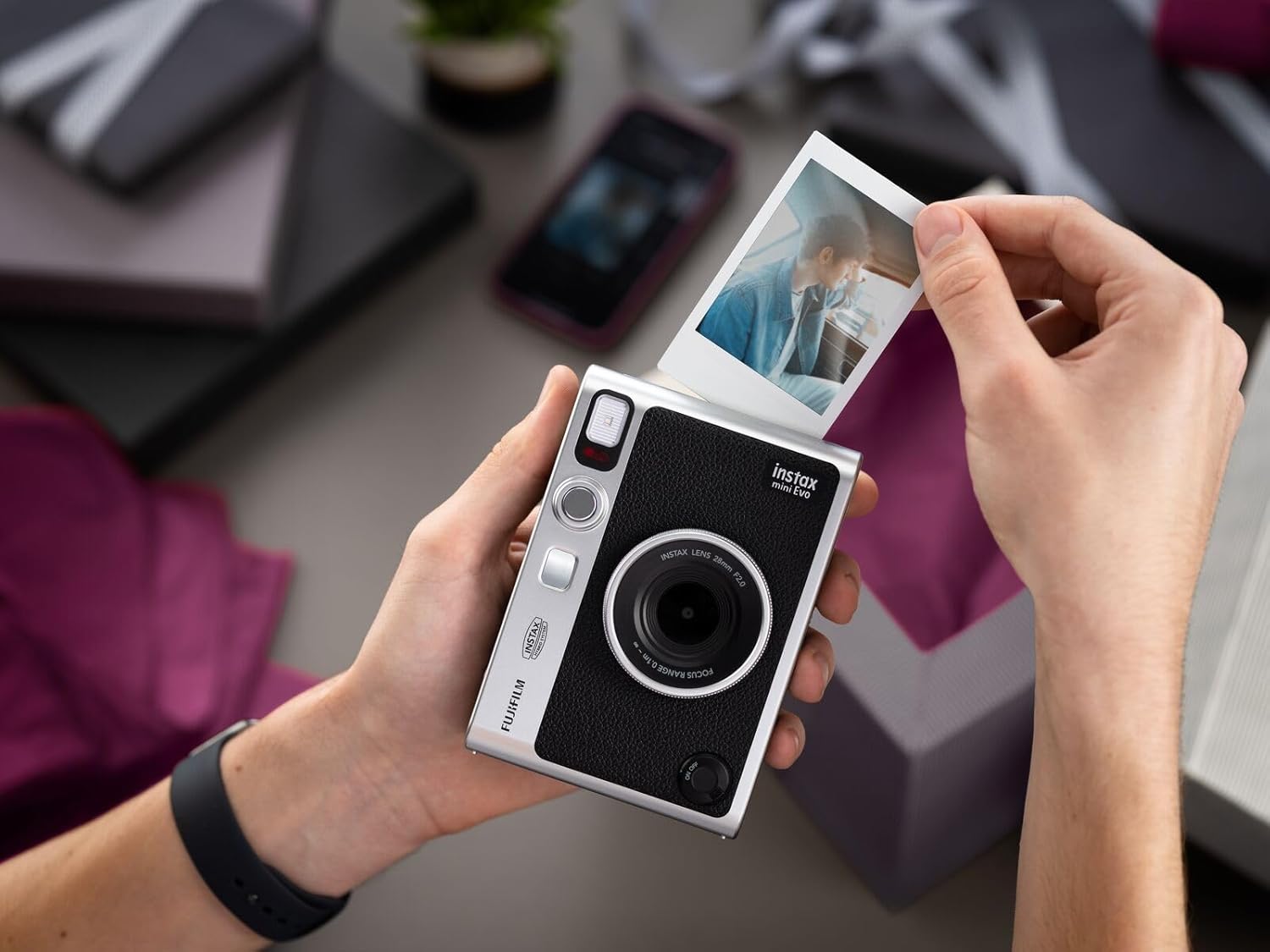
8. irudia: Printing an Instant Photo. This image shows an instant photo being ejected from the top slot of the Instax Mini EVO camera after the print lever has been activated.

9. irudia: Variety of Instant Prints. This image displays the Instax Mini EVO camera alongside several instant photos, illustrating the diverse range of images that can be captured and printed.
Using the INSTAX MINI EVO App
The free INSTAX MINI EVO App enhances your camera experience by connecting to your smartphone via Bluetooth.
- Deskargatu aplikazioa: Bilatu "INSTAX MINI EVO" in your smartphone's app store and install it.
- Bluetooth bidez konektatu: Follow the in-app instructions to pair your camera with your smartphone.
- Urruneko tiroketa: Use your smartphone as a remote control to capture photos with the camera.
- Print from Smartphone: Select images from your smartphone's gallery and print them directly using the Instax Mini EVO camera.
- Save Printed Images: Any image you print from the camera can be saved in a digital format to your smartphone via the app, facilitating easy sharing.

10. irudia: Direct Printing from Smartphone. This image shows the Instax Mini EVO app on a smartphone, demonstrating the ability to select and print images directly to the camera.

11. irudia: Smartphone Printer and Instant Camera Functionality. This image illustrates how the Instax Mini EVO functions as both an instant camera and a smartphone printer, showing the app interface for transferring and printing images.
Mantentzea
Kamera garbitzea
- Erabili zapi leun eta lehor bat kameraren gorputza garbitzeko.
- For the lens and LCD screen, use a lens cleaning cloth specifically designed for optical surfaces. Avoid abrasive materials.
- Do not use alcohol, thinners, or other volatile solvents, as they may damage the camera's finish.
Bateria zaintzea
- Recharge the battery regularly, even if the camera is not in frequent use, to maintain battery health.
- Avoid exposing the camera to extreme temperatures, which can affect battery performance and lifespan.
Filmen biltegiratzea
- Store Instax Mini film in a cool, dry place, away from direct sunlight and high humidity.
- Ensure film packs are sealed until ready for use to prevent exposure to light.
Arazoak konpontzea
| Arazoa | Kausa posiblea | Irtenbidea |
|---|---|---|
| Kamera ez da pizten. | Bateria agortuta dago. | Kargatu bateria hornitutako USB-C kablea erabiliz. |
| Filma ez da kanporatzen. | Film paketea hutsik dago edo gaizki kargatuta dago. | Replace the film pack or re-load it correctly. Ensure the film compartment is closed securely. |
| Prints are too dark/light. | Incorrect exposure settings or lighting conditions. | Adjust exposure settings before taking the photo (refer to Figure 7). Ensure adequate lighting. |
| Ezin da telefonoaren aplikaziora konektatu. | Bluetooth is off or pairing failed. | Ensure Bluetooth is enabled on both the camera and smartphone. Restart both devices and try pairing again. |
| Irudiaren kalitatea eskasa da. | Dirty lens or film, or low-light conditions. | Clean the lens. Ensure sufficient lighting. Check film expiration date. |
Zehaztapenak
| Ezaugarri | Xehetasuna |
|---|---|
| Marka | Fujifilm |
| Ereduaren izena | Instax Mini EVO |
| Elementuaren eredu-zenbakia | 16812493 |
| UPC | 074101204957 |
| Produktuaren neurriak (L x W x H) | 5.78 x 4.06 x 3.39 hazbete |
| Elementuaren pisua | 10.1 ontza (0.63 libra) |
| Film Formatu Mota | Instant (Instax Mini) |
| Ezaugarri Berezia | Auto-esposizioa |
| Pilak | 1 litio ioizko bateria (barne) |
| Gailu bateragarriak | Camera, Smartphone (via app) |
| Fabrikatzailea | Fujifilm |
| Eskuragarri dagoen lehen data | 18ko azaroaren 2021a |
Bermea eta Laguntza
For detailed warranty information and customer support, please refer to the official Fujifilm documentation included with your product or visit the Fujifilm support webgunea.
Erabiltzailearen eskuliburuaren bertsio elektronikoa deskargatzeko eskuragarri dago: Fujifilm Instax Mini EVO User Manual (PDF).
Extended protection plans may be available from third-party providers. Please consult your retailer for more information.