
1. Segurtasun informazio garrantzitsua
Read all instructions carefully before using this treadmill. Keep this manual for future reference.
- Jarri beti zinta-korrikalaria gainazal lau eta egonkor batean.
- Ensure adequate clear space (at least 2 meters behind and 0.6 meters on each side) around the treadmill during operation.
- Mantendu haurrak eta maskotak zintatik urrun funtzionatzen ari diren bitartean.
- Ez erabili zinta-korrikalaria kablea edo entxufea hondatuta badu, edo behar bezala ez badabil.
- Jantzi kirol oinetako eta arropa egokiak.
- Erabili segurtasun-giltza uneoro. Lotu klipa arropari entrenamendua hasi aurretik.
- Kontsultatu medikuari edozein ariketa-programa hasi aurretik.
- The maximum user weight capacity is 130 kg (286 lbs).
2. Produktua amaitu daview
The JOROTO F20PRO Folding Treadmill is designed for home and office use, offering a compact and efficient cardio workout solution. It features a powerful motor, adjustable incline, and smart app connectivity.
Osagaiak barne:
- JOROTO F20PRO Treadmill Unit
- Elikatze kablea
- Segurtasun-giltza
- Erabiltzailearen eskuliburua (dokumentu hau)

2.1. irudia: Orokorrean view of the JOROTO F20PRO Folding Treadmill. This image displays the treadmill in its unfolded, ready-to-use state, highlighting its compact design and main components like the console, handrails, and running deck.
3. Konfigurazioa eta hasierako erabilera
The JOROTO F20PRO treadmill comes largely pre-assembled. Follow these steps for initial setup:
- Despaketatzea: Kontu handiz atera zinta-korrikalaria bere paketetik. Gorde ontziratzeko materialak etorkizunean garraiatzeko edo biltegiratzeko.
- Lekua: Position the treadmill on a firm, level surface, ensuring sufficient clearance around the unit as described in the safety section.
- Unfolding (if folded): If the treadmill is in its folded position, gently lower the running deck until it locks into place. Ensure all locking mechanisms are secure.
- Konektatzeko potentzia: Plug the power cord into the treadmill's power input, then into a grounded electrical outlet.
- Attaching Safety Key: Sartu segurtasun-giltza kontsolan dagokion zirrikituan. Zinta-korrikalariak ez du funtzionatuko segurtasun-giltza jarrita ez badago.

Figure 3.1: Product dimensions of the JOROTO F20PRO Treadmill. This image illustrates the treadmill's measurements (length, width, height) in both unfolded and folded states, aiding in proper placement and storage planning.
4. Funtzionamendu-argibideak
4.1 Piztu/Itzali
- To power on, ensure the safety key is in place and press the 'Start' button on the console.
- To power off, press the 'Stop' button or remove the safety key.
4.2 Kontsolaren funtzioak
The LED display shows time, distance, calories, and speed. Use the console buttons to adjust settings.
4.3 Abiadura Doikuntza
The treadmill offers speeds up to 12 km/h. Use the '+' and '-' buttons on the console or handrails to increase or decrease speed. Quick speed buttons may also be available for preset speeds.

Figure 4.1: Treadmill speed ranges for various activities. This image illustrates different speed settings (1-3 km/h for leisure walking, 4-6 km/h for fat burning, 7-9 km/h for cardio training, and 10-12 km/h for intensive training) to guide users in selecting appropriate workout intensities.
4.4 Eskuzko inklinazio doikuntza
The treadmill features a manual incline adjustment. To change the incline, stop the treadmill, lift the running deck, and adjust the support feet to the desired incline level (e.g., 0% or 10%). Ensure both sides are adjusted equally and securely before resuming your workout.
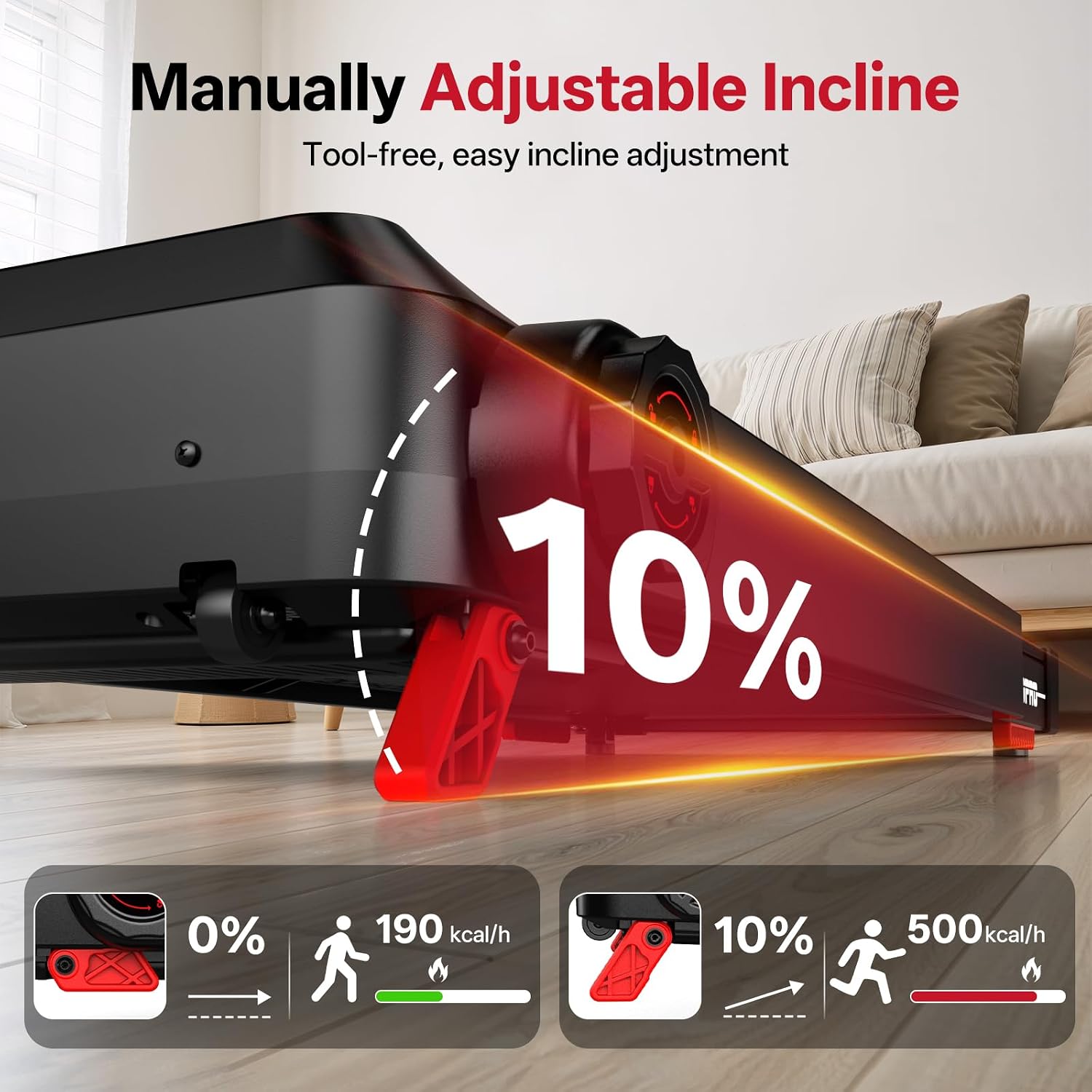
Figure 4.2: Manual incline adjustment mechanism. This image demonstrates how to manually adjust the treadmill's incline, showing the difference between a flat (0%) and an inclined (10%) running surface and the corresponding calorie burn.
4.5 Aurrez ezarritako programak
The treadmill includes 15 pre-set workout programs. Select a program from the console to automatically adjust speed and incline (if applicable) throughout your workout.
4.6 Smart App Connectivity
Connect your treadmill to a compatible fitness app via Bluetooth for enhanced tracking and control. Refer to the app's instructions for pairing and usage.

Figure 4.3: Smart app connectivity feature. This image shows a user exercising on the treadmill while connected to a fitness app, demonstrating how the app displays workout data and enhances the training experience.
4.7 Larrialdi geldialdia
In case of an emergency, pull the safety key from its slot. The treadmill will immediately stop. The safety key also acts as an automatic shut-off if you accidentally step off the running belt.
5. Tolestura eta biltegiratzea
The JOROTO F20PRO treadmill features a foldable design for convenient storage.
- Stop the Treadmill: Ensure the treadmill is completely stopped and powered off.
- Fold Handrails: Turn the knob on the handrail support to release and fold the handrails downwards.
- Lift Running Deck: Carefully lift the running deck upwards until it locks into its vertical storage position.
- Move for Storage: Use the integrated transport wheels to move the folded treadmill to a suitable storage location.

Figure 5.1: Foldable handrail design and storage. This image demonstrates the process of folding the treadmill's handrails and then the entire unit for compact storage, highlighting its space-saving feature.
6. Mantentzea
Mantentze-lan erregularrak zure zinta-korrikalariaren iraupena eta funtzionamendu segurua bermatzen ditu.
6.1 Garbiketa
- Garbitu kontsola eta kanpoko gainazalak iragarkiekinamp erabili ondoren zapi bat garbitu. Saihestu garbitzaile urratzaileak.
- Periodically vacuum underneath the treadmill to prevent dust buildup.
6.2 Korrikako Gerrikoen lubrifikazioa
The running belt requires periodic lubrication to reduce friction and extend its lifespan. Refer to the specific lubrication instructions provided with your treadmill or contact customer support for guidance on the correct lubricant and application frequency.
6.3 Korrika egiteko gerrikoaren doikuntza
If the running belt starts to slip or drift to one side, it may need adjustment. Consult the detailed instructions in the full manual or contact customer support for proper belt tensioning and centering procedures.
7. Arazoak
Zure zinta-korrikalariarekin arazoak badituzu, jo ezazu honako arazo eta irtenbide ohikoenei:
| Arazoa | Kausa posiblea | Irtenbidea |
|---|---|---|
| Treadmill does not power on | Power cord not connected; Safety key not in place; Power switch off | Ensure power cord is securely plugged in; Insert safety key; Turn on power switch |
| Korrika gerrikoaren irristaketak | Belt too loose; Belt needs lubrication | Adjust belt tension (refer to maintenance); Lubricate running belt |
| Ezohiko zarata funtzionamenduan | Osagai solteak; Gerriko marruskadura; Motorraren arazoa | Check for loose screws; Lubricate belt; Contact customer support if noise persists |
| Kontsolaren pantailak ez du funtzionatzen | Loose cable connection; Console malfunction | Check console cable connections; Contact customer support |
For issues not listed here or if solutions do not resolve the problem, please contact JOROTO customer support.
8. Zehaztapenak
| Ezaugarri | Xehetasuna |
|---|---|
| Marka | JOROTO |
| Modelo zenbakia | F20PRO |
| Motor Zaldia | 2.5 HP |
| Gehienezko Abiadura | 12 kilometro orduko |
| Gehienezko pisu-gaitasuna | 130 kilogramo |
| Produktuaren neurriak (L x W x H) | 47.24"S x 24.02"Z x 40.94"A (120cm x 61cm x 104cm) |
| Tolestutako Tamaina | 114 cm x 61 cm x 130 cm (gutxi gorabehera 44.9" x 24" x 51.2") |
| Elementuaren pisua | 25 kilogramo |
| Materiala | Karbono altzairua |
| Programa kopurua | 15 |
| Muntaia Beharrezkoa | Ez (konfigurazio minimoa) |
9. Bermea eta Laguntza
Your JOROTO F20PRO Treadmill is covered by a manufacturer's warranty. Please refer to the warranty card included with your product for specific terms and conditions. For technical support, parts, or warranty claims, please contact JOROTO customer service through the retailer where the product was purchased or visit the official JOROTO webgunea.
Bezeroarentzako laguntza: Laguntza behar baduzu, bisitatu JOROTO Store on Amazon or consult your purchase documentation.