
1. Sarrera
The HP Envy x360 is a versatile 2-in-1 convertible laptop designed for productivity and flexibility. Its 360-degree hinge allows it to function as a traditional laptop, a tablet, or in tent and stand modes, adapting to various user needs. This manual provides essential information for setting up, operating, maintaining, and troubleshooting your device.
Key features include a powerful Intel Core i7-1165G7 processor, 16GB DDR4 RAM for seamless multitasking, and a fast 512GB PCIe M.2 SSD for quick boot-ups and data access. The 15.6-inch Full HD multitouch-enabled IPS touchscreen offers clear visuals and intuitive interaction. It comes pre-installed with Windows 10 Pro, with a free upgrade to Windows 11 available.

Figure 1.1: HP Envy x360 laptop with Windows desktop displayed.
2. Konfigurazioa
2.1 Hasierako piztea
- Konektatu korronte-egokitzailea ordenagailu eramangarriaren korronte-atakara eta hormako entxufe batera.
- Press the power button, typically located on the side or top right of the keyboard.
- Follow the on-screen instructions to complete the Windows setup process, including language selection, network connection, and user account creation.
2.2 Periferikoak konektatzea
The HP Envy x360 offers various ports for connecting external devices:
- USB Type-C (10Gbps signaling rate): For high-speed data transfer and display output.
- USB Type-A (5Gbps signaling rate): USB gailu estandarrak konektatzeko, hala nola saguak, teklatuak edo kanpoko unitateak.
- HDMI: Kanpoko pantailetara edo proiektoreetara konektatzeko.
- Entzungailuen/mikrofonoaren konbinazio-jacka: Audio sarrera eta irteerarako.
- SD txartelaren irakurgailua: SD memoria txarteletatik datuak irakurtzeko.

Figure 2.1: Left side ports including USB-A, HDMI, USB-C, and audio jack.

Figure 2.2: Right side ports including SD card slot, USB-A, and power port.
3. Zure ordenagailu eramangarria erabiltzea
3.1 2-in-1 Modes
The HP Envy x360 can be used in four versatile modes:
- Ordenagailu eramangarriaren modua: Ordenagailu eramangarriaren erabilera tradizionala idazteko eta produktibitaterako.
- Karpa modua: Leku mugatuetan bideoak edo aurkezpenak ikusteko aproposa.
- Zutik egoteko modua: Perfect for touch-based applications and media consumption.
- Tablet modua: Fully folded back for use as a tablet, great for drawing or note-taking with the touchscreen.

Figure 3.1: Laptop in Tent Mode.

Figure 3.2: Laptop in Tablet Mode.
3.2 Teklatua eta ukipen-panela
The laptop features a full-size, backlit keyboard with a numeric keypad for comfortable and accurate typing, even in dim lighting. The Imagepad with multi-touch gesture support allows for intuitive navigation.
- Atzeko argiztatutako teklak: Sakatu Fn + F5 (or the key with the backlight icon) to toggle keyboard backlight.
- Hatz-marken irakurgailua: For secure and quick login, located near the keyboard.
- Kamera obturatzailea: estaltzeko etengailu fisiko bat webkamera pribatutasunerako.
- Mikrofonoa mutu: A dedicated key to mute the microphone.

Figure 3.3: Keyboard features and controls.
3.3 Audioa eta Webkamara
Experience rich, authentic audio with Bang & Olufsen Audio featuring three speakers. The HP Wide Vision 720p HD Webcam with integrated dual array digital microphones is suitable for video calls, online classes, and remote work.
3.4 Haririk gabeko konexioa
The laptop supports Intel Wi-Fi 6 AX201 (2x2) for fast and reliable internet connections and Bluetooth 5.2 for connecting wireless peripherals.
3.5 Bateriaren iraupena
The 3-cell 51 Whr Li-ion polymer battery provides up to 9 hours and 30 minutes of usage on a single charge, depending on usage patterns.
3.1. bideoa: Over batview of the HP Envy Convertible Laptop's features and capabilities, including its powerful processing, versatile touch display, advanced wireless connectivity, all-day battery life, ultra-slim design, fast SSD storage, and professional Windows experience.
4. Mantentzea
4.1 Ordenagailu eramangarria garbitzea
- Erabili lipurrik gabeko zapi leun bat dampPantaila garbitzeko, urarekin edo pantaila-garbitzaile batekin garbitu.
- Teklatuarentzat eta xasisarentzat, erabili oihal leun eta lehor bat. Saihestu produktu kimiko gogorrak.
- Garbitu aldizka aireztapenak hautsa pilatzea saihesteko, hozte-errendimenduan eragina izan baitezake.
4.2 Software eguneraketak
Keep your operating system and drivers updated to ensure optimal performance and security. Windows Update will automatically download and install necessary updates.
4.3 Bateria zaintzea
To prolong battery life, avoid extreme temperatures and do not leave the laptop plugged in constantly after it is fully charged for extended periods.
5. Arazoak
5.1 Ohiko arazoak eta irtenbideak
| Gaia | Irtenbide posiblea |
|---|---|
| Ordenagailu eramangarria ez da pizten. | Ensure the power adapter is securely connected and the outlet is working. Try holding the power button for 15 seconds. |
| Pantaila hutsik dago edo keinuka ari da. | Check external display connections if applicable. Restart the laptop. Update graphics drivers. |
| Wi-Fi konexio arazoak. | Restart your router and laptop. Check Wi-Fi settings and ensure airplane mode is off. Update wireless drivers. |
| Teklatuak edo ukipen-panelak ez du erantzuten. | Berrabiarazi ordenagailu eramangarria. Ziurtatu kanpoko gailuek ez dutela interferentziarik egiten. Egiaztatu gidarien eguneraketak. |
Arazo konplexuagoetarako, jo HPren laguntzara. webwebgunean edo jarri harremanetan bezeroarentzako zerbitzuarekin.
6. Zehaztapenak
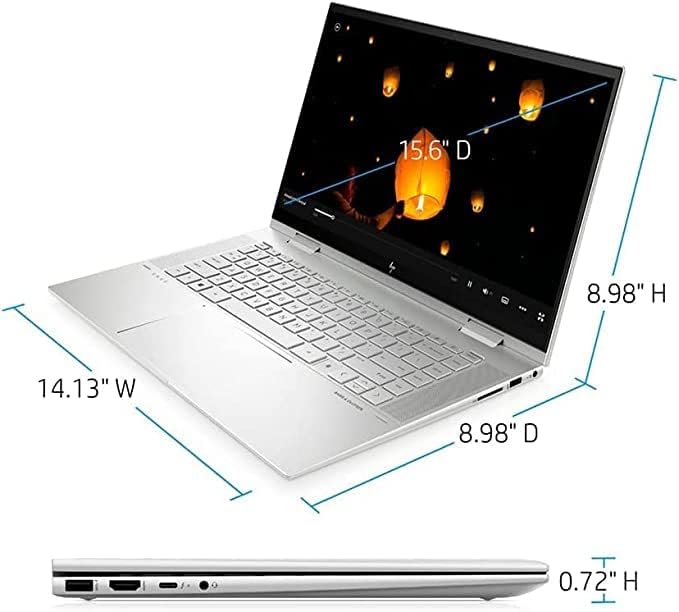
6.1 irudia: Produktuaren neurriak.
| Ezaugarri | Xehetasuna |
|---|---|
| Marka | HP |
| Ereduaren izena | HP Envy x360 |
| Pantailaren tamaina | 15.6 hazbete |
| Pantailaren bereizmena | 1920 x 1080 Pixels (Full HD IPS Touchscreen) |
| Prozesadorea | Intel Core i7-1165G7 (up to 4.6GHz Turbo Boost) |
| RAM | 16 GB DDR4 |
| Disko gogorra | 512 GB PCIe M.2 SSD |
| Koprozesadore grafikoa | Intel Iris Xe grafikoak (integratuak) |
| Sistema eragilea | Windows 10 Pro (Free upgrade to Windows 11 when available) |
| Haririk gabeko mota | Wi-Fi 6 (AX201), Bluetooth 5.2 |
| Portuak | 1x SuperSpeed USB Type-C 10Gbps, 2x SuperSpeed USB Type-A 5Gbps, 1x HDMI, 1x Headphone/Microphone combo, 1x SD Card Reader |
| Bateriaren iraupena | Up to 9.5 Hours (3-cell 51 Whr Li-ion polymer) |
| Elementuaren pisua | 4.24 kilo |
| Produktuaren neurriak | 14.09 x 9.06 x 0.75 hazbete |
| Kolorea | Zilar naturala |
| Ezaugarri bereziak | Backlit Keyboard, Fingerprint Reader, Bang & Olufsen Audio with 3 Speakers, HP Wide Vision 720p HD Webkamara |
7. Bermea eta Laguntza
For detailed warranty information, please refer to the warranty card included with your product or visit the official HP support webgunea. The webguneak gidariak, software eguneratzeak eta arazoak konpontzeko baliabide gehigarrietarako sarbidea ere eskaintzen du.
HP laguntza Webgunea: https://support.hp.com
For technical assistance, you may contact HP customer support through the channels listed on their official support page.