
Sarrera
Eskerrik asko erosketagatik.asing the Northpoint NP-TL LED Desk Lamp. This modern and versatile desk lamp is designed to provide optimal lighting for your workspace while offering convenient features such as QI wireless charging and an integrated display for time and temperature. Please read this manual carefully before use to ensure proper operation and to maximize the lifespan of your product.
Segurtasun-argibideak
- Ensure the power adapter is compatible with your local power supply before connecting.
- Do not disassemble, repair, or modify the lamp zeure burua. Jarri harremanetan zerbitzu-langile kualifikatuekin laguntza jasotzeko.
- Saihestu l jartzeaamp in high-temperature, humid, or dusty environments.
- Mantendu lamp uretatik eta beste likidoetatik urrun.
- Ez begiratu zuzenean LED argi-iturriari denbora luzez, begiak nekatzeko arriskua saihesteko.
- Deskonektatu lamp from the power outlet before cleaning or when not in use for a long time.
- Produktu hau barrualdean erabiltzeko diseinatuta dago.
Paketearen edukia
Mesedez, egiaztatu paketea elementu hauek dituen:
- Northpoint NP-TL LED Desk Lamp
- 12V potentzia egokitzailea
- Erabiltzailearen eskuliburua
Produktua amaituview
Familiarize yourself with the components of your Northpoint NP-TL LED Desk Lamp.

1. irudia: Aurrealdea view of the Northpoint NP-TL LED Desk Lamp, showing the adjustable light head, flexible arm, integrated display, and QI wireless charging base with mood lighting.

2 irudia: Albokoa view of the Northpoint NP-TL LED Desk Lamp, highlighting the flexible arm design and the integrated display on the lampren gorputza.

Image 3: The Northpoint NP-TL LED Desk Lamp in a typical desk environment, demonstrating its compact size and ambient lighting capabilities.
- Adjustable LED Head: Argiztapen norabideduna eskaintzen du.
- Beso malgua: Allows for easy positioning of the light.
- Pantaila integratua: Shows time, date, and ambient temperature.
- Ukitu kontrol-panela: For adjusting light settings and display functions.
- QI Wireless Charging Pad: Located on the base for compatible devices.
- Mood Light Base: Provides ambient RGB lighting.
Konfigurazioa
- Desegin: Kontu handiz kendu osagai guztiak ontzitik.
- Posizioa: Jarri lamp gainazal egonkor eta lau batean.
- Konektatu energia: Insert the DC plug of the 12V power adapter into the power input port on the back of the lamp base. Plug the adapter into a standard wall outlet.
- Initial Display Setup: Upon first power-on, the display will illuminate. You may need to set the time and date using the touch controls (refer to "Operating Instructions - Display Settings").
Funtzionamendu-argibideak
Argi-funtzioak
- Piztu/Itzali: Sakatu Pizteko botoia (
 ) on the touch control panel to turn the lamp piztu edo itzali.
 - Brightness Adjustment (Dimmable): lamp is on, press and hold the Distira botoia (often represented by a sun icon or +/-) to smoothly adjust the light intensity. Release when the desired brightness is reached.
- Kolore-tenperaturaren doikuntza: Sakatu Mode/Color Temperature button (often represented by a 'M' or color spectrum icon) to cycle through different color temperatures: Warm White, Neutral White, and Cool White.
QI haririk gabeko karga
- Place your QI-compatible smartphone or device directly onto the wireless charging pad located on the lampren oinarria.
- Kargatze optimoa lortzeko, ziurtatu gailua kargatzeko oinarriaren erdian dagoela.
- A charging indicator (if available on your device) will confirm that charging has begun.
- Remove any metallic objects or thick cases from your device that may interfere with wireless charging.
Integrated Display Settings (Time, Date, Temperature)
The integrated LCD displays time, date, and ambient temperature. Specific buttons for setting these functions are usually located near the display or on the touch panel.
- Ordua/Data ezartzea: Look for buttons labeled "SET", "MODE", or similar. Typically, you press "SET" to enter setting mode, then use arrow buttons or +/- to adjust values, and "SET" again to confirm and move to the next setting (e.g., hour, minute, year, month, day).
- Tenperatura bistaratzea: Lamp automatically detects and displays the ambient temperature. No manual setting is required for this function.
Giro-argiztapena
- Lamp features an integrated mood light base. Look for a dedicated Mood Light botoia (often a color wheel or RGB icon).
- Tap the button to cycle through different static colors or activate a color-changing mode.
- Press and hold the button to turn the mood light off.
Mantentzea
- Garbiketa: Deskonektatu korrontea garbitu aurretik. Erabili zapi leun eta lehor bat garbitzeko.amp. Do not use abrasive cleaners, solvents, or harsh chemicals.
- Biltegiratzea: l gordez geroamp for an extended period, unplug it and store it in a cool, dry place.
- LED argiaren iturria: LED argi-iturria integratuta dago eta ezin du erabiltzaileak ordezkatu.
Arazoak konpontzea
| Arazoa | Kausa posiblea | Irtenbidea |
|---|---|---|
| Lamp ez da pizten. | Ez dago energia konexiorik. Elektrizitate-egokigailu akastun bat. | Ziurtatu korronte-moldagailua ondo konektatuta dagoela lamp eta hormako entxufea. Saiatu beste entxufe batekin. Arazoak jarraitzen badu, jarri harremanetan bezeroarentzako arreta-zerbitzuarekin. |
| Haririk gabeko kargatzeak ez du funtzionatzen. | Device not QI-compatible. Gailua ez dago behar bezala lerrokatuta. Obstruction (e.g., thick case, metallic object). | Verify your device supports QI wireless charging. Reposition your device on the charging pad. Remove any cases or metallic objects. |
| Display shows incorrect time/date. | Time/date not set or reset after power interruption. | Refer to "Operating Instructions - Display Settings" to manually set the time and date. |
| Argia keinuka edo ezegonkorra da. | Energia-hornidura ezegonkorra. Barne osagaien arazoa. | Saiatu l konektatzenamp into a different power outlet. If the problem continues, discontinue use and contact customer support. |
Zehaztapenak
| Marka | Northpoint |
| Modelo zenbakia | NP-TL |
| Produktuaren neurriak (L x W x H) | 16.6 x 6 x 33.5 cm |
| Materiala | Faux Larrua |
| Akabera mota | Leather look |
| Argi iturri mota | LED |
| Boterea | 18 Watt |
| Argi Fluxua | 480 lm |
| Kolore errendatze indizea (CRI) | 80.00 |
| Ezaugarri bereziak | Dimmable, QI Wireless Charging, Temperature Display, Mood Lighting |
| Aldatu estiloa | Ukitu |
| IP balorazioa | IP20 |
| liburukiatage | 12 Volt |
| Dakarten osagaiak | QI Charging Station, 12V Power Adapter |

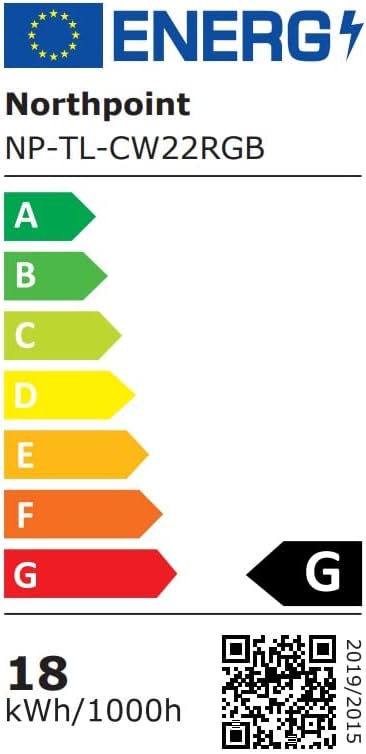
Image 4: Energy efficiency label for the Northpoint NP-TL LED Desk Lamp, indicating energy class G and 18 kWh/1000h consumption.
Bermea eta Laguntza
Northpoint products are manufactured to high-quality standards. For warranty information or technical support, please refer to the contact details provided with your purchase documentation or visit the official Northpoint webgunea. Gorde erosketaren egiaztagiria berme-erreklamazioetarako.
Note: Information regarding spare parts availability and software updates is not available at the time of printing.