
Sarrera
This manual provides essential information for setting up, operating, maintaining, and troubleshooting your HP Pavilion Desktop PC, Model TP01-2040. Designed for reliable performance, this desktop PC integrates advanced technology to support various computing needs, from daily tasks to more demanding applications.
The HP Pavilion Desktop PC is built to offer a seamless user experience with its powerful AMD Ryzen 5 5600G processor, ample memory, and fast storage, ensuring efficiency and responsiveness for home and office environments.
Produktua amaituview
The HP Pavilion Desktop PC (TP01-2040) is a pre-built PC tower featuring a natural silver finish. It comes equipped with a wired keyboard and mouse combo.

1. irudia: Aurrealdea view of the HP Pavilion Desktop PC tower. This image displays the sleek natural silver finish of the desktop tower, highlighting its compact design suitable for various spaces.
Ezaugarri nagusiak:
- Prozesadorea: AMD Ryzen 5 5600G Hexa-core processor (3.90 GHz base speed).
- Grafikoak: Integrated AMD Radeon Graphics.
- Memoria: 12 GB DDR4 RAM (expandable).
- Biltegiratzea: 512 GB PCIe NVMe M.2 Solid State Drive for fast performance.
- Sistema eragilea: Pre-installed Windows 11 Home.
- Konektibitatea: Wi-Fi 5 (802.11a/b/g/n/ac) and Bluetooth.
- Portuak: Multiple USB ports (SuperSpeed USB Type-A, SuperSpeed USB Type-C, USB 2.0 Type-A), HP 3-in-1 Media Card Reader.
- Audioa: Supports 5.1 surround sound.
- Osagarriak barne: USB black wired keyboard and mouse combo.

2 Irudia: Gainetikview of the HP Pavilion Desktop PC and its core components. This image illustrates the desktop tower alongside its included keyboard and mouse, emphasizing its AMD Ryzen processor, Wi-Fi 5, Bluetooth capabilities, and Windows 11 Home operating system.
Zer dago Kutxan:
- HP Pavilion Desktop TP01-2040
- USB kable beltzaren teklatua eta sagua konbinazioa
Konfigurazio Gida
Follow these steps to set up your new HP Pavilion Desktop PC:
- Deskonprimitu ordenagailua: Carefully remove the desktop tower, keyboard, mouse, and any cables from their packaging.
- Konektatu monitoreari: Connect your monitor to the appropriate video output port on the back of the PC (e.g., HDMI, VGA).
- Konektatu periferikoak:
- Connect the USB wired keyboard and mouse to any available USB ports.
- If using external speakers or headphones, connect them to the audio output port.
- Konektatu energiara: Plug the power cord into the PC's power input and then into a wall outlet or surge protector.
- Piztu: Press the power button on the front of the desktop tower. The system will boot up and guide you through the initial Windows 11 Home setup process.
- Interneteko konexioa: During Windows setup, you will be prompted to connect to a Wi-Fi network or an Ethernet connection.
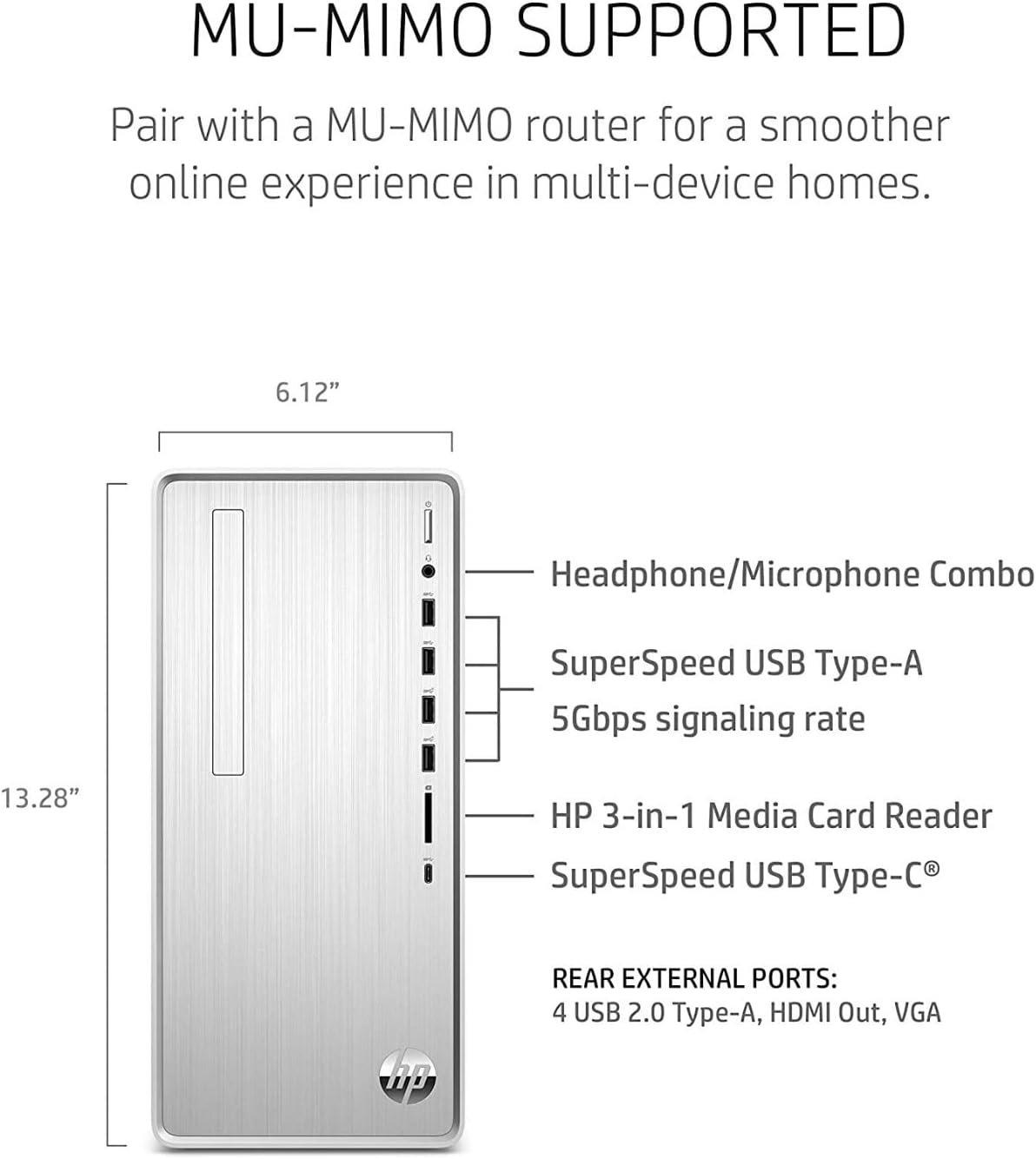
Figure 3: Front and rear port configuration. This diagram provides a clear layout of the various ports available on the HP Pavilion Desktop PC, including USB Type-A, USB Type-C, headphone/microphone combo, and media card reader on the front, and additional USB 2.0, HDMI, and VGA ports on the rear.
Zure ordenagailua erabiltzea
Once set up, your HP Pavilion Desktop PC is ready for use. Windows 11 Home provides a user-friendly interface for all your computing needs.
Oinarrizko funtzionamendua:
- Piztu/Itzali: Use the power button on the front of the tower to turn the PC on. To shut down, click the Start button in Windows, then select Power > Shut down.
- Berrabiarazi: For system updates or to resolve minor issues, select Power > Restart from the Start menu.
- Lo egiteko modua: To put the PC into a low-power state, select Power > Sleep.
Konektibitatea:
- Wi-Fi: Connect to wireless networks via the Wi-Fi 5 (802.11ac) adapter. Manage connections through the Network & Internet settings in Windows.
- Bluetootha: Pair Bluetooth-enabled devices such as headphones, speakers, or mobile phones through the Bluetooth & devices settings.
- USB atakak: Utilize the various USB ports for connecting external storage, printers, and other peripherals. The front-facing SuperSpeed USB ports offer faster data transfer rates.
- Multimedia txartelen irakurgailua: Insert SD, SDHC, or SDXC memory cards into the HP 3-in-1 Media Card Reader for easy file transferentzia.
Mantentzea
Regular maintenance helps ensure the longevity and optimal performance of your HP Pavilion Desktop PC.
- Mantendu garbi: Regularly clean the exterior of the PC with a soft, dry cloth. Ensure ventilation openings are free from dust and obstructions to prevent overheating.
- Software eguneraketak: Keep your Windows operating system and drivers updated. Windows Update automatically handles most system updates.
- Birusen aurkako babesa: Install and regularly update antivirus software to protect against malware and viruses.
- Datuen babeskopia: Aldian-aldian egin babeskopia garrantzitsuenak filekanpoko disko gogor batera edo hodeiko biltegiratzera gorde datuak galtzea saihesteko.
- Diskoen kudeaketa: Use Windows built-in tools like Disk Cleanup and Disk Defragmenter (for HDDs, not typically needed for SSDs) to maintain storage efficiency.
Arazoak konpontzea
This section addresses common issues you might encounter with your HP Pavilion Desktop PC.
- Ordenagailua ez da pizten:
- Ensure the power cord is securely connected to both the PC and a working power outlet.
- Probatu korronte-hartunea beste gailu batekin.
- If using a surge protector, ensure it is turned on and functioning.
- Ez dago pantailan pantailan:
- Verify the monitor's power cable is connected and the monitor is turned on.
- Check that the video cable (HDMI, VGA) is securely connected to both the PC and the monitor.
- Ensure the monitor's input source is set correctly (e.g., HDMI 1, VGA).
- Errendimendu motela:
- Itxi atzeko planoan exekutatzen ari diren beharrezkoak ez diren aplikazioak.
- Birusen eskaneatzea exekutatu malwarea dagoen egiaztatzeko.
- Egiaztatu eskuragarri dauden Windows eguneraketak eta instalatu itzazu.
- Ensure you have sufficient free space on your SSD.
- Ez dago Interneteko konexiorik:
- For Wi-Fi, check if your Wi-Fi adapter is enabled and if you are connected to the correct network.
- Berrabiarazi zure bideratzailea/modema.
- For wired connection, ensure the Ethernet cable is properly connected.
Arazo konplexuagoetarako, jo HPren laguntzara. webgunearekin edo jarri harremanetan HP bezeroarentzako arreta-zerbitzuarekin.
Zehaztapenak
| Kategoria | Zehaztapena |
|---|---|
| Eredua | HP Pavilion Desktop TP01-2040 |
| Prozesadorea | AMD Ryzen 5 5600G (Hexa-core, 3.9 GHz) |
| RAM | 12 GB DDR4 (1 x 4GB, 1 x 8GB) |
| Biltegiratzea | 512 GB-ko PCIe NVMe M.2 SSD |
| Grafikoak | AMD Radeon grafikoak (integratuak) |
| Sistema eragilea | Windows 11 Home |
| Haririk gabeko konexioa | Wi-Fi 5 (802.11a/b/g/n/ac), Bluetooth |
| USB atakak (aurrealdea) | 4 SuperSpeed USB Type-A, 1 SuperSpeed USB Type-C |
| USB atakak (atzealdean) | 4 USB 2.0 Type-A |
| Beste Portu batzuk | HDMI Out, VGA, Headphone/Microphone Combo |
| Media Txartelaren irakurgailua | HP 3-in-1 (SD, SDHC, SDXC) |
| Neurriak (LxWxH) | 11.93 x 6.12 x 13.28 hazbete |
| Pisua | 13.14 kilo |
| Kolorea | Zilar Naturala |
Bermea eta Laguntza
Your HP Pavilion Desktop PC comes with a 1-year limited warranty, protecting your purchase against manufacturing defects.
For technical assistance, warranty claims, or additional support, please visit the official HP support website or contact HP customer service directly. Ensure you have your product model number (TP01-2040) and serial number ready when seeking support.
Informazio gehiagorako, bisitatu dezakezu HP denda Amazonen.