
Sarrera
The MIFA WildBox is a portable Bluetooth speaker designed for robust outdoor and indoor use. It features powerful audio output, dynamic LED lighting, and a durable waterproof and dustproof design. This manual provides essential information for setting up, operating, maintaining, and troubleshooting your MIFA WildBox speaker to ensure optimal performance and longevity.

Figure 1: MIFA WildBox Bluetooth Speaker showcasing its waterproof design and power bank feature.
Kutxan dagoena
Upon unboxing your MIFA WildBox, please ensure all the following items are present:
- 1 x MIFA WildBox Bluetooth Speaker
- 1 x USB-C kargatzeko kablea
- 1 x User Guide Manual
Ezaugarriak
- Audio irteera indartsua: 60W total output with 2x20W RMS woofers and 2x10W RMS tweeters for loud sound and deep bass.
- IP67 Iragazgaitza eta hautsaren aurkakoa: Designed to withstand immersion in water up to 1 meter for 30 minutes and fully protected against dust ingress. The speaker is also floatable.
- LED argi dinamikoak: Features 16 million dynamic LED lights with multiple modes to enhance your listening experience.
- TWS & Partyadd Function: Allows pairing of two MIFA WildBox speakers for true stereo sound, or connecting over 100 MIFA WildBox speakers for a synchronized party experience.
- Konektibitate polifazetikoa: Supports Bluetooth 5.3 for stable wireless connection up to 197ft, Aux input, and Micro SD card slot for various audio sources.
- Barneko potentzia-bankua: Equipped with a 10000mAh battery that can charge external devices via its USB-A output port.
- Jolasaldi luzea: Gehienez 24 orduko musika-erreprodukzio jarraitua karga bakar batekin.
- Diseinu eramangarria: Integrated carrying handle for easy transport.

2 Irudia: Gainetikview of MIFA WildBox key features.
Konfigurazioa
1. Hasierako kargatzea
Before first use, fully charge your MIFA WildBox speaker. Connect the provided USB-C cable to the speaker's USB-C input port (labeled 'IN') and the other end to a compatible USB power adapter (not included). The charging indicator will show the charging status. A full charge takes approximately 4 hours.
2. Piztu/Itzaltzea
- Pizteko: Eduki sakatuta Pizteko botoia (
 ) for 2-3 seconds until you hear an audible prompt and the LED lights activate.
 - Itzaltzeko: Eduki sakatuta Pizteko botoia again for 2-3 seconds.
3. Bluetooth parekatzea
- Power on the MIFA WildBox speaker. It will automatically enter Bluetooth pairing mode, indicated by a flashing blue LED.
- Zure gailu mugikorrean (smartphone-a, tableta, etab.), gaitu Bluetooth-a eta bilatu eskuragarri dauden gailuak.
- Select "MIFA WildBox" from the list of devices.
- Once successfully paired, the blue LED will remain solid, and you will hear a confirmation tone.
4. TWS (benetako haririk gabeko estereoa) parekatzea
To pair two MIFA WildBox speakers for a stereo experience:
- Ensure both MIFA WildBox speakers are powered on and not connected to any Bluetooth device.
- Bozgorailu batean, sakatu TWS botoia (
 ). It will search for the second speaker.
 - The speakers will automatically connect to each other. Once connected, the main speaker's LED will flash blue (ready to pair with a device), and the secondary speaker's LED will be solid blue.
- Connect your mobile device to the main speaker via Bluetooth as described in step 3. Audio will now play in stereo through both speakers.

Figure 3: Multiple speakers connected via Partyadd for an immersive audio experience.
5. Aux Input & Micro SD Card Usage
The MIFA WildBox supports audio playback via a 3.5mm AUX cable and a Micro SD card.
- Sarrera Aux: Connect a 3.5mm audio cable (not included) from your audio source to the AUX-in port on the speaker. The speaker will automatically switch to AUX mode.
- Mikro SD txartela: Insert a Micro SD card (up to 32GB, not included) with your music fileMikro SD txartelaren zirrikituan sartu. Bozgorailuak automatikoki Mikro SD modura aldatuko da eta erreprodukzioa hasiko du.

Figure 4: Connectivity options including Bluetooth, Micro SD, and AUX.
Funtzionamendu-argibideak
1. Botoiaren funtzioak
The control panel on top of the speaker provides easy access to various functions:
- Pizteko botoia (): Eduki sakatuta pizteko/itzaltzeko.
- Modu botoia (M): Short press to switch between Bluetooth, AUX, and Micro SD card modes.
- Bolumena jaitsi (-): Sakatu labur bolumena jaisteko.
- Erreproduzitu/Pausatu botoia (
 ): Short press to play or pause music. Long press for next track.
 - Bolumena igo (+): Sakatu laburra bolumena handitzeko.
- Argi botoia (
 ): Short press to cycle through different LED light modes. Long press to turn lights off/on.
 - Baxuaren botoia: Press to activate or deactivate the extra bass effect.
- TWS Button (): Press to initiate TWS or Partyadd pairing.
2. LED argi moduak
The MIFA WildBox features 6 distinct RGB light modes. Use the Light button to switch between them or turn the lights off completely.
3. Energia Bankuaren Funtzioa
To use the speaker as a power bank:
- Open the rubber flap on the back of the speaker to access the ports.
- Connect your device's charging cable to the USB-A output port (labeled 'OUT') on the MIFA WildBox.
- Kargatzen hasiko da automatikoki.

Figure 5: The MIFA WildBox functioning as a power bank.
Mantentzea
- Waterproof & Dustproof Care: Ensure the rubber flap covering the ports is securely closed before exposing the speaker to water or dust. While IP67 rated, avoid prolonged submersion or exposure to high-pressure water jets.
- Garbiketa: Erabili biguna, damp oihal bat erabili bozgorailuen kanpoaldea garbitzeko. Ez erabili produktu kimiko gogorrik edo garbitzaile urratzailerik.
- Biltegiratzea: Denbora luzez erabiltzen ez duzunean, gorde bozgorailua leku fresko eta lehor batean, eguzki-argitik eta muturreko tenperaturetatik babestuta.
- Bateria zaintzea: Bateriaren iraupena luzatzeko, saihestu bozgorailua maiz erabat deskargatzea. Kargatu aldizka, etengabe erabiltzen ez baduzu ere.

Figure 6: The MIFA WildBox is designed to be waterproof and floatable.
Arazoak konpontzea
| Arazoa | Kausa posiblea | Irtenbidea |
|---|---|---|
| Bozgorailuak ez du pizten. | Bateria baxua. | Kargatu bozgorailua guztiz (gutxi gorabehera 4 ordu). |
| Ezin da Bluetooth bidez parekatu. | Speaker is already connected to another device or out of range. | Ensure the speaker is in pairing mode (flashing blue LED). Disconnect from other devices. Move speaker closer to your device. |
| Ez dago soinurik bozgorailutik. | Volume too low, incorrect mode, or audio source issue. | Increase speaker and device volume. Check if the correct input mode (Bluetooth, AUX, SD card) is selected. Ensure audio source is playing. |
| TWS parekatzeak huts egin du. | Speakers are too far apart or already connected to other devices. | Ensure both speakers are disconnected from other devices. Place them close to each other during TWS pairing. |
| LED argiak ez dira funtzionatzen. | Lights are turned off or in a static mode. | Short press the Light button to cycle modes. Long press to turn lights on/off. |
Zehaztapenak
| Ezaugarri | Xehetasuna |
|---|---|
| Ereduaren izena | MIFA WildBox |
| Hizlari mota | Outdoor / Portable Bluetooth Speaker |
| Bozgorailuaren irteera-potentzia maximoa | 60 Watt |
| Wooferaren diametroa | 2.75 Inches (70mm) x 2 |
| Tweeter Diametroa | 0.79 Inches (20mm) x 2 |
| Erradiadore pasiboak | 85mm x 2 |
| Konektibitate Teknologia | Bluetooth 5.3, Laguntzailea (3.5mm), USB (energia bankurako) |
| Wireless Range | Gehienez 197 oin (60 metro) |
| Uraren Erresistentzia Maila | IP67 (Iragazgaitza eta hautsaren aurkakoa) |
| Bateria Edukiera | 10000 mAh |
| Jolas-ordua | Gehienez 24 ordu |
| Kargatzeko Denbora | Gutxi gorabehera. 4 ordu |
| Produktuaren neurriak (L x W x H) | 12" x 7" x 5" |
| Elementuaren pisua | 4 kilo |
| Materiala | Plastikoa |
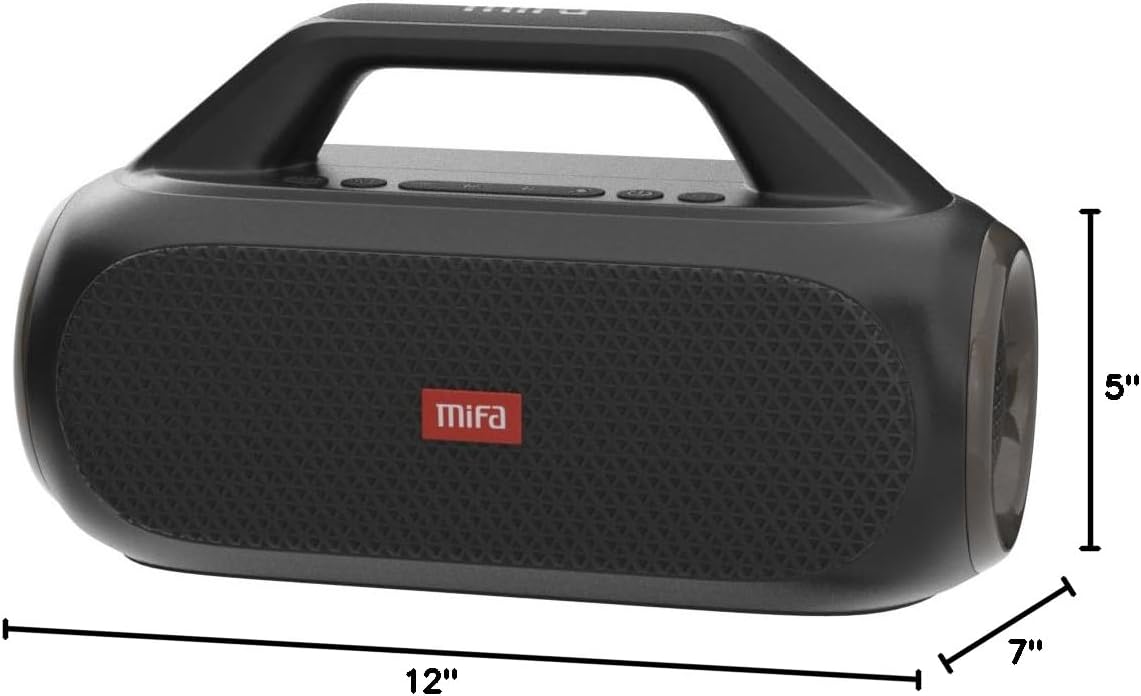
Figure 7: MIFA WildBox dimensions.
Bermea eta Laguntza
The MIFA WildBox Bluetooth Speaker comes with a limited warranty. For specific details regarding warranty coverage, duration, and terms, please refer to the warranty information provided in the packaging or contact MIFA customer support directly.
For technical assistance, troubleshooting beyond this manual, or warranty claims, please visit the official MIFA website or contact their customer service team. Contact information can typically be found on the product packaging or the MIFA brand store on Amazon.