
Sarrera
Welcome to the iHome AutoVac Nova experience. This manual provides essential information for the setup, operation, and maintenance of your new robot vacuum and mop. Please read it thoroughly to ensure optimal performance and longevity of your device.

The iHome AutoVac Nova system includes the robotic vacuum, its self-empty charging base, and integrates with the iHome Clean mobile application for smart control.
Konfigurazioa
Hasierako Prestaketa
- Deskargatzea: Carefully remove all components from the packaging. Ensure all accessories are present.
- Kargatzeko oinarriaren kokapena: Place the self-empty base against a wall in an open area, ensuring at least 1.5 feet of clear space on either side and 5 feet in front for optimal navigation. Plug the base into a power outlet.
- Hasierako karga: Place the robot onto the charging base. Ensure the charging contacts align. Allow the robot to fully charge before its first use (approximately 4-5 hours).

The robot automatically returns to its charging base when battery is low and resumes cleaning from where it left off once recharged.
App Connection & Mapping
- Deskargatu aplikazioa: Download the 'iHome Clean' app from your smartphone's app store.
- Konektatu wifira: Follow the in-app instructions to connect your robot to your home's 2.4GHz Wi-Fi network.
- Initial Mapping (Homemap 2.0): For the first cleaning cycle, allow the robot to clean your entire home without interruption. This enables the LiDAR navigation system to create an accurate map of your floor plan.
- Set Virtual Boundaries: Use the app to define 'No-Go Zones' (areas the robot should avoid) and 'No-Mop Zones' (carpeted areas where mopping is not desired).

The Homemap 2.0 system utilizes LiDAR navigation and advanced algorithms to create a precise map of your home, ensuring efficient and thorough cleaning paths.
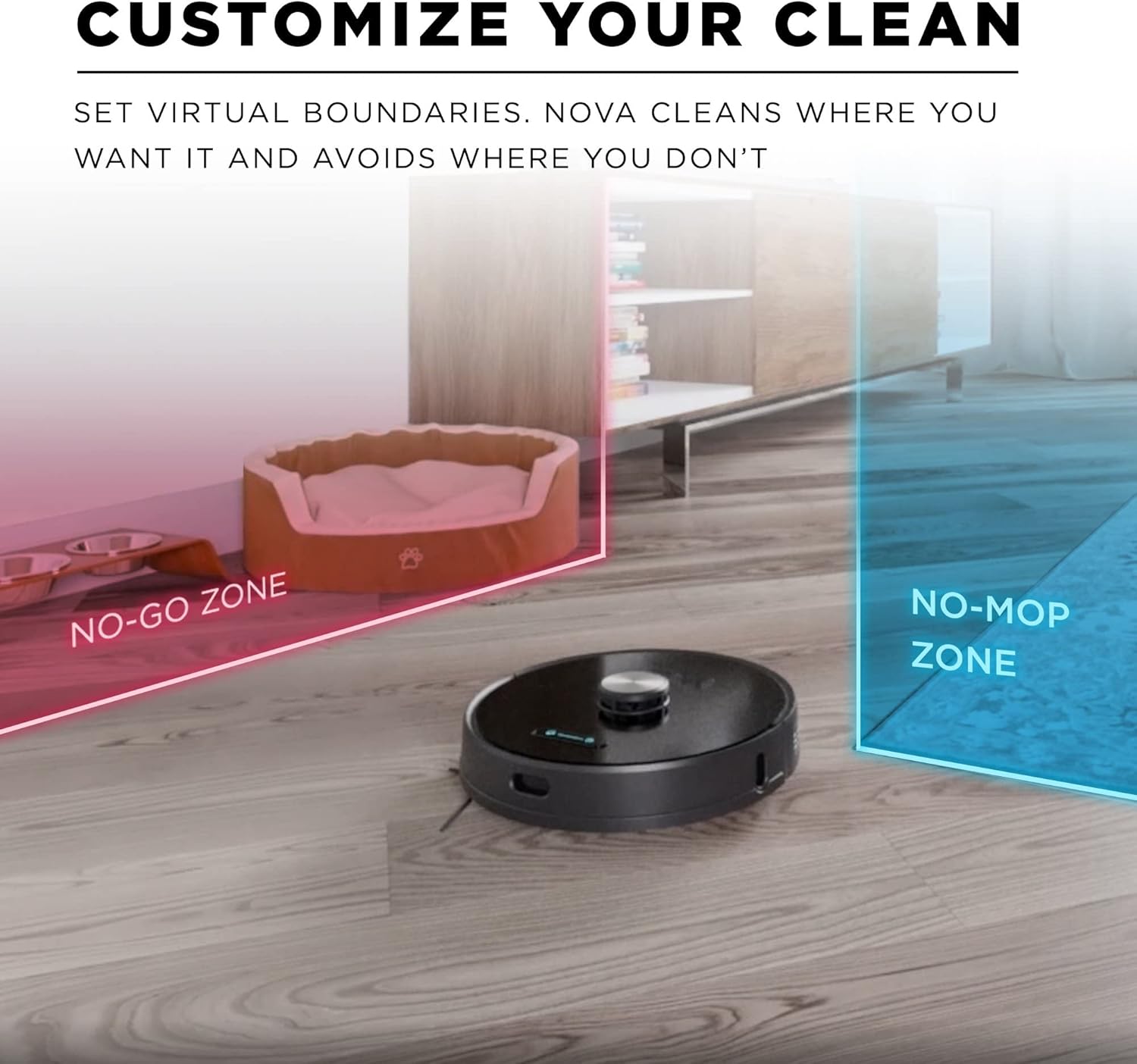
Personalize your cleaning by setting virtual boundaries, including 'No-Go Zones' for vacuuming and 'No-Mop Zones' for mopping, directly through the mobile application.
Funtzionamendu-argibideak
Starting a Clean
- Eskuzko hasiera: Press the 'Clean' button on the robot or the app to begin a cleaning cycle.
- Programatutako garbiketa: Set cleaning schedules through the iHome Clean app. You can specify times and days for automatic cleaning.
- Eremu garbiketa: Select specific rooms or zones to clean using the app.
- Ahots kontrola: The iHome AutoVac Nova is compatible with Amazon Echo and Google Home. Link your device through the respective apps to enable voice commands for starting or stopping cleaning.

Customize your cleaning experience by setting specific areas for cleaning, creating schedules, and defining 'No-Go Zones' to restrict access to certain areas.
Mantentzea
Regular maintenance ensures your iHome AutoVac Nova operates efficiently. Perform these steps as needed or recommended.
Main Roller Brush Maintenance
The main roller brush should be cleaned regularly to remove entangled hair and debris.
This video provides step-by-step instructions on how to remove, clean, and reinstall the main roller brush to ensure optimal performance and prevent hair entanglement.
Dustbin and Filter Maintenance
Empty the dustbin and clean the filters after each cleaning cycle or as indicated by the app.
This video guides you through the process of removing the dustbin, emptying debris, and cleaning the filters for proper maintenance of your robot vacuum.
- Zaborrontzia hustea: Pinch the release tab on the dustbin and pull it out. Open the dustbin compartment and discard collected debris.
- Garbiketa iragazkiak: Remove the black filter and the HEPA filter from the dustbin. Rinse the black filter under running water and allow it to air dry completely. Tap the HEPA filter to remove loose debris; do not wash the HEPA filter. Ensure all filters are completely dry before reinstallation.
- Berreinstalazioa: Insert the HEPA filter first, ensuring the pull tab is facing out, followed by the black filter. Close the dustbin compartment until you hear a click. Push the dustbin back into the robot along the tracks until it clicks into place.

The self-empty base holds weeks of debris, simplifying maintenance by reducing the frequency of manual dustbin emptying.
Arazoak konpontzeko gida
If you encounter issues with your iHome AutoVac Nova, refer to the following common solutions:
- Robota ez da kargatzen: Ensure the charging base is plugged in and the robot's charging contacts are clean and properly aligned with the base.
- Robota trabatuta geratzen ari da: Clear obstacles from the cleaning path. Ensure no loose cables or small items are on the floor. Use 'No-Go Zones' in the app for persistent problem areas.
- Garbiketa-errendimendu eskasa: Check and clean the main roller brush, side brushes, and dustbin/filters as described in the maintenance section. Ensure the dustbin is not full.
- Aplikazioen konexio arazoak: Verify your Wi-Fi network is 2.4GHz and stable. Restart your router, smartphone, and the robot. Re-pair the device if necessary.
- Ezohiko zaratak: Inspect the main roller brush and side brushes for any foreign objects or damage. Clean thoroughly.
Produktuaren zehaztapenak
| Ezaugarri | Xehetasuna |
|---|---|
| Marka | iHome |
| Modelo zenbakia | iHRV6 |
| Ezaugarri bereziak | Dry, LiDAR Navigation, Wet |
| Produktuaren neurriak | 13"L x 13"Z x 3"A |
| Iragazki mota | Kartutxoa, Oihal, Aparra |
| Bateriaren iraupena | 120 minutu |
| liburukiatage | 3.7 Volt |
| Energia iturria | Bateriaren bidez |
| Kontrol-metodoa | Ahotsa |
| Gailu bateragarriak | Amazon Echo, Google Home |
| Forma-faktorea | Robotikoa |
| Elementuaren pisua | 10 kilo |
| Eskuragarri dagoen lehen data | 28ko abenduaren 2021a |
Bermearen informazioa
The iHome AutoVac Nova typically comes with a limited warranty. Please refer to your purchase documentation or contact customer support for specific warranty terms and conditions. Some renewed products may have a shorter warranty period, such as 1 month, as noted by some users.
Bezeroarentzako Arreta
For further assistance, technical support, or inquiries regarding your iHome AutoVac Nova, please refer to the contact information provided in your product packaging or visit the official iHomeClean webgunea.