
Tecno BD4i
Tecno Pop 5 LTE erabiltzailearen eskuliburua
Model: BD4i
Sarrera
This manual provides comprehensive instructions for setting up, operating, and maintaining your new Tecno Pop 5 LTE smartphone. Designed for seamless performance and a vibrant user experience, your device comes equipped with advanced features to keep you connected and entertained.

Figure 1: Tecno Pop 5 LTE - Front and Back View
Produktua amaituview Bideoa
Ikusi bideo ofizial hau azkar ikustekoview of the Tecno Pop 5 LTE's main features and design.
Video 1: Tecno Pop 5 LTE Product Overview
Paketearen edukia
Upon unboxing your Tecno Pop 5 LTE, please ensure all the following items are present:
- Tecno Pop 5 LTE Smartphone
- Elikatze-moldagailua
- Mikro USB kablea
- SIM kanporatzeko tresna
Konfigurazio Gida
SIM and SD Card Installation
Your Tecno Pop 5 LTE supports dual Nano SIM cards and expandable memory via a microSD card.
- Bilatu SIM txartelaren erretilua gailuaren alboan.
- Sartu SIM txartela ateratzeko tresna erretiluaren ondoko zulo txikian eta bultzatu astiro erretilua atera arte.
- Jarri Nano SIM txartela(k) eta/edo microSD txartela erretiluko zirrikituetan, orientazio zuzena ziurtatuz.
- Kontu handiz sartu erretilua gailuan berriro, alboarekin berdindu arte.
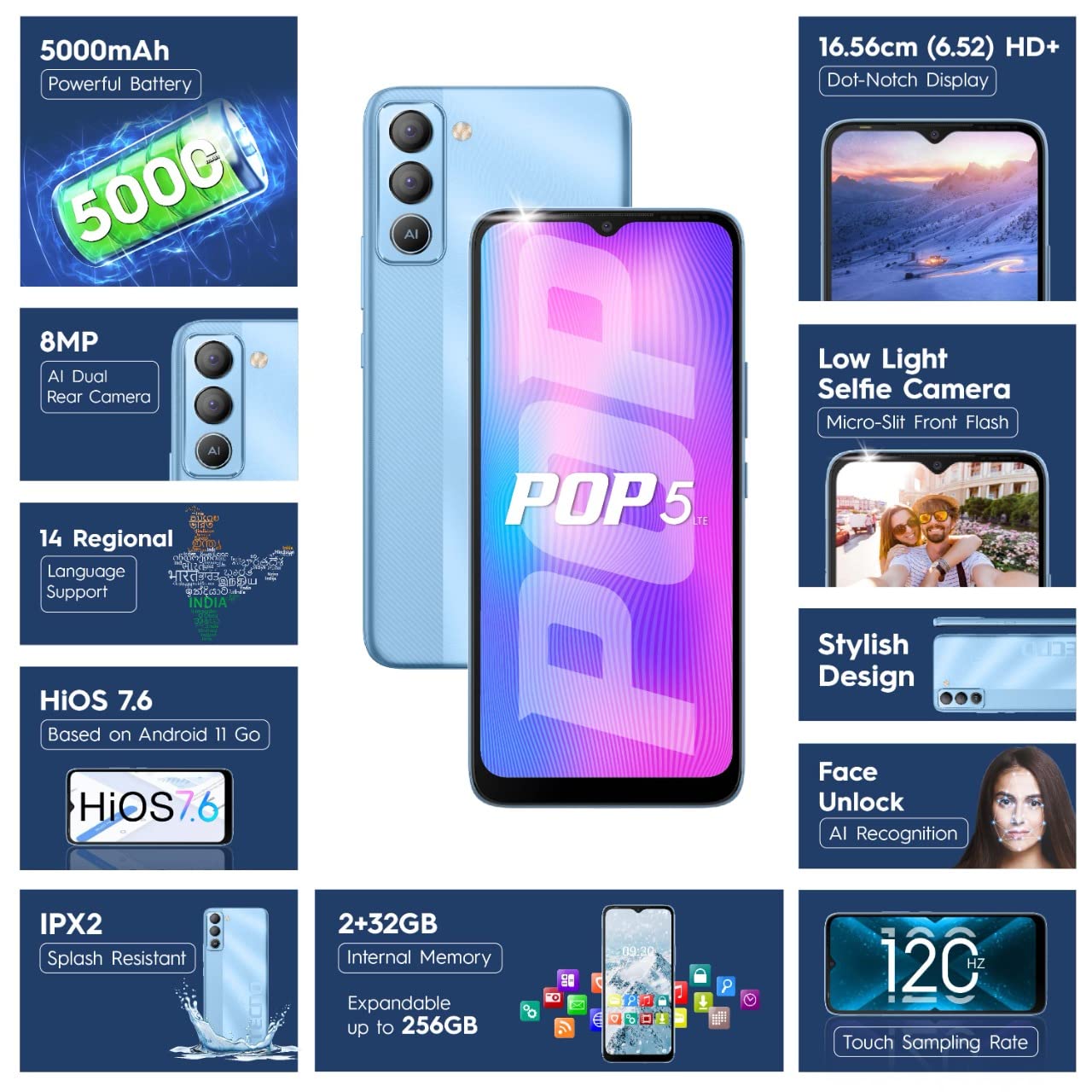
Figure 2: SIM Tray Insertion
Hasierako piztea eta konfigurazioa
Press and hold the power button located on the side of the device until the Tecno logo appears. Follow the on-screen prompts to select your language, connect to Wi-Fi, and set up your Google account.
Ezaugarri nagusiak Overview
Pantaila bizia
The Tecno Pop 5 LTE features a vibrant 6.52-inch Dot Notch HD+ display with a 90% screen-to-body ratio, offering an immersive viewing experience. With up to 480 nits maximum brightness, content remains clear even in bright conditions.

Figure 3: Immersive Dot Notch Display
Iraupen luzeko bateria
Indartsu batez hornitua 5000mAh bateria, the Tecno Pop 5 LTE provides extended usage times, including up to 48 hours of video playback and 31 days of standby time. The Ultra Power Saving Mode further optimizes battery life.
Advanced Camera System
Capture clear and detailed images with the 8MP Portrait Dual rear Camera, featuring excellent image processing and a dual flashlight for enhanced low-light photography. For selfies, the 5MP F2.0 Aperture Front Camera includes a Micro Slit Front Flash with adjustable brightness for brighter night selfies.

Figure 4: Rear Camera Module
Errendimendua eta biltegiratzea
The device runs on a 2 GB RAM and is powered by a MediaTek Helio A22 2GHz Quad-core processor, ensuring smooth daily operations. It comes with 32 GB barne biltegiratzea, expandable up to 256GB, providing ampzure aplikazio eta multimediarentzako lekua.
Softwarea eta segurtasuna
Your smartphone operates on HiOS 7.6 based on Android 11, offering a user-friendly interface and various localized features. Security features include Aurpegi desblokeatzea with closed eye protection for instant and secure access. Additional features like Kids Mode, Anti-Theft Alarm, Vault 2.0, and Voice Changer enhance usability and safety.
Iraunkortasuna hobetua
The Tecno Pop 5 LTE is Splash Resistant up to IPX2 rating, providing protection against water splashes.
Zure gailua funtzionatzea
Oinarrizko Nabigazioa
Navigate your device using intuitive touch gestures. The 120Hz Ukipen Sampling Tarifa ensures a smoother and more responsive touch experience.
Using Face Unlock
To set up Face Unlock, go to Ezarpenak > Segurtasuna > Aurpegi bidezko desblokeoa and follow the instructions. Once set up, simply look at your phone to unlock it instantly.
Kameraren funtzioak
Open the Camera app to access various modes like AI Portrait, HDR, AI Beauty, and Filters. Tap the shutter button to capture photos or switch to video mode for 1080P video recording.
Energia aurrezteko modua
To extend battery life, activate Ultra Power Saving Mode via the quick settings panel or in Settings > Battery Lab.
Regional Language Support
The device supports 14 regional languages. To change your device language, go to Ezarpenak > Sistema > Hizkuntzak eta idazketa > Hizkuntzak.
Phone Cloner
Easily migrate your data from an old device to your new Tecno Pop 5 LTE using the Phone Cloner feature, which allows one-tap data migration without using mobile data.
Mantentzea eta zaintzea
Bateria zaintzea
To maximize battery lifespan, avoid extreme temperatures and try to keep the battery charge between 20% and 80%. Use only the provided adaptor and Micro USB cable for charging.
Zure gailua garbitzea
Use a soft, lint-free cloth to gently wipe the screen and body of your phone. Avoid using harsh chemicals or abrasive materials.
Software eguneraketak
Egiaztatu eta instalatu software eguneraketak aldizka, zure gailuak azken funtzioak, segurtasun adabakiak eta errendimendu hobekuntzak dituela ziurtatzeko. Eguneraketak aurki ditzakezu hemen: Ezarpenak > Sistema > Sistemaren eguneraketa.
Arazoak konpontzea
Ohiko arazoak eta irtenbideak
- Gailua ez da pizten: Ziurtatu bateria kargatuta dagoela. Konektatu telefonoa kargagailura gutxienez 15 minutuz pizten saiatu aurretik.
- Pantailak ez du erantzuten: Try restarting the device by holding the power button for 10-15 seconds. If the issue persists, a factory reset might be necessary (Oharra: Honek datu guztiak ezabatuko ditu).
- Sare seinale eskasa: Egiaztatu SIM txartela sartuta dagoela. Mugitu sare-estaldura hobea duen eremu batera.
- Aplikazioak huts egiten ari dira: Garbitu arazoa sortzen duen aplikazioaren cachea (Ezarpenak > Aplikazioak eta jakinarazpenak > Aplikazioaren informazioa > [Aplikazioaren izena] > Biltegiratzea eta cachea > Garbitu cachea). If the issue continues, reinstall the app.
Zehaztapen Teknikoak
Zehaztapen zehatzak
| Ezaugarri | Xehetasuna |
|---|---|
| Modelo zenbakia | BD4i |
| Sistema eragilea | HiOS 7.6 based on Android 11 |
| RAM | 2 GB |
| Barne Biltegiratzea | 32 GB (256 GB arte zabaldu daiteke) |
| Prozesadorea | MediaTek Helio A22, 2 GHz Quad-core |
| Bistaratzea | 6.52" Dot Notch HD+ (720p), 480 nits max. brightness, 120Hz Touch Sampling Tarifa |
| Atzeko kamera | 8MP + AI Lens, Dual Flashlight, F2.0 Aperture, AI Portrait, HDR, AI Beauty, Filters, 16 AI Scene Detection, 4X Zoom, 1080P Video |
| Aurrealdeko kamera | 5MP F2.0 Aperture, Micro Slit Front Flash |
| Bateria | 5000mAh litio-polimeroa |
| Konektibitatea | Cellular (LTE), Bluetooth, Wi-Fi, USB, GPS/GNSS/BEIDOU/Galileo |
| Audio Jack | 3.5 mm |
| Neurriak | 16.5 x 7.6 x 0.9 cm |
| Pisua | 195 g |
| Kolorea | Izotz Urdina |
| Ezaugarri bereziak | Enhanced Regional Language Supports (14 languages), Kids Mode, Anti Theft Alarm, Vault 2.0, Voice Changer, Splash Resistant (IPX2), Face Unlock (0.93 Sec Instant Unlock) |
Bermea eta Laguntza
Produktuaren laguntza
Your Tecno Pop 5 LTE comes with a 1 Urteko Bermea from the manufacturer, G Mobiles India.
For any technical assistance, service, or warranty claims, please contact Tecno customer support. You can find more information on their official website or visit one of their 950+ Service Centers across India.
Manufacturer: G Mobiles India, Ismartu India Private Limited, D-197 and 198, Sector 63, Noida, Gautam Buddha nagar, Uttar Pradesh 201301.
Importer: G-Mobile Devices Private Limited, Unit No. B 301, Third Floor Tower B Plot no 7, Sec - 142, Noida, Uttar Pradesh PIN - 201301.
For further information, you may also visit the product detail page on Amazon.in.
Ask a question about this manual
Ask about setup, troubleshooting, compatibility, parts, safety, or missing instructions. Manuals+ will review the question and use this page’s manual context to help answer it.