
Perixx PERIBOARD-332
Perixx PERIBOARD-332 Wired Backlit USB Keyboard User Manual
Sarrera
This manual provides detailed instructions for the setup, operation, maintenance, and troubleshooting of your Perixx PERIBOARD-332 Wired Backlit USB Keyboard. Please read this manual thoroughly before using the product to ensure optimal performance and longevity.

Image: The Perixx PERIBOARD-332 Wired Backlit USB Keyboard, showcasinbere diseinu trinkoa dela eta.
Paketearen edukia
Egiaztatu elementu guztiak paketean daudela:
- Perixx PERIBOARD-332 Wired Backlit USB Keyboard
- USB kable integratua
- Erabiltzailearen eskuliburua (dokumentu hau)

Image: The Perixx PERIBOARD-332 keyboard, its integrated USB cable, the user manual, and the product packaging.
Konfigurazio Argibideak
Konektatu teklatua: Locate an available USB port on your computer (PC, laptop, tablet, or smartphone with appropriate adapter). Insert the USB cable from the PERIBOARD-332 into the USB port.
Gidariaren instalazioa: The keyboard is plug-and-play and typically does not require additional drivers for basic functionality on Windows, macOS, Linux, or Chrome OS. Your operating system should automatically detect and configure the device.
Lekua: Place the keyboard on a stable, flat surface. The compact design is ideal for small workspaces.

Image: A user typing on the Perixx PERIBOARD-332 keyboard, demonstrating its compact size and wired connection on a desk.
Funtzionamendu-argibideak
Erabilera orokorra
The Perixx PERIBOARD-332 features a standard US English QWERTY layout with 84 keys. Its low-profile scissor keys provide a quiet and comfortable typing experience, similar to laptop keyboards. The compact design helps optimize desk space.

Image: A user typing on the Perixx PERIBOARD-332 keyboard, highlighting its compact size and ergonomic placement in a workspace.

Irudia: Gertuko planoa view of the sculpted, low-profile scissor keys of the Perixx PERIBOARD-332, highlighting their design.
Function Keys (Fn Hotkeys)
The keyboard includes integrated Fn hotkeys for quick access to multimedia and system functions. These functions are primarily designed for Windows operating systems. For other operating systems (macOS, Linux, Chrome OS), their functionality may vary or require specific system settings/configurations.
- Fn+F1: Fn blokeoa
- Fn+F2: Backlight Brightness Adjustment (Cycle through levels)
- Fn+F3: Isildu
- Fn+F4: Bolumena jaitsi
- Fn+F5: Bolumena igo
- Fn+F6: Aurreko Pista
- Fn+F7: Erreproduzitu/Pausatu
- Fn+F8: Hurrengo Pista
- Fn+F9: Pausa
- Fn+F10: Korritzeko blokeoa
- Fn+F11: Txertatu
- Fn+F12: Inprimatu pantaila
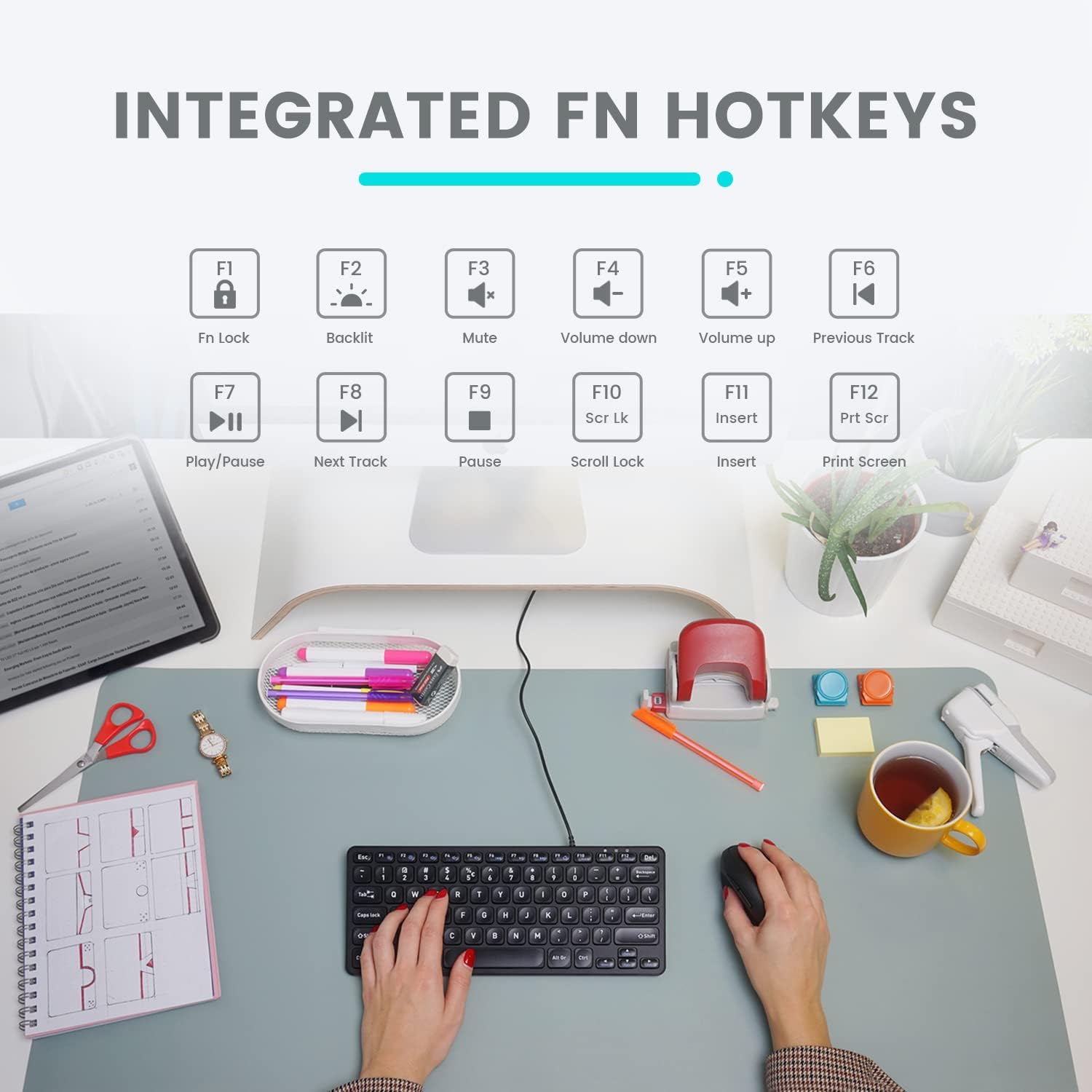
Image: Diagram illustrating the integrated Fn hotkeys on the Perixx PERIBOARD-332, showing the function of each F-key when pressed with the Fn key.
Atzeko argiaren kontrola
The PERIBOARD-332 features white LED backlighting with adjustable brightness. To adjust the backlight brightness, press the Fn + F2 keys simultaneously. Repeatedly pressing this combination will cycle through different brightness levels (including off).
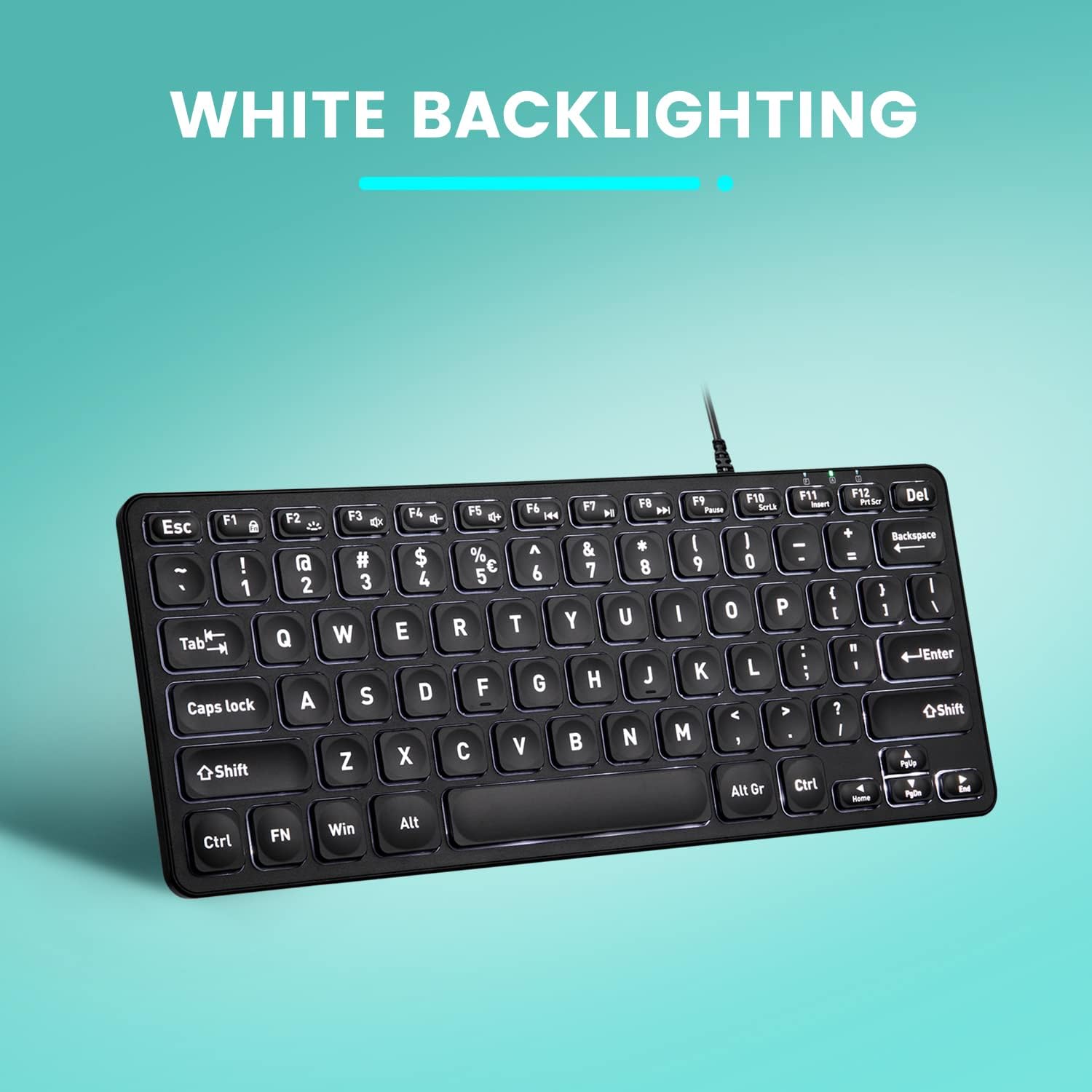
Irudia: Goitik behera view of the Perixx PERIBOARD-332 keyboard with its white LED backlighting illuminated, showcasing the clear, large font on the keys.
Mantentzea
Teklatuaren iraupena eta funtzionamendu egokia bermatzeko, jarraitu mantentze-jarraibide hauek:
- Garbiketa: Erabili lipurrik gabeko zapi leun bat dampened with water or a mild cleaning solution to wipe the surface of the keyboard. Avoid excessive moisture. Do not spray cleaners directly onto the keyboard.
- Hautsa kentzea: Erabili aire konprimatua teklen arteko hautsa eta hondakinak kentzeko.
- Saihestu isurketak: Keep liquids away from the keyboard to prevent damage. The keyboard is not water-resistant.
- Biltegiratzea: Erabiltzen ez duzunean, gorde teklatua leku garbi eta lehor batean, muturreko tenperaturetatik urrun.
Arazoak konpontzea
If you encounter issues with your Perixx PERIBOARD-332, refer to the following common solutions:
Teklatuak ez du erantzuten
- Egiaztatu USB konexioa: Ensure the USB cable is securely plugged into both the keyboard and the computer's USB port. Try a different USB port.
- Berrabiarazi ordenagailua: Batzuetan, ordenagailua berrabiaraztearekin arazoak konpondu daitezke.
- Proba beste gailu batean: Connect the keyboard to another computer or device to determine if the issue is with the keyboard or the original computer.
Backlight Not Working or Adjusting
- Check Brightness Setting: Sakatu Fn + F2 repeatedly to cycle through all brightness levels, including off. Ensure it's not set to the lowest or off setting.
- Energia iturria: Ensure the keyboard is properly connected to a powered USB port.
Giltzak ez dira behar bezala funtzionatzen
- Giltza garbiak: Check for any debris or obstructions under the affected keys. Use compressed air to clear them.
- Software-gatazkak: If specific keys are not working, check for any software or driver conflicts on your computer.
Multimedia Keys Not Working on macOS/Linux/Chrome OS
- Sistema eragilearen bateragarritasuna: The multimedia shortcut keys are primarily designed for Windows. On other operating systems, their functionality may vary or require specific system settings/configurations.
Zehaztapenak
| Ezaugarri | Xehetasuna |
|---|---|
| Marka | Perixx |
| Modelo zenbakia | PERIBOA-332 |
| Konektibitate Teknologia | USB (kablea) |
| Teklatuaren deskribapena | US English QWERTY |
| Ezaugarri Berezia | Backlit (White LED) |
| Aldatu mota | Scissor Switches |
| Gako kopurua | 84 |
| Produktuaren neurriak (L x W x H) | 11.22" x 4.57" x 0.83" (28.5 cm x 11.6 cm x 2.1 cm) |
| Elementuaren pisua | 0.79 lbs (12.3 Ounces / 350 grams approx.) |
| Gailu bateragarriak | PC, Laptop, Tablet, Smartphone (with compatible USB port/adapter) |
| Sistema eragileen bateragarritasuna | Windows 7, 8, 10, 11; macOS; Linux; Chrome OS |
| Materiala | Plastikoa |
Bermea eta Laguntza
Bermearen informazioa
Your Perixx PERIBOARD-332 keyboard comes with a 12 hilabeteko berme mugatua from the date of purchase. This warranty covers manufacturing defects and workmanship under normal use. It does not cover damage caused by misuse, accidents, unauthorized modifications, or external factors.
Mesedez, gorde zure erosketa-froga berme-erreklamazioetarako.
Bezeroarentzako Arreta
For technical assistance, warranty claims, or any questions regarding your Perixx product, please visit the official Perixx website or contact their customer support team. Contact information can typically be found on the Perixx webgunean edo produktuaren ontzian.
Era berean, bisitatu dezakezu Perixx denda Amazonen informazio eta laguntza baliabide gehiago lortzeko.
Ask a question about this manual
Ask about setup, troubleshooting, compatibility, parts, safety, or missing instructions. Manuals+ will review the question and use this page’s manual context to help answer it.