
1. Sarrera
This manual provides detailed instructions for the setup, operation, and maintenance of your new KKG12A-C1 replacement remote control. Designed for compatibility with various CHANGHONG, REE, Pastamic, and CHEBLO air conditioner models, this remote offers a seamless replacement experience without the need for complex programming.
2. Produktua amaitu daview
2.1. Osagaiak
- 1 x KKG12A-C1 Remote Control Unit
2.2. Ezaugarri nagusiak
- Eredu aplikagarria: Specifically designed for Changhong KKG12A-C1 air conditioner remote control, ensuring stable performance.
- Drive Free Operation: Ready to use directly after battery installation; no setup or programming required.
- Erabiltzaileentzako diseinua: Ergonomic and intuitive layout for easy operation.
- Sensitive Buttons: Responsive buttons with a full range of functions to perfectly replace your original remote.
- Eraikuntza iraunkorra: Made from high-quality ABS material for long-lasting use and resistance to wear.
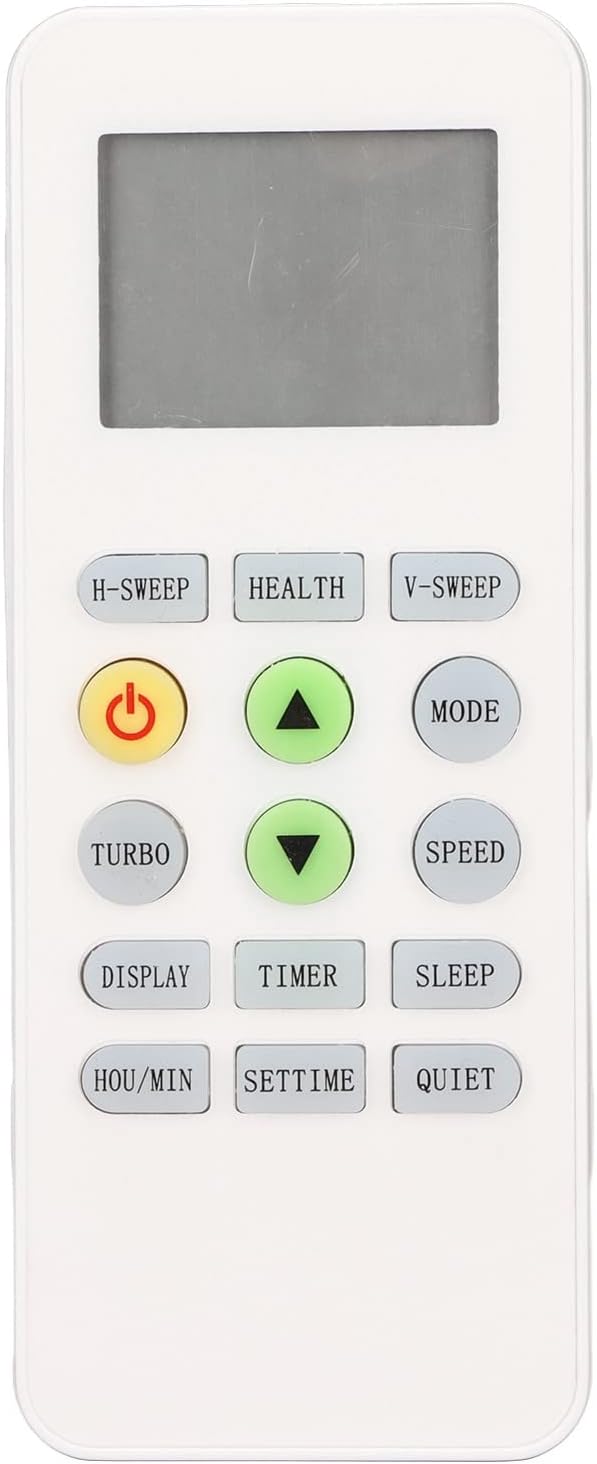
2.2.1. irudia: Aurrealdea view of the KKG12A-C1 remote control, highlighting its display and button arrangement.
3. Konfigurazioa
3.1. Bateriaren instalazioa
Urrutiko agintea bi (2) AAA bateria behar ditu (ez daude barne). Jarraitu urrats hauek instalatzeko:
- Kokatu bateriaren konpartimentuaren estalkia urrutiko agintearen atzealdean.
- Irristatu estalkia beherantz edo sakatu pestilloa (baldin badago) konpartimentua irekitzeko.
- Sartu bi AAA pila, ziurtatuz terminal positiboa (+) eta negatiboa (-) konpartimentuaren barruko markekin behar bezala lerrokatuta daudela.
- Irristatu bateriaren konpartimentuaren estalkia berriro bere lekuan klik egin arte.
Ohar garrantzitsua: Ensure batteries are inserted with correct polarity. Do not mix old and new batteries, or different types of batteries. Remove batteries if the remote control will not be used for an extended period.

3.1.1. irudia: Ireki bateriaren konpartimentua AAA bateria instalatzeko.
4. Funtzionamendu-argibideak
Once batteries are installed, the remote control is ready for immediate use. Point the remote control directly at the air conditioner's receiver when operating.

Figure 4.0.1: The remote control held comfortably in hand.
4.1. Oinarrizko funtzioak
- Pizteko botoia (⑂): Sakatu aire girotua pizteko edo itzaltzeko.
- MODE botoia: Cycles through operating modes such as Auto, Cool, Dry, Fan, and Heat (if supported by your AC unit).
- Tenperatura doikuntza (▲ / ▼): Use the Up/Down arrows to increase or decrease the desired temperature.
- SPEED botoia: Haizagailuaren abiadura doitzen du (adibidez, Baxua, Ertaina, Altua, Automatikoa).
4.2. Funtzio aurreratuak
- H-SWEEP Button: Activates or deactivates horizontal swing of the air deflector.
- V-SWEEP Button: Activates or deactivates vertical swing of the air deflector.
- TURBO botoia: Engages maximum cooling/heating power for rapid temperature change.
- BISURATZEKO botoia: Aire girotuaren unitateko pantaila aktibatzen/desaktibatzen du (adibidez, tenperaturaren pantaila).
- TIMER botoia: Used to set the ON/OFF timer for the air conditioner. Refer to your AC unit's manual for specific timer setting procedures.
- LO botoia: Activates the sleep mode, which adjusts temperature and fan speed for comfortable sleep.
- HEALTH Button: Activates specific health-related functions (if available on your AC unit), such as air purification or ionizer.
- ISILIA botoia: Reduces fan speed to minimize noise for quieter operation.
- HOU/MIN Button: Used in conjunction with the TIMER or SETTIME functions to adjust hours and minutes.
- SETTIME Button: Used to set the current time on the air conditioner's display (if applicable).

Figure 4.2.1: Remote control in active use with an air conditioner.
5. Mantentzea
5.1. Garbiketa
Urrutiko agintearen itxura eta funtzionaltasuna mantentzeko:
- Garbitu gainazala zapi leun eta lehor batekin.
- Zikinkeria egoskorrerako, apur bat lehortuampGarbitu oihal bat urarekin eta detergente leun batekin, eta gero lehortu berehala.
- Ez erabili garbitzaile urratzailerik, alkoholik edo likido korrosiborik, hauek urrutiko agintearen gainazala edo barneko osagaiak kaltetu baititzakete.
5.2. Biltegiratzea
When not in use for extended periods, store the remote control in a cool, dry place away from direct sunlight and extreme temperatures. Remove batteries to prevent leakage and potential damage to the remote.
6. Arazoak
Urrutiko agintearekin arazoak badituzu, jo ezazu honako arazo eta irtenbide ohikoenei:
| Arazoa | Kausa posiblea | Irtenbidea |
|---|---|---|
| Urrunekoak ez du erantzuten | Pilak hilda edo gaizki instalatuta. Urrutiko agintearen eta korronte alternoaren unitatearen arteko oztopoa. Urrutiko agintea irismenetik kanpo. | Replace batteries with new AAA batteries, ensuring correct polarity. Remove any obstructions. Move closer to the AC unit. |
| Limited range or intermittent response | Weak batteries. Infrared sensor on AC unit is dirty or blocked. Strong light interference. | Replace batteries. Clean the infrared sensor on the AC unit. Avoid using in direct sunlight or near strong light sources. |
| Botoiek ez dute funtzionatzen | Physical damage to buttons. Internal circuit issue. | Ensure buttons are not stuck. If physical damage is evident or issue persists, consider replacement. |
7. Zehaztapenak
| Ezaugarri | Xehetasuna |
|---|---|
| Elementu mota | Urruneko Kontrola |
| Materiala | ABS |
| Bateria mota | 2 x AAA bateria (ez daude barne) |
| Gailu bateragarriak | Air Conditioner (CHANGHONG/REE/Pastamic/CHEBLO KKG12A-C1 models) |
| Konektibitate Teknologia | Infragorriak |
| Paketearen neurriak | 5.43 x 2.28 x 0.79 hazbete |
| Elementuaren pisua | 2.11 ontza |
8. Bermea eta Laguntza
This product is covered by the manufacturer's standard warranty. For specific warranty details, returns, or technical support, please refer to the information provided at the point of purchase or contact Acogedor customer service directly. Please have your product model number (KKG12A-C1) and purchase details ready when contacting support.