
1. Sarrera
This manual provides essential information for the setup, operation, and maintenance of your MUSTAR Electric Guitar Kit. This kit is designed for both beginner and intermediate players, offering a complete package to start playing electric guitar.
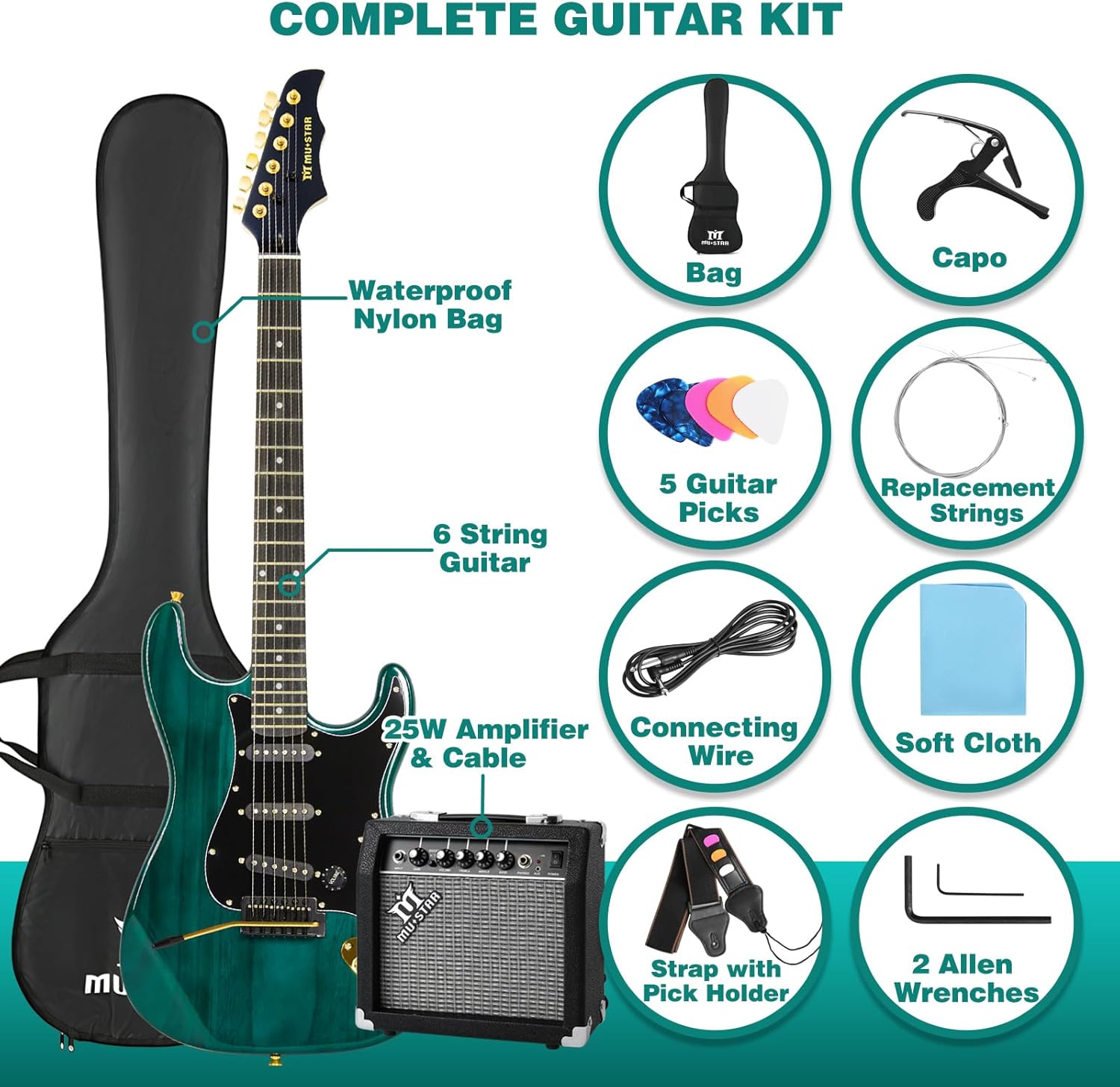
Image 1.1: A musician playing the MUSTAR Electric Guitar with the included ampbiziagoa.
2. Paketearen edukia
Mesedez, egiaztatu behean zerrendatutako elementu guztiak zure paketean sartuta daudela:
- 1 x 39-inch Electric Guitar (Ripple Green)
- 1 x 25-Watt Ampbiziagoa
- 1 x Gig Bag
- 1 x Digital Tuner
- 1 x Capo
- 1 x Sorbalda uhala
- 1 x Guitar Cable
- 5 x Guitar Picks
- 1 x Set of Extra Strings
- 2 x Allen Wrenches
- 1 x Garbiketa zapi

2.1. irudia: Amaituview of all items included in the MUSTAR Electric Guitar Kit.
3. Guitar Features
The MUSTAR Electric Guitar features a solid wood body with a high gloss finish, a Canadian maple neck, and a rosewood fingerboard. It is equipped with S-S-S (Single-Single-Single) pickups for a versatile sound.
- Gorputza: Solid Wood, 39-inch full size, Ripple Green finish.
- Lepoa: Canadian Maple, C-Shape.
- Diapasia: Rosewood.
- Bilketak: S-S-S configuration with a 5-way switch for tone selection.
- Kontrolak: 1 Volume knob, 2 Tone knobs.
- Zubia: Tremolo bridge system with a removable whammy bar.
- Sintonizatzaileak: Golden tuning pegs.

Image 3.1: Key features of the MUSTAR Electric Guitar.

Image 3.2: Controls and pickup configuration.

Image 3.3: Tremolo bar and golden hardware details.
4. Amplifier Ezaugarriak
The included 25-Watt amplifier provides sufficient power for practice and features essential controls for shaping your sound.
- Potentzia irteera: 25 watt.
- Kontrolak: Gain, Volume, Treble, Middle, Bass.
- Sarrerak: Guitar input, Auxiliary input (for connecting external audio devices like phones or MP3 players).
- Irteerak: Headphone jack (for silent practice).
4.1. bideoa: Over batview of the MUSTAR 39-inch Electric Guitar Kit, including a demonstration of the amplifier's features.
5. Konfigurazioa
5.1 Connecting the Guitar to the Ampbiziagoa
- Ziurtatu ampLifigailua itzalita dago eta bere bolumena minimoan jarrita dago.
- Connect one end of the included guitar cable to the output jack on your guitar.
- Connect the other end of the guitar cable to the 'Input' jack on the ampbiziagoa.
- Entxufatu amplifier's power cord into a suitable electrical outlet.
- Piztu amplifier. Gradually increase the volume to your desired level.
5.2 Gitarra afinatzea
Use the included digital tuner to accurately tune your guitar. The tuner clips onto the headstock and detects string vibrations.
- Clip the digital tuner onto the headstock of your guitar.
- Turn on the tuner.
- Pluck each string individually. The tuner display will show the note and indicate if it is sharp (too high) or flat (too low).
- Adjust the corresponding tuning peg until the tuner indicates the correct note (E, A, D, G, B, E from thickest to thinnest string) and is in tune.
5.3 Sorbalda uhala eranstea
Attach the guitar strap to the strap buttons located on the body of the guitar. Adjust the strap length for comfortable playing while standing or sitting.
5.4 Using the Capo
The capo can be used to raise the pitch of the open strings. Place the capo firmly behind the desired fret on the neck of the guitar.
6. Operating the Guitar and Ampbiziagoa
6.1 Ampbiziagoa Kontrolak
- Irabazi: Controls the amount of overdrive or distortion. Higher gain settings produce a more distorted sound.
- Bolumena: Irteera-maila orokorra doitzen du ampbiziagoa.
- Altxorrak: Adjusts the high-frequency tones.
- Erdikoa: Adjusts the mid-range frequency tones.
- Baxua: Adjusts the low-frequency tones.
- Aurikularrak Jack: Connect headphones for private practice. This mutes the main speaker.
- Sarrera osagarria: Connect an external audio source (e.g., smartphone) to play along with backing tracks.
6.2 Guitar Controls (5-Way Pickup Switch)
The 5-way switch allows you to select different pickup combinations, altering the guitar's tone:
- 1. posizioa (Zubia): Activates the bridge pickup for a bright, sharp tone.
- 2. posizioa (zubia eta erdialdea): Combines bridge and middle pickups for a slightly warmer, quacky tone.
- 3. posizioa (erdialdea): Erdiko mikrofonoa aktibatzen du tonu orekatu eta garbi bat lortzeko.
- 4. posizioa (erdialdea eta lepoa): Combines middle and neck pickups for a warm, full tone.
- 5. posizioa (lepoa): Activates the neck pickup for a warm, mellow tone.
The Volume knob controls the overall output level of the guitar, and the two Tone knobs adjust the treble frequencies for specific pickups (typically one for neck/middle and one for bridge).
Video 6.1: A demonstration of the guitar's features and sound customization options.
7. Mantentzea
7.1 Garbiketa
Regular cleaning helps maintain the appearance and playability of your guitar. Use the included cleaning cloth to wipe down the guitar body, neck, and strings after each use. For deeper cleaning, use guitar-specific cleaning products.
7.2 Soka Ordezkapena
Strings should be replaced periodically as they wear out, lose their tone, or break. The kit includes a set of extra strings. Use the provided Allen wrenches for any necessary bridge adjustments during string changes.
7.3 Arreta orokorra
- Store the guitar in its gig bag when not in use to protect it from dust and minor impacts.
- Avoid exposing the guitar to extreme temperatures or humidity, as this can damage the wood.
- Handle the guitar and amplifier with care to prevent physical damage.
8. Arazoak
8.1 Soinurik ez Ampbiziagoa
- Ziurtatu amplifier is powered on and plugged into a working outlet.
- Check that the guitar cable is securely connected to both the guitar and the ampbiziagoa.
- Verify that the guitar's volume knob is turned up.
- Ziurtatu amplifier's volume knob is turned up and not muted by headphones.
- Test with a different cable or guitar if available to isolate the issue.
8.2 Burrunba edo nahi gabeko zarata
- Egiaztatu kable-konexio guztiak solteak diren.
- Ensure the guitar strings are properly grounded.
- Try reducing the amplifier's gain or volume settings.
- Move away from electronic devices that might cause interference.
8.3 Difficulty Staying in Tune
- Ensure strings are properly stretched when new.
- Check that strings are correctly wound around the tuning pegs.
- Verify that the tuning pegs are not loose.
- Consider replacing old or worn strings.
9. Zehaztapenak
| Ezaugarri | Zehaztapena |
|---|---|
| Marka | MIZARRA |
| Modelo zenbakia | JN-01 (MEG-100) |
| Elementuaren pisua | 12.5 kilo |
| Produktuaren neurriak | 39 x 13 x 1.6 hazbete |
| Gorputzaren Materiala | Egur trinkoa |
| Lepoko material mota | Astigarrak |
| Fretboard Materiala | Solid Wood (Rosewood) |
| Kate kopurua | 6 |
| Gitarra jasotzeko konfigurazioa | S-S-S |
| Guitar Bridge System | Tremolo (Hard Tail) |
| Soka materiala | Nikelatua |
| Eskuen Orientazioa | Eskuin |
| Amppotentzia biziagoa | 25 Watt |
10. Bermea eta Laguntza
For warranty information and customer support, please refer to the documentation provided with your purchase or contact MUSTAR customer service directly. Keep your proof of purchase for any warranty claims.